
You've got a Playwright script that works on your laptop, passes a quick local smoke test, and then starts failing in CI for reasons that feel invisible. The form still renders, the selectors still look right, but the session behaves differently because the browser, the network path, and the identity signal aren't the same thing you shipped from your dev machine. That gap is where browser as a service lives.
It's easiest to think about it as remote browser infrastructure instead of “a browser in the cloud.” A provider runs the browser process, exposes it to your code over a control protocol or SDK, and handles the messy parts that break at scale, like session isolation, browser lifecycle, and network routing. Once you separate those pieces, the category gets much clearer.
Table of Contents
- What Browser as a Service Actually Means
- The Architecture Behind Hosted Browsers
- Residential IPs and Per-GB Billing Economics
- Self-Hosted Versus Managed BaaS Tradeoffs
- How Clearcote's Hosted Browser Fits the Model
- When BaaS Is the Wrong Tool for the Job
- Choosing the Right Browser Runtime
What Browser as a Service Actually Means
A local script and a production workload often fail for different reasons. On your laptop, the browser inherits your profile, your IP reputation, your machine state, and all the little settings that make the session look consistent. In CI, those same steps may run from a fresh container behind a datacenter IP, and that difference alone can change how a site responds.
That's the core problem browser as a service tries to solve. The provider owns the remote browser instance, and your app controls it programmatically through a browser automation protocol or SDK. In practice, that means your code still clicks, types, moves between pages, and waits for elements, but the browser runs somewhere else and the provider handles the session plumbing.
What it is, and what it is not
It helps to draw the boundary carefully:
- It is a fully rendered, scriptable browser that your application controls remotely.
- It is not headless Chromium stuffed into a Docker image you manage yourself.
- It is not a scraping API that returns JSON without giving you a browser session.
- It is not just a proxy service, because the browser itself is still doing the rendering and interaction work.
That distinction matters because a lot of teams say they need “a browser,” when what they need is only one of three things, rendering, network identity, or extraction. If you treat those as one bundle, you end up paying for the wrong layer. If you separate them, you can choose the lightest tool that still solves the job.
Practical rule: if your task depends on JavaScript execution, login state, or real user interaction, you're in browser territory. If the data is already exposed cleanly, the browser is usually the expensive path.
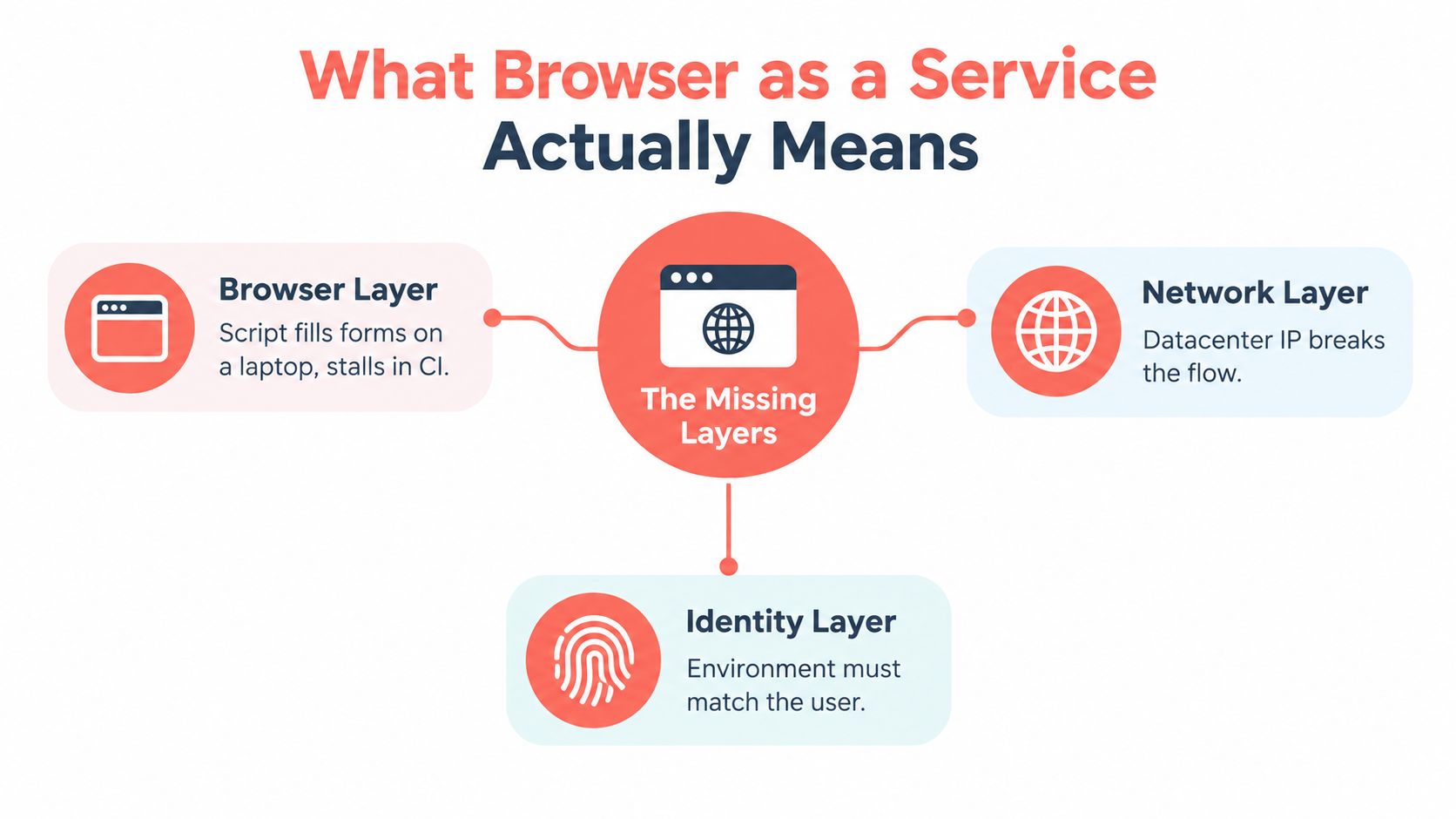
The useful mental model is simple. Browser layer means the engine that renders pages and runs JavaScript. Network layer means the path the request takes, including proxy location and IP class. Identity layer means the fingerprint, session continuity, and browser state that sites use to decide whether this looks like a coherent user. When teams say “our script works locally but not in production,” one of those layers is usually different.
The Architecture Behind Hosted Browsers
Hosted browsers are easiest to understand as two planes. One plane sends commands, and the other plane does the work of rendering pages and holding session state. That split is why the category scales, and it's also why debugging it feels different from debugging a normal web app.
Control plane and data plane
The control plane is your client code, usually a Playwright or Puppeteer script, or a lower-level CDP client. It sends actions like navigation, clicks, keyboard input, and screenshot requests. The data plane is the remote browser process that renders the page, executes JavaScript, and streams events back to you.
| Layer | Responsibility | Traffic Type | Example |
|---|---|---|---|
| Control Plane | Sends commands and receives events | WebSocket or protocol messages | Playwright telling the browser to navigate |
| Data Plane | Renders pages and maintains session state | Frames, console events, DOM state, screenshots | Remote Chromium loading the target site |
The protocol matters because browser control is bidirectional. Your code doesn't just send a request and wait for one response. It sends input, then receives console output, navigation events, network events, and screenshots as the session evolves. That's why hosted browsers often use WebSocket-style transport instead of plain HTTP. The browser is not a simple request-response service.
Session lifecycle is the other piece engineers underestimate. A provider usually creates a session, attaches a debugger endpoint, keeps the browser state alive for a while, and then recycles it. Identity signals can be injected at launch or through runtime overrides, depending on the engine and provider. The practical goal is coherence across the session, not a random collection of spoofed fields.
If you want a grounded view of how headless Chrome behaves in the actual world, the production headless Chrome tips guide is useful context because it shows how much operational work still sits outside the browser itself. For a provider-specific version of the same idea, the Clearcote Labs architecture documentation shows how a hosted runtime is wired as an attachable browser service.
The key debugging question is not “did the page load?” It's “which layer changed, the browser, the network, or the identity state?”
Residential IPs and Per-GB Billing Economics
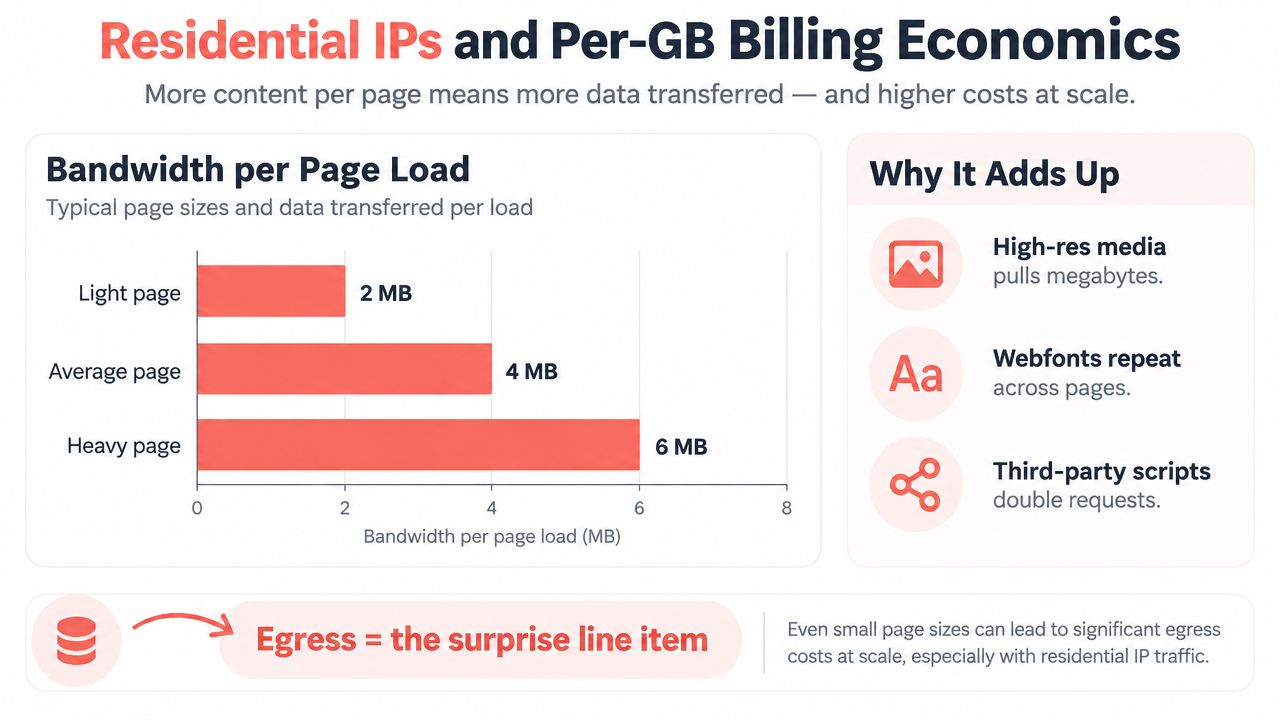
A browser session starts spending before the page feels expensive. It pulls HTML, CSS, JavaScript, fonts, images, and tracker scripts, so the first surprise on the invoice is often bandwidth, not compute.
Why egress becomes the surprise line item
Hosted browser providers commonly meter traffic by the gigabyte, sometimes with committed-use discounts. That pricing fits the way real sessions behave, because a light page and a media-heavy page do not consume the same amount of data. The bill follows the bytes that leave the browser.
A simple session shows why this matters. If a browser spends about two minutes loading a 3 MB product page, then refreshes several assets and keeps the session open for 10 interactions an hour, the traffic can add up fast across repeated runs. The exact bill depends on the provider's metering rules, but the shape of the cost is easy to miss until the workload scales.
When engineers talk about residential IPs, they mean routing browser traffic through address pools that look like normal household connections rather than obvious cloud data centers. The goal is not magic. It is to make the browser's network identity match the kind of user a site expects to see. That can change how anti-bot systems classify the session, how geo-sensitive flows behave, and whether login or checkout completes cleanly. For a plain explanation of the proxy side of that model, residential proxies explained for data engineers is a useful companion read because it focuses on how the traffic path changes the session outcome.
What actually drives the bill
The line items are usually straightforward:
- Egress volume: more page assets and more session time mean more bytes billed.
- IP class: residential routing can reduce the mismatch between the browser and the target site.
- Session behavior: long, interactive flows cost more than one-shot renders because state has to stay alive.
- Geography: the closer the proxy geography is to the user story, the less likely the site is to treat the session as odd.
CPU is not the whole story. If your workload downloads a lot of assets, refreshes often, or keeps sessions open for a long time, bandwidth can dominate the economics. If the target site is sensitive to proxy class, cheap compute will not save a failed session.
See Clearcote hosted pricing details for per-GB metering and included residential IP allowances.
Watch the video on YouTubeSelf-Hosted Versus Managed BaaS Tradeoffs
A lot of teams compare deployment paths as if they're choosing a brand. That's the wrong frame. You're really choosing how much browser plumbing you want to own, how visible the failures need to be, and how predictable the spend has to stay.
Three paths, three very different pain points
| Dimension | Self-hosted Chromium | API extraction | Managed BaaS |
|---|---|---|---|
| Engineering overhead | You own updates, crashes, and scaling | Low browser ops, but limited flexibility | Lower than self-hosted, with provider-managed sessions |
| Detection risk | Depends on your fingerprinting and proxy stack | Lower browser exposure, but only works for exposed data | Better for interaction-heavy targets with coherent sessions |
| Cost predictability | Can be good at scale, but ops time adds up | Often cheapest for simple extraction | Easier to tie cost to session use and bandwidth |
| Debugging surface | Full browser logs, full maintenance burden | Narrow surface, fewer browser clues | Rich enough to inspect, without owning the browser fleet |
Self-hosted Chromium gives you maximum control, but it also means you own the boring parts that never show up in demos. Someone has to patch browser versions, manage profiles, recover crashed sessions, and keep the fleet healthy. That's manageable if you already run browser infrastructure, but it's a tax if your team only needs occasional automation.
API-first extraction sits on the opposite end. If a page exposes the data cleanly, this path can be far simpler and more predictable than any browser stack. The downside is obvious, though, once the site needs login state, real rendering, or interaction.
Managed BaaS sits between those two. It gives you a real browser session without asking you to run the fleet, and it keeps more of the debugging surface visible than a pure API. That makes it a strong fit for workflows that are interaction-heavy, flaky in CI, or sensitive to session identity.
How Clearcote's Hosted Browser Fits the Model
Clearcote's hosted runtime is a concrete example of the pattern above. It connects like a browser service, but the browser itself is still the thing doing the work. The useful part is that the session stays coherent across the engine, the SDK, and the network path.
What the runtime is doing
The first thing that stands out is engine-level fingerprint control. Signals such as navigator state, canvas behavior, and WebGL output are handled in the browser engine itself, so the session stays internally consistent instead of looking like a bundle of patched values. That matters because modern detection systems often look for mismatches across realms, not just one bad field.
The second piece is the SDK story. Clearcote is designed as a drop-in browser for Playwright and Puppeteer, so the attach flow is closer to connecting to a remote runtime than rewriting your automation logic. That lowers the migration cost because existing scripts can often point at a remote endpoint and keep moving.
A third piece is residential IP routing. The hosted browser can align proxy geography with the target site, which keeps the browser's network identity closer to the session story. That's especially useful when the target expects traffic that doesn't look like a generic cloud workload.
The last piece is billing. Per-GB bandwidth pricing means the cost ties back to what the browser transfers, not just the fact that a session exists. That's a cleaner way to think about browser economics when page weight varies a lot.
If you want to see the hosted browser format in more detail, the Clearcote hosted browsers documentation maps the runtime to an actual attachable session. Clearcote is one implementation of the category, not the category itself, but it's a useful reference point because the abstractions line up cleanly.
The important check is whether the browser, proxy, and identity layers stay coherent together. If they don't, the target site will usually notice before your script does.
When BaaS Is the Wrong Tool for the Job
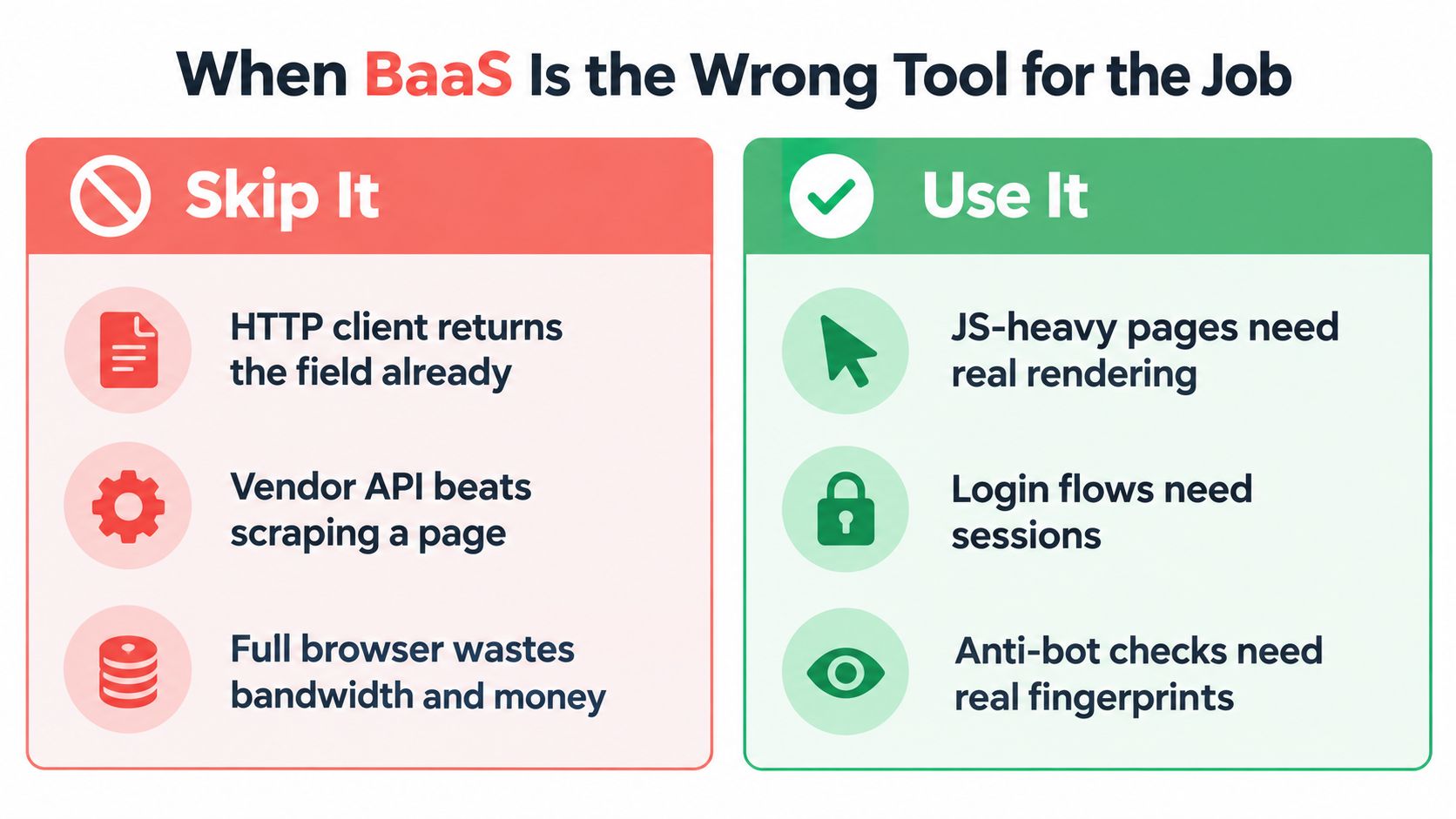
Browser infrastructure is expensive when the task is just getting a field. If the target already exposes the answer through a clean HTTP response, a browser can be the slowest and costliest route to the same result.
Skip the browser when the data is already exposed
That means a public RSS feed should stay a feed. A documented REST API should stay an API call. A search engine with an official API should be consumed that way instead of rendering results just to parse them back out. In all of those cases, browser rendering adds work without adding much value.
The split that matters is interaction automation versus data automation. Interaction automation needs a browser because the page state changes through clicks, typing, and script execution. Data automation often doesn't. If you use a browser for both, you blur a decision that should stay sharp.
The market itself is moving toward that distinction. Some browser infrastructure is built for real interaction, while other tooling is aimed more narrowly at extraction. That's why the right question is not “managed or self-hosted?” It's “do I need a live browser session, or do I need the field behind the session?”
Where the browser still earns its keep
Use a browser when the page is browser-shaped:
- JS-heavy apps: the content appears only after rendering or client-side navigation.
- Login flows: the session depends on cookies, redirects, and identity continuity.
- Anti-bot checks: the target site evaluates the browser, not just the request.
- Human-like workflows: you need to click through screens, not just extract text.
The short version is simple. If an HTTP client can already get the value, the browser is wasteful. If the site only behaves correctly when a real session exists, the browser is the right abstraction.
Choosing the Right Browser Runtime
The best runtime is the one that matches your real workload, not the one that sounds most advanced. A team can be perfectly rational and still pick the wrong layer if they optimize for convenience, then discover the bill or maintenance burden later.
Signals that point to managed browser infrastructure
Three signs usually justify browser as a service:
- Anti-bot failures are frequent. If protected targets are blocking or degrading sessions regularly, the browser stack needs more coherence than a bare container can easily provide.
- CI sessions churn constantly. Ephemeral runners make session continuity hard, and managed infrastructure removes a lot of that friction.
- Debugging time keeps climbing. If your team is spending more than an engineer-day a week untangling browser failures, the runtime has become a product in its own right.
Signals that point to staying self-hosted
Self-hosted Chromium still wins in some cases:
- Stable targets under 1k requests per day and low operational variance.
- Full control requirements where compliance or data handling policy keeps the browser inside your own environment.
- In-house ops capacity to patch Chromium regularly and keep the fleet healthy.
A practical way to score the choice is to rate detection risk, engineering hours, and predictable spend from 1 to 5 for the next quarter, then pick the runtime with the lowest total score. That keeps the decision grounded in the work ahead, not in the ideal architecture you wish you had.
Teams don't stay pure for long. They start managed, hit a cost plateau, and then hybridize by sending low-risk scraping to self-hosted runners while keeping hosted browsers for protected targets and brittle login flows.
Clearcote Labs builds browser infrastructure for teams that need real sessions without owning the full browser fleet. If your work depends on Playwright, Puppeteer, or CDP-based automation, Clearcote Labs is worth a look because it maps directly onto the control plane, network, and identity problems covered above. Use it when you want to keep the browser layer coherent and spend less time patching the plumbing around it.