Agentic web browsing moved from a niche automation pattern to a measurable traffic class in a remarkably short time. HUMAN Security reported 7,851% year-over-year growth in agentic AI traffic, while its benchmark found 77% of agentic activity landing on product and search pages, compared with 8.8% on account pages and 5% on authentication flows (HUMAN Security traffic analysis). The important signal isn't the size of the headline. It's where the traffic goes. Agents are already influencing discovery, comparison, and research before a person completes a purchase.
That changes the engineering problem. You're not building a scraper that reads HTML once. You're operating a software actor inside a hostile, stateful environment, with an LLM deciding what to do next, a browser carrying identity and credentials, and a production system that has to explain every click when something goes wrong.
Table of Contents
- What Agentic Web Browsing Actually Is
- The Four-Layer Architecture of a Browser Agent
- MCP Versus CDP for Browser Integration
- How Agents Browse the Web in Practice
- Security and Privacy Risks Developers Underestimate
- Identity, Fingerprints, and the Engine-Level Problem
- A Practical Checklist for Building or Buying an Agent Stack
- Where Agentic Browsing Is Heading Next
What Agentic Web Browsing Actually Is
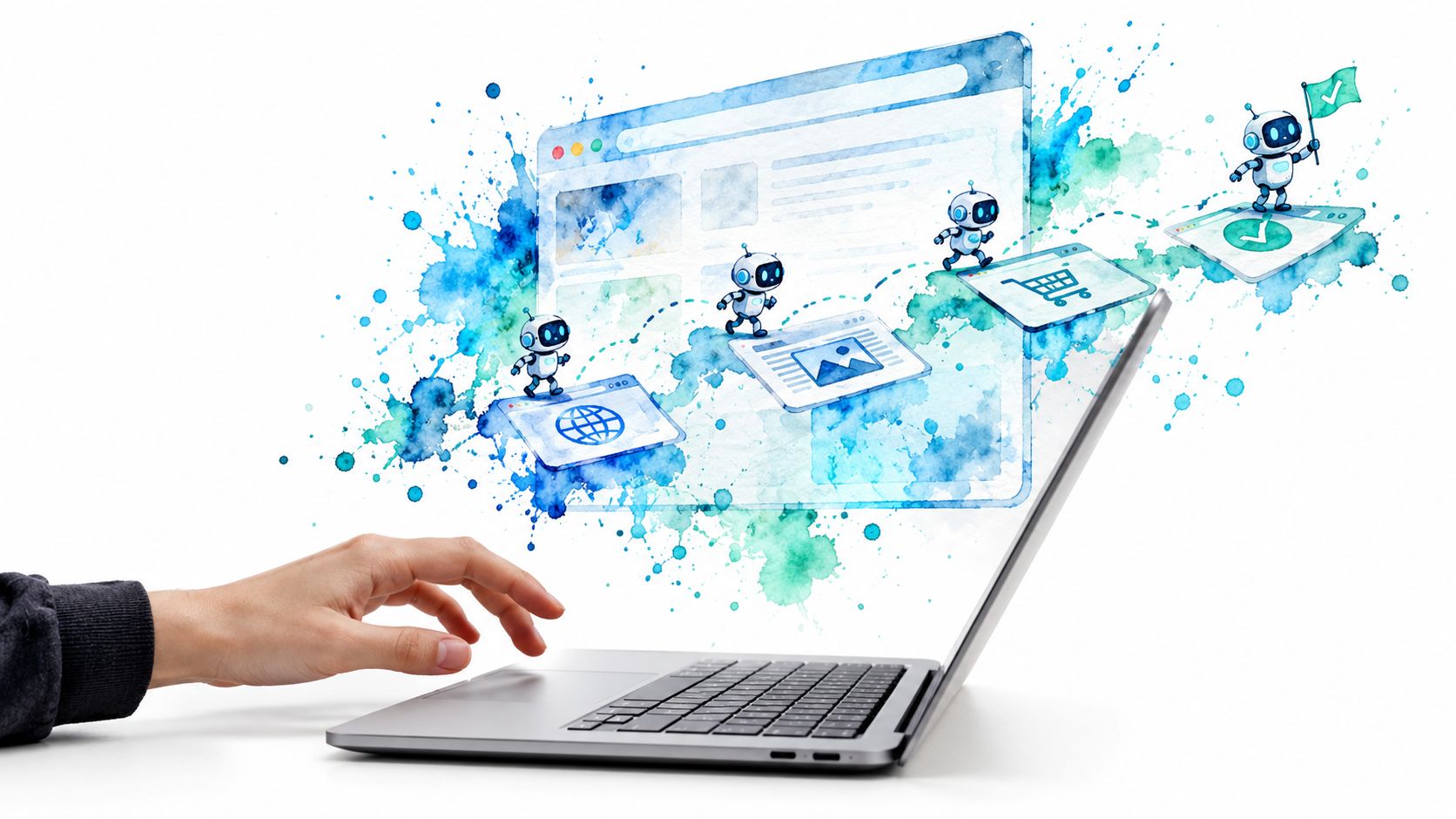
Agentic web browsing is goal-directed browser automation. A user gives the system an outcome, such as finding compatible replacement parts, checking a set of prices, or validating a workflow after deployment. The agent interprets the goal, observes the current page, chooses an action, inspects the result, and replans when the page doesn't match its expectation.
That loop separates it from three tools developers often group together.
A traditional scraper usually targets a known endpoint and applies a parser to the response. It may follow pagination, but its logic remains largely tied to a document structure. A robotic process automation workflow follows a deterministic script. If the expected button moves or a modal appears, the script generally stops. A headless test runner executes actions against assertions, such as “click this selector, then verify this text.” It has a goal in the testing sense, but it doesn't reason about how to achieve an open-ended outcome.
An agentic browser treats the page as a dynamic environment, not a static document. It can decide that a cookie wall must be dismissed before a price table is visible, recognize that a link opened a new tab, or abandon a blocked route and search for an equivalent source. That flexibility comes from the perception and replanning loop, not from the mere presence of an LLM.
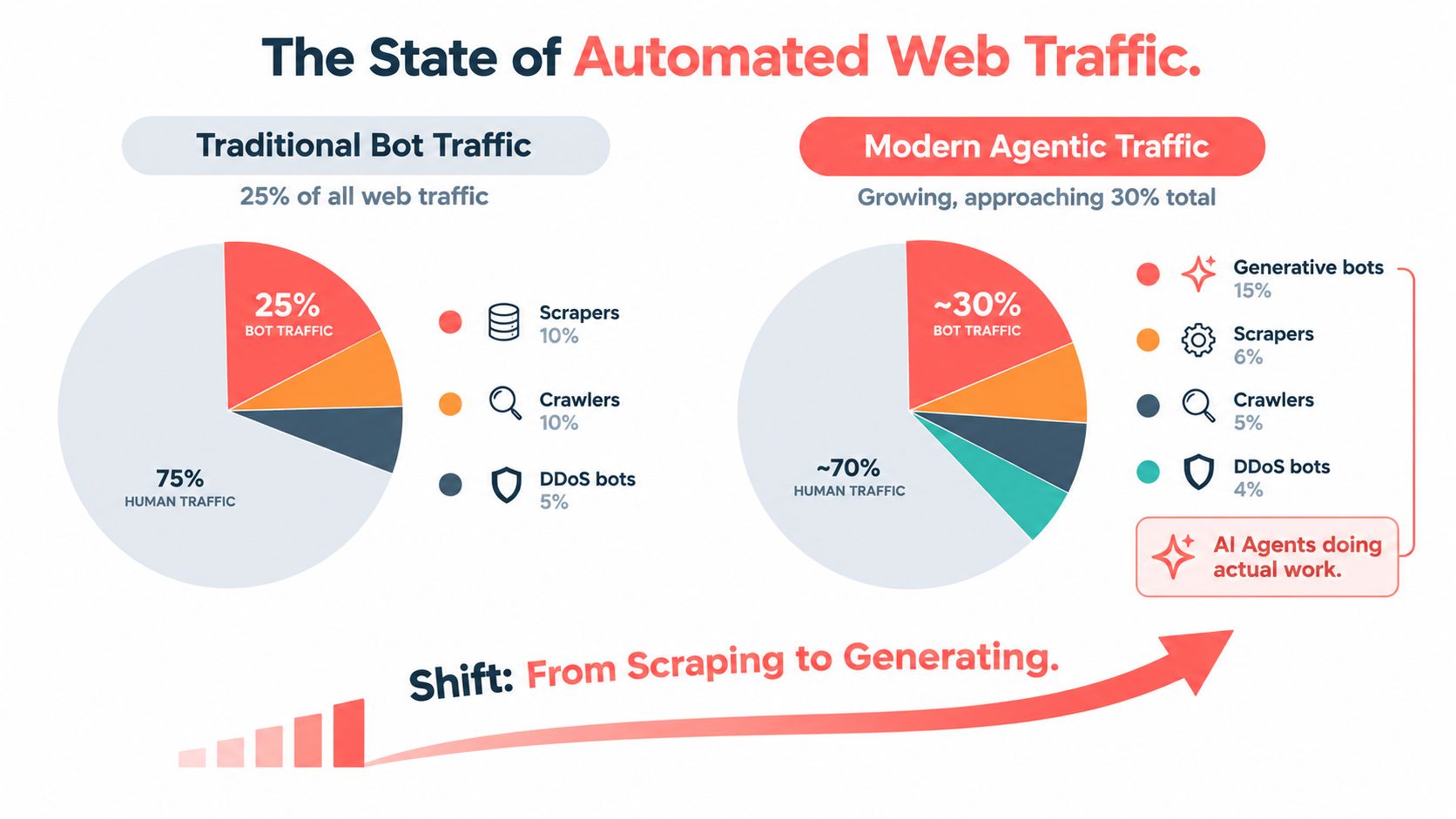
The protocol difference
At the browser level, the distinction is visible in how the system handles uncertainty:
- Scrapers parse known responses. They work well when the target structure is stable and the task is narrow.
- RPA scripts replay known procedures. They work well for controlled internal applications with predictable screens.
- Test runners validate known paths. They work well when the product team owns the interface and can update selectors with each release.
- Browser agents maintain a task state. They choose among possible actions and use new observations to change the plan.
The last category brings a broader failure surface. A selector can be technically valid but semantically wrong. A page can expose text in the DOM while hiding the relevant control behind a shadow root. A site can return a successful HTTP response while rendering an interstitial that invalidates the entire plan.
That makes the surrounding discipline as important as the model. Teams working on agentic app development will recognize the wider pattern: the model is only one component in a system that needs tools, state, permissions, and reliable execution boundaries. A useful agent is less like a chatbot with a browser attached and more like a distributed workflow engine whose actuator happens to be a browser.
The Four-Layer Architecture of a Browser Agent
Production browser agents become easier to debug when you split them into four layers: perception, reasoning, action, and recovery. Vendors may package these layers differently, but failures still tend to appear in the same places.
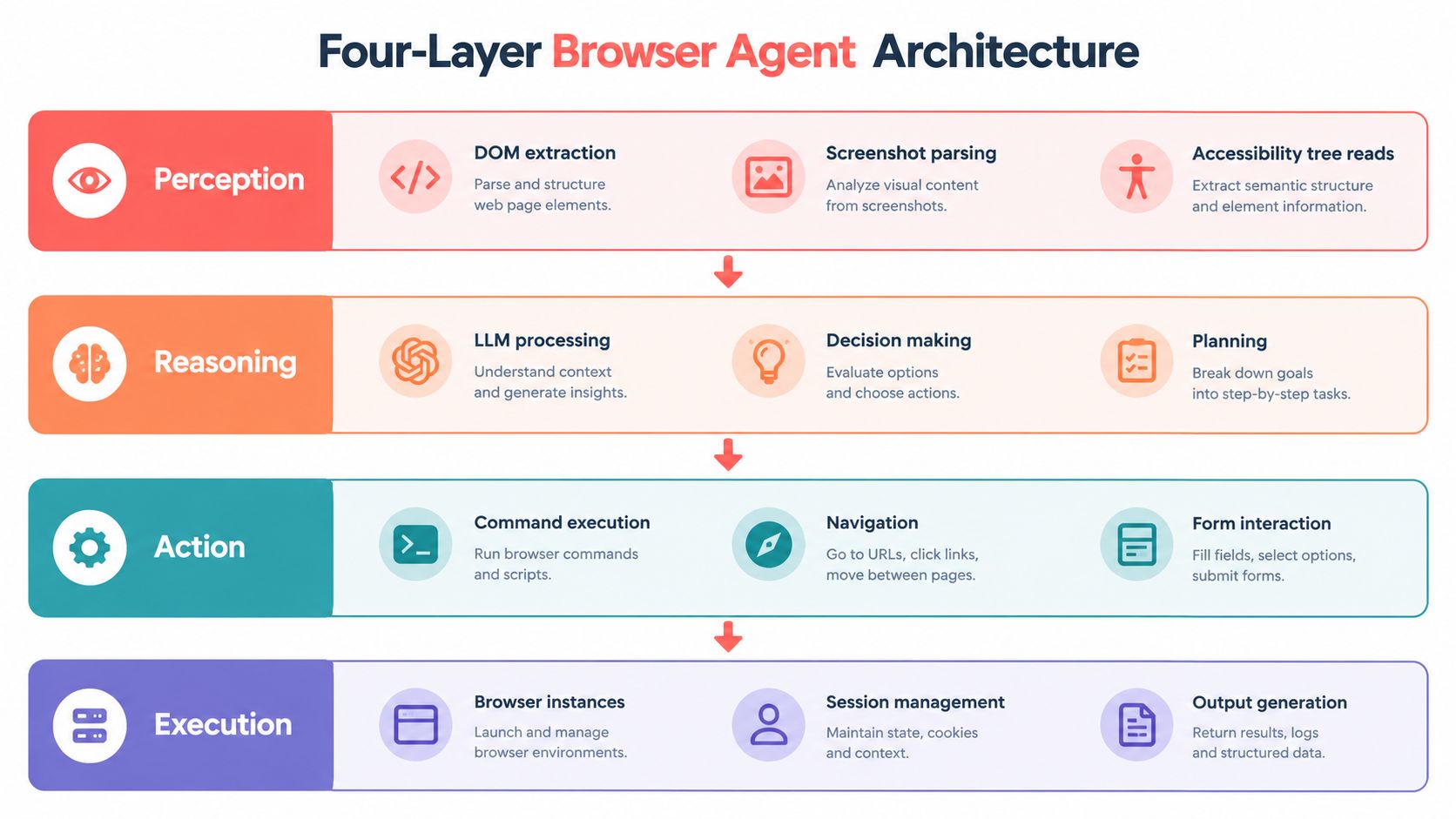
Perception and reasoning
Perception turns a browser state into something the planner can use. That may include extracted DOM text, screenshots, accessibility-tree nodes, visible controls, URL changes, console messages, and selected network responses. No single representation wins everywhere. DOM extraction is precise for ordinary forms, screenshots help with canvas-heavy interfaces, and accessibility data often gives the clearest description of interactive controls.
Perception drifts when a site adopts shadow DOM, virtualized lists, canvas rendering, or client-side content that arrives after the initial load. A production agent should record what it saw, not just what it did. Without the input state, a failed click is almost impossible to diagnose.
Reasoning converts a goal into a sequence of actions. It decides whether to click a visible control, search within the page, open another tab, or stop because the task requires approval. The common production failure isn't always a wrong decision. It can be a loop, such as repeatedly attempting to close a modal that has already reappeared, or a hallucinated selector that never existed in the current state.
Benchmarks expose why sustained navigation matters. BrowseComp contains 1,266 short-answer questions designed around persistent, multi-step navigation for difficult-to-find information (OpenAI's BrowseComp description). The benchmark isolates search strategy and state retention rather than rewarding fluent final answers.
Action and recovery
The action layer performs clicks, typing, scrolling, navigation, uploads, and form submission. Higher-level automation APIs make common actions convenient. CDP commands provide lower-level control when the agent needs network interception, DOM inspection, or browser-state manipulation.
Action breaks when applications rely on non-standard events, virtualized lists, coordinate-sensitive controls, or asynchronous updates that arrive after a click. “The click succeeded” isn't a sufficient result. The agent needs evidence that the intended state followed it.
Recovery handles that evidence. It detects stale pages, unexpected redirects, authentication expiry, captchas, blocked resources, and inconsistent results. It can try a fallback locator, reload a route, rehydrate a session, or escalate to a human. Recovery becomes a black hole when retry policies lack limits and every error produces another identical attempt.
WebVoyager evaluates end-to-end agents across 643 tasks on 15 real-world websites, including search, navigation, forms, maps, travel lookup, shopping, and information retrieval (WebVoyager benchmark leaderboard). That live-site framing matters because browser work combines perception, action selection, and recovery from changing interfaces.
For teams exploring analytical workflows around these traces, academic data analysis with PlotStudio AI offers useful context on turning agent activity into inspectable workflows. The implementation details also belong in an explicit system design, not a hidden vendor abstraction. A good architecture record should document the browser boundary, state model, and recovery contract, as shown in this browser architecture documentation.
Watch the video on YouTubeMCP Versus CDP for Browser Integration
The choice between Model Context Protocol, or MCP, and Chrome DevTools Protocol, or CDP, determines how much of the browser your agent can see and control.
MCP is a JSON-RPC client-server contract. An MCP server exposes browser capabilities as structured tools, such as reading page text, listing controls, clicking an element, or filling a field. The model calls a tool and receives a result. It doesn't need to understand Chromium's transport or internal object model.
CDP is lower-level. A client connects to a Chromium instance over a WebSocket and sends commands to domains covering pages, runtime evaluation, network events, cookies, storage, emulation, and more. That power is useful when you need to control session identity, intercept requests, coordinate tabs, or observe browser internals.
MCP wins on integration speed. Tool schemas are easy for models to consume, and the same agent can often move between browser servers without rewriting its entire planner. The limitation is the server boundary. If the MCP implementation doesn't expose a capability, the agent can't use it safely or directly.
CDP wins on control. It lets an engineering team implement unusual network conditions, browser-level instrumentation, custom tab orchestration, and detailed session handling. The cost is maintenance. Your team now owns protocol compatibility, lifecycle management, error mapping, and the risk of exposing dangerous primitives to the model.
| Dimension | MCP | CDP |
|---|---|---|
| Abstraction | Structured tools for model interaction | Browser debugging and automation protocol |
| Integration effort | Faster path to a working agent | More engineering and operational work |
| Browser control | Limited to server-exposed tools | Broad access to Chromium capabilities |
| Portability | Easier to swap compatible servers | Tied more closely to browser implementation |
| Identity handling | Usually delegated to the server | Direct control over cookies, storage, and sessions |
| Best fit | Research agents and controlled workflows | Infrastructure, QA, security, and custom orchestration |
Many production teams settle on a hybrid. MCP handles the model-facing tool contract, while CDP manages the browser transport, session identity, network observation, and capabilities that shouldn't be expressed as free-form model actions. That arrangement gives the planner a constrained interface without throwing away the controls needed by operations.
The practical trade-off is blunt. MCP buys speed to first demo but can cap the ceiling. CDP buys control but creates a maintenance obligation. Before adopting either, document the intended boundary in the MCP integration guide, especially which operations are read-only, which mutate state, and which require human approval.
How Agents Browse the Web in Practice
A research agent tasked with comparing competitor pricing starts with a broad objective, not a fixed selector map. It opens candidate sites, records the initial page state, dismisses a cookie dialog if it blocks the content, and identifies the product or pricing route. Pagination is deterministic once the “next” control is verified, but the agent should replan when a site changes the route, opens a new tab, or returns a login wall.
If a paywall blocks the required detail, the agent shouldn't repeatedly refresh it. It can mark the source as incomplete, search for an official documentation page, or return a partial result with provenance. The useful output includes the source pages, extracted fields, confidence, and the exact point at which the task became uncertain.
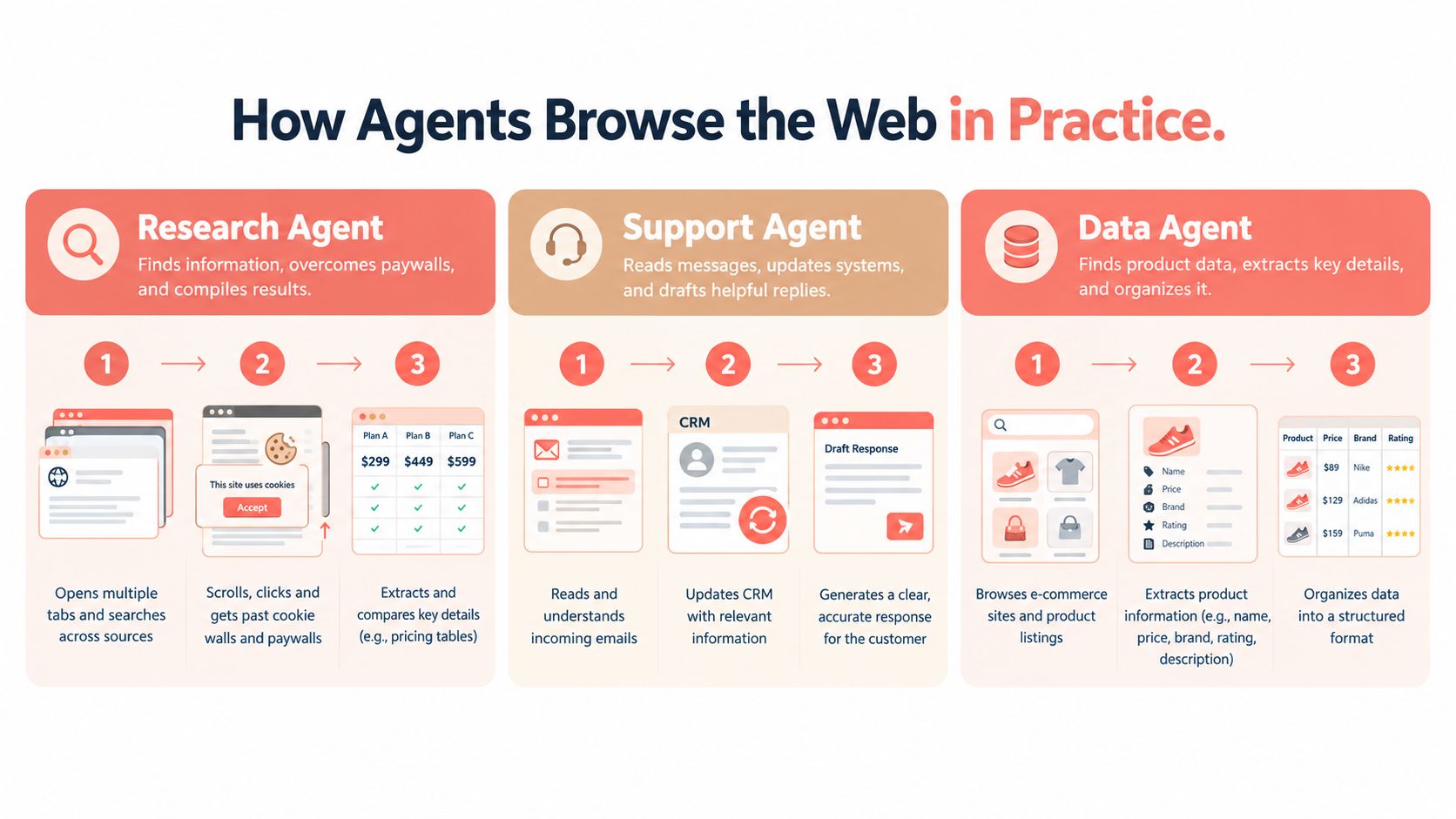
A QA agent operates differently. After a deployment, it authenticates into a staging dashboard, runs a known smoke path, captures screenshots at meaningful checkpoints, and compares the observed state with the expected one. Clicking a stable navigation item can remain deterministic. Recovering from an unexpected modal, expired session, or changed onboarding screen requires a reasoned branch.
The extraction agent has the least visual predictability. Suppose it must collect product specifications from a government registry with an outdated DOM. It first identifies labels and nearby values, then checks whether the same fields repeat across records. If the DOM contains no usable semantic structure, it can use an accessibility tree or screenshot-assisted reading, but the system should lower confidence rather than invent a field without support.
Instrument the work, not only the result
A successful final answer can conceal a fragile run. Store:
- Page-state diffs, including URL, visible controls, relevant text, and authentication status before and after actions.
- Action traces, with tool name, arguments, result, timing, and the evidence used to confirm success.
- Token cost per completed task, separated from abandoned or retried runs.
- Loop and selector failures, including repeated actions, stale locators, unexpected redirects, and blocked states.
- Human interventions, so the team can distinguish an agent that completed a task from one that was rescued.
The key design choice is deciding where to replan. Use deterministic actions when the state is known and the consequence is reversible. Invoke the model when the page diverges, the task requires interpretation, or several valid paths exist. That division keeps the agent flexible without paying reasoning cost for every scroll.
Security and Privacy Risks Developers Underestimate
The dangerous browser agent isn't the one that fails to click a button. It's the one that completes the task while exposing data or taking an action the user never intended.
Rendered page content can contain prompt injection. A hostile page may instruct the model to reveal its context, follow an unrelated link, upload data, or delete messages. The browser doesn't know that the instruction came from an untrusted document. If the planner treats page text and system policy as equivalent, the site can steer the run.
Credentials create a second boundary problem. Session cookies, OAuth refresh tokens, saved form values, and MFA material can sit inside browser state or become visible through automation interfaces. A compromised runner, overly broad debugging endpoint, or careless trace export can turn a task agent into a credential-disclosure mechanism.
Screenshots add another channel. An agent may capture personal information that wasn't necessary for the task, then send the image to a model, logging system, or external observability service. Redaction after capture is weaker than restricting what the agent can see in the first place.
A December 2025 academic study evaluated eight browser agents and identified 30 vulnerabilities, with at least one issue in every product tested (Help Net Security coverage of the browser-agent privacy study). The result doesn't mean every implementation has the same risk. It does establish that the attack surface is operational, not hypothetical.
| Risk Category | Example Failure Mode | Typical Severity |
|---|---|---|
| Prompt injection | Page content overrides the task or requests secret data | High |
| Credential exposure | Session state or tokens appear in logs, screenshots, or tools | Critical |
| Excessive authority | Agent can send, delete, purchase, or change settings without approval | High |
| Cross-tenant leakage | One profile reads cookies or cached content from another | Critical |
| Sensitive observation | Screenshots include unrelated personal or financial information | High |
| Unsafe recovery | Retry logic repeats a destructive action | High |
Build security into the action policy
Treat all page content as untrusted input. Keep system instructions, user intent, and page observations in separate channels. Give tools narrow schemas, reject actions outside the declared task, and require explicit confirmation before sending messages, making purchases, changing account settings, or deleting data.
Use isolated profiles and short-lived credentials where possible. Keep traces private, redact sensitive fields at collection time, and make every write auditable. Vendor demonstrations usually run on benign pages. Production incidents arrive through adversarial layouts, unexpected redirects, poisoned documents, and accounts that contain much more authority than the task requires.
Identity, Fingerprints, and the Engine-Level Problem
A browser agent can have perfect reasoning and still fail before the page becomes useful. Websites evaluate more than the user agent string. They can observe browser APIs, rendering behavior, network characteristics, storage, locale, timing, and the relationship between those signals.
Standard headless instances create problems at scale because teams often reuse the same browser characteristics across unrelated sessions. Shared fingerprints can trigger defenses. Cookie jars can cross tenant boundaries. A profile that looks consistent in one context can become incoherent when its locale, timezone, WebGL behavior, TLS characteristics, and claimed browser version disagree.
Identity therefore needs to be treated as a first-class runtime layer. A production session commonly requires:
- An isolated profile, with its own cookies, local storage, permissions, and cache.
- A persistent identity store, so a resumed workflow sees the expected account state.
- A controlled network identity, with geography and browser settings that don't contradict each other.
- A reproducible persona, particularly for QA and data collection where a stable device is part of the test.
- A lifecycle policy, defining when an identity is created, paused, resumed, rotated, or destroyed.
CDP gives you access to many browser controls, but it doesn't solve multi-tenant identity by itself. Your orchestration layer still has to allocate profiles, prevent accidental attachment to the wrong browser, handle crashes, and reconcile cookies after a session resumes. A protocol connection is transport. It isn't an identity boundary.
Engine-level implementations address a different part of the problem by keeping related signals coherent inside the browser rather than injecting isolated JavaScript patches. That distinction matters across workers, iframes, rendering paths, and network requests. The research question is not merely which browser a site sees. It is how the browser's observable behavior was produced and whether the signals agree, a point explored in this analysis of the engine behind the user agent.
For teams evaluating options, Clearcote Labs maintains Clearcote, an open-source Chromium fork with engine-level fingerprint and identity controls, Playwright and Puppeteer SDKs, Docker and hosted-browser options, and an MCP server for driving a fixed-identity browser. It belongs in the same comparison as commercial browser infrastructure and conventional Chromium fleets, with the choice depending on required control, operating model, and compliance constraints.
A Practical Checklist for Building or Buying an Agent Stack
Before writing browser code, answer three questions:
- Where does the engine run? Is it inside your infrastructure, a vendor-managed browser, or a local desktop process?
- Who owns session isolation? Can you prove that profiles, storage, credentials, and traces remain separated?
- How is recovery instrumented? Can an operator see why a run stopped and resume it without replaying unsafe steps?
Those answers expose more than a feature checklist. They tell you whether the system has a real runtime model or merely wraps a browser with a prompt.
Questions for a vendor evaluation
Ask for a working demonstration against a site your team controls, not a polished sample flow. Inspect the browser process, the profile lifecycle, the protocol boundary, and the records produced after a deliberate failure.
- Protocol access: Does the platform support MCP, CDP, or both? Can your team attach its own observability and security controls?
- Identity lifecycle: Can each task receive an isolated profile? Can a run pause and resume with a fresh identity when policy requires it?
- Action accounting: Does pricing and telemetry expose cost per step, retry, model call, and completed task rather than hiding all activity behind a single success metric?
- Mutation audit: Are DOM mutations, form submissions, downloads, navigation events, and external writes recorded with timestamps?
- Recovery controls: Can you set retry limits, stop repeated actions, quarantine a failed profile, and escalate to a human?
- Data boundaries: Where do screenshots, page text, cookies, and model prompts go? How long are they retained?
- Operational ownership: Who patches the browser engine, updates protocol compatibility, and investigates a crash?
Red flags that predict brittle systems
A vendor that hides the browser engine makes root-cause analysis difficult. A platform that charges only per successful task can encourage silent retries and conceal expensive failure paths. A provider that refuses to expose the underlying protocol may be protecting a proprietary abstraction, but it also prevents your team from adding controls when the default behavior isn't sufficient.
A sensible integration sequence starts small:
- Containerize the browser and pin the runtime.
- Connect the model through a constrained tool layer.
- Keep mutations behind human review until traces are trustworthy.
- Add page-state diffs and action-level audit logs.
- Track model usage and browser resource consumption per task.
- Test expired sessions, blocked pages, malformed forms, modal loops, and partial completion.
- Promote only workflows with clear stop conditions and reversible actions.
The goal isn't a spectacular prototype. It's a system an SRE can restart, inspect, and trust after the third unexpected redirect of the night.
Where Agentic Browsing Is Heading Next
The next phase of agentic web browsing will be defined by operations rather than demos. Agent traffic is moving through identifiable browser products and concentrating on discovery behavior, with monthly measurements placing product and search routes around 75% to 79% of observed activity through mid-2026 (HUMAN Security's June 2026 agentic traffic benchmark). That pattern gives product teams a reason to measure agent sessions separately from ordinary crawlers and human interaction, without assuming that traffic volume equals business value.
The browser mix is also changing. HUMAN Security's April 2026 observations attributed roughly 71% of observed agent activity to browser-based agents, with Comet at 48.12%, Atlas at 21.33%, Claude Chrome Extension at 17.33%, and ChatGPT Agent at 8.55% (April 2026 agentic traffic observations). By July, Comet remained the largest source at 47.13%, Claude Chrome Extension had risen to 24%, and media exceeded e-commerce in the reported category mix. These shifts make static allowlists and one-time traffic classifications unreliable.
Three developments deserve close attention:
- Tool standardization: MCP-style servers will increasingly become the model-facing boundary for browser capabilities, while teams retain lower-level protocols for identity and operations.
- Native browser surfaces: Browser vendors are likely to expose more controlled agent features, which may reduce integration friction but increase the importance of permission design.
- Engine-level identity: Fingerprint and profile coherence will become a core runtime concern, not a late anti-detection patch.
Open questions remain uncomfortable. Liability is unclear when an agent books the wrong service or submits an inaccurate form. The industry has no settled answer for whether per-task fingerprints should be normalized through a web standard. Model costs may fall as smaller reasoning systems improve, but browser execution, identity management, and human review still carry operational cost.
Agents will colonize repetitive discovery, structured comparison, form preparation, regression checks, and low-risk extraction first. Human review will persist around money movement, legal commitments, account recovery, sensitive communications, and ambiguous decisions. The winning architecture won't remove people from every workflow. It will give them a clean checkpoint before the browser crosses an irreversible boundary.
Clearcote Labs offers an open-source, de-Googled Chromium fork with engine-level identity and fingerprint controls, plus Playwright, Puppeteer, CDP, MCP, Docker, and hosted-browser integration paths. If you're building identity-aware browser agents or need reproducible sessions for QA and data workflows, visit Clearcote Labs to evaluate the available runtime options.