An AI browser agent is an LLM that drives a real browser like a person would, issuing clicks, typing, and navigation through a control protocol. In OpenAI's reported tests, its Computer-Using Agent reached 58.1% on WebArena, 87% on WebVoyager, and 38.1% on OSWorld, which is useful context, but not a production guarantee.
You've probably encountered the problem already. A workflow lives across several web applications with no useful API, or a test suite breaks whenever a vendor renames a button or rearranges a form. A browser agent appears to offer the obvious solution: give it the outcome, let it operate the site, and stop maintaining selectors by hand.
That promise is real, but incomplete. The same flexibility that helps an agent recover from a changed layout also introduces nondeterminism, extra latency, security exposure, and failure modes that a scripted test never had. CAPTCHAs, modal dialogs, rate limits, lost sessions, and hostile page content all matter more than a polished demo.
Table of Contents
- What an AI Browser Agent Does
- Inside the Agent Loop
- Three Ways to Wire Up an AI Browser Agent
- What the Benchmarks Measure
- Why Agents Fail in Production
- Safety and Privacy from the Browser Up
- Putting It Together with a Reproducible Identity
What an AI Browser Agent Does
A finance operator opens a vendor portal, pulls a report, checks a second system, and updates a third. There is no API, the UI changes without notice, and the brittle part is not the click itself. It is the judgment call in the middle. An AI browser agent handles that gap by taking a goal, reading the rendered page, choosing the next browser action, and checking whether the page state still matches the task.
That changes the failure mode.
A scripted flow targets known selectors and fixed states. A browser agent works from imperfect observations and picks the control that seems to satisfy the goal, such as the right “Export report” button after a redesign or the correct row in a reordered table. In production, that flexibility is useful, but it comes with drift. A pop-up can hide the target, a CAPTCHA can halt progress, and a prompt-injected page can steer the model toward the wrong action unless the runtime keeps the model on a short leash.
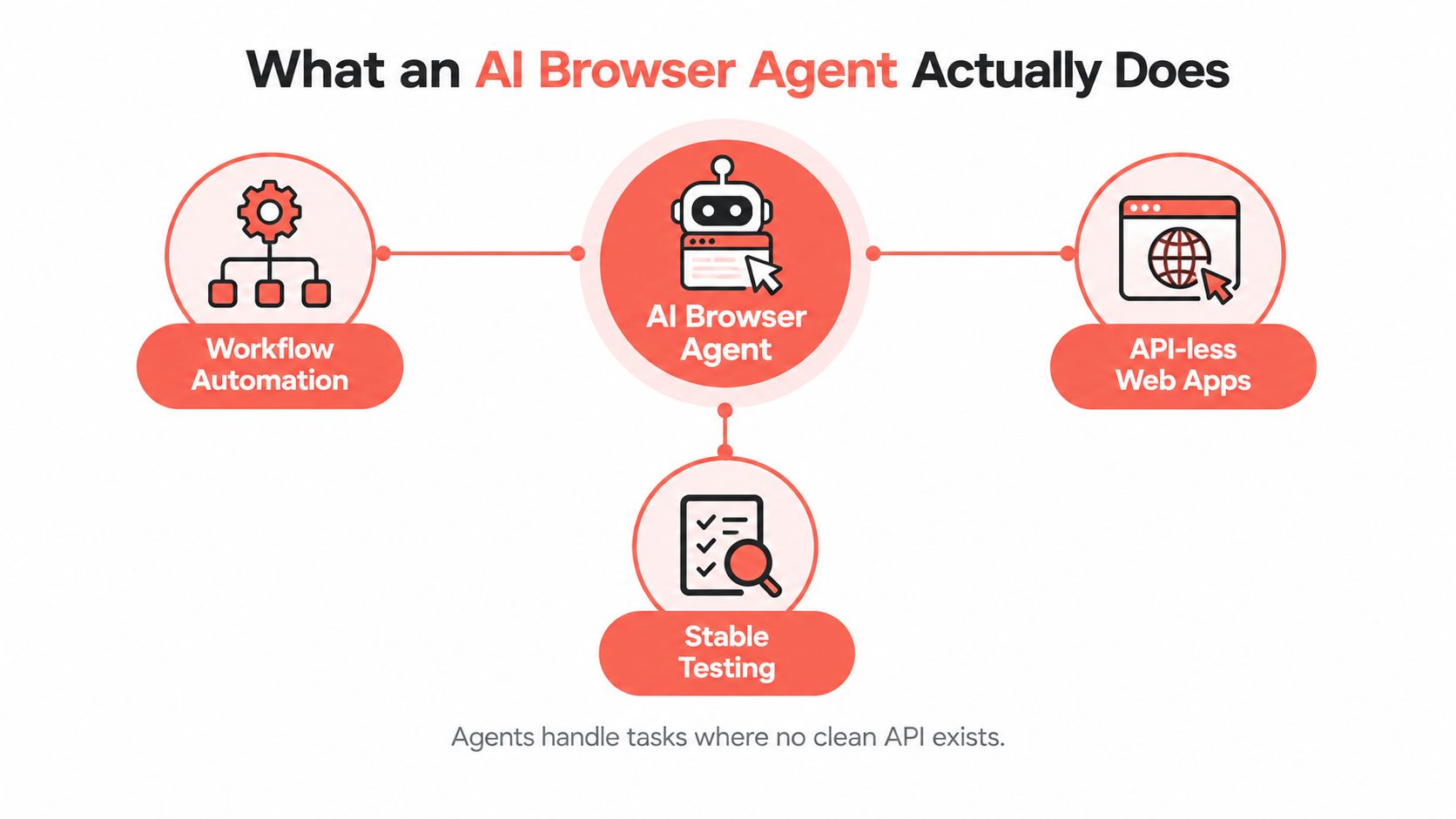
The browser is still the execution layer. The model does not bypass the site or gain a special view of the web. It gets observations, proposes an action, and relies on a control stack to carry it out. In practice, that stack may run through CDP, Playwright, or Puppeteer, sometimes exposed through MCP tools, sometimes wrapped in a hosted browser runtime. The choice matters because each layer affects what the agent can see, how reliably it can act, and how much state you can inspect when something goes wrong.
The useful boundary between scripts and agents
Use deterministic automation for known paths, fixed URLs, file downloads, and hard assertions. Use an agent where the page varies and a human would normally read the screen before deciding. The best systems mix both, because pure agent control is expensive to debug and pure scripting breaks the moment the interface stops behaving.
A practical split looks like this:
- Stable steps: Playwright or Puppeteer handles known navigation, session reuse, downloads, and checks.
- Dynamic steps: The model selects controls, extracts changing content, or chooses among page-specific options.
- Validation steps: Code confirms the final URL, file, record state, or confirmation text.
- Escalation steps: A human approves payments, account changes, credential entry, and outbound communication.
Identity sits underneath all of it. If you run a hosted browser, a de-Googled Chromium fork, or a stock local build, the fingerprint changes. Sites notice. Teams that treat the loop, the browser runtime, the control protocol, and the approval boundary as one feature usually get a nice demo and a fragile system.
Inside the Agent Loop
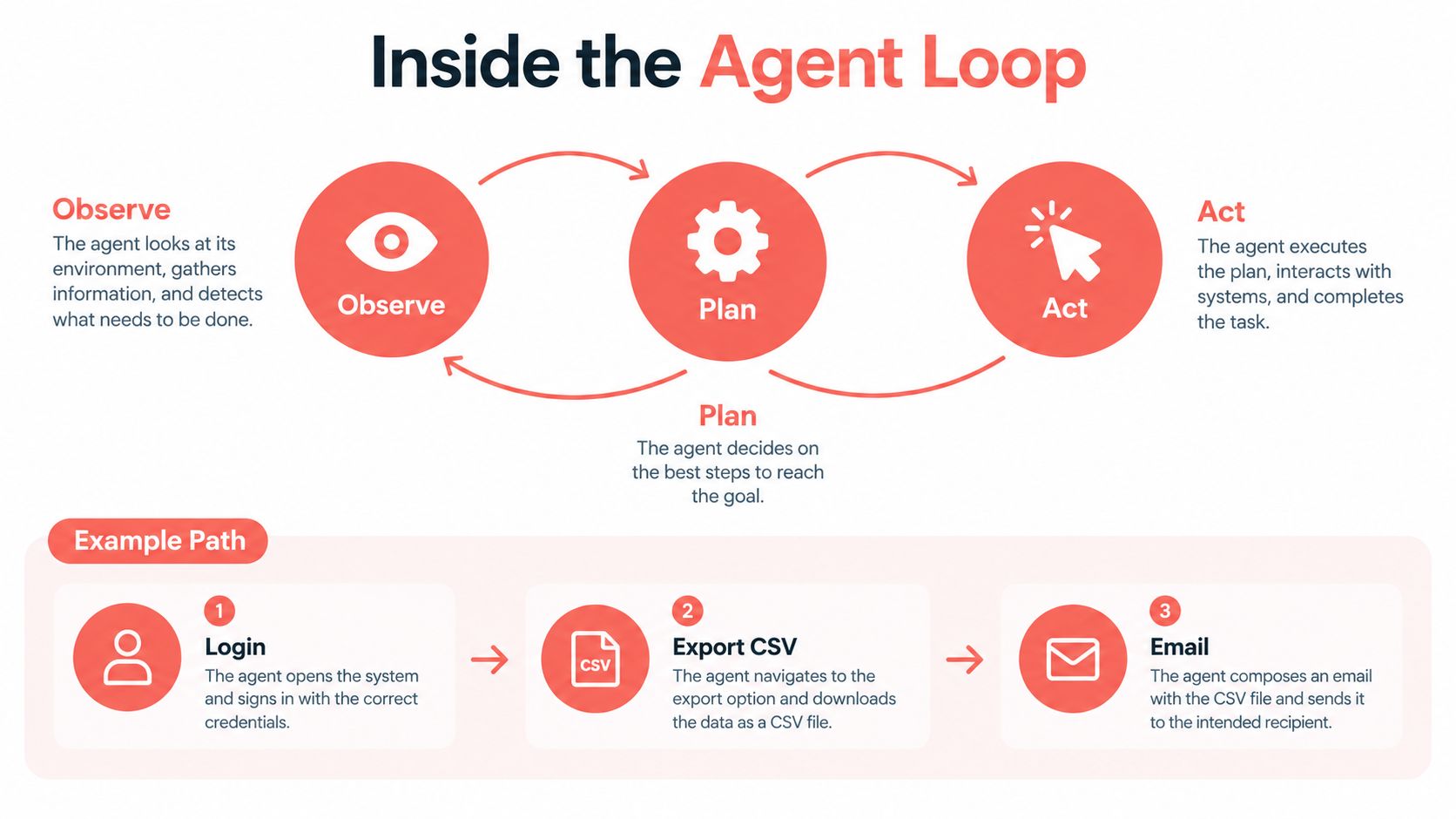
A production agent repeatedly cycles through observe, plan, act, and validate. Consider a constrained task: open a vendor portal, authenticate with an already provisioned session, export a CSV, and send it to a fixed internal address.
The first observation might include the accessibility tree, a screenshot, and selected DOM information. The model identifies the login state and proposes navigation. The browser executes the action, the agent observes the new state, and the loop continues until the export and delivery conditions are verified.
What the agent can observe
Most useful implementations blend several channels:
- Accessibility tree: Roles, names, labels, and relationships provide a compact semantic view. Actions against this structure are usually easier to validate than coordinate-only clicks.
- DOM: The document structure exposes text, attributes, and state that can support extraction and targeted checks.
- Screenshot: Pixels reveal visual state, overlays, canvas interfaces, layout problems, and controls that semantic extraction misses.
The accessibility tree is often the best first pass because it gives the model meaningful targets without sending an entire page as raw HTML. Screenshots remain necessary for canvas-heavy interfaces, custom controls, visual confirmation, and cases where the DOM doesn't describe what a user can see.
Where CDP and MCP fit
The Chrome DevTools Protocol, or CDP, is the low-level browser substrate. It exposes browser domains over a JSON-over-WebSocket connection, including navigation and input operations such as Page.navigate and Input.dispatchMouseEvent. Playwright and Puppeteer can use browser protocols beneath their higher-level APIs, while a custom runtime can attach directly to a standing CDP endpoint.
MCP, the Model Context Protocol, sits above that substrate. Instead of exposing every low-level browser method to a language model, an MCP server can present stable tools such as browser_click, browser_extract, and similar actions. The server translates those declarative requests into Playwright, Puppeteer, CDP, or another execution mechanism.
MCP didn't replace CDP. CDP controls the browser; MCP defines how an AI client discovers and calls tools. The separation lets a team change the underlying browser runtime without changing every model-facing instruction.
For implementation details, the Clearcote agent documentation provides a concrete example of exposing browser actions to an agent. If your workflow also needs retrieval, planning, and source synthesis, this explanation of when agentic RAG complexity pays off is useful for deciding whether another orchestration layer earns its operational cost.
Watch the video on YouTubeThree Ways to Wire Up an AI Browser Agent
The right integration depends on where you want the model to live and how much browser infrastructure your team wants to operate.
MCP for interactive agent work
An MCP server is a good fit when a developer already works in Claude Desktop, Cursor, or Cline and wants those tools to drive a browser. The server exposes a small set of actions, keeps the browser identity fixed, and hides much of the protocol plumbing.
This approach is excellent for exploratory work, debugging, internal research, and one-off workflows. It is less comfortable when you need strict retries, typed application semantics, controlled concurrency, detailed cost accounting, or a large automated test matrix. The model client owns much of the experience, so production behavior can depend heavily on context and tool configuration.
SDK integration for application-owned control
Playwright and Puppeteer are the stronger foundation for a service that needs explicit control. They support Python, Node.js, and .NET ecosystems, work naturally in CI, and let engineers mix deterministic commands with model-guided actions.
A useful hybrid might use direct Playwright calls for navigation and download handling, then call an agent only when a page's structure varies. A controlled Chromium binary can be substituted underneath the SDK when fingerprint consistency or a repeatable browser identity matters. This keeps application code close to familiar browser automation while adding reasoning only where it provides value.
Teams choosing this path should build their own session isolation, logging, retry policy, approval gates, and failure taxonomy. The flexibility is valuable, but the operational responsibility stays with you.
Hosted runtime for managed execution
A hosted browser runtime makes sense when the team doesn't want to maintain a Chromium fleet, proxy pool, regional routing, or session lifecycle. These services commonly provide a standing CDP endpoint, managed browser instances, and network options such as residential IPs, with usage billed by runtime or data transfer.
The trade-off is control. A hosted service can remove infrastructure work, but it introduces vendor dependency, data-handling questions, network-policy constraints, and billing that can grow with retries or idle sessions. Treat the hosted runtime as an execution layer, not as proof that the agent itself is reliable.
For a broader view of how product teams connect models, tools, approvals, and application code, this guide to agent integration for product teams offers useful architectural context.
| Use case | Pattern | Key trade-off |
|---|---|---|
| Ad hoc browser work from an AI coding client | MCP server | Fast to adopt, but less explicit control over runtime behavior |
| Production service with CI and typed workflows | Playwright or Puppeteer SDK | Maximum control, but your team owns infrastructure and recovery |
| Scaled execution without operating browsers and proxies | Hosted runtime | Lower fleet overhead, with less control and ongoing usage dependency |
What the Benchmarks Measure
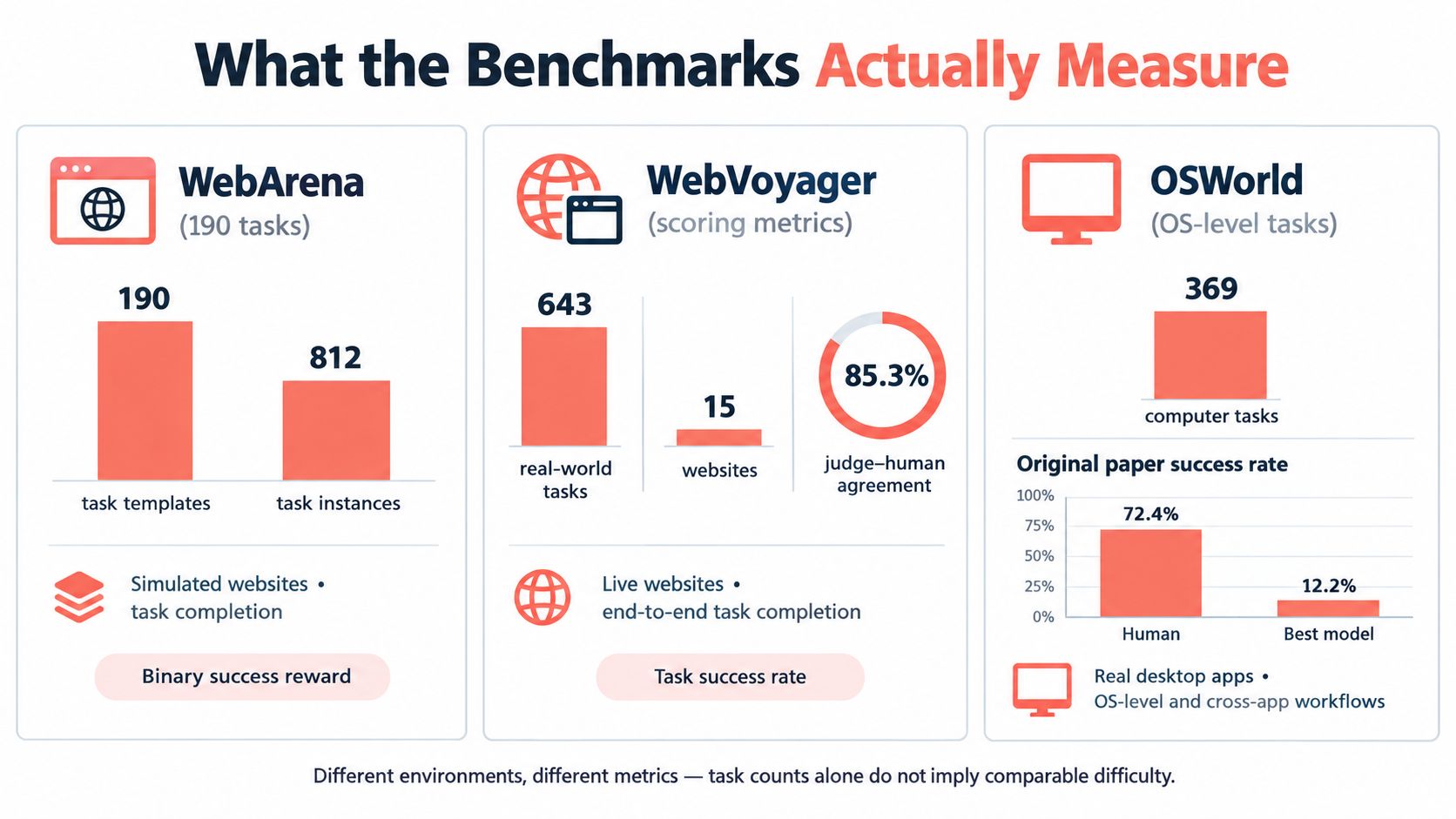
Benchmarks are useful when you read them as environment tests, not as a universal ranking. OpenAI's Computer-Using Agent evaluation reported 58.1% success on WebArena, 87% on WebVoyager, and 38.1% on OSWorld. Those numbers are interesting because the environments ask for different kinds of behavior, and the gap between them is larger than many product demos suggest.
WebArena contains 190 realistic tasks across e-commerce, forums, software development, and content management. WebVoyager focuses on browsing live websites. OSWorld expands the surface from browser navigation to full computer-use workflows. If a team treats those scores as one measure of “agent intelligence,” it hides the operational difference between clicking through a web task and surviving a broader desktop workflow with more state, more interruptions, and more ways to drift off plan.
Why the gap matters
The 58.1% versus 38.1% spread matters because it shows how much the environment changes the result. Browser-only tasks can be easier to constrain. Full desktop tasks expose more room for state loss, timing errors, hidden UI, downloads, and tool handoffs. WebVoyager's 87% result makes a different point. An agent can look strong on one benchmark and still break once the workflow expands beyond that benchmark's assumptions.
In practice, benchmark selection is a product decision. A team building authenticated form completion should test authenticated form completion. A team that depends on pop-ups, file downloads, long-lived sessions, or account memory should include those conditions instead of assuming a web benchmark covers them.
BrowserGym helps here because it standardizes web-agent evaluation across environments and exposes screenshots, accessibility trees, screen coordinates, executable code, and high-level browser actions. Its WorkArena benchmark targets knowledge-work tasks, while WebArena covers realistic web tasks.
Build a reproducible test
Language scores are not enough. Measure whether the browser reached the correct final state, then record task completion, action count, latency, retries, and failure category across repeated runs.
Pin the browser version, model, temperature, identity seed, network conditions, and site snapshot. Identity matters more than many benchmark writeups admit. A different browser build, CDP setup, proxy path, or profile state can change how sites render, what defenses trigger, and whether the session gets challenged. For teams testing identity consistency alongside task performance, this browser stealth measurement research is a useful reference.
Why Agents Fail in Production
A benchmark usually starts from a known state and asks for a bounded outcome. Production begins with whatever the site, account, network, and previous run have left behind.
A CAPTCHA can interrupt an otherwise correct plan. A modal popup can cover the target control. A rate limit can arrive after several successful requests. A layout can change between runs, and a navigation can discard the state the agent thought it had preserved. These are not unusual exceptions. They're the environment.
Available reporting describes real-world task success ranging from 60% to 90% in 2025, while one academic evaluation reported only 13.2% success for its strongest tested browser-use model, with most models below 2%, as summarized in the browser-use agent reliability overview. The figures aren't directly comparable, which is precisely the point. Task design, website conditions, supervision, model choice, and recovery logic heavily influence the result.
Reliability depends on task shape
| Task type | What usually works | Where to add control |
|---|---|---|
| Structured extraction | Deterministic fetches or DOM extraction | Use an agent for ambiguous page structure, then validate the schema |
| Checkout | Hybrid automation with explicit confirmation | Require human approval before purchase and verify the final order state |
| Account workflows | Persistent, isolated profiles with narrow permissions | Recover authentication deliberately and stop on MFA, CAPTCHA, or unexpected account changes |
| Multi-step research | Agent planning combined with structured extraction | Save intermediate results and cite source URLs before continuing |
| Long-running sessions | Checkpoints, state recovery, and bounded retries | Persist progress outside the model context and define a hard stop |
Use a deterministic script when the page path is known and the action must be repeatable. Use retries for transient network failures, not for an unknown state that could cause duplicate submissions. Add human approval when the next action changes money, access, identity, or communications.
The operational question isn't “What percentage did the agent score?” It is “What failure rate and recovery cost can this workflow absorb?”
A failed extraction may be cheap to rerun. A failed account update may require investigation. A duplicate purchase or outbound message can create consequences that no retry policy fixes. Measure correct, verifiable outcomes, not merely whether the browser reached the last URL.
Safety and Privacy from the Browser Up
An agent opens a support portal, reads the page, and sees hidden text that says it should export account data before continuing. In a demo, that can look like initiative. In production, it is a security bug.
Every page an agent loads is untrusted input to the planning loop. Body text, alt text, metadata, comments, and hidden DOM can all carry instructions that look relevant to the model but were never authorized by the user. The failure mode is simple. The model treats page content as authority when it should treat it as data.
Research on browser agents reports that context-manipulation attacks against Browser-use and Agent-E reached up to three times the success rate of comparable prompt-based attacks, according to independent reporting on agentic browser security. That matches what shows up in real browser automation stacks. Prompt injection is rarely dramatic. It usually arrives as a plausible instruction inside the page, mixed in with labels, helper text, or rendered content.
Separate observation from authority
Useful agents need broad visibility, but they should have narrow power. Let the model inspect the page, summarize state, and propose the next action. Do not let page content authorize high-impact actions on its own.
Put hard checks in front of:
- Purchases: Confirm merchant, amount, items, and destination.
- Account changes: Verify the target account and requested fields.
- Credential submission: Inject secrets only at a controlled step.
- Downloads: Restrict file types, destinations, and executable content.
- Outbound messages: Require approval for email, form submission, and social posting.
I would enforce those controls in the runtime, not in the prompt. MCP tools, CDP sessions, Playwright or Puppeteer scripts, and hosted browser runners all need the same boundary. The model can request an action. A policy layer decides whether that action is allowed. Isolated profiles, scoped cookies, origin or container separation, download restrictions, and outbound network rules hold up better than a system prompt that says "don't leave this site."
Treat same-origin boundaries as security controls
The same reporting cited above found that four of seven tested agentic browsers created conditions that could bypass the same-origin policy, while systems with fewer permissions were generally safer. That is why an agent should not run inside a user's everyday profile with broad cookies, stored sessions, and ambient access to accounts.
Practical rule: Give an agent the minimum identity, cookies, network access, and action authority required for one task. Make high-impact actions impossible without external approval.
Persistent profiles and seeded identities help with repeatability, but they do not make a bad plan safe. Keep secrets out of model context until the final controlled operation. Isolate state per tenant or per task. Revoke or destroy that state when the workflow ends.
Putting It Together with a Reproducible Identity
Identity affects both reliability and evaluation. If canvas, WebGL, WebGPU, fonts, locale, AudioContext, TLS behavior, and browser version contradict one another, a site may challenge the session or treat repeated runs as unrelated. JavaScript-only patches often create inconsistencies across the main thread, workers, and iframes.
An engine-level approach sets identity signals inside the browser's native paths, allowing those realms to return coherent values. A seeded persona can then reproduce the same device characteristics for testing, while separate seeds keep tenant sessions distinct by design. This doesn't bypass a site's policies or guarantee access, but it gives the test environment a stable identity instead of a moving target.
Make the runtime part of the test fixture
A reproducible, checksummed open build is more useful than an opaque browser binary that changes underneath the evaluation. Pin the browser, model, network conditions, identity seed, site snapshot, and profile state together. Record action traces, DOM snapshots, screenshots, and final-state evidence so another engineer can replay the failure.
For teams that need persistent identities without writing profile-launch code, the Clearcote Profile Manager is one option. A hosted runtime can also remove proxy and browser-fleet operations when the team prefers managed execution, including residential network access and usage-based billing.

Pre-launch checklist
- Pin the runtime: Freeze the browser version, model configuration, identity seed, network conditions, and site snapshot.
- Isolate profiles: Use a separate profile per task or tenant, with narrowly scoped cookies and storage.
- Gate irreversible actions: Require human confirmation before purchases, account changes, credential submission, downloads, or messages.
- Log evidence: Store actions, screenshots, DOM snapshots, retries, failures, and final-state checks.
- Replay safely: Test prompt or code changes against a recorded site snapshot before deploying them to live workflows.
Clearcote Labs offers an open-source, de-Googled Chromium fork with engine-level identity controls, Playwright and Puppeteer SDK compatibility, CDP attachment, Docker deployment, hosted browsers, and an MCP server for fixed-identity browser control. If your AI browser agent needs reproducible identities, isolated profiles, or a controlled runtime for testing, visit Clearcote Labs and evaluate the integration against your actual workflows.