You're choosing a browser automation stack while two different problems compete for your attention. One team needs dependable checkout tests across the browsers its customers use. Another needs a lean Chromium worker that can open pages, extract content, and shut down quickly. Both teams can write working code with Playwright or Puppeteer, but they won't get the same operational result.
The practical Playwright vs Puppeteer decision isn't a feature-counting exercise. It comes down to the constraint you can't ignore: cross-browser correctness, single-browser throughput, migration effort, debugging quality, or browser identity. Playwright generally earns its place in serious end-to-end testing. Puppeteer remains a sharp choice for focused Chromium automation, especially when a small Node.js stack and fast short-lived jobs matter more than browser breadth.
Table of Contents
- Two Engineers, Two Stacks
- How Playwright and Puppeteer Came to Be
- API, Languages and Browsers Side by Side
- Performance, Reliability and Footprint
- Migration Gotchas Most Comparisons Skip
- Which Tool Fits Which Job
- When the Browser Itself Is the Bottleneck
Two Engineers, Two Stacks
A checkout suite fails after a browser update. Engineer A opens the Playwright trace, checks the failing payment step, and reruns the flow in Chromium, Firefox, and WebKit. The issue is not page startup time. The release must behave consistently in every engine customers use.
Engineer B is processing product pages through a queue. Their Puppeteer workers launch a Chrome-derived binary, extract structured fields, and shut down. Safari coverage, a second language binding, and a built-in test runner would add setup without solving the actual job. Predictable Chromium control and low orchestration overhead matter more.
Both designs can be correct. The workload decides which one creates less operational work.
| Dimension | Playwright | Puppeteer |
|---|---|---|
| Primary strength | Cross-browser testing and larger automation suites | Focused Chromium automation |
| Browser coverage | Chromium, Firefox, and WebKit through one API surface | Chromium and Chrome centric, with Firefox support not equivalent to Playwright's breadth |
| Waiting model | Locator-based auto-waiting and actionability checks | Explicit waits and application-specific helpers |
| Test infrastructure | First-party runner with fixtures, retries, reports, traces, and parallelism | External runner and reporting stack usually required |
| Language options | Node.js, Python, Java, and .NET first-party bindings | JavaScript and TypeScript |
| Best starting point | A suite where browser behavior and flake reduction dominate | A lean Chrome-only script where startup and simplicity dominate |
Puppeteer arrived first, but Playwright's broader platform moved quickly. Independent 2026 summaries place Playwright ahead of Puppeteer in practical usage, while one comparison reports more GitHub stars for Puppeteer. Those measures answer different questions: package usage reflects current activity, while stars accumulate community visibility. The browser automation market timeline provides additional context for how quickly the two projects developed.
A de-Googled Chromium drop-in such as Clearcote can change the calculation for scraping and QA. If the job depends on a Chromium-compatible browser identity or a controlled browser binary, the browser choice becomes part of the architecture. Playwright still helps when one suite must cover multiple engines. Puppeteer may remain the simpler control layer when the target is Chromium and the surrounding worker system already exists.
Practical rule: Choose the tool that optimizes your dominant constraint, not the one with the longer feature list.
A cross-browser QA team choosing Puppeteer may spend time assembling test infrastructure and compensating for limited engine coverage. A scraping team choosing Playwright for a simple Chromium worker may accept installation and orchestration complexity it does not need. The 2026 browser automation market overview adds useful market context, but it does not replace measuring the workload that will run in production.
The right verdict changes with the workload.
How Playwright and Puppeteer Came to Be
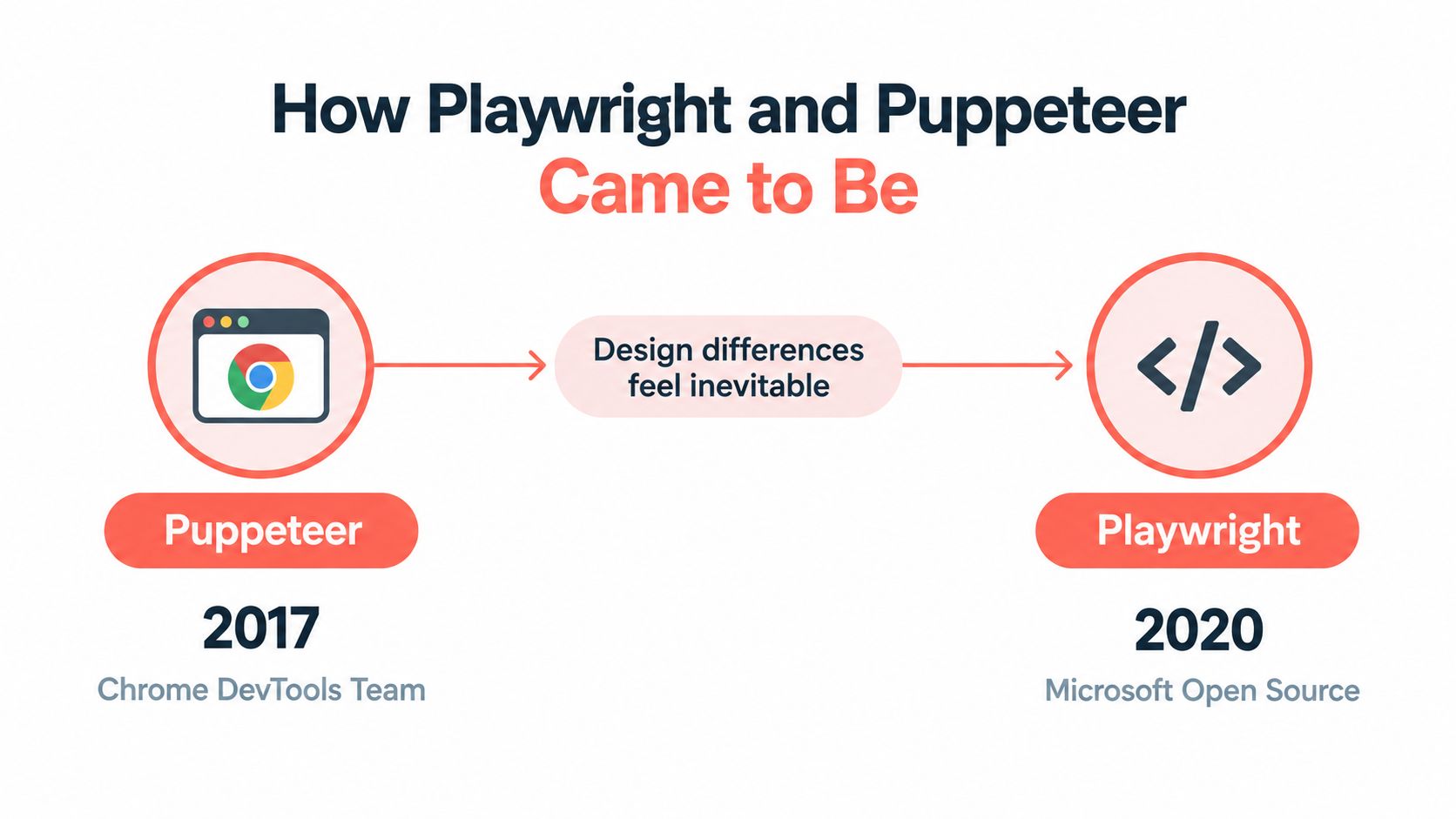
Puppeteer emerged from a specific engineering need. The Chrome DevTools team released it in 2017 as a Node.js library for controlling Chromium through the Chrome DevTools Protocol. Its design stayed close to that protocol: launch a browser, create a page, send commands, and inspect the result. That focus made Chrome automation compact and easy to adopt.
Playwright arrived in January 2020, with support for Chromium, Firefox, and WebKit. Its stable release followed on May 6, 2020, and its first first-party test runner appeared in November 2020. The published framework timeline captures the sequence. The projects also began with different design constraints. Puppeteer optimized direct Chromium control. Playwright designed its automation model around multiple browser engines and repeatable test execution from the start.
Why the history still matters
Puppeteer's early adoption produced a large installed base and a familiar Chrome automation model. That simplicity still works well for focused jobs such as PDF generation, screenshots, and data extraction from Chromium-rendered pages. Teams with an existing Puppeteer worker system also benefit from its small conceptual surface.
Playwright's creators addressed problems that become expensive in larger test suites. Supporting Chromium, Firefox, and WebKit should not require separate automation models. An element being present in the DOM does not mean a real user can click it, especially when an animation, overlay, or disabled state is involved. Playwright's browser contexts, locator behavior, traces, fixtures, retries, and reports reflect those requirements.
The difference is architectural, not merely chronological. Puppeteer starts with direct browser control and lets the surrounding application provide more of the test structure. Playwright supplies more of that structure through isolation and diagnostics. That can reduce custom framework code, while also introducing conventions a team must learn and maintain.
Neither approach is obsolete. Puppeteer remains a sensible control layer for Chromium-focused automation. Playwright fits suites where engine coverage, isolated state, and failure investigation justify a broader framework. Their APIs overlap because both operate on the same browser primitives, but their assumptions about scale, reliability, and test ownership are different.
The history also explains why a migration is rarely a package swap. Equivalent browser actions may require different waiting, context, fixture, and debugging choices once the surrounding workflow changes.
API, Languages and Browsers Side by Side
The launch code looks familiar in both libraries, which is why migrations can seem easier than they are. A basic Puppeteer setup uses:
const browser = await puppeteer.launch({ headless: 'new' });
The corresponding Playwright setup is:
const browser = await chromium.launch({ headless: true });
The larger difference appears after the browser starts. Playwright's locator API expresses an interaction in terms closer to user intent:
await page.getByRole('button', { name: 'Continue' }).click();
A Puppeteer implementation commonly relies on a selector and an explicit wait:
await page.waitForSelector('button[type="submit"]', { visible: true });
await page.click('button[type="submit"]');
That Puppeteer code can be perfectly reliable when the helper logic matches the application. It gives the engineer direct control, but the team owns the timing model. Playwright performs actionability checks around the locator, including whether the target is ready to receive the interaction. The Playwright documentation for Clearcote integrations shows how that API can also connect to an alternate Chromium runtime without changing the broader automation model.
| Dimension | Playwright | Puppeteer |
|---|---|---|
| Primary API shape | Locators, browser contexts, pages, and test-oriented fixtures | Browser, pages, selectors, and direct Chromium control |
| Selector ergonomics | getByRole, getByText, and locator support user-facing targeting |
CSS selectors, XPath, text handling, and explicit selector waits |
| Waiting behavior | Built-in actionability and web-first behavior | Explicit waitForSelector and custom wait helpers |
| Official languages | Node.js, Python, Java, and .NET | JavaScript and TypeScript |
| Browser engines | Chromium, Firefox, and WebKit | Chromium and Chrome focused |
| Test runner | First-party Playwright Test | External runner such as Jest or Mocha is typically assembled |
Language choice can settle the decision before browser features enter the discussion. Playwright supplies first-party bindings for Node.js, Python, Java, and .NET. Puppeteer's official path is JavaScript and TypeScript. A Python or .NET team can't treat an unofficial wrapper as equivalent to a maintained first-party API without accepting additional maintenance risk.
Browser coverage is the other decisive divide. Playwright presents Chromium, Firefox, and WebKit through a unified surface. Puppeteer remains centered on Chromium and Chrome automation. For a team that needs to validate Safari behavior, WebKit support isn't an optional convenience. It changes whether one suite can cover the required engines at all.
There's a cost to Playwright's broader surface. Its browser installation, fixtures, traces, and parallel execution model add concepts that a small Puppeteer script doesn't need. Conversely, Puppeteer's smaller core doesn't remove complexity. It moves responsibility for waits, retries, reports, and isolation into your code and test framework.
The shorter script isn't automatically the lower-maintenance system. Count the helpers and CI rules around it, not just the lines that open a page.
Performance, Reliability and Footprint
A browser job that finishes quickly on an empty page can still become slow, flaky, or expensive at production scale. Short Chromium-only scripts, navigation-heavy workflows, and large parallel test suites stress different parts of the stack, so a single benchmark rarely settles the Playwright versus Puppeteer decision.
A controlled navigation-heavy comparison recorded 4.513 seconds for Playwright and 4.784 seconds for Puppeteer, a difference of roughly 5–6% in Playwright's favor on that run (third-party 2026 benchmark comparison). Another same-browser comparison found nearly identical warm-run medians. Puppeteer can launch slightly faster for simple, short-lived Chromium jobs. Independent writeups also describe Puppeteer as 10–20% faster on lean Chrome-only jobs, with some short-script tests reporting a wider 25–30% difference. Those results describe particular workloads, not a universal ranking (short-run performance discussion).
| Metric | Playwright | Puppeteer |
|---|---|---|
| Navigation-heavy benchmark | 4.513 seconds in one reported run | 4.784 seconds in the same reported run |
| Warm-run behavior | Nearly identical in another same-browser comparison | Nearly identical in another same-browser comparison |
| Short Chromium-only jobs | Can carry more orchestration overhead | Can launch slightly faster |
| Large suites | Auto-waiting, contexts, parallelism, and test artifacts help reduce manual coordination | Requires more custom coordination around waits, retries, isolation, and reporting |
| Browser footprint | Broader installation when Chromium, Firefox, and WebKit are required | Narrower when the workflow only needs Chromium |
Reliability usually matters more than the first timer. Playwright's locator actions wait for elements to become usable, while its first-party runner supplies fixtures, retries, reports, traces, and parallel execution. Puppeteer can reach the same operational quality, but the team must design and maintain the wait helpers, artifact collection, retry policy, and isolation model.
That difference becomes visible in CI. A small Puppeteer script may have less startup overhead, yet a larger suite can spend more time recovering from timing failures or coordinating browser state. Playwright's added machinery costs resources, but it can reduce the amount of support code required to keep a busy suite predictable.
Footprint depends on the job you ship. A Puppeteer worker that needs one Chromium-derived binary avoids installing engines it will never execute. A Playwright suite that validates Chromium, Firefox, and WebKit accepts a broader browser footprint because cross-engine coverage is part of its requirement. Comparing installation size without comparing required coverage produces the wrong optimization.
What to measure in your own workload
Use a small benchmark that resembles production, rather than racing both tools against empty pages.
- Cold launch: Measure the time from process start to the first usable page in the exact container or host you deploy.
- Sustained extraction: Keep navigation, parsing, retries, and output writes in the run. A browser that wins an empty-page test may lose once real pages dominate the work.
- Parallel tabs: Watch memory, file descriptors, browser crashes, and queue latency as concurrency rises.
- Flake rate: Record retries and failure categories. A slightly slower first attempt can cost less than repeated CI reruns.
The performance gap depends on workload: Puppeteer favors short simple scripts, while Playwright often pulls ahead when browser state and orchestration become more substantial. The same workload-dependence shows up in independent writeups (short-run performance discussion). Optimize the bottleneck you can measure.
For scraping teams, browser identity and detection can matter more than framework latency. The layer-by-layer automation detection analysis is relevant because a fast browser still fails if the target rejects its identity, protocol, or network behavior. A de-Googled Chromium drop-in such as Clearcote can therefore change the calculus for scraping and QA, where acceptance by the target matters as much as execution speed.
Migration Gotchas Most Comparisons Skip
A Puppeteer-to-Playwright migration often begins with reassuringly similar code and ends with tests that fail for reasons the diff doesn't reveal. The syntax is close. The semantics aren't interchangeable.
Start with waits. In Puppeteer, waitForSelector commonly confirms that a selector exists or is visible, depending on the options supplied. The subsequent click still depends on the page being stable, unobstructed, enabled, and attached to the expected DOM state. Playwright's locator action applies its own actionability checks, so the same-looking click can wait longer, target a different node after a re-render, or fail with a diagnostic that exposes the actual problem.
Replace timing assumptions, not just method names
A direct rewrite such as this:
await page.waitForSelector('.checkout-button');
await page.click('.checkout-button');
shouldn't automatically become this:
await page.waitForSelector('.checkout-button');
await page.click('.checkout-button');
In Playwright, prefer a locator that expresses the control's role or stable test contract:
await page.getByRole('button', { name: 'Pay now' }).click();
The migration task is to decide which waits were essential and which were compensating for weak selectors. Keeping every old timeout can make the new suite slower and can conceal application defects.
networkidle is another trap. The frameworks use different lifecycle semantics, and recent migration coverage notes that Playwright's networkidle behavior is stricter than Puppeteer's networkidle2 behavior (migration gotchas in Playwright and Puppeteer). A long-polling application, analytics stream, or open socket can therefore turn a seemingly mechanical replacement into a timeout.
Check the boundaries around page code
Lifecycle states also need explicit review. load, domcontentloaded, and network-idle conditions don't mean that a client-rendered component is ready for interaction. A page can finish loading while a framework is still replacing nodes, fetching data, or enabling a button.
page.evaluate deserves the same scrutiny. Code inside the browser runs in the page's JavaScript context, not the Node.js or test process context. Variables, handles, serialization rules, and element lifetimes can behave differently after a migration, especially when a Puppeteer script relies on chained $ calls and a Playwright rewrite uses locators.
Migration rule: Port the intent of each wait and selector. Don't port every line mechanically.
Finally, audit evidence and debugging artifacts. Playwright traces and Puppeteer's screenshots, videos, and external runner artifacts don't form one interchangeable replay format. A team that switches frameworks mid-project should expect to regenerate evidence with the new runner rather than assume an old trace can be opened and inspected in the new viewer.
Which Tool Fits Which Job
Three workload shapes produce three clear recommendations.
Cross-browser QA
For an enterprise-facing application where Firefox and Safari behavior are essential, choose Playwright. Its single API surface covers Chromium, Firefox, and WebKit, while Playwright Test supplies the fixtures, retries, reports, traces, and parallelism that a serious end-to-end suite needs.
Use role-based locators and web-first assertions from the start. Keep browser contexts isolated by test or user state, and treat traces as part of the failure workflow rather than as an emergency add-on. Puppeteer can be connected to an external test runner, but that means assembling more of the test platform yourself and still leaves WebKit coverage outside its core strength.
Chrome-only scraping
For a scraper that only needs Chromium and values a lean Node.js implementation, choose Puppeteer. Its direct model and focused browser target make it easy to launch, traverse, extract, and close pages without installing or coordinating engines the job never uses.
That recommendation changes when the target behaves differently outside Chromium or reacts strongly to browser identity. Playwright's cross-browser option can provide another execution path, but neither framework automatically solves anti-bot enforcement. Test the target, measure rejection behavior, and keep browser choice separate from proxy, identity, rate, and retry decisions.
AI-agent browser control
For an AI agent, check the agent SDK before choosing the browser library. If the framework already exposes Playwright actions, accessibility-oriented page representations, or an MCP integration, use Playwright. If the SDK is built around Puppeteer or direct Chrome DevTools Protocol calls, Puppeteer may be the lower-friction option.
Both can drive an agent workflow. The important engineering questions are whether the agent receives stable page state, whether selectors survive UI changes, how the system limits actions, and how you replay a failed run. Browser automation is only one component of the safety boundary. Teams evaluating broader resilience practices can also review automated chaos testing for DevOps for ideas on testing failure paths beyond ordinary UI assertions.
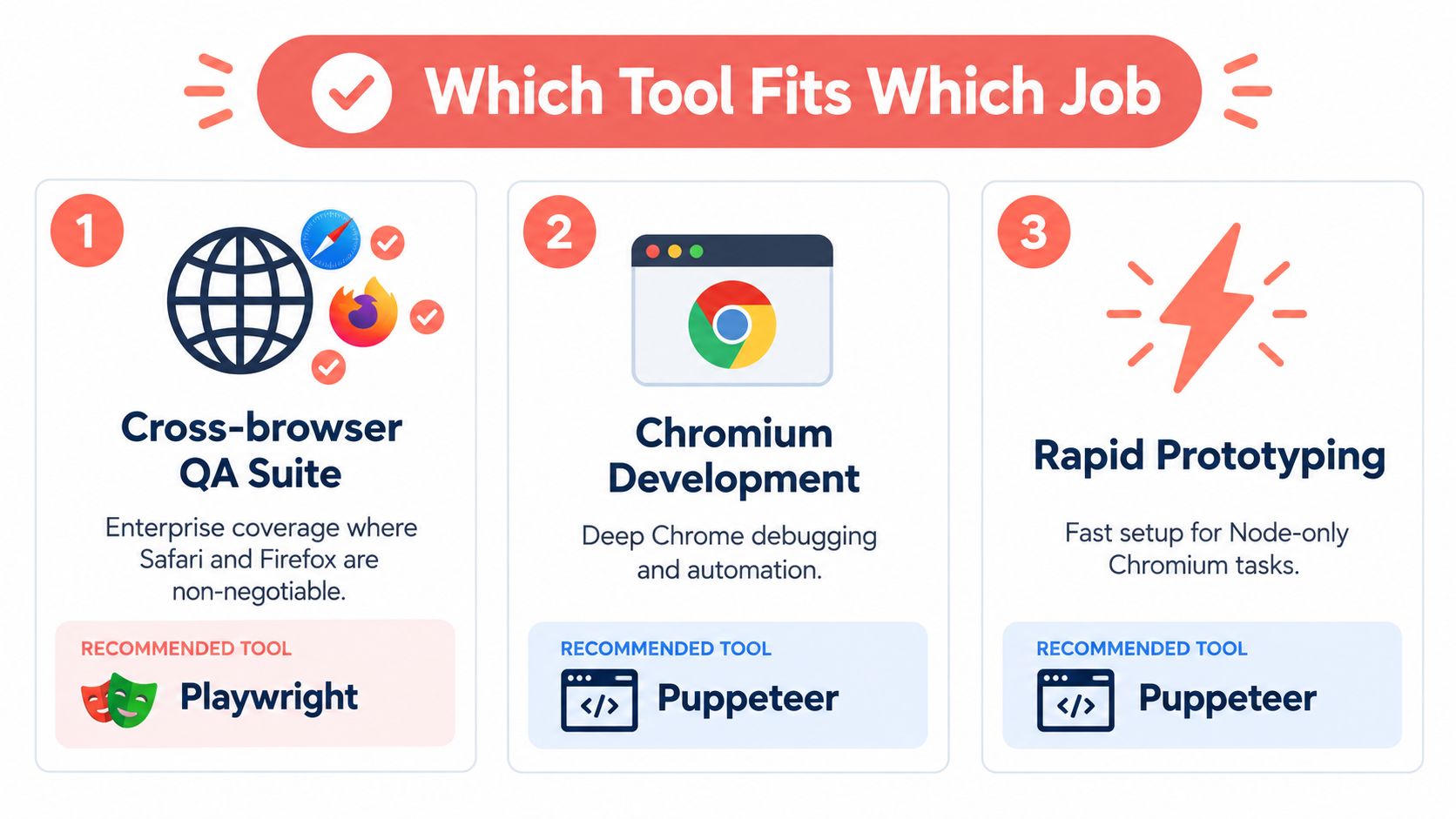
Apply this decision rule when you need an answer quickly:
- Need Chromium, Firefox, and WebKit? Pick Playwright.
- Need only Chrome and care about cold-start time? Pick Puppeteer.
- Building an agent? Check the SDK and its browser-control contract first.
Don't choose Playwright solely because it's popular, and don't choose Puppeteer solely because the first script is shorter. The recommendation should follow the workload's hardest requirement.
When the Browser Itself Is the Bottleneck
Many Playwright vs Puppeteer discussions assume Chromium is a neutral component. In production, it isn't. The browser binary contributes startup behavior, network activity, identity signals, update policy, and the operational shape of the container that runs it.
A de-Googled Chromium drop-in changes that part of the decision without forcing a framework migration. If the binary preserves the DevTools Protocol surface, Puppeteer can point to it with executablePath, while Playwright can use the same idea through its launch options:
const browser = await puppeteer.launch({
  executablePath: '/path/to/chromium'
});
const browser = await chromium.launch({
  headless: true,
  executablePath: '/path/to/chromium'
});
The exact binary still matters. Some de-Googled builds expect the newer headless mode, so validate headless: true and the relevant launch arguments in the target container rather than assuming every Chrome flag behaves identically.
What this changes operationally
A browser build with fewer external calls can simplify a CI image and reduce unwanted network activity. A build with engine-level identity controls can also address inconsistencies that JavaScript-only patches miss across workers, iframes, and browser contexts. That doesn't guarantee access to a protected site, and it doesn't replace permission, rate, or compliance controls.
Teams should validate four things before switching the binary:
- Startup behavior: Measure cold launch in the deployed image.
- Protocol compatibility: Run navigation, downloads, screenshots, PDF generation, and request interception.
- Identity consistency: Check the browser's reported values across frames and workers.
- Update ownership: Pin the browser version and rebuild on a schedule because automatic Chromium updates are no longer doing that work for you.
| Build | Median cold start | Telemetry calls on launch | Anti-bot 403 rate in a sample | Drop-in for Puppeteer | Drop-in for Playwright |
|---|---|---|---|---|---|
| Standard Chrome or Chromium | Measure in your deployment | Inspect with your network controls | Measure against your permitted targets | Usually, through executablePath |
Usually, through executablePath |
| De-Googled Chromium build | Measure in your deployment | Validate from the build and runtime | Measure against your permitted targets | Yes, when the DevTools Protocol is compatible | Yes, when the DevTools Protocol is compatible |
The table intentionally avoids invented universal values. Cold-start latency and rejection rates depend on the binary, host, target, network path, and launch mode. A useful security review should also cover how browser-side behavior appears in JavaScript pentest reporting with ThreatExploit AI, particularly when automation interacts with an application that treats client-side signals as security inputs.
For teams that don't want to operate the browser binary locally, hosted browser options can change the infrastructure calculation. Review the hosted browser runtime documentation before deciding whether local process management, Docker, or a remote browser fits your workload.
The browser choice and framework choice are separate decisions. Playwright remains the stronger test platform for cross-browser QA. Puppeteer remains the simpler Chromium controller for focused jobs. A compatible de-Googled binary can give either one a different runtime profile, but it also makes browser pinning, regression testing, and release maintenance your responsibility.
Clearcote Labs offers a de-Googled Chromium fork with Playwright and Puppeteer integration, local and Docker deployment options, and hosted browser runtimes for teams that need controlled browser identities. If browser startup, telemetry, or inconsistent fingerprint signals are affecting your automation, visit Clearcote Labs and test the binary against your own Playwright or Puppeteer workload.