You're trying to get a browser automation flow working in a place that has no screen, no monitor, and often no human watching it. That's usually when a login test in CI, a scraper job in Docker, or an AI agent hitting a web app bumps into the same question, what exactly is a headless browser?
A headless browser is a full browser runtime running without a visible window. It still needs the same engine pieces a normal browser uses to render pages and execute scripts, which is why it can handle sites that plain HTTP clients can't. Once you think of it as full browser minus the GUI, the rest of the trade-offs start to make sense.
Table of Contents
- What a Headless Browser Is
- How Headless Browsers Evolved Into Mainstream Tooling
- Anatomy of a Headless Browser Deployment
- Detection Vectors and Why Configuration Coherence Is the Core Defense
- Matching the Headless Browser to the Job
- Security When AI Agents Sit Behind the Browser
- Operational Decisions for Real Deployments
- Three Questions Every Headless Browser Setup Must Answer
What a Headless Browser Is
A lot of people meet the idea after a test fails. The workflow works on a laptop with a browser open, then the same login flow breaks in CI because there is no display attached and the machine cannot show a normal window. A headless browser solves that by running the browser runtime without the visible interface, so the code still gets a real page engine even when nobody is watching it.
Full engine, no window
That distinction matters. A headless browser is different from curl, requests, or any other lightweight HTTP client, because those tools fetch content but do not execute the page the way a browser does. Modern sites often rely on JavaScript, dynamic DOM changes, and browser-native behavior, so if you need the page the way users see it, you need a browser engine, not just a fetcher.
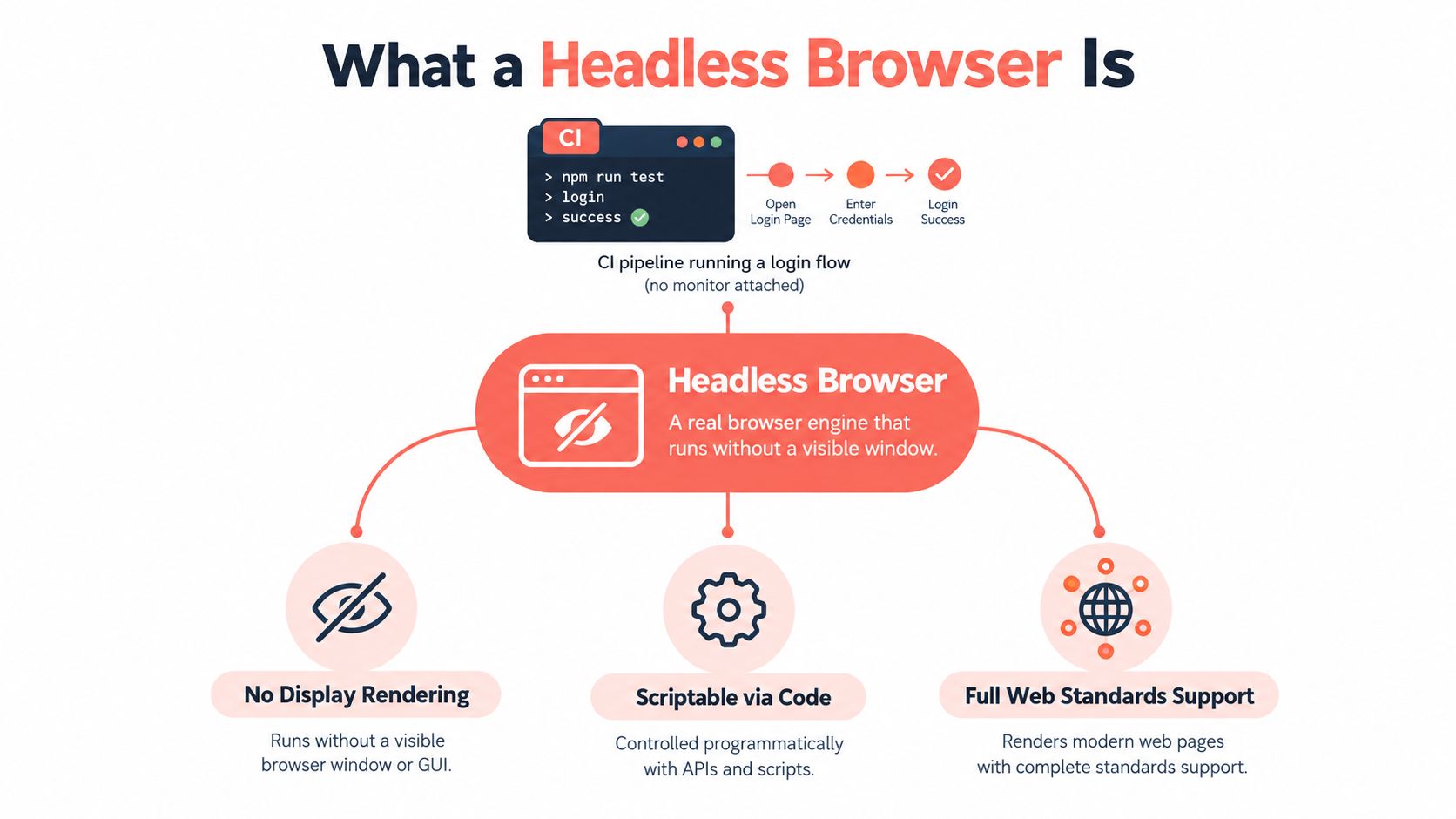
The practical mental model is simple. The browser still loads the page, runs JavaScript, speaks the web platform, and can capture screenshots or generate PDFs. The window is the only missing piece, which is why headless mode fits automated testing, server-side crawling, and browser-driven agents.
Practical rule: if the page needs rendering or scripted interaction, reach for a browser runtime first. If you only need a static response body, a lightweight client may be enough.
The browser's visible surface is gone, but the browser itself is still there. That is why headless mode can click buttons, wait for network activity, and validate interactions in a way that pure HTTP tools cannot. The first shift is understanding that the display is absent, while the browser engine remains fully present.
How Headless Browsers Evolved Into Mainstream Tooling
Teams first reached for tools like PhantomJS because they needed browser automation without a visible window. That goal made sense, but it came with a trade-off. The farther a tool drifted from a mainstream browser engine, the easier it was for automated behavior to diverge from what users saw in normal browsing.
From a special-purpose tool to Chrome itself
Google's native headless support in Chrome 59 shifted that center of gravity in 2017, starting on macOS and Linux, with Windows support in Chrome 60 (Chrome headless history). Automation could now use Chrome's own rendering and JavaScript engines without a visible interface or an X server. That made browser automation practical in CI, containers, testing pipelines, and server-side crawling.
The main gain was parity. QA and scraping teams could run scripts against the same mainstream engine their users already had in front of them, which cut down on the familiar “works in automation, breaks in Chrome” problem. A tool built for scripts was no longer the only serious option.
The later convergence mattered just as much
The first implementation still used a lighter Chromium architecture based around the content module, so it did not yet match headed Chrome in every detail (Chrome headless history). Then Chrome 112 introduced a newer headless implementation that used the full Chrome browser without a visible window, and Chrome 132 removed the legacy headless mode from the main binary (Chrome headless history). The practical effect was straightforward. Fewer rendering mismatches, fewer parity gaps, and less guessing about whether a bug only appeared in headless mode.
Watch the video on YouTubeThat convergence is why modern teams treat headless browsers as normal infrastructure. The browser became more aligned with the version people use, which is why headless is now standard tooling.
Anatomy of a Headless Browser Deployment
A deployment begins with the browser binary, but that is only one piece of the system. Engineers also need a connection layer, usually the Chrome DevTools Protocol (CDP), plus a clean way to manage pages, browser contexts, and workers. If you treat the setup as “just launch a browser,” the failure modes stay hidden until load, state leakage, or timing issues start showing up.
Process lifetime is the first decision
The first operational choice is whether to keep one browser process alive and reuse it, or start a fresh process for each task. Chrome's automation docs describe a benchmark where spawning a new Chromium process and CDP connection for every workflow added roughly 3 seconds of baseline overhead, while persistent Playwright and Selenium connections kept overhead below 100 milliseconds per operation (persistent CDP guidance).
That gap changes the shape of the deployment. In production scraping, QA, or agent work, the usual pattern is to launch once, reuse contexts or pages, and separate jobs with browser contexts wherever possible. A standing CDP endpoint also lets multiple workers attach to the same browser process without paying startup cost over and over.
Contexts are where isolation really lives
Pages are not sessions. A browser context gives you a cleaner boundary for cookies, local storage, and site state, which matters when one job's identity has to stay apart from another's. The trade-off is capacity, because each concurrent context still consumes CPU and memory for JavaScript, rendering, networking, and whatever the site loads in the background.
Practical rule: reuse the browser, isolate with contexts, and cap concurrency based on measured memory pressure, not on how many tasks your queue can generate.
| Aspect | Persistent CDP | Spawn per Operation |
|---|---|---|
| Startup overhead | Low after the browser is running | High on every task |
| Isolation shape | Reuse browser, separate contexts | Clean process boundary each time |
| Throughput | Better for steady workloads | Poorer for repeated operations |
| Operational cost | Easier to supervise and scale | More process churn |
| Best fit | Crawlers, agents, long-lived QA jobs | Rare one-off tasks |
The main pattern is simple. The browser process is expensive to create, but relatively cheap to reuse. Once you accept that, the deployment starts to look less like ad hoc scripting and more like infrastructure.
Detection Vectors and Why Configuration Coherence Is the Core Defense
A headless browser is often treated as if the User-Agent string is the main clue. In practice, that is only one small signal. Independent research generated 89,486 Chromium fingerprints across 1,748 configuration parameters, 13 Chromium versions, and two hardware platforms, and it showed that headless and headful operation can be distinguished, while launch settings themselves materially affect fingerprints (fingerprinting research).
The browser leaks through many surfaces
The obvious leaks are familiar, but they do not tell the whole story. Canvas, WebGL, WebGPU, AudioContext, fonts, locale, and other browser-visible features can all contribute to a fingerprint. Launch flags, worker behavior, iframe behavior, and the way HTTP-level traits line up with the browser persona matter too. If one surface says “stable desktop Chrome” and another says “automation build with odd patches,” that mismatch becomes the signal.
A separate measurement study of the Tranco Top 10,000 found that headless Chromium was blocked on 15.2% of sites, versus 6.8 to 7.2% for other tested configurations, and 82% of blocks were due to bot detection rather than infrastructure failure. That result fits the same pattern. Simple spoofing often addresses the wrong layer.
Coherence beats piling on more patches
Adding more spoofing can make detection easier if it creates an unusual combination. A browser with one patched signal, two untouched signals, and a strange launch profile is often easier to classify than a browser with a clean, internally consistent persona. Good operators treat identity as a system, not a patch list.
A useful mental model is a passport check. One altered field may not matter on its own, but several mismatched details invite scrutiny.
The same idea applies to browser automation. For a practical view of how this shows up in real tooling, the discussion of Playwright bot detection is a useful companion. The discipline is measurement-driven identity design. Establish a baseline, test the full configuration against independent fingerprinting systems, and treat reproducibility as separate from plausibility.
Configuration coherence also matters before a site ever renders a page. A browser that claims one platform in its headers, exposes another in its APIs, and launches with flags that do not fit either profile is leaving a configuration leak, not just a fingerprint. That is why the defense starts with alignment across the whole stack.
Matching the Headless Browser to the Job
Different workloads ask for different trade-offs. A testing team doesn't need the same setup as a scraper fleet, and an AI agent has a different risk profile again. The mistake is trying to pick one universal browser shape and force every job through it.
Four common deployment shapes
Testing usually wants deterministic behavior. Seeded personas, captured device profiles, and consistent launch settings help QA teams reproduce bugs without wondering whether a weird browser state caused the failure. That's especially useful when the target is cross-device verification rather than raw browsing realism.
Large-scale scraping cares about throughput and memory pressure. Historical deployment reports have described Chrome-based container workloads using up to about 150 MB per instance in one setup, while older configurations could approach 1 GB before memory-saving improvements, which is why process reuse and concurrency controls matter more than the label “headless” by itself (headless browser economics). Residential IP coverage and proxy economics often enter the conversation here too, because network identity is part of the workload.
AI-driven agents need continuity. Persistent authentication, CDP or MCP attach surfaces, and stable browser identities help an agent carry state across steps, but they also increase the blast radius if the session is compromised. That makes containment more important than in a simple scraper.
Reproducible QA sits between the two. It wants stable cross-device coverage, but it also needs to show that a failure is real, not just a fingerprint mismatch. That's where a captured profile and a repeatable browser build matter.
Tool choice follows workload shape
Teams sometimes compare tools before they define the job. That usually produces vague debates about “lightweight” versus “powerful.” A better filter is whether you need deterministic tests, scalable extraction, unattended agents, or repeatable verification across device profiles.
If you're comparing automation stacks, the trade-off between browser control models is worth studying in the context of Selenium vs Playwright. The right answer still depends on your operational goal, not on which framework sounds modern.
Security When AI Agents Sit Behind the Browser
An AI-driven headless browser isn't just automation, it's an execution surface that can be influenced by what it loads. Research presented at EMNLP 2025 showed that indirect prompt injection can manipulate web-navigation agents through malicious instructions embedded in page content, including attacks that cause credential exfiltration or unwanted clicks (EMNLP 2025 demonstration). That changes the threat model.
The browser can't treat page text as trusted input
Traditional browser automation mostly worries about selectors, sessions, and connection stability. An agent adds another layer, because it may read page content as instructions while also possessing powerful actions like clicking, navigating, or downloading. That's why a browser used by an agent needs a security model, not just an API.
A sane setup starts with least-privilege browser profiles, domain allowlists, sandboxing, download controls, and confirmation before irreversible actions. It also keeps secrets separate from the browsing session, because once a page can influence the agent, you want the blast radius to stay small.
If you're reviewing an agent before launch, scan agent configs before launch is the kind of operational check that helps teams catch obvious misconfigurations early. The point isn't to block automation, it's to keep automation from becoming an uncontrolled interpreter of untrusted page content.
Persistent identity raises both value and risk
A fixed browser identity helps continuity, which is useful when an agent needs stable logins, cookies, and device state. But the same persistence also increases the impact of a compromised session, because the attacker gets a browser that already carries trust. Logging page-derived instructions helps here, because you want a trail of what the agent thought the page was telling it to do.
Practical rule: let the browser remember state, but never let it assume page instructions are safe.
For teams building browser-driven agents, this is why AI browser agent discussions should always include containment, not just capability. The browser is powerful enough to do useful work unattended, which means it's powerful enough to do the wrong work too.
Operational Decisions for Real Deployments
Once the concepts are clear, the main work is deciding how to run the thing. Some teams launch once and reuse contexts. Others prefer a hosted browser with attached workers. Both can work, but they solve different problems and carry different costs.
The choices that matter most
If you launch once and reuse contexts, you usually get better throughput and less process churn. That approach fits crawler fleets, long-running QA jobs, and agent systems that need stable sessions. It also makes the persistent-CDP pattern natural, because the browser stays alive while workers attach as needed.
If you spawn per run, you pay more startup cost but gain cleaner isolation between jobs. That can make sense for small, infrequent tasks where state leakage is worse than startup overhead. The catch is that the overhead piles up fast when the workload is repetitive.
Self-hosted versus hosted is mostly a question of who owns the browser fleet and the surrounding maintenance. Self-hosted gives you control over the environment and the network path. Hosted browsers reduce the amount of infrastructure you need to supervise, especially when residential IPs or dedicated servers are part of the job.
Integration shape matters too. Clearcote Labs ships an open-source Chromium fork with engine-level fingerprint control, plus SDKs for Playwright and Puppeteer in Python, Node.js, and .NET, along with Docker and standing CDP endpoint options. That kind of shape matters because teams don't want to rewrite every script just to change the browser layer.
Identity, budget, and integration belong together
The same coherence principle from detection also helps with QA and cross-device verification. If your persona is stable, your tests are more reproducible. If your browser is reused well, your memory budget is easier to understand. If your attach surface is clean, your tools integrate with less friction.
Operational habit: decide the identity first, then choose the process model, then decide how many concurrent contexts your memory budget can actually carry.
This is also where proxy economics, browser state, and concurrency planning meet. A fleet that is cheap to start but expensive to keep coherent usually creates hidden cost elsewhere. An engine-level approach reduces some of that friction because the browser itself owns the signals, instead of layering them on from outside.
Three Questions Every Headless Browser Setup Must Answer
Every deployment I trust can answer three questions without hand-waving. First, is the identity coherent across launch flags, network stack, workers, and iframes? Second, is the persona reproducible enough for QA, but still plausible enough for population-style scraping? Third, is the agent contained if it's left unattended or exposed to hostile content?
Use the three questions as a review checklist
If the answer to the first question is no, the browser is probably leaking through a mismatch. If the answer to the second is no, your tests will drift and your results won't hold up across runs. If the answer to the third is no, the browser is too risky to let run on its own.
That's the point where a measurement-driven workflow becomes useful. Establish a baseline, test the complete browser configuration against independent fingerprinting systems, and treat reproducibility and plausibility as separate goals. Don't assume that a clean-looking User-Agent string means the rest of the browser is coherent.
For teams thinking about how browser automation fits into a larger system, what is AI orchestration is a good lens for seeing why browser control, tool calls, and policy all need to line up. The browser isn't an isolated widget once agents are involved, it's part of an operating system for web tasks.
Profile one of your current scripts against these three questions before you add more tooling. If it can't explain its identity, its reproducibility, and its containment, fix that first. Then move the workload toward a browser setup that matches the job instead of fighting it.
Clearcote Labs builds browser infrastructure for teams that need coherent identities, stable automation, and better control over headless execution. If you're working on testing, scraping, or AI agents, visit Clearcote Labs to see how its browser, SDK, and hosted options fit that kind of workflow.