
You've probably seen this failure: a Playwright job works against a staging copy, then receives a challenge page from the production site before the target DOM appears. You remove navigator.webdriver, change the user agent, add a proxy, and run the job again. The result may improve briefly, but the block returns because the server isn't evaluating one JavaScript property. It's evaluating whether the entire session makes sense.
That distinction matters for legitimate QA, monitoring, accessibility workflows, research, and authorized data collection as much as it matters for abuse prevention. Playwright is a mainstream browser automation framework, launched by Microsoft in January 2020, and one industry analysis reported about 57.6 million weekly npm downloads for Playwright during the week of May 27 to June 2, 2026, compared with roughly 2.06 million for selenium-webdriver in the same week (industry analysis of Playwright adoption). A framework marker alone can't establish intent.
Table of Contents
- The Three Layers of Modern Bot Detection
- Diagnosing Network and Protocol Leaks
- Achieving Engine-Level Browser Coherence
- Aligning Proxy Geography with Browser Context
- Integrating Clearcote for Drop-In Identity Control
- Validating Your Automation Against Detection
The Three Layers of Modern Bot Detection
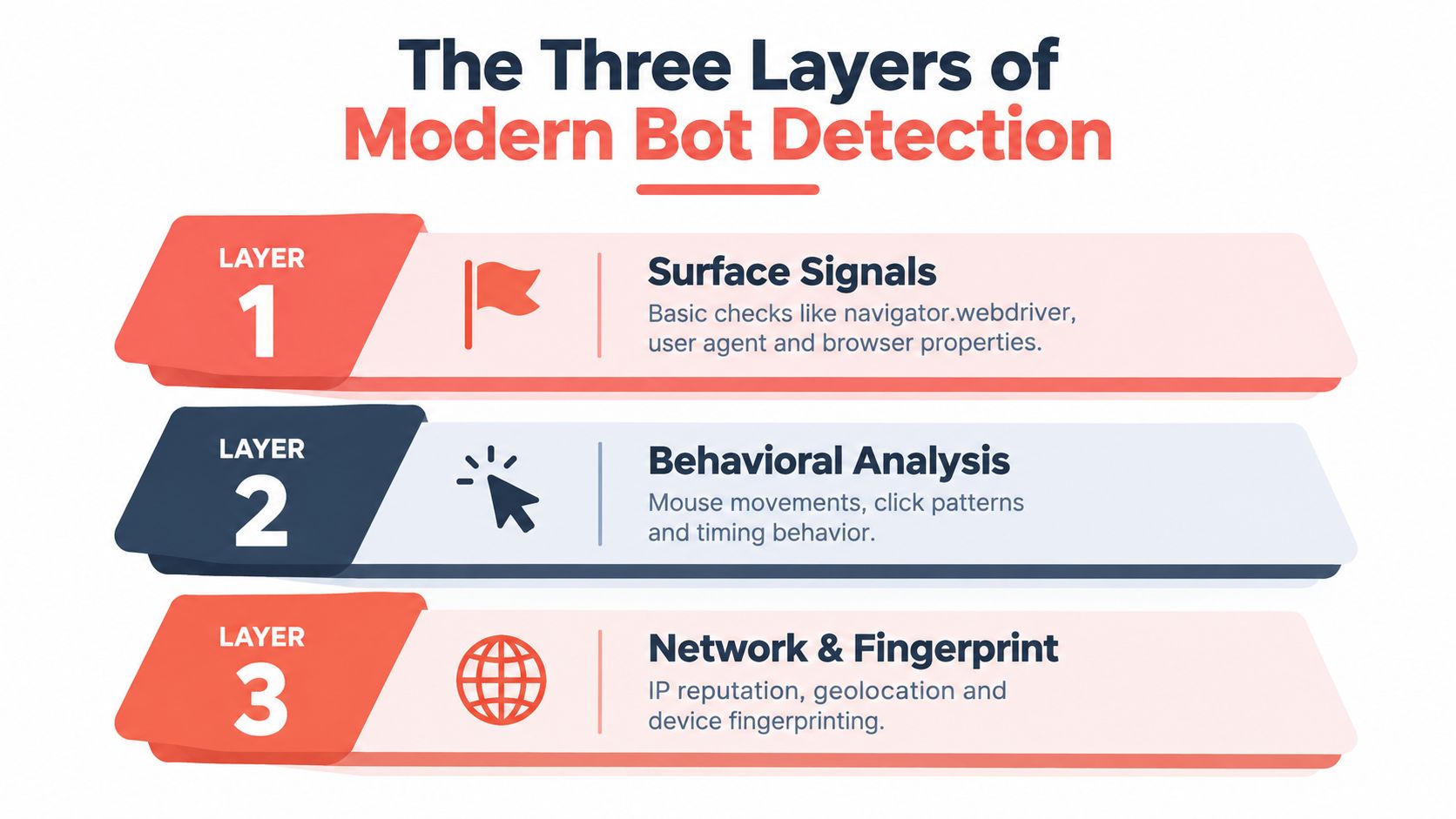
A Playwright job can pass staging checks, reach production, and trigger a challenge before page JavaScript executes. The server is already comparing network identity, browser identity, and behavior. Modern detection treats the session as a connected system rather than a single headless-browser flag, as described in this multi-layer detection research.
Network identity comes first
The network layer includes source IP reputation, the TLS ClientHello, cipher and extension ordering, and HTTP/2 behavior. A session may declare a current desktop Chrome profile while its transport characteristics point to another runtime or environment. That mismatch gives a risk engine stronger evidence than one suspicious header.
The browser layer examines what the page can observe. Relevant inputs include navigator.webdriver, User-Agent Client Hints, plugins, MIME types, WebGL and canvas output, fonts, locale, permissions, and values exposed by the main page, workers, and iframes. Changing one JavaScript property does not make those contexts agree. Cross-realm consistency matters because a patched top-level page can still disagree with its workers or child frames.
Behavior adds session context. Navigation timing, event cadence, pointer movement, scrolling, request volume, and session persistence help distinguish a controlled workflow from an ordinary visit. A test runner, accessibility tool, and credential-abuse script may all use Playwright, while their authorization and activity differ sharply.
Practical rule: Check contradictions across layers before assigning a response. Detection indicates risk, not malicious intent.
Why one patch fails
Hiding navigator.webdriver changes one browser signal. It leaves TLS, HTTP/2 settings, rendering output, font availability, worker values, iframe values, and navigation rhythm untouched. An isolated patch can also create a fresh contradiction, such as a desktop declaration paired with mobile-only rendering properties.
Automated traffic is a broad classification problem. The 2024 Imperva Bad Bot Report context states that bots represented 51% of observed global web requests, including approximately 37% bad-bot traffic and 14% good-bot traffic (Imperva Bad Bot Report context). Those figures do not make Playwright traffic malicious. They explain why sites apply graduated controls that distinguish authorized automation from abuse.
Proxy selection belongs in the same assessment. For authorized collection, this guide to find public proxies for anonymous scraping provides background, but a proxy cannot repair a browser identity that conflicts with its network path.
Defenders correlate evidence across these layers. This explanation of how automation gets caught layer by layer reinforces the operational takeaway: a believable session is coherent across layers, not merely quiet at the surface.
Diagnosing Network and Protocol Leaks
A Playwright session can be flagged before its first page script runs. During the initial connection, the server can inspect the TLS ClientHello, connection properties, request headers, and HTTP/2 behavior while the browser is still waiting for navigation.
Capture what the server receives
Start at the edge, not inside page.evaluate(). Capture raw or normalized telemetry for a controlled request, then compare it with an ordinary browser session using the same target, region, and browser family.
Record these fields as one set:
- TLS identity: ClientHello metadata, protocol version, cipher suites, extensions, supported groups, and a normalized JA4-style representation.
- HTTP behavior: Observable header order, HTTP/2 settings, pseudo-header ordering, stream behavior, and connection reuse.
- Declared browser context: User-Agent,
sec-ch-ua,sec-ch-ua-mobile,sec-ch-ua-platform,Accept-Language, and related request headers. - Session context: Exit network, reputation, geographic resolution, connection age, cookies, and whether the browser is persistent or fresh.
Avoid treating the result as one fixed “Playwright fingerprint.” Playwright drives different browsers, and the server sees a combination of engine, release, operating system, launch mode, proxy path, and identity settings. That combination matters more than any isolated JavaScript property.
Look for contradictions
A request may declare desktop Chrome on Windows while its TLS and HTTP/2 behavior reflect another runtime. The mismatch can increase risk even when the User-Agent appears ordinary. UA-CH can create the same problem if it reports one browser version while the transport signature follows another.
Research on automated traffic has found widespread inconsistency between claimed identities and independently observed TLS and HTTP-header fingerprints. The practical response is not to copy a reported fingerprint. Compare browser claims with transport evidence that page scripts cannot rewrite after the connection is established.
Use a controlled diagnostic loop:
- Capture a baseline from an ordinary, authorized browser session.
- Capture the Playwright session without changing several variables at once.
- Diff transport and headers before examining page-level APIs.
- Change one layer and repeat the request.
- Log the server outcome and response stage, such as connection rejection, challenge, or post-navigation block.
A JavaScript override cannot change the TLS stack after the handshake. Header rewriting can change declarations, but it does not automatically align HTTP/2 settings, stream behavior, or connection details. Request interception therefore helps isolate variables during debugging, while a complete identity fix requires consistency across the browser and network path.
Design tests around authorization and data minimization. Store only telemetry needed to diagnose your own traffic, exclude unrelated user data, and maintain an allowlist for internal automation. The goal is to explain why a legitimate session appears inconsistent, then correct that inconsistency without disguising unauthorized activity.
Achieving Engine-Level Browser Coherence
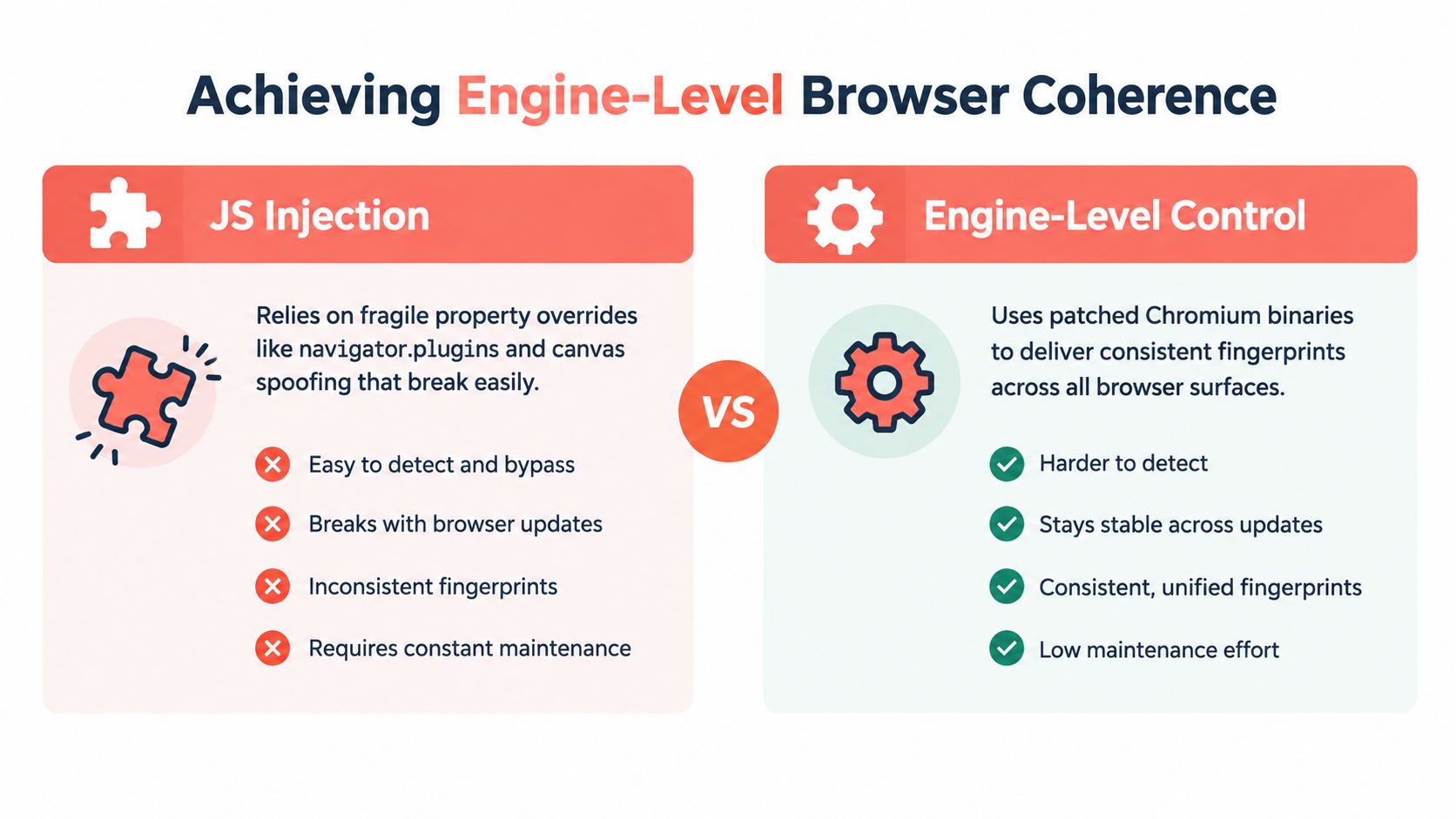
A Playwright session may pass a navigator check and still fail minutes later. The break often appears when a detector compares workers, iframes, rendering output, browser behavior, and transport observations. A page.add_init_script() call can set a property before application code runs, but it cannot make every execution context and connection characteristic agree.
Why realm consistency matters
Detection code can inspect several surfaces:
- The main realm, including
navigator, WebGL, canvas, audio, permissions, and timing APIs. - Dedicated workers, where page-level injection may not apply in the same way.
- Service workers, when the application uses them.
- Cross-origin iframes, which can follow a separate initialization path.
- Browser and transport observations, which JavaScript cannot rewrite after the connection exists.
A changed navigator.plugins value is weak evidence if another context exposes an empty or incompatible related surface. Canvas noise can also vary between calls or conflict with GPU claims. Detectors do not need to identify the injected script. They can score the contradictions it creates.
An independent benchmark reported identifiable characteristics across at least one network, HTTP, or browser layer for every evaluated automation tool. The practical conclusion is to reduce accidental inconsistencies and validate the complete session identity, rather than promise that automation will be undetectable.
Compare the engineering trade-offs
| Approach | What it changes | Where it helps | Main weakness |
|---|---|---|---|
| JavaScript injection | Selected page-visible properties | Basic compatibility checks and controlled test fixtures | Cross-realm gaps, correlated values, and maintenance drift |
| Context configuration | Locale, timezone, viewport, permissions, headers | Reproducible application testing | Does not repair engine or transport behavior |
| Browser-engine control | Rendering, identity APIs, and related engine paths | Consistent values across execution contexts | Requires a maintained browser build and careful validation |
| Network telemetry and tuning | TLS and HTTP/2 observations | Finding pre-DOM contradictions | Cannot fix browser APIs or behavior by itself |
Engine-level control places identity-related behavior closer to the code that generates it. That improves consistency across the main thread, workers, iframes, rendering paths, and browser-version claims. It does not replace authorization, rate controls, or behavioral testing. A technically coherent session can still access a site without permission or create excessive load.
The trade-off is maintenance. A patched Chromium fork requires browser-release tracking, review of rendering changes, graphics and font testing, and checks that the resulting transport identity matches the claimed release. JavaScript patches cost less to start, then spread one-off fixes across application code. Engine-level control demands more work upfront and can reduce that patchwork.
Watch the video on YouTubeUse surface scripts for test setup and narrowly scoped compatibility work. Treat them as diagnostic tools, not a durable answer to multi-layer detection.
Aligning Proxy Geography with Browser Context
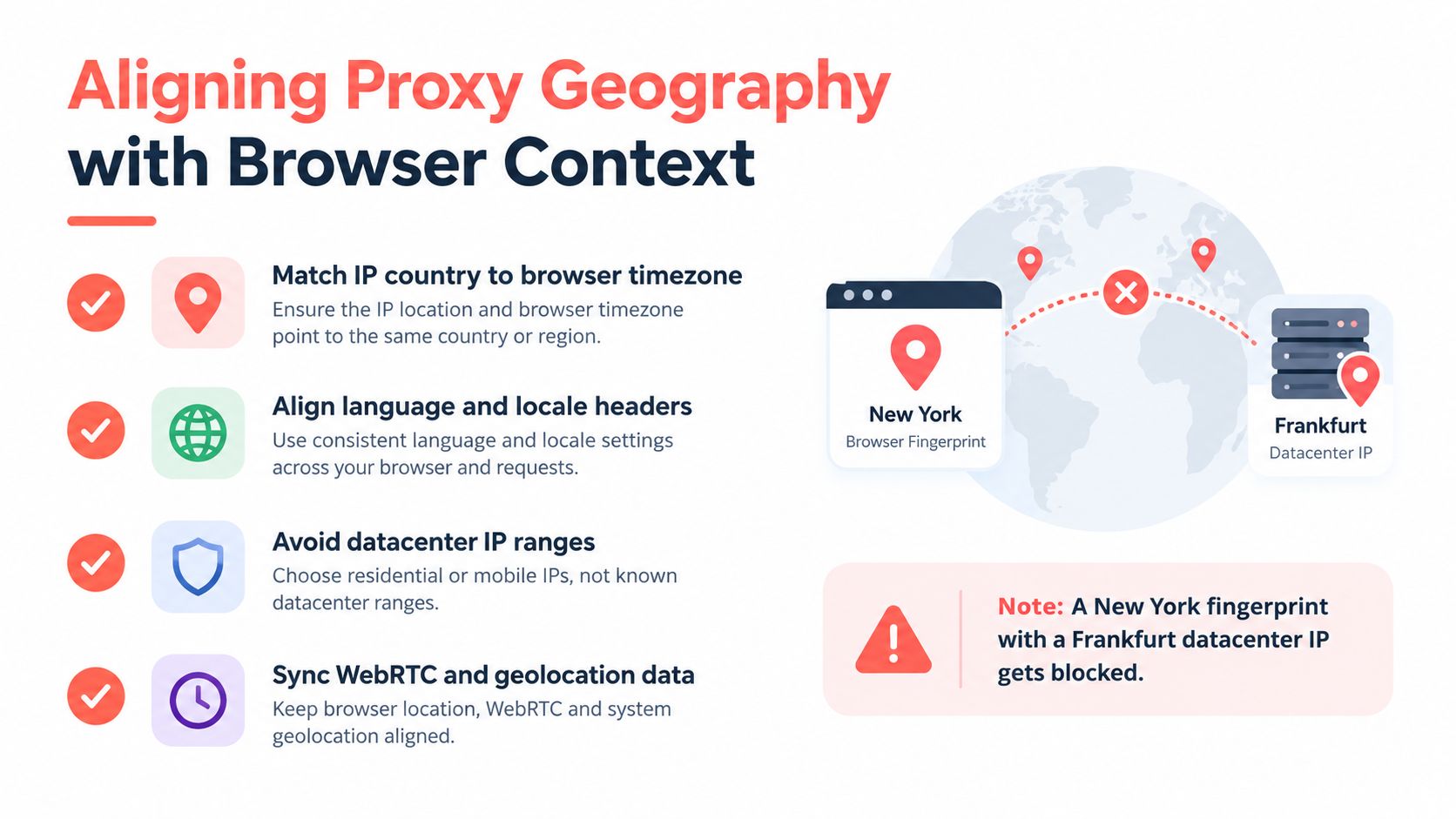
A session can look internally consistent and still make no geographic sense. A browser configured with a New York locale, timezone, and language order paired with an exit network associated with a Frankfurt datacenter creates a contextual contradiction. The problem isn't that either value is invalid. The problem is that the values don't describe the same plausible environment.
Build the context from the exit location
Resolve the authorized proxy exit location first, then derive the browser context from that result. In Playwright, the relevant settings typically include:
- Timezone: Set
timezone_idto a timezone plausible for the exit region. - Locale: Set
localeand language preferences consistently, including the order of accepted languages. - Geolocation: Provide it only when the workflow legitimately needs location and the permission model supports it.
- WebRTC: Prevent local network candidates from contradicting the intended network context, while preserving the behavior your application requires.
- Viewport and device traits: Keep screen size, touch support, mobile status, and platform claims compatible with the chosen persona.
- Proxy routing: Confirm that DNS and browser traffic follow the intended route, rather than assuming the proxy setting covers every connection.
Timezone and language are particularly useful because applications can observe them through ordinary browser APIs and request headers. WebRTC deserves separate attention because local candidates or permission behavior can reveal a network context that doesn't match the exit path.
Don't confuse geography with intent
Geo-matching can reduce false positives caused by inconsistent configuration, but it doesn't turn an unauthorized workflow into an authorized one. Avoid datacenter ranges where your use case requires a consumer context only when you have a lawful, documented reason and the provider's terms permit it. Public proxies can be unstable, reused, or associated with unwanted activity, so reputation and reliability need to be measured rather than assumed.
Clearcote's proxy geo-matching documentation describes an approach that adjusts browser context to the proxy exit. Whether you use that or implement the controls yourself, test the resulting values from the page and from server-side telemetry.
A practical validation page should report the effective timezone, ordered languages, platform indicators, WebRTC behavior, geolocation permission state, and relevant request headers. Compare those observations with the proxy's resolved region and the declared persona. If the values disagree, fix the source of the identity rather than adding another isolated override.
Operational constraint: Geography should be deterministic for a test identity. If the same seed or profile changes locale, timezone, and network context unpredictably, you can't tell whether a block came from the target or from your own fixture.
Integrating Clearcote for Drop-In Identity Control
Teams that need engine-level consistency face a maintenance decision. They can operate a customized Chromium build, assemble context and network controls around standard Playwright, or use a browser distribution that exposes the required controls through an existing automation interface.

Clearcote Labs offers an open-source, de-Googled Chromium fork with fingerprint and identity controls implemented in browser-engine paths. Its documented integration model is a drop-in binary swap for Playwright and Puppeteer, with SDKs for Node.js, Python, and .NET. The important distinction is architectural: identity values such as canvas, WebGL, WebGPU, AudioContext, fonts, and locale are controlled in engine paths rather than assembled only through page-level JavaScript.
Node.js integration
The integration pattern is to launch Playwright with the Clearcote executable path while keeping the familiar browser object and context APIs:
const { chromium } = require("playwright");

const browser = await chromium.launch({
  executablePath: process.env.CLEARCOTE_EXECUTABLE,
  headless: true
});

const context = await browser.newContext({
  locale: "en-US",
  timezoneId: "America/New_York"
});

const page = await context.newPage();
await page.goto("https://your-authorized-target.example");
await browser.close();
The exact executable discovery and SDK initialization should come from the maintained Clearcote Playwright documentation. Keep the rest of your automation unchanged at first. That makes failures easier to attribute because you're changing the browser binary, not your navigation logic, waits, selectors, and request handling at the same time.
Python integration and identity lifecycle
Python follows the same principle. Launch Chromium with the supplied executable path, create a normal Playwright context, and apply the identity configuration through the supported integration rather than injecting a large collection of overrides into every page.
A seeded identity is useful for repeatable QA because the same seed can reproduce a device profile across runs. Different seeds can represent separate test personas, while persistent profiles preserve the state your workflow needs. Reproducibility matters more than random variation when diagnosing a block. If every run changes the browser, network, and profile together, you won't know which variable caused the result.
Engine-level control still has trade-offs:
- Version maintenance: The browser fork must track relevant Chromium behavior.
- Validation burden: You still need headed, headless, operating-system, proxy, and context coverage.
- Policy responsibility: A stable identity doesn't grant permission to access or collect data.
- Behavioral signals: Engine coherence doesn't make programmatic navigation human or automatically legitimate.
- Infrastructure choice: Local, Docker, and hosted execution each introduce different network and lifecycle variables.
Treat Clearcote as one implementation option for teams that need reproducible browser identities and want to avoid maintaining every patch in application code. It should sit inside an authorization, rate-limit, and observability plan, not replace one.
Validating Your Automation Against Detection
A session can pass a fingerprint page and still receive a challenge on the next request. Test pages often inspect a limited set of JavaScript properties, while production defenses compare TLS, HTTP/2, browser APIs, cross-realm values, session history, and behavior. Validation must therefore reproduce the environments in which your automation runs.
An independent benchmark found that every evaluated automation tool exposed an identifiable characteristic in at least one network, HTTP, or browser layer (independent browser automation benchmark). Use that finding to measure exposure and false positives, not to assume that all automated sessions deserve a block.
Use a controlled matrix
Test headed and headless Chromium, operating-system variants, persistent and fresh contexts, direct and proxied egress, and multiple Playwright versions. Run the same diagnostic page in the main world, dedicated workers, service workers where available, and cross-origin iframes. Record browser APIs, rendering output, locale values, permissions behavior, event-loop timing, TLS telemetry, and HTTP/2 observations.
| Test Variable | Configurations to Evaluate | Primary Signal Measured |
|---|---|---|
| Browser mode | Headed and headless Chromium | Surface API and rendering differences |
| Operating system | Linux and Windows environments | Platform, fonts, graphics, and engine consistency |
| Context lifecycle | Persistent and fresh contexts | Session linkage, storage, cookies, and identity stability |
| Network path | Direct and proxied egress | IP reputation, TLS, geography, and HTTP/2 alignment |
| Playwright release | Multiple supported versions | Version drift and protocol changes |
| Execution realm | Main page, workers, and iframes | Cross-realm consistency |
| Interaction profile | Clean human sessions and automated workflows | Timing, cadence, pointer, and navigation signals |
Run enough fresh sessions in every matrix cell to observe variation. Reusing one profile can make session linkage look like detection. The benchmark methodology recommends 30 to 50 sessions per cell, using fresh identities and reporting detection rate, false-positive rate, confidence intervals, and time-to-detection (benchmark methodology).
Measure decisions, not just fingerprints
Your harness should capture:
- The first intervention: connection rejection, challenge, altered response, or post-navigation block.
- The triggering evidence: network, browser, behavior, or a combination.
- Recovery outcome: allowed, rate-limited, step-up verification, manual review, or denied.
- False-positive path: clean human sessions, accessibility tools, internal monitors, and authorized automation.
- Version sensitivity: whether a browser or dependency update changes the decision.
Separate deterministic indicators from statistical ones. A directly exposed WebDriver signal calls for a different response than timing or pointer features, which require calibration against genuine traffic. Avoid publishing one overall “bot percentage” without separating prevalence, classifier performance, and the cost of false positives.
For QA teams building repeatable browser coverage, these browser testing case studies offer context on structuring testing workflows. Keep the anti-bot benchmark private and controlled, particularly when it includes target-specific behavior.
Measure resilience as a time series. A setup that passes today's test page can fail after a Chromium update, proxy change, or detector rule change.
Maintain an appeal or verification route for ambiguous sessions. Legitimate automation needs documented authorization, stable identity, and a recovery path when a risk score is wrong. The strongest implementation explains what the server saw, reproduces the result, and applies an appropriate response rather than claiming to be undetectable.
Clearcote Labs provides an engine-controlled Chromium option that can run as a drop-in browser for existing Playwright and Puppeteer workflows, with seeded identities and controls intended to keep browser signals coherent across contexts. If blocked sessions result from mismatched engine, network, or geographic signals, visit Clearcote Labs to evaluate the integration against an authorized benchmark.