
You've rotated through a large residential pool, changed the exit country, and still received challenge pages instead of product data. The requests look distributed at the network layer, yet the scraper keeps presenting the same browser fingerprint, timezone, cookies, and timing pattern. After a while, the problem stops looking like an IP shortage and starts looking like an identity contradiction.
A proxy for web scraping is useful because it places an intermediary between an automated client and the destination website. It can change the apparent network origin, route traffic through a required geography, separate sessions, and sometimes reuse cached responses. But a proxy won't make an incoherent browser identity look ordinary. Reliable collection comes from matching the proxy, browser, session, geography, request rate, and access method to the workload.
Table of Contents
- Why Proxy Rotation Alone Fails Scraping Pipelines
- Proxy Types and When to Use Each One
- How Proxy Geo-Matching Works Step by Step
- How Modern Bot Detection Evaluates Proxies
- Building a Feedback-Controlled Proxy Architecture
- Measuring Proxy Performance with Real Metrics
- When Proxies Are Not the Right Solution
- Proxy Setup Checklist and Next Steps
Why Proxy Rotation Alone Fails Scraping Pipelines
A common failure begins with a reasonable idea. The scraper assigns a new residential exit to every request, hoping that a larger address pool will prevent blocks. The browser still reports one unchanged TLS and HTTP/2 profile, keeps the same language and timezone, repeats identical navigation timing, and carries cookies across unrelated locations. The target doesn't need to trust any individual IP. It can correlate the contradictions across the session.
Modern defenses can evaluate source-network classification, TLS fingerprints, HTTP/2 behavior, cookies, JavaScript execution, and request patterns together. A cloud-hosted exit that claims to represent a normal consumer browser creates a network-level inconsistency before the page behavior is considered. Rotating the address while preserving one identical client fingerprint can leave a strong automation signal, and a group of addresses presenting that signal may be treated as one coordinated source. The signal-coherence problem is documented in practical guidance on residential proxy latency, IP bans, and identity consistency.
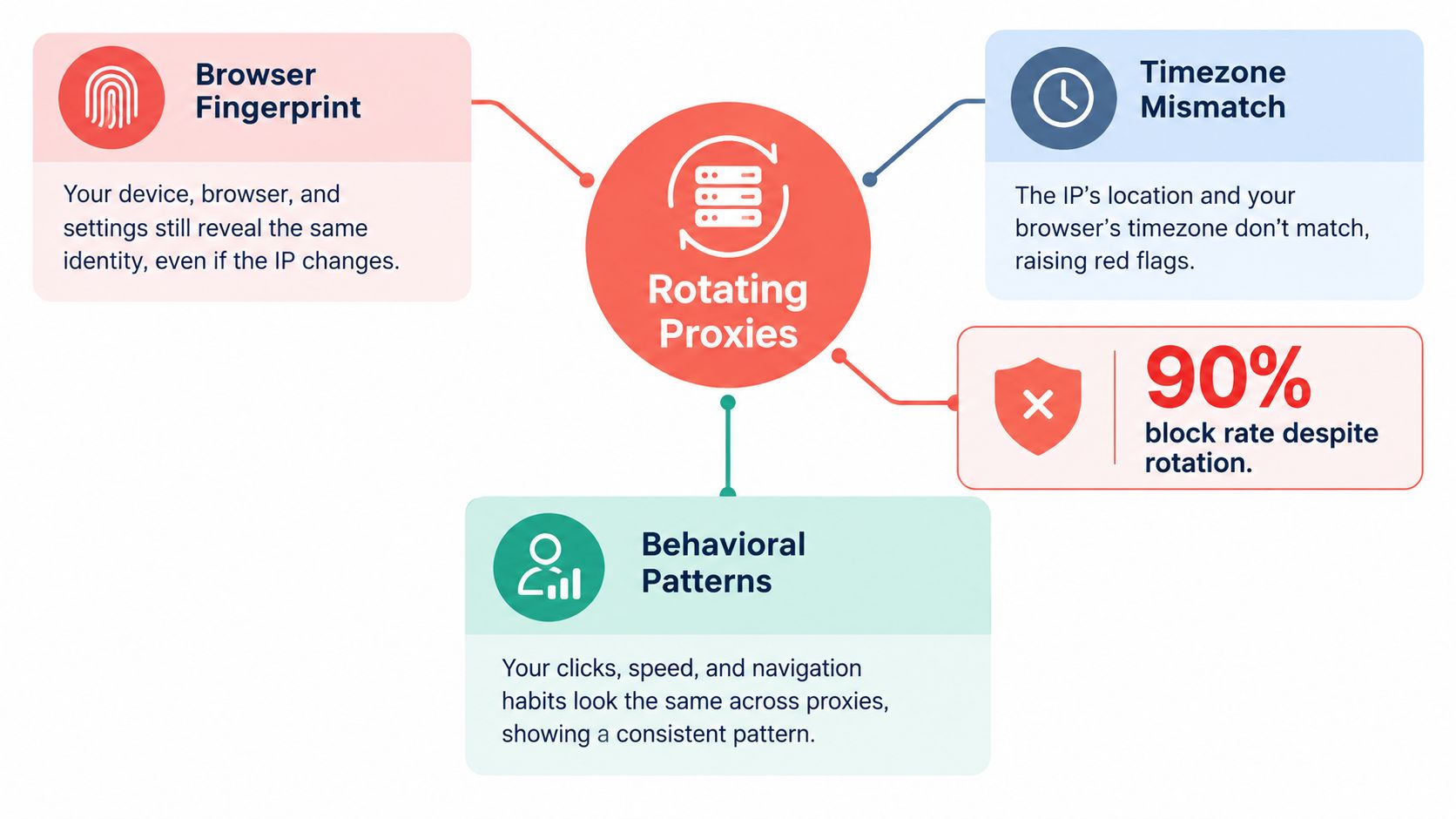
Bind sessions to coherent identities
Treat the proxy as one component of a session identity, not as a disposable IP-address wrapper. A logical browser session should keep its exit geography, user-agent and client hints, cookies, locale, timezone, connection behavior, and browser state aligned. This matters even more for authenticated workflows, where uncontrolled rotation can invalidate cookies, trigger extra verification, or create implausible movement between locations.
A sticky session is usually safer than per-request rotation when pages depend on state. Rotate between independent sessions, or after a controlled failure, rather than halfway through a login or multi-page journey. The original proxy model was already broader than address substitution. CERN's historical account of web proxies describes an intermediary that retrieves external resources on behalf of a client, with access control and caching as important early functions.
Practical rule: Change the exit only when the workload requires a different route. Don't change it merely because the pool contains more addresses.
Proxy Types and When to Use Each One
Proxy categories describe the network origin of the exit. They don't automatically describe rotation behavior, session duration, or suitability for every target. A datacenter proxy can be static or rotating, and a residential proxy can also support a sticky session, so keep proxy type separate from proxy assignment policy.
| Proxy Type | Latency | Cost | Detection Risk | Best Use Case |
|---|---|---|---|---|
| Datacenter | Generally lower and more predictable | Generally lower | Hosting ASN and infrastructure classification can increase suspicion | High-throughput collection from accessible public pages |
| Residential | More variable across locations and routes | Higher and less predictable | Consumer origin can reduce infrastructure-based suspicion, but shared reputation and proxy detection remain concerns | Location-sensitive pages or targets that restrict cloud networks |
| ISP | Often more stable than rotating peer residential routes | Typically higher than datacenter | ISP-issued origin may appear less like cloud infrastructure, but it isn't invisible | Sessions requiring steadier consumer-network classification |
| Mobile | Variable, depending on carrier routing and availability | Often premium | Shared carrier addressing changes the network signal but doesn't remove browser or behavior checks | Content that specifically depends on mobile-carrier geography |
Datacenter routes are a sensible starting point when the target serves complete and correct pages through them. They offer predictable capacity and are easier to test consistently. Their weakness is classification. A target can identify hosting-network metadata and apply stricter treatment to the entire range.
Residential and ISP routes can help when network origin or geographic precision is the demonstrated problem. They introduce their own risks, including variable latency, shared reputation, higher bandwidth cost, and unstable endpoint availability. A residential label also says nothing by itself about sourcing or user consent, so procurement needs the same scrutiny as technical performance.
Mobile routes belong in a narrower category. They can represent mobile-network origin, but they don't turn automated behavior into human behavior. Reserve them for a workload where mobile-carrier routing is part of the data requirement, not as a default response to every challenge.
How Proxy Geo-Matching Works Step by Step
A proxy exit in one country paired with a browser configured for another creates a contradiction that geo-aware systems can evaluate. Geo-matching means aligning the observable parts of the browser and connection with the route, while preserving the session state that the target expects.
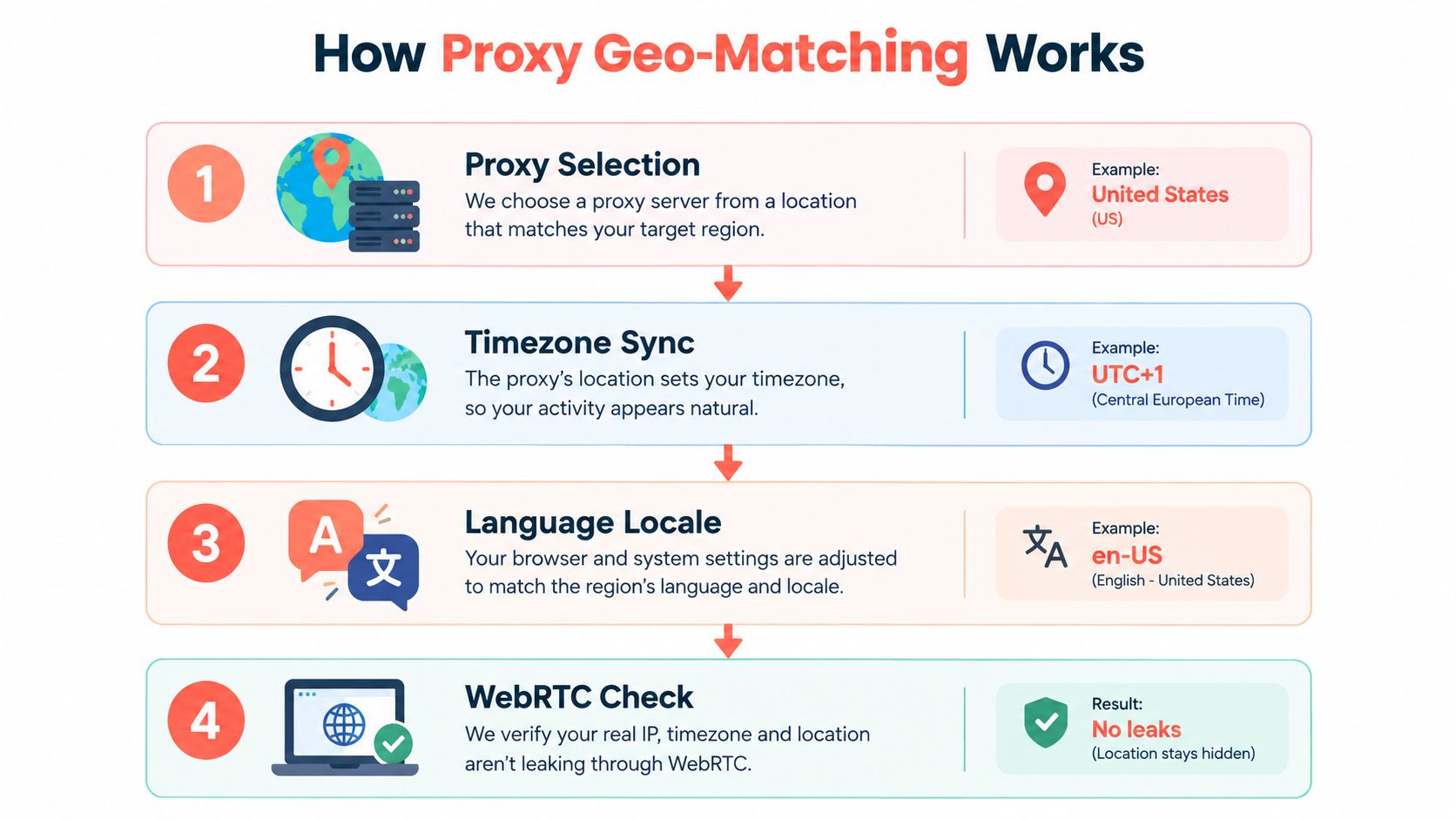
1. Select the required exit geography
Start with the geography that the page is expected to represent. Country-level targeting may be enough for one workload, while city or regional content may require a more precise route. Record the selected location alongside the result because geography is part of the observation's provenance, not just a transport setting.
Verify the observed exit location instead of trusting only the provider's label. Also check the ASN and network classification. A route identified as consumer traffic but paired with a browser that exposes a clearly different infrastructure profile can still look inconsistent.
2. Synchronize the timezone
Set the browser timezone to match the exit location. A US route combined with a European timezone can produce a mismatch in JavaScript date values, cookie behavior, scheduled events, and other browser-visible signals. The browser should present a timezone that makes sense for the selected geography, such as a UTC offset appropriate to the target region.
Timezone matching won't compensate for an invalid session or excessive request volume. It removes one contradiction from the identity rather than solving every detection problem.
3. Align language and locale
Match the language headers, browser locale, number formatting, and other regional settings to the route and the intended page variant. A US session using an en-US locale should not suddenly request a European language pack while retaining US-specific cookies and location state unless the workflow requires that combination.
Keep locale stable for the life of the session. If the job intentionally compares regional variants, create separate identities rather than mutating one browser back and forth.
4. Check WebRTC and connection behavior
WebRTC can expose information that conflicts with the proxy route if it isn't handled consistently. Check that the browser's WebRTC behavior, geolocation permissions, language settings, and connection path agree with the selected identity. Also keep the user-agent, client hints, cookies, and session timing coherent.
The proxy geo-matching feature documentation provides a useful reference for the kinds of browser settings that need to move together. A practical verification run should inspect the final page, detected locale, currency, timezone, WebRTC behavior, and session persistence, not only the exit country.
The browser flow below illustrates why these settings are operational rather than cosmetic.
Watch the video on YouTubeHow Modern Bot Detection Evaluates Proxies
An exit IP is one signal in a broader assessment. Recent research describes bot detection as a combination of rule-based heuristics, statistical methods, and machine learning, while also noting that automated systems can imitate aspects of human behavior. A proxy changes the apparent network origin, but it doesn't resolve browser inconsistencies, session reuse, authentication barriers, or implausible request patterns. The research on contemporary bot detection methods supports treating proxy selection as one layer of a larger system.

The signals that travel with the request
A target can correlate several classes of evidence:
- Network identity: The exit IP, ASN, hosting or consumer classification, geography, and reputation.
- Transport identity: TLS characteristics, HTTP/2 behavior, connection reuse, and protocol consistency.
- Browser identity: User-agent, client hints, JavaScript behavior, cookies, locale, timezone, and rendering signals.
- Session behavior: Navigation order, authentication state, repeated identifiers, and whether the same session changes geography unexpectedly.
- Request behavior: Concurrency, timing, retries, endpoint selection, and response handling.
That correlation changes how success should be defined. A request returning an HTTP success response isn't necessarily a useful scrape. The response may contain a challenge, an empty application shell, an access notice, or a different regional page. The useful result is a validated record collected through a session that remains stable enough for the workflow.
Why more rotation can reduce reliability
Aggressive rotation can create the very inconsistency the pool is intended to prevent. A target may see one session carrying cookies from one location, switching to another exit, using the same browser fingerprint, and continuing with identical timing. On an authenticated journey, the change can invalidate state or trigger an additional challenge.
This is why the least-rotating strategy that satisfies the target's rate and geographic constraints is usually more effective. Measure challenge rate, useful-response rate, median latency, and bandwidth cost instead of treating pool size as the primary success metric. The proxy management guidance from WebScraper.io also emphasizes session stickiness, controlled concurrency, and feedback from response codes.
Building a Feedback-Controlled Proxy Architecture
A production pool should make decisions from observed outcomes. The orchestrator assigns a route, binds it to a coherent session, controls the request rate, validates the response, and feeds the result back into route selection. That design is more useful than a large pool with no memory.
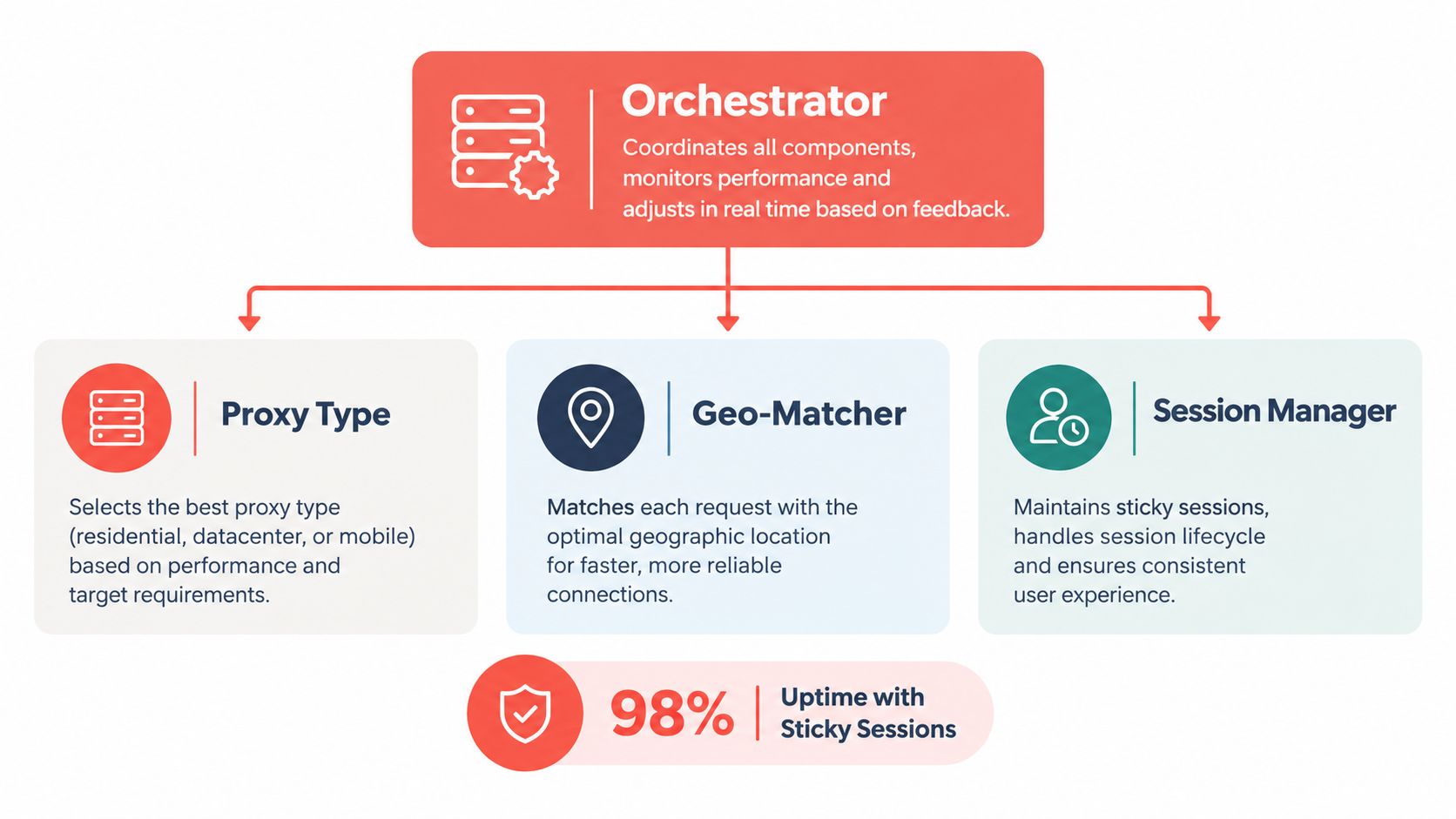
Give each component a clear job
The proxy selector chooses datacenter, residential, ISP, or mobile routing according to the target, geography, and results from earlier tests. It shouldn't escalate every failure to a more expensive route. A selector failure may represent a broken parser, a missing browser step, or an explicit access boundary.
The geo-matcher binds the route to the browser timezone, language, locale, geolocation permissions, and WebRTC behavior. It should reject an identity that combines incompatible settings rather than allowing the request to proceed and diagnosing the contradiction later.
The session manager owns cookies, browser state, authentication state, and sticky-session identifiers. It should keep a logical journey on one coherent route and retire the session when its state becomes unreliable.
The rate controller applies per-origin concurrency limits and token-bucket limits. It should slow down when the target returns HTTP 429 or 403 responses, respect retry guidance where available, and avoid immediately replaying the same request through a new exit.
Turn responses into routing decisions
Use response classification rather than a binary success flag:
- Useful page: Keep the session available for related work.
- Challenge response: Mark the exit and identity for review, then apply a controlled backoff.
- Repeated access failure: Retire the exit from that target instead of recycling it indefinitely.
- Incomplete or empty page: Inspect rendering, JavaScript execution, and selectors before changing proxy class.
- Authentication or permission barrier: Stop escalation and route the case to an authorized access method.
Sticky sessions don't guarantee success, but they preserve the conditions needed to diagnose it. A larger rotating pool isn't automatically better, especially when shared exits already carry poor reputation or per-request changes break state. The architecture documentation is a useful place to formalize the relationship between orchestration, browser identity, and proxy sessions.
A feedback loop should answer two questions after every failure: did the route fail, or did the identity and workflow fail?
Measuring Proxy Performance with Real Metrics
Proxy testing should measure the output that the business needs, not the number of available exits. A large pool can still produce poor records, unstable sessions, and high bandwidth waste. Start with a representative URL set and hold the scraper, browser, request schedule, validation logic, and retry policy constant while comparing proxy classes.
Track transport and data separately
Record the following for each target and geography:
- Challenge rate: The share of responses that require an interstitial, CAPTCHA, or other challenge.
- Useful-response rate: The share of responses that contain the expected page and pass field validation.
- Median latency: The typical response or page-load time, separated from slow-tail behavior.
- Bandwidth cost: The bytes consumed per validated record, including retries.
- Session survival time: How long a logical session remains usable before a challenge, logout, or route failure.
- Successful records per gigabyte: A practical measure when proxy traffic is metered.
Keep status codes, final URLs, response markers, and validation failures in the same observation record. A successful transport response can still contain the wrong page, and a failed transport response can reveal that the target is rate limiting rather than rejecting the network identity.
Run controlled comparisons
Test datacenter and residential routes against the same page types and geography requirements. Use realistic concurrency, because a route that works sequentially may behave differently under production scheduling. Compare the cost of validated records, not the price of a request or the apparent success of a status code.
Repeat the test when the target, proxy pool, browser version, or extraction logic changes. Track results by endpoint and session, not only by aggregate pool. That granularity shows whether the problem is localized to a route, a page type, a geography, or the browser identity.
When Proxies Are Not the Right Solution
A proxy is insufficient when the target evaluates more than network origin and the scraper hasn't addressed the rest of the identity. Rotating residential exits won't fix an incomplete browser-rendered workflow, an invalid token, a broken selector, or a session that changes geography mid-journey. It also won't create authorization where the collection requires an account, contract, API, or permission.
Use a simple decision boundary:
- Ordinary rate-limited automation: Keep the route stable, reduce concurrency, pace requests, and respect the target's controls.
- Browser-rendered workflow: Use a browser that can execute the required JavaScript and validate the rendered result.
- Authenticated access: Use an authorized account and preserve its session state. Don't treat proxy rotation as a way around authentication barriers.
- Multi-signal anti-bot enforcement: Diagnose browser, transport, session, and behavior signals before considering any route change.
- Explicit restriction or unclear authority: Stop and evaluate an API, partnership, licensed feed, cached public dataset, or permissioned collection process.
The governance problem is separate from technical reachability. Research on robots.txt and scraping governance notes that the Robots Exclusion Protocol isn't legally binding and isn't a substitute for access control. A technically successful request can still be operationally or legally indefensible when it involves personal data, copyrighted material, login-restricted pages, or contractual restrictions.
Residential sourcing adds another responsibility. Ask how the provider obtains consent, how users can opt out, how customers are vetted, and how abuse reports are handled. A proxy's anonymity doesn't establish lawful authorization, and a consumer-network route should never be treated as a general-purpose bypass for a target's boundaries.
Proxy Setup Checklist and Next Steps
Start with the least complex route that can produce the required data. For accessible public pages, test datacenter proxies first. Escalate to residential or ISP routes only when controlled results show that network classification, location, or access reliability is the limiting factor. Consider mobile routing only when mobile-network origin is part of the workload.
Configure the identity
- Choose the geography: Select the exit country or region required by the page, then verify the observed location and ASN.
- Match the browser: Align timezone, language, locale, geolocation behavior, WebRTC, user-agent, client hints, and connection behavior.
- Preserve the session: Keep cookies, authentication state, browser storage, and the sticky route together for each logical journey.
- Control the rate: Apply per-origin concurrency and token-bucket limits, then back off on 429 and 403 responses.
- Validate the page: Check the expected title, content markers, required fields, locale, currency, and final URL.
- Retire bad routes: Remove exits with repeated challenges or unreliable geography instead of rotating them back into the same target.
- Review authority: Check terms, robots directives, authentication boundaries, privacy requirements, opt-outs, and deletion procedures before collection.
The proxy documentation can help teams map proxy settings to browser automation workflows. If the browser identity remains inconsistent after route and session controls are correct, investigate fingerprint and transport coherence rather than adding more exits. If the target offers an official API, feed, partnership, or permissioned dataset, compare that option before increasing proxy complexity.
Run a small representative test, store the validation results, and promote only the configuration that meets the data requirement at an acceptable total cost. A proxy for web scraping should be treated as a controlled infrastructure component, not a magic layer between a fragile scraper and a blocked page.
Clearcote Labs offers browser automation with identity controls, geo-matching, and residential proxy support for Playwright and Puppeteer workflows. Visit Clearcote Labs to evaluate whether a coherent browser and proxy setup fits your scraping pipeline.