
You can feel the difference in the first week of a new test suite. The logs are clean, the selectors look sensible, and the team feels confident, until the nightly run starts failing on the same checkout step, a login modal, or a button that only breaks when the browser is under load. That is where selenium vs playwright stops being a tooling preference and becomes a reliability problem.
| Area | Selenium | Playwright |
|---|---|---|
| Core model | W3C WebDriver through a driver process | Persistent browser connection over WebSocket |
| Historical maturity | Long-lived enterprise ecosystem | Newer, browser-bundled automation |
| Runtime feel | Strong when infrastructure is already in place | Strong when you want modern control and built-in waiting |
| Best fit | Broad compatibility, legacy estates, standards-driven stacks | New suites, modern web apps, tight CI workflows |
A team I worked with once tried to settle the debate by rewriting their flakiest tests in the newer tool. The rewrite looked cleaner, but the failures stayed because the actual problem was shared test data, brittle selectors, and timing races. That's the same trap many teams hit after reading a practical practical Python scraping walkthrough, because the hardest part of browser automation is usually not the syntax, it's the system around it. If your test architecture is unstable, a new API just gives you different failures, and the operational burden still lands on your team, which is why a deeper browser automation at scale mindset matters.
Table of Contents
- Browser Automation Choices Start With Failure Modes
- Architecture and Protocol Differences
- Performance Benchmarks and Execution Speed
- Why Migration Does Not Always Fix Flaky Tests
- Ecosystem Maturity and Developer Adoption Trends
- When to Use Selenium and When to Choose Playwright
- Frequently Asked Questions About Selenium and Playwright
Browser Automation Choices Start With Failure Modes
A test suite usually looks fine until it starts failing in the same checkout step, a login modal, or a button that only breaks under load. At that point, selenium vs playwright stops being a tooling preference and becomes a reliability problem.
A team can switch to Playwright because the tests read more naturally, then discover the suite still breaks whenever a fixture leaks state between runs. Another team can keep Selenium because the grid already exists, then spend months blaming the framework for selector drift that would have broken any tool. The browser automation layer becomes the scapegoat for problems above it.
Reliability is usually an architecture issue
The biggest failures come from shared mutable state, selector fragility, and timing races. Those are design problems, not just tooling problems. If one test changes the database, another test reuses the same browser profile, and a third clicks before the UI is ready, you get noise no matter which runner you choose.
Practical rule: compare tools only after you isolate fresh browser contexts, separate test data, and hold the application build constant.
That keeps the discussion honest. If Selenium fails and Playwright passes on the same build with the same scenario, the framework may matter. If both fail, the suite design needs work first.
A test that fails only at scale usually points to the system around it, not the API surface. A practical browser automation at scale mindset helps teams separate real product defects from test design problems.
What a real migration conversation looks like
The useful question is not, “Which API is easier to write?” It is, “Which test portfolio can survive in CI with the least hidden work?” That includes debugging artifacts, parallel execution, maintenance load, and how much time your team spends triaging false alarms instead of shipping coverage.
I have seen teams rewrite flaky tests into a newer framework and still end up with the same failure pattern, because the root cause was shared data, brittle locators, and uneven environment setup. I have also seen teams keep Selenium and stabilize the suite by fixing isolation, wait strategy, and test ownership. The tool choice matters, but it sits behind the reliability model.
That is why many automation teams end up with a split strategy instead of a purity play. One tool can cover the legacy grid and broader compatibility layer, while the newer one handles modern application flows with less ceremony. If you want to keep the conversation grounded, start with the production pain, not the syntax, and use a practical Python scraping walkthrough only as a reference point for implementation patterns, not as a substitute for test design.
Architecture and Protocol Differences
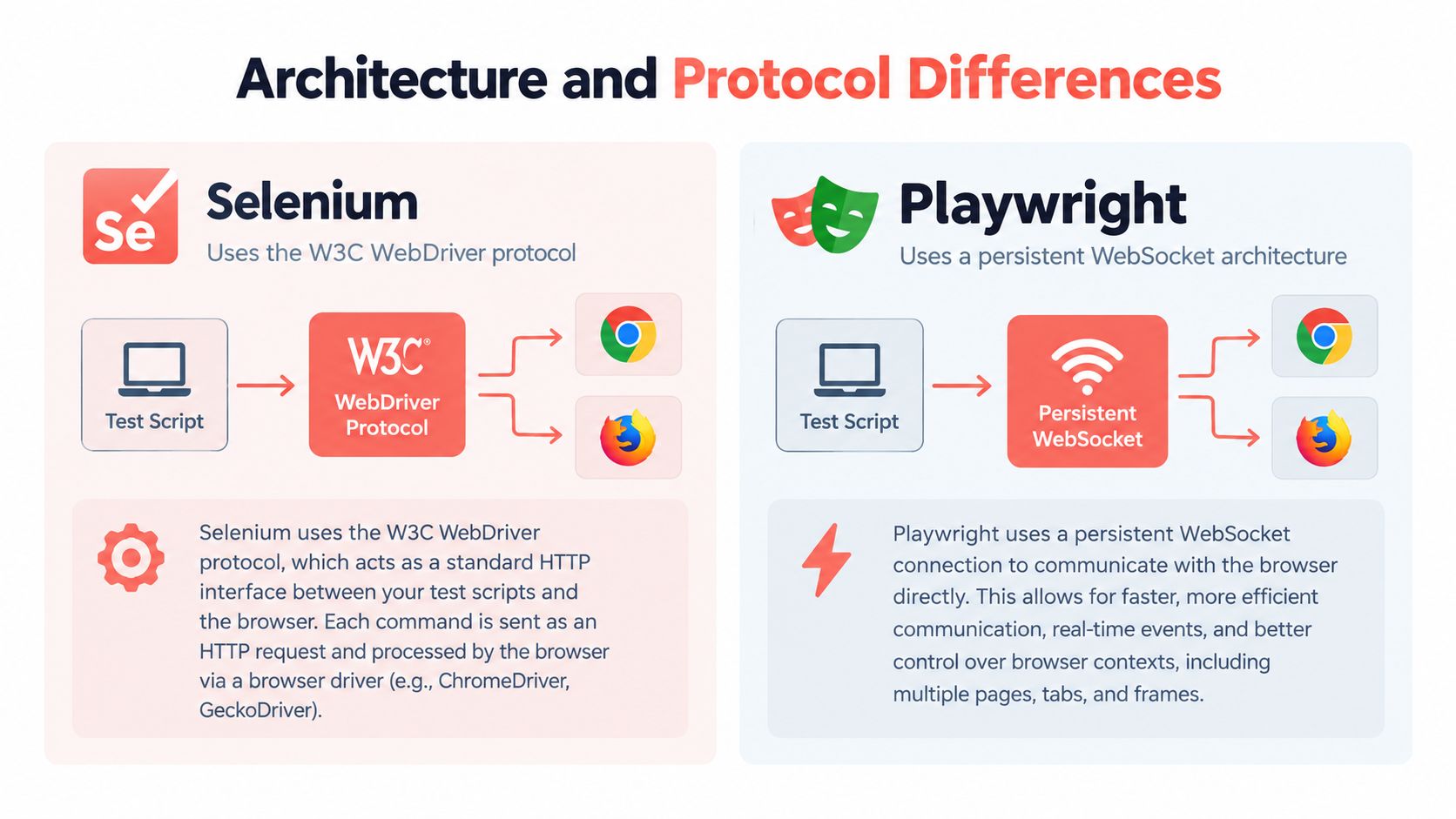
Selenium's classic model sends commands through the W3C WebDriver protocol, through a driver process that translates each action to the browser. Playwright keeps a persistent WebSocket connection to the browser, which reduces per-command transport overhead and avoids that extra translation hop. That difference is the reason command execution often feels tighter in Playwright, especially when tests make many small browser interactions.
Playwright's latency advantage shows up in published comparisons, where the reported per-action time was about 290 ms for Playwright versus 536 ms for Selenium TestingBot comparison of Selenium vs Playwright. That number is useful as a directional signal, not a promise, because browser startup, page complexity, waits, and network distance can all distort the result. Selenium 4 also matters here because WebDriver BiDi narrows some of the old request-response limits, so classic Selenium and current Selenium are not identical things.
State matters as much as transport
A persistent connection does more than shave transport overhead. It also makes modern debugging patterns easier because the runner stays closer to the browser session. That's part of why teams often describe Playwright as more responsive during execution, especially when the UI is dynamic and the test needs to observe state changes without constantly re-querying the driver.
Selenium still has the edge where protocol compatibility is the actual requirement. Enterprise grids, long-lived infrastructure, and multi-language estates often depend on that WebDriver contract. The mature path is not obsolete, it's just built for a different operational shape.
The distinction shows up clearly in adjacent browser-automation work too, including the way teams attach tooling to real browsers in projects like AI browser agent workflows. When the browser becomes part of a larger automation system, connection state and protocol choice stop being theoretical details.
Watch the video on YouTubeThe transport layer rarely fixes a bad suite, but it can magnify the pain of a good one.
Performance Benchmarks and Execution Speed
Speed claims get made too loosely. The useful comparison comes from full test runs, not isolated clicks or one-off measurements.
In a benchmark covering 250 end-to-end tests for authentication, search, checkout, and administration in a React single-page application, Playwright finished four-way sharded execution in 3 minutes 48 seconds, while Selenium with equivalent TestNG parallelism took 6 minutes 52 seconds Scrolltest benchmark on Playwright vs Selenium. The same benchmark recorded 1.4% Playwright flakiness across 50 runs versus 5.1% for Selenium. On that workload, the runtime was 44% shorter and the observed failure rate was about 3.6 times lower.
Why the app shape changes the result
The picture changed on a server-rendered Java application with less client-side JavaScript. Playwright took 5 minutes 10 seconds, Selenium took 5 minutes 55 seconds, and the flakiness gap narrowed to 1.8% versus 2.3%. The point is simple, browser automation overhead matters more when the application is interactive and timing-sensitive.
Benchmark rule: evaluate your own app shape, not the headline speed claim.
SPAs often benefit more from Playwright's built-in waiting and tighter browser control. On a server-rendered page where the UI settles more predictably, framework overhead is only part of the run time. Parallelization strategy, CI agent quality, and test design can dominate the outcome.
A broader look at browser automation open source discussions shows the same pattern in practice, teams often end up debating maintenance cost and execution stability, not just raw speed.
What the numbers do not tell you
A fast suite that flakes constantly is still expensive. A slower suite that passes reliably may cost less because the team spends less time re-running jobs and investigating false failures. That trade-off is why I treat speed as part of reliability, not a vanity metric.
If your pipeline is already stretched, inspect how much of the delay comes from framework overhead versus application behavior.
Why Migration Does Not Always Fix Flaky Tests
Moving from Selenium to Playwright can improve reliability, but it does not cure a broken suite by itself.
One reported two-week comparison tied 71% of failures to visibility timing races and 12% to shared-state leaks, and the failure rate fell below 0.5% only after both framework and architecture changes were made Scrolltest stability comparison. That matters because auto-waiting can remove one class of timing problems, but it cannot repair unstable fixtures, bad test data, or selectors that point at the wrong element.
How to separate framework problems from test-design problems
The best diagnostic method is boring, which is usually a good sign. Run both suites against the same application build. Measure flaky rate, not just pass rate. Keep browser contexts fresh so data and filesystem state don't bleed across tests. Then compare equivalent scenarios instead of translated lines of code.
That approach is especially useful when teams are deciding whether to invest in support or rewrite work. A service like automation support services can help teams isolate whether the recurring failure comes from the framework choice or from the suite's own design debt.
What to watch before you migrate
- Shared state: If tests depend on order, neither framework will save you.
- Selector quality: If locators target unstable markup, every release becomes a risk.
- Retry habits: If retries hide real races, your suite looks healthier than it is.
A migration that only translates syntax usually disappoints. A migration that also resets test data strategy, context isolation, and failure classification can make a real difference.

Ecosystem Maturity and Developer Adoption Trends
Selenium has the longer institutional history. It began in 2004, when Jason Huggins created Selenium Core at ThoughtWorks as an internal JavaScript-based testing tool, and it was open-sourced the same year. Selenium and WebDriver later merged into Selenium 2.0 on July 8, 2011, and the W3C WebDriver specification became a formal W3C Recommendation on June 5, 2018 TestDino timeline and standardization overview. That history matters because enterprise adoption usually follows standardization, not just popularity.
Playwright arrived later, launched by Microsoft in January 2020, with a first stable release reported in May 2020. TestDino timeline and standardization overview The two tools come from different eras of browser automation. Selenium fits a protocol-oriented, compatibility-heavy model. Playwright fits a newer browser-bundled model built around modern workflows.
Adoption signals mean different things
Survey and community signals point in the same direction, but they do not describe the same reality as production deployment. A 2024 State of JS survey cited 3,674 respondents using Playwright at work and 1,130 using Selenium, putting Playwright at about 3.25 times Selenium's reported usage in that sample. The same source reported 3,603 Cypress users, so the sample reflects a broader modern-testing moment, not a final verdict on production reality. GitHub stars tell a similar story of interest rather than deployment, with roughly 67,000 stars for Playwright and about 31,000 for Selenium Testland survey summary.
That gap does not mean Selenium is fading out. Newer teams often start with Playwright, while older estates keep Selenium because the surrounding infrastructure already works. Hiring patterns, debugging habits, and vendor support follow that split.
How to read the ecosystem correctly
If your team already has Selenium tests embedded in a grid, a rewrite needs a stronger reason than taste. If you are building a new suite around JavaScript or TypeScript and care about modern browser control, Playwright has the cleaner path. The ecosystem question is less “which tool is winning” and more “which history matches your current stack.”
When to Use Selenium and When to Choose Playwright
The cleanest answer is to split by workload.
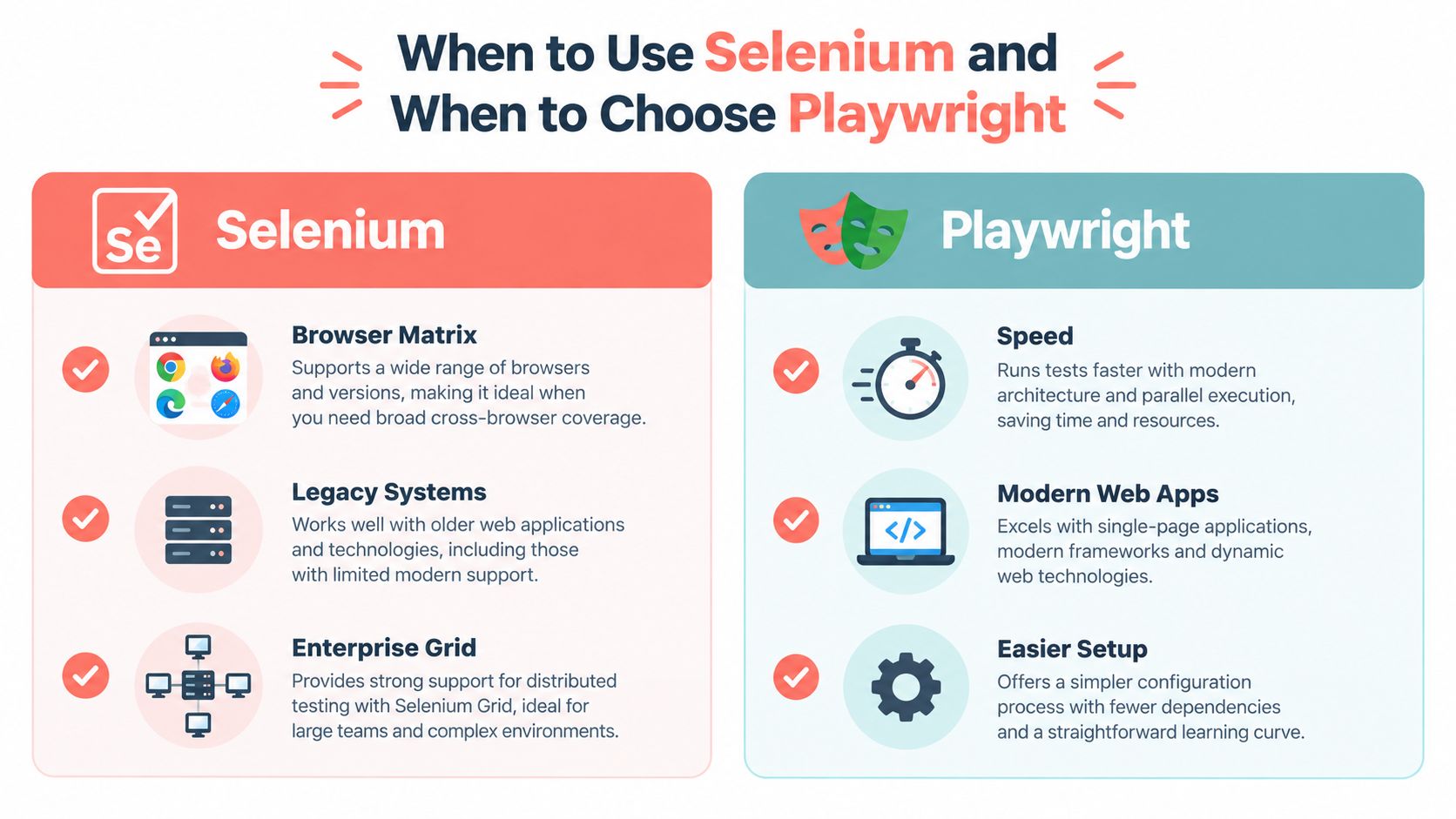
Selenium remains strategically relevant when you need to validate multiple browser implementations, keep legacy environments alive, or plug into WebDriver-compatible infrastructure. Playwright is attractive for modern Chromium-, Firefox-, and WebKit-oriented end-to-end tests, especially when you want built-in tracing and auto-waiting Browserless comparison and guidance.
A practical decision boundary
- Choose Selenium if your organization depends on a working grid, multiple language bindings, or cross-browser certification against older infrastructure.
- Choose Playwright if the suite is new, the app is highly interactive, and your team wants tighter control over modern browser behavior.
- Keep both if your product needs a compatibility layer for certification and a faster lane for application-flow testing.
That hybrid shape is often the most defensible setup. Selenium covers the broad compatibility story, while Playwright handles the tests where browser interaction, traceability, and quicker execution matter most. The boundary is not ideological, it's operational.
The publisher's own browser automation stack, Clearcote Labs, fits into this recommendation space as a drop-in browser runtime that supports Playwright and Puppeteer workflows across local, Docker, and hosted execution. That kind of option is relevant when teams want to keep their existing automation model but change how the browser runs.
Frequently Asked Questions About Selenium and Playwright
Is Playwright faster than Selenium? Often, yes, because it keeps a persistent browser connection and its runner handles parallel execution cleanly. The gap depends on the application, the CI environment, and how much waiting the tests already do.
Can Playwright replace Selenium completely? For many web suites, it can. The exceptions are the ones that matter operationally, such as a working Selenium Grid, broad WebDriver-dependent infrastructure, or a multi-language test estate tied to Selenium bindings.
Does Selenium still make sense in 2026? Yes. It still makes sense when compatibility, enterprise grids, and standards-driven browser coverage are more important than the convenience of a newer runner.
Should a new team start with Selenium or Playwright? New suites usually fit Playwright better, especially when the app is modern and the team wants built-in waiting and tracing. A team should still check its browser matrix, reporting needs, and infrastructure before deciding.
Is a full migration the right default? Not always. If the current suite is stable enough and the environment already runs tests reliably, the cheaper path may be to improve the suite rather than rewrite it.
Clearcote Labs helps teams work through this kind of browser automation decision with a browser runtime built for Playwright and Puppeteer workflows. If your current suite is fighting flakiness, identity drift, or browser execution overhead, visit Clearcote Labs and compare how its browser stack fits your test strategy.