
The surprising part about anti-detect browsers is that spoofing one field rarely helps. A browser can lie about its user agent and still get caught because the rest of the identity, canvas output, locale, workers, and transport fingerprints, don't agree with the story it's telling. That's why the earliest anti-detect approaches, which leaned on JavaScript injection plus extensions, could be exposed by cross-realm inconsistencies and property comparisons across contexts (2020 study on anti-fingerprinting browsers).
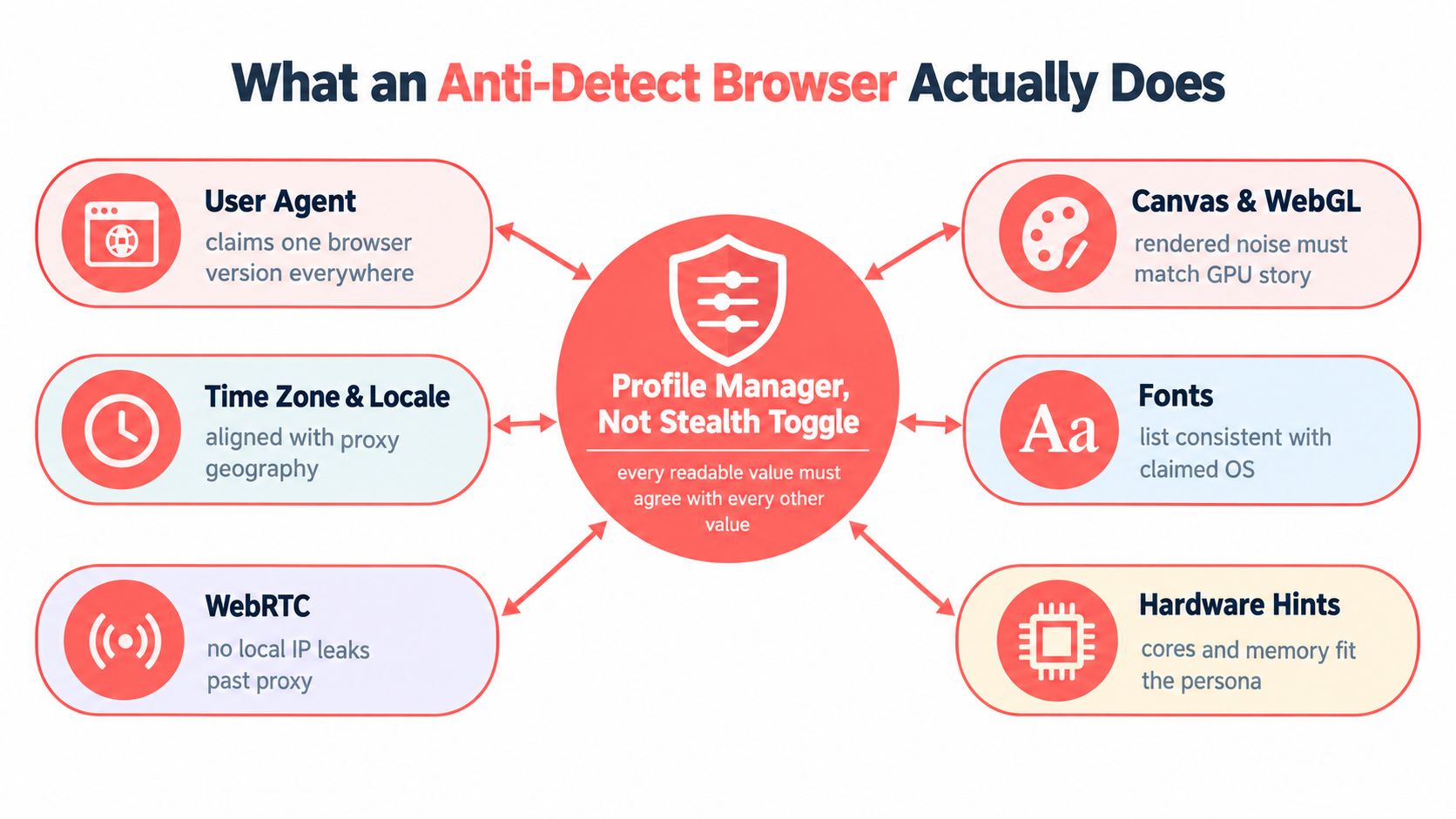
An anti-detect browser is best understood as a profile manager for coherence, not a stealth switch. Its job is to make every signal a site can observe line up with the same seeded persona, from the visible page to the network handshake. If one layer drifts, detection systems don't need to prove the whole identity is fake, they only need one mismatch.
Table of Contents
- What an Anti-Detect Browser Actually Does
- How a Browser Fingerprint Is Built in the First Place
- Cross-Realm Coherence Is the Hard Part
- The Network Layer That JavaScript Cannot Reach
- How Detection Has Moved Above the Browser
- Legitimate Use Cases and Where the Line Sits
- How Clearcote Approaches Identity at the Engine Level
- Choosing an Anti-Detect Browser the Right Way
What an Anti-Detect Browser Actually Does
The easiest mistake is to think an anti-detect browser hides you. It doesn't. It tries to make the browser's identity look internally consistent, so the values a site reads from JavaScript, rendering, and the network all belong to the same plausible device profile.
Coherence beats concealment
That means a modern profile has to keep User-Agent, screen signals, GPU hints, locale, timezone, audio output, canvas behavior, and font enumeration in sync. If a profile claims one operating system but leaks a font set, WebGL renderer, or timezone that belongs to another, the mismatch can stand out more than a normal browser ever would. The technical problem is less about randomizing values and more about making them agree.
The first generation of tools mostly patched JavaScript-readable properties after the page had already loaded. That approach was useful against simple checks, but it left the engine untouched, which meant different contexts could still reveal contradictions. The 2020 academic study on anti-fingerprinting browsers is important precisely because it shows why this class of spoofing remains detectable, and why engine-level coherence matters more than patching globals late (study).
Practical rule: if a browser only changes what JavaScript can read, it's still operating on the surface.
A proper mental model is a stack. The top layer is the page script, but beneath that sit the rendering engine, the operating system, and the transport stack. An anti-detect browser only earns the name when it keeps all of those layers aligned instead of just decorating the topmost one.
How a Browser Fingerprint Is Built in the First Place
A fingerprint usually starts with something obvious, then compounds over time. A site checks the browser version, then asks what the platform looks like, then samples rendering output, then compares how the session behaves over time. One value doesn't identify you, the combination does.
A session can break after one harmless update
A common failure looks boring at first. A team runs the same multi-account workflow for weeks, then a site update adds one more probe, and the profiles that looked clean yesterday start failing today. The reason is usually not one dramatic leak, it's a new cross-check that exposes a value the profile never aligned in the first place.
At the top of the stack, JavaScript can read the User-Agent string and navigator properties. One level down, the rendering engine contributes canvas pixels, font rasterization, and WebGL output. Lower still, the operating system adds locale, font availability, and codec behavior, while the hardware and GPU shape the final graphics fingerprint. Even movement patterns, scroll curves, and typing cadence can add to the composite profile when a site watches session behavior rather than a single page load.
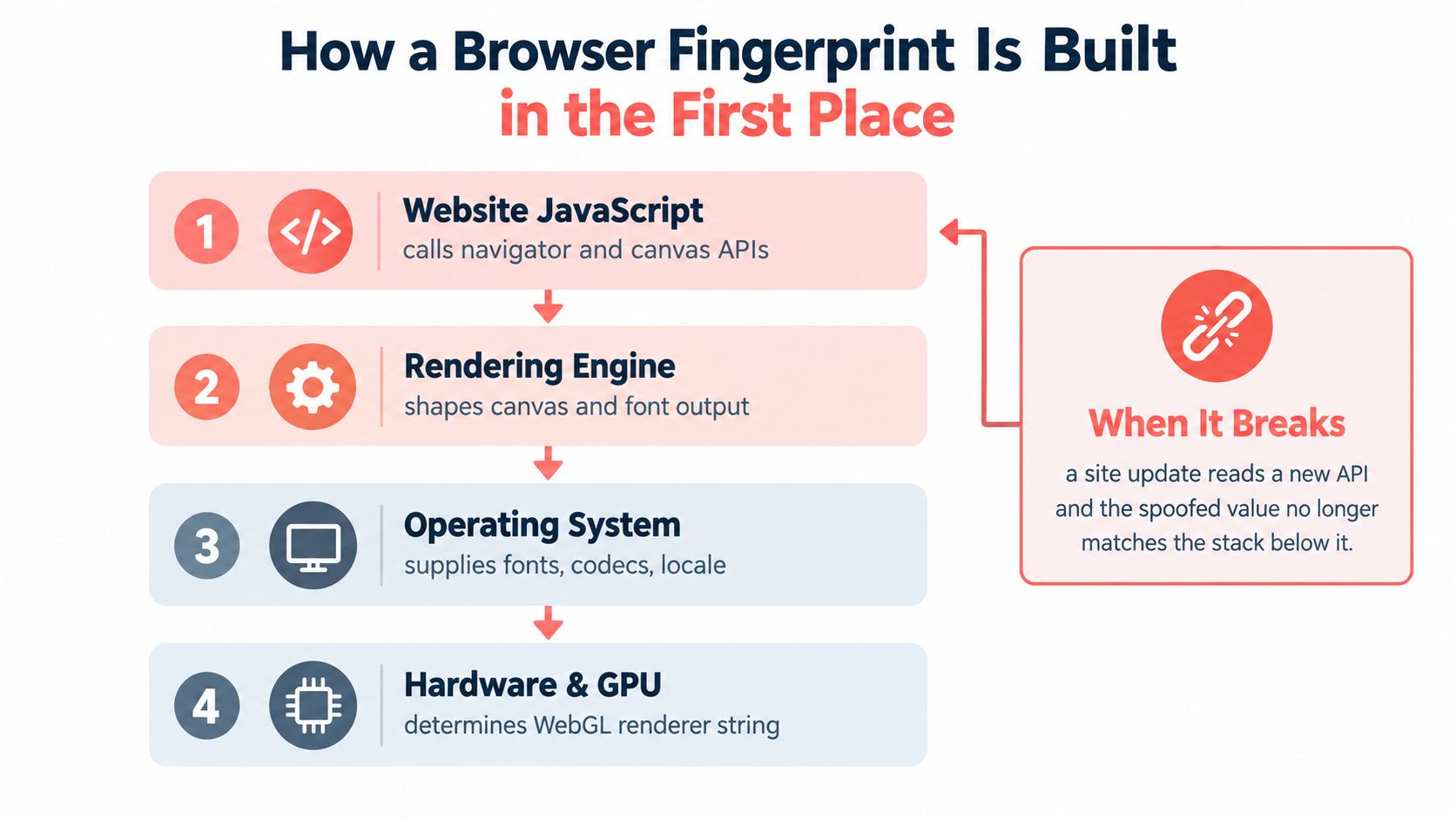
The reason simple spoofing fails is that each layer can validate the others. A browser can claim a Windows-like user agent, but if the canvas hash, font list, or WebGL renderer looks like something else, the session becomes easier to classify. That's why a site update can break a workflow without changing the visible page at all.
For readers who want a visual map of those signals, the anatomy of a browser fingerprint from Clearcote Labs is a useful companion reference, especially if you're trying to understand how each field feeds the next: browser fingerprint anatomy.
If you're trying to reduce account linkage, proxy choice matters too, but it only solves one slice of the problem. A practical primer on mobile IP rotation tactics from Evoproxy is helpful if your workflow depends on changing exits without breaking geography-related checks, because IP rotation alone doesn't fix a mismatched browser identity (mobile IP rotation tactics).
Cross-Realm Coherence Is the Hard Part
A browser can't just look right in one place. It has to agree in the main thread, in dedicated and shared workers, in service workers, and inside same-origin iframes. If three witnesses tell the same story and the fourth does not, the contradiction is the evidence.
One identity, many execution realms
That is what cross-realm coherence means. A seeded profile has to emit the same identity everywhere the page can observe it, because modern detection does not stay inside the visible tab. It spins up hidden workers, checks iframes, and compares what each realm says about the same browser.
The early script-injection era failed here. Injecting a fake navigator object into one context did not change the underlying engine, so another realm could still reveal the original values. That is why the move from post-hoc patching to engine-level controls was structural, not cosmetic.
Detection gets easier the moment the browser tells two different stories about the same device.
The practical consequence is simple. If a profile is only patched where the page can see it, hidden execution contexts can still disagree. For a deeper treatment of how those realms diverge, see the cross-realm coherence research from Clearcote Labs: cross-realm coherence. Once that happens, the browser stops acting like one identity and starts looking like a bundle of inconsistent clues. A good anti-detect browser has to make the engine, not the page script, the source of truth.
The Network Layer That JavaScript Cannot Reach
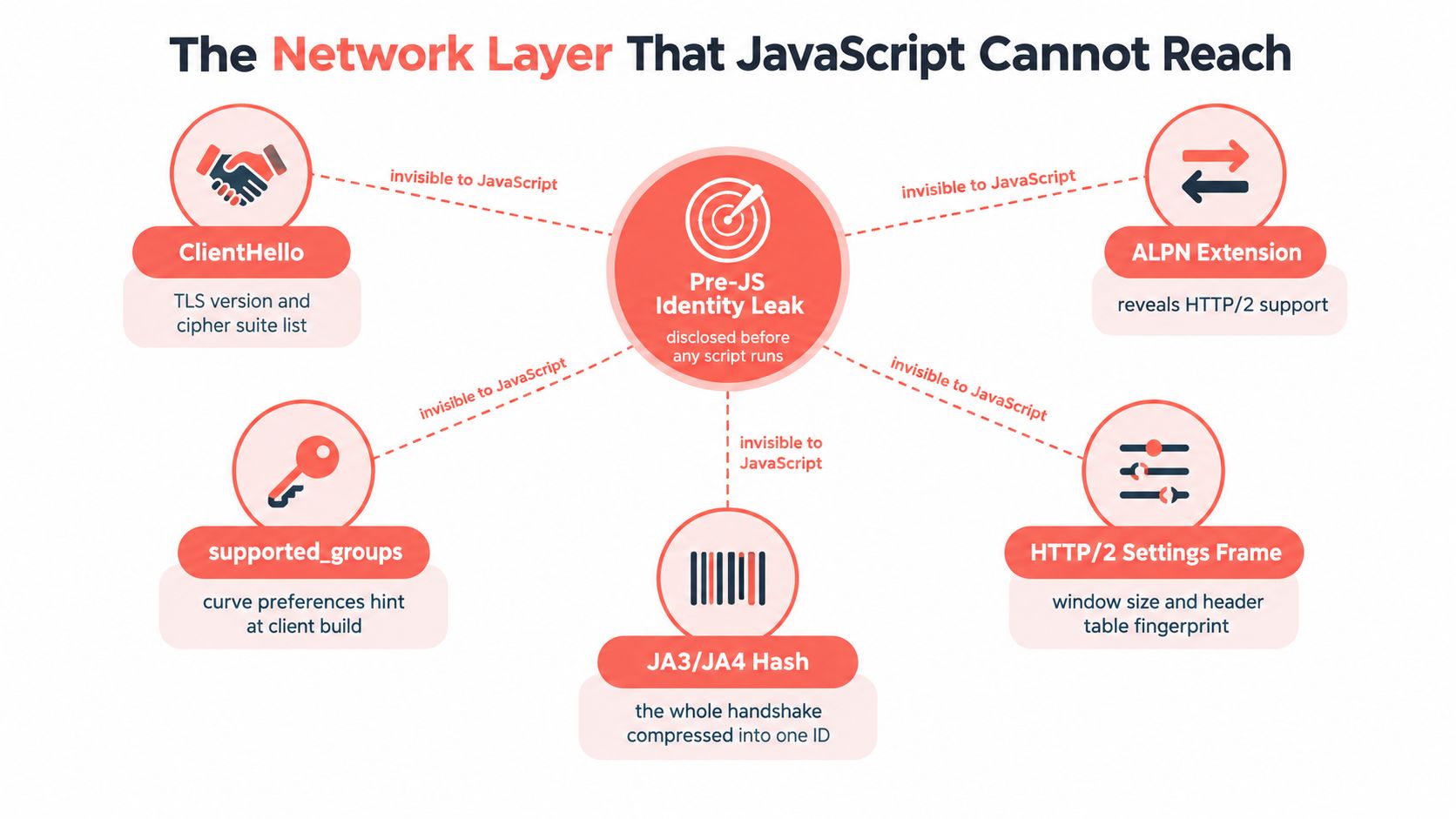
By the time JavaScript starts running, the network handshake has already exposed useful identity hints. That's why any tool that only edits page-visible values is leaving a blind spot below the script layer. The browser has already spoken to the server before the page gets a chance to lie.
TLS and HTTP/2 leak identity early
Passive transport fingerprints can reveal browser family, version, and sometimes operating system details through the structure of the handshake itself. The TLS ClientHello carries version, cipher suite ordering, and extension patterns, while HTTP/2 adds its own SETTINGS and framing fingerprints. Broader fingerprinting research also notes that real-user telemetry sees far more fingerprinting activity than automated crawls, missing about 45% of the sites seen by real users (arXiv paper).
That matters because script spoofing can't reach into the handshake. A patched navigator.userAgent means little if the transport stack still announces a different browser build. The problem is architectural, not just operational.
If you need a deeper technical walkthrough of JA3 and JA4 style TLS fingerprints, this reference keeps the protocol side grounded in practical examples: JA3 and JA4 TLS fingerprint guide.
A browser that claims one identity at the page layer and another at the network layer is easy to distrust. The goal of engine-level work is to keep User-Agent, Sec-CH-UA, ALPN ordering, and HTTP/2 settings aligned to the same claimed version, so the transport story doesn't contradict the rendering story. Proxy services can still help with routing, but they don't fix a browser that leaks the wrong handshake shape on its own (proxy services).
Watch the video on YouTubeHow Detection Has Moved Above the Browser
The big shift is that detection no longer stops at the browser. It now compares identities across populations, baselines, and server-side artifacts, which means a technically clean profile can still look suspicious if it behaves like a rare outlier. Client-side camouflage helps less when the scoring system is watching the whole fleet.
Server-side correlation is the newer battlefield
Recent independent coverage says detection systems increasingly compare executable paths, binary strings, memory artifacts, and behavior patterns against clean-browser baselines, while also checking for inconsistencies that survive spoofing, such as timezone-to-IP coherence and TLS fingerprints (server-side fingerprinting research). That's a different problem than hiding a field from JavaScript. It's population analysis.
The browser-fingerprinting surface itself has also widened. Independent reporting says fingerprinting appeared on 78% of the Tranco top 10,000 sites in 2026, up from 61% in 2024, and a commercial measurement report says tampering showed up in 4.4% of desktop browser identifications in 2025, nearly double 2024 (browser fingerprinting 2026 report). Those numbers matter less as headlines than as proof that the detection surface keeps expanding.
| Detection Layer | Signal Read | JS-Spoofable? |
|---|---|---|
| Page script | navigator values, canvas, fonts | Partially |
| Workers and iframes | cross-realm consistency | Harder |
| TLS and HTTP/2 | handshake shape, settings, ALPN | No |
| Server-side analysis | binary, memory, behavior, population fit | No |
A tool built only for page-layer spoofing ages badly because the scoring environment keeps moving upward. Once a single patched property gets recognized at scale, the whole cohort can inherit suspicion. That's why durable systems focus on coherence across the stack, not on one clever patch.
Legitimate Use Cases and Where the Line Sits
Anti-detect browsers aren't automatically malicious. QA teams use them to replay flows across browser versions, ad verification teams check how creatives render in different geographies, researchers collect telemetry without tying every test back to one device, and automation teams need reproducible identities for browser-based agents. The technology is neutral, the policy is not.
The line is intent, not the engine
A browser profile that looks like a real user can be used for legitimate testing or for abuse. Coupon farming, review manipulation, and ban evasion all rely on the same underlying trick, which is why the product contract matters as much as the fingerprint quality. An ethical tool should make the allowed workflow auditable and the disallowed workflow hard to pretend is harmless.
That usually means audit logs, clear consent boundaries, and refusal of patterns that look like fraud automation. A product that can't explain what it changes, or won't say when it's inappropriate to use, leaves the operator guessing where accountability begins. That's a bad sign in any environment where identity matters.
One useful way to judge a tool is to ask whether it supports reproducibility without hiding the mechanics. If a team can seed a profile, recreate it later, and explain why it behaves the same way, the system is serving engineering. If the only sales pitch is invisibility, the tool is serving a different audience.
How Clearcote Approaches Identity at the Engine Level
Clearcote is a concrete example of the engine-level model. It's a de-Googled Chromium fork with fingerprint and identity controls compiled into the browser engine, not injected later by page scripts. That design choice matters because it moves the source of truth below the surface where detection starts comparing realms.
Engine control instead of post-hoc patching
The identity signals are set in C++ paths, which lets the browser keep values coherent across canvas, WebGL, WebGPU, AudioContext, fonts, locale, and related subsystems. Because the same engine owns those values, the main thread, workers, and iframes all see the same patched identity instead of drifting copies. Clearcote also aligns TLS and HTTP/2 fingerprints with the claimed Chrome version, so the network stack doesn't undermine the browser story.
Seeded identities are a practical detail, not a marketing line. The same seed yields the same device, which is useful when a QA team wants repeatable behavior and when a security team wants a profile to remain stable across sessions. Different seeds are designed to be unlinkable, which helps separate test personas without making each one look like a broken clone.
The operational surface is straightforward. Clearcote ships as a drop-in for Playwright and Puppeteer, with local, Docker, and hosted options, and it supports persistent profile management for teams that need reproducible identities. It also exposes browser profiles with captured device characteristics, which helps when a workflow needs the identity to feel grounded in a real hardware story rather than a random assortment of toggles.
A browser profile is only useful if the same seed reproduces the same identity every time.
There's a practical distinction here that gets missed in feature lists. Tools that only spoof JavaScript values leave the engine, transport, and realm consistency unsolved. Tools that control the engine can coordinate those layers together, which is the part detection has become much harder to fool with one-off patches.
Choosing an Anti-Detect Browser the Right Way
The easiest buying mistake is to compare feature lists without checking where the identity is enforced. A browser that changes visible values but leaves TLS, HTTP/2, and worker contexts untouched is a temporary fix, not a durable one. The right checklist is about where the coherence lives.
What to verify before you commit
- Engine layer control: confirm that the tool changes browser identity inside the engine, not only through injected JavaScript.
- Transport alignment: check whether TLS, HTTP/2, and user-agent fields stay aligned with the same claimed browser version.
- Cross-realm coherence: verify that workers and iframes report the same identity as the main page.
- Seeded reproducibility: make sure a profile can be recreated from the same seed and produce the same result.
- Operational transparency: look for clear docs on what changes, what doesn't, and how the product expects you to use it.
- Integration parity: test whether Playwright, Puppeteer, or Selenium sessions see the same identity consistently.
Red flag: any product that promises “100% undetectable” without explaining the underlying mechanics is asking you to trust marketing over evidence.
Proxy-only solutions are another warning sign. They can be useful for routing, but they don't fix a browser that leaks the wrong fonts, wrong timezone, or wrong handshake structure. The same goes for opaque builds, missing source visibility, and products that avoid legal or policy guidance altogether.
The durable principle is simple. The browser engine is the only layer with enough authority to keep every fingerprint signal coherent, so any tool that works around the engine instead of through it will age badly as detection moves upstream.
If you're evaluating anti-detect browsers for QA, automation, or identity-aware testing, Clearcote Labs can help you think at the engine layer instead of the surface layer. Visit Clearcote Labs to review its Chromium fork, browser profiles, and integration options for Playwright and Puppeteer.