
Browser fingerprinting combines observable browser and device traits to recognize a browser without needing a cookie or login. Large studies differ in samples and methods, yet they converge on the same result: a modest set of attributes can single out many browsers, and plugin-era configurations exposed even more identifying detail.
A practical answer to what is browser fingerprinting rests on two ideas: combined rarity and cross-signal coherence. Combined rarity asks which traits separate a browser from its peers. Coherence asks whether those traits describe one plausible device. Uniqueness stays probabilistic, and a spoofed value that disagrees with neighboring signals can make a browser easier to spot.
Table of Contents
- What Browser Fingerprinting Actually Identifies
- How Combined Signals Create Entropy
- Canvas WebGL Audio Fonts and TLS Signals
- How Widespread Fingerprinting Became
- Why a Fingerprint Is Not a Fixed ID
- What Actually Limits Fingerprinting
- Validate Coherence Before You Automate
What Browser Fingerprinting Actually Identifies
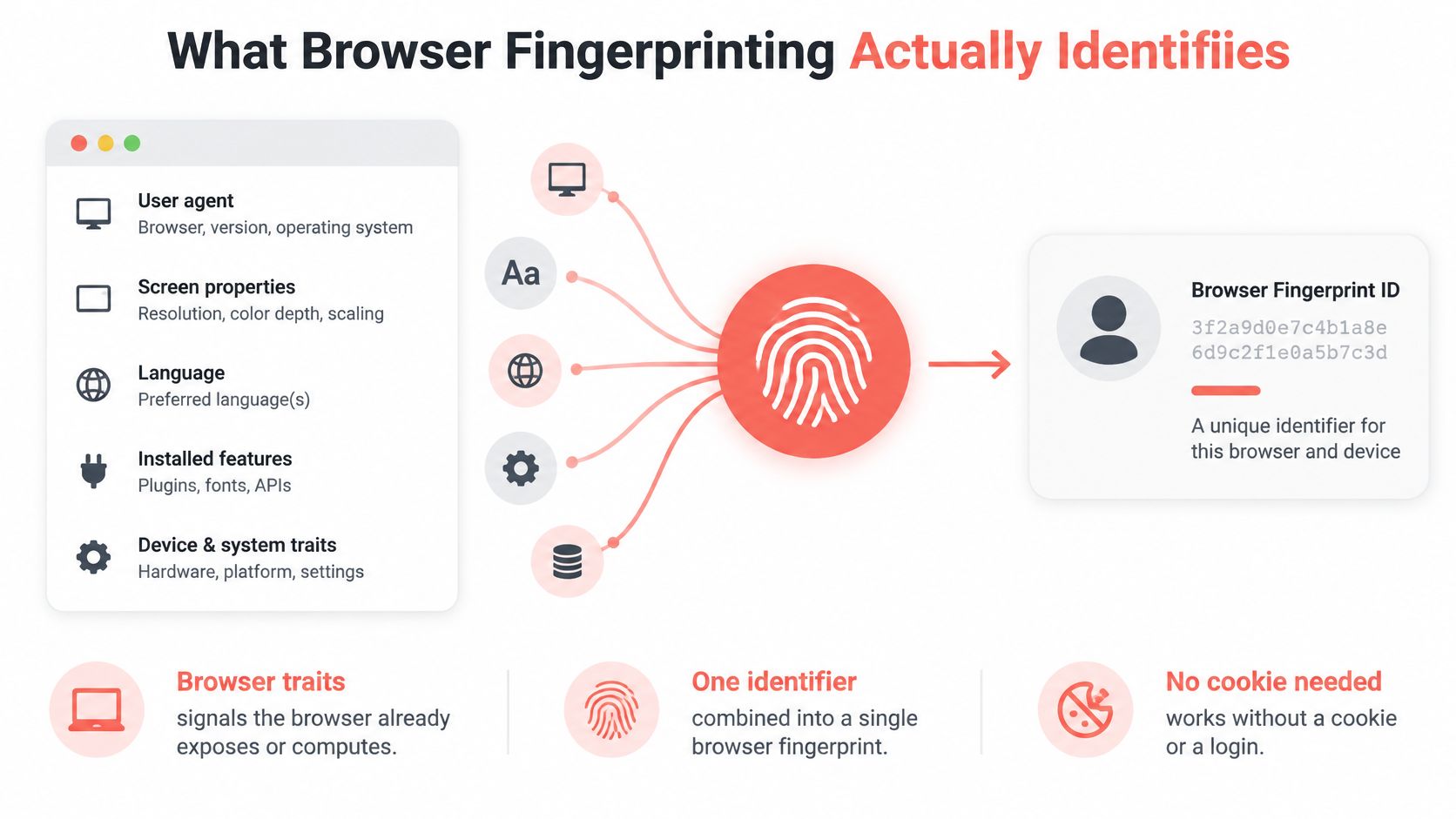
A website can collect properties your browser already exposes or calculate new ones by asking it to perform ordinary tasks. A script then combines the results into a fingerprint, often represented as a compact identifier that a server can compare with earlier observations.
The first-visit collection can include user agent and platform, screen size and color depth, language, time zone, installed fonts, and available browser features.
How often a browser fingerprint is unique
| Study | Sample | Share unique | Entropy or note |
|---|---|---|---|
| Panopticlick 2010, all browsers | Approximately half a million distinct browsers | 84% | At least 18.1 bits; about 1 in 286,777 browsers expected to share a fingerprint under the study's interpretation |
| Panopticlick 2010, Flash or Java | Same study, browsers with Flash or Java | 94% | At least 18.8 bits |
| Google Research 2025, 13 attributes | 8,400 consenting U.S. participants | About 60% | Demographic differences also studied |
The Panopticlick results established that browser configuration could distinguish visitors without stored identifiers. Plugins exposed additional information, making the plugin-enabled subset particularly distinctive. The entropy figure describes the identifying information in the combined fingerprint, not a special identifier hidden inside the browser.
The newer U.S. result answers a narrower question: how often the selected attributes singled out a participant within that particular dataset. It doesn't establish a global identification rate, and it doesn't mean the remaining participants were impossible to track.
Why the samples produce different answers
Plugin-rich desktop browsers offered a different collection of signals from today's more standardized mobile and desktop environments. Mobile browsers often share similar configurations, while the disappearance of plugins removed a useful source of variation.
That makes the historical result important evidence of the technique, but a poor universal estimate for your current browser. A sample's device mix, the attributes collected, and the visitors who participate all affect the outcome.
The illustration separates the inputs from the identifier they produce.
A browser observation isn't a person
Suppose a site observes an English-language browser with a common screen size and a particular font collection. None of those values names its owner. Their combination may nevertheless distinguish that browser from the other visitors the site sees.
The site can hash the collected values to simplify comparison. Hashing packages the observation; it doesn't make the observation more accurate. If different browsers expose identical inputs, their hashes can match.
Likewise, a unique fingerprint doesn't reveal a name, email address, or household by itself. It identifies a configuration within an observed population. Connecting that configuration to a person requires additional information.
The useful distinction is between recognizing a browser and knowing who operates it. Fingerprinting can support the former without automatically accomplishing the latter.
How Combined Signals Create Entropy
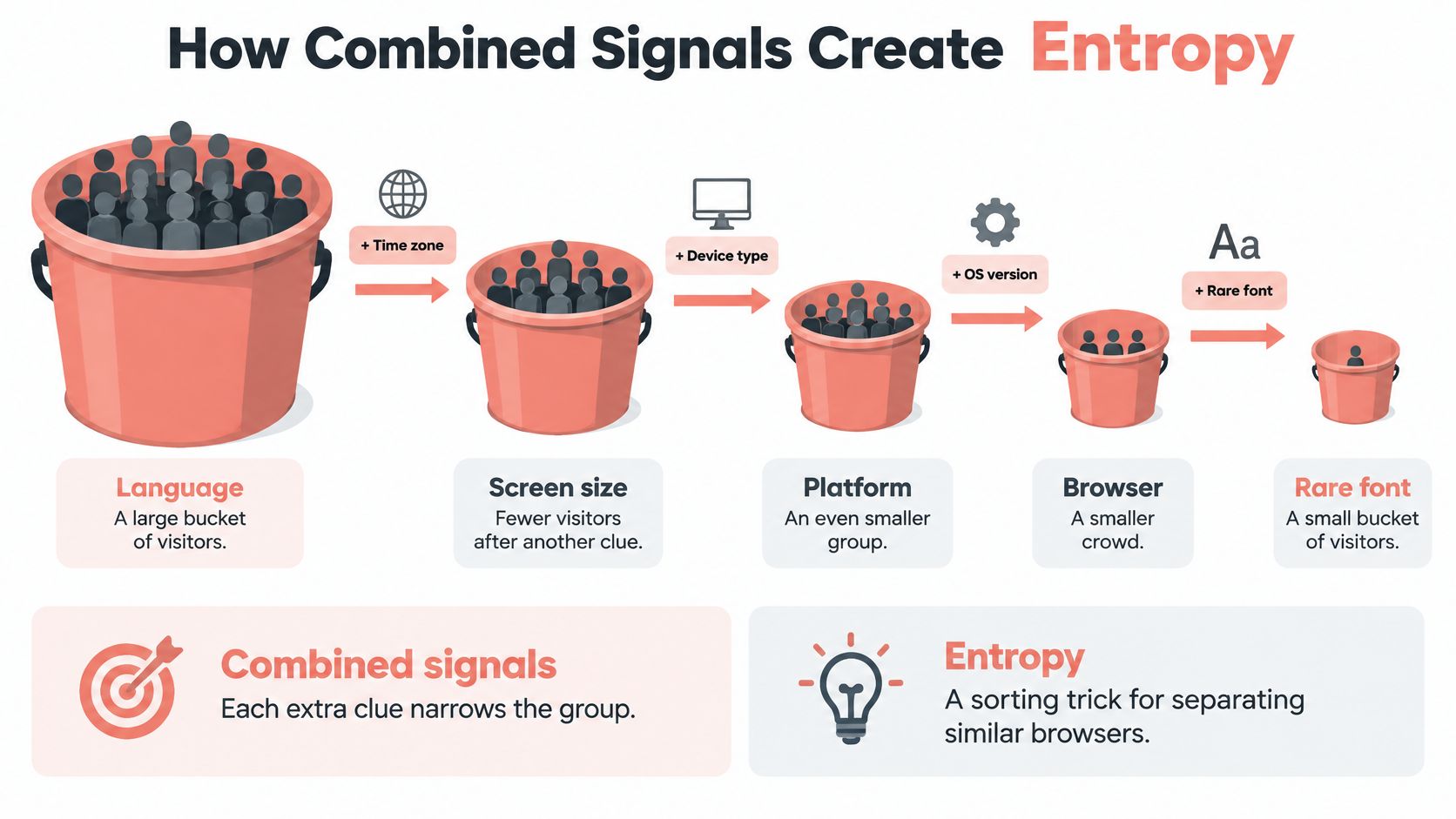
Say a website groups visitors by language. A common language puts many visitors together, so that property alone tells the site little about any particular browser.
Next, it groups those visitors by font availability. A less common font collection narrows the group. Adding screen characteristics and feature support may narrow it further, provided those signals contribute information the site doesn't already have.
This branching pattern is the simplest way to visualize entropy.
Information comes from the combination
Entropy measures how much a set of observations helps distinguish possibilities. The peer-reviewed Panopticlick analysis treats identifying information as a property of the measured fingerprint distribution, not a score attached to an isolated setting.
Signals aren't necessarily independent. Knowing the operating system already tells you something about likely fonts, so collecting both doesn't always contribute their full standalone identifying power. A tracker gains more from an attribute that separates otherwise similar browsers.
Cookies and fingerprints also work differently. A cookie resembles a name tag the site issued. A fingerprint resembles recognizing someone by height, shoes, and handwriting without having issued a tag.
Practical rule: Evaluate a signal against the other signals already available. A value that's ordinary by itself may be unusual in combination.
What a tracker needs from each signal
A useful privacy inventory separates these qualities:
- Stability: Does the value survive a reload, or does it fluctuate during ordinary use?
- Rarity: How many comparable browsers expose the same value?
- Persistence: Can the site observe a comparable result on a later visit or across another origin?
- Reach: Can any origin read it, or does access require permission or a restricted context?
For an engineering review, add the API name, required precision, business purpose, and supported execution contexts to that inventory. A scheduling feature may need a usable time zone; it doesn't follow that every unrelated script needs detailed device characteristics.
Reducing precision and standardizing values can reduce unnecessary differentiation. Permission boundaries can also limit who obtains sensitive measurements. The goal isn't to remove every feature, but to expose only the detail needed for legitimate functionality.
For a complementary explanation of the identification process, the following video provides another way to approach the topic.
Watch the video on YouTubeA careless spoof doesn't necessarily reduce identifying information. If you change the claimed platform while leaving platform-dependent behavior untouched, you've created an unusual combination rather than joined a larger crowd.
Coherence matters because trackers can inspect relationships between values, not just the values themselves.
Canvas WebGL Audio Fonts and TLS Signals
Fingerprint signals and what makes them differ
| Signal | What is read | Why browsers differ | Observed scale |
|---|---|---|---|
| Canvas | Pixel readback of drawn text or graphics | OS, GPU, drivers, fonts, hinting, antialiasing | 14,371 sites in a Princeton census |
| Canvas font | Which faces a canvas draw can use | Installed fonts and fallback chains | 3,250 sites in the survey |
| WebGL | Rendering output and device parameters | GPU and driver stack | Over 99% of 1,903 devices in one 31-task method |
| AudioContext | Output of an audio processing graph | Audio hardware and software stack | 67 sites in the survey |
| WebRTC | Local candidates and media devices | Network interfaces and hardware | 715 sites in the survey |
| UA, Client Hints, TLS and HTTP/2 | Version, hints, and handshake shape | Browser build and network stack | Observed on requests and connections; no comparable site count established here |
The rendering results and site counts above come from the browser-fingerprinting survey. They describe different measurements, not a single test of every surface against the same population.
Canvas and font measurements
A canvas probe uses HTMLCanvasElement and a drawing context to render selected text or shapes. It then reads the pixels, commonly through getImageData() or an exported image representation.
Those pixels reflect several layers: the browser's drawing implementation, the operating system's text engine, available fonts, and graphics behavior. Antialiasing and subpixel hinting can affect the result even when two screenshots look indistinguishable to a person.
A canvas-font probe asks a related question: does drawing with a particular font produce different metrics or pixels from a fallback? It can infer font availability without receiving a straightforward inventory of installed fonts. The canvas fingerprinting explanation examines how drawing and readback become a recognition surface.
Font fallback matters too. Asking for monospace doesn't require every operating system to select the same face or rasterize it identically. A claimed platform and its font behavior should therefore make sense together.
Graphics audio and network discovery
WebGL exposes a graphics context through APIs such as getParameter() and rendering readback through readPixels(). A probe can inspect reported capabilities and compare the output of selected rendering tasks.
The underlying GPU and driver stack influence both. A renderer string is only a claim; actual rendered output gives a tracker another measurement to compare against it. The device-identification result in the table illustrates why examining graphics behavior can reveal more than reading a vendor name alone.
AudioContext fingerprinting constructs a small audio-processing graph and inspects its output, often using OfflineAudioContext without playing audible sound. Browser implementations and processing paths can introduce differences. It shouldn't be understood as a direct serial-number query to an audio device.
WebRTC introduces another layer through RTCPeerConnection, connection candidates, and related media APIs. What a page can learn about network interfaces or devices depends on browser protections, permissions, and connection setup. A probe doesn't receive unrestricted access to every local address or device in every browser.
Headers and handshakes describe a different stack
The user-agent header, navigator.userAgent, and User-Agent Client Hints describe browser and platform characteristics. TLS and HTTP/2 observations instead describe how the browser's network stack establishes and operates connections.
Identifiers such as JA3 or JA4 summarize aspects of handshake behavior. A remote server can observe this layer even when a page script can't inspect the connection directly.
That separation creates a consistency check. A script might change a JavaScript-reported browser version while the connection still resembles another implementation.
Deterministic outputs help a tracker repeat a measurement. Cross-layer agreement helps it judge whether the measurements describe a plausible browser, rather than a collection of unrelated overrides.
How Widespread Fingerprinting Became
How do you measure something designed to be invisible? Researchers have tried web-scale crawls, real-user browsing data, and newsroom investigations. Each approach returns a different number, because each is measuring a slightly different thing.
Measured fingerprinting prevalence by study
| Measurement | Sample | Result | Note |
|---|---|---|---|
| Early academic scan, 2013 | Alexa top 1 million sites | A small number of sites caught fingerprinting | Early baseline |
| Princeton Web Census | 1 million websites | 14,371 sites with canvas fingerprinting | Scripts from about 400 domains |
| Measurement of top U.S. websites, 2019 | 500 popular U.S. sites | A substantial share of sites | Single measurement, not a census |
| Ranked-site measurement | Alexa top 100,000 | A minority overall, concentrated in the most-visited ranks | Prevalence tracks popularity |
| Real-user browsing vs automated crawl | Fingerprinting sites visited both ways | The automated visit missed a large share of detections | Misses tied to consent, login, and interaction |
The Princeton Web Census and associated prevalence measurements counted those 14,371 canvas-fingerprinting sites in a crawl of one million websites. That establishes fingerprinting on real websites while also showing how strongly the result depends on which sites and behaviors investigators examine.
Read the early baseline as evidence of observed deployment, not proof that investigators captured every implementation. The Princeton result then showed how canvas-based collection could spread: a script served from a few hundred domains can appear on thousands of otherwise unrelated sites. Deployment scales through reuse, not through each site building its own collector.
The later U.S. measurement examined a smaller, heavily visited group, and the ranked-site measurement found prevalence varying across popularity bands. These aren't interchangeable samples, so joining them into a smooth global growth curve would misrepresent what they measure.
What a prevalence chart can and can't establish
An illustration can communicate expansion without providing a comparable historical series. Read the graphic below as a picture of growth rather than a measured time series: its visit totals come from a different kind of accounting than the site counts above.
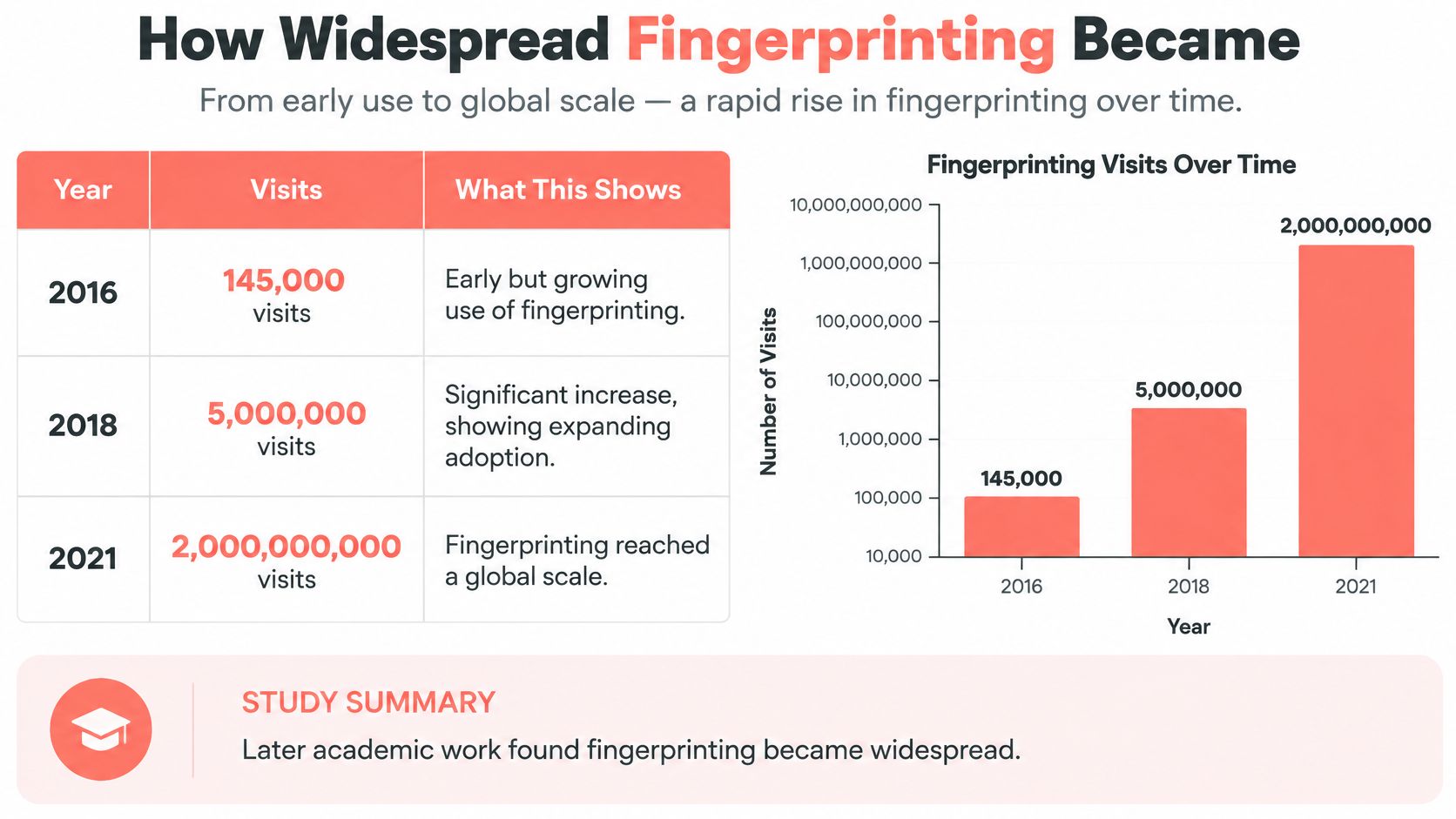
A site count, a share of popular websites, and a count of browsing visits answer different questions. A widely distributed script can appear on many sites while rarely running, and a single heavily visited site can expose many people to a script that a census counts once. Neither quantity can be inferred from the other without additional measurement.
There is also a subtler gap. Every row in the table measures deployment: whether a script capable of fingerprinting ran at all. None of them measure how often the resulting fingerprint singles out one visitor from the crowd. Presence and identification are different questions.
The safe conclusion is that fingerprinting isn't merely a laboratory possibility. The unsafe conclusion is that every website uses it, or that any one percentage describes your browsing.
Why an automated visit can miss it
A crawler may load a landing page and stop. A person accepts or rejects consent, signs in, opens an account page, and interacts with a feature before a fingerprinting script ever runs.
Detection therefore depends on the path through the site:
- Consent state: Scripts may load only after a particular choice or consent-manager event.
- Authentication: Account pages can include scripts absent from public pages.
- Interaction: Clicking, scrolling, or opening a feature can trigger deferred collection.
- Browser capabilities: A script can select probes based on available APIs.
For scraping and QA teams, an uneventful headless page load isn't evidence that the full user journey lacks fingerprinting. Record the pages visited, the interaction sequence, the authentication state, and the detector coverage alongside any prevalence result.
A negative crawler result means the test didn't observe fingerprinting under its conditions. It doesn't establish that the site never fingerprints.
The practical lesson is methodological: reproduce the browsing conditions you care about before interpreting a clean scan.
Why a Fingerprint Is Not a Fixed ID
A fingerprint isn't a cookie that lasts forever. A large-scale study of a major French website collected 2,067,942 fingerprints and found 33.6% unique, while also finding that the disappearance of plugins reduced fingerprinting effectiveness, particularly on mobile browsers.
That result challenges the idea that every browser necessarily has a distinctive configuration. It also shows why a tracker can use fingerprints probabilistically even when they don't uniquely identify every visitor.
A match may mean the same browser returned. It may instead mean another browser exposes the same configuration.
Change and recognition can coexist
Browser upgrades, operating-system changes, privacy settings, font installations, graphics-driver updates, and network conditions can alter parts of the composite. Some changes affect many values together; others affect only a small portion.
A tracker doesn't have to demand an exact hash match. It can compare components and decide whether the new observation resembles an earlier one closely enough.
For example, suppose the screen, language, fonts, and graphics behavior stay consistent while the reported browser build changes. A system can treat that as a plausible update rather than an entirely new visitor. Conversely, a shared corporate image may produce closely matching observations from different employees.
A changing fingerprint isn't automatically unlinkable, and a matching fingerprint isn't proof of identity.
Recognition has different jobs
The required confidence depends on what the site wants to accomplish.
- Session recognition: A site may only need to recognize the browser during an active interaction. Short-lived consistency can be sufficient.
- Cross-session tracking: The system needs enough continuity to connect visits after storage changes or browser restarts.
- Identity attribution: The system joins an observation to something else, such as a login, cookie, IP history, or behavioral pattern.
These jobs shouldn't be collapsed into a single claim that fingerprinting identifies you. A fraud system might use the fingerprint to adjust a risk score without concluding that it knows the operator's name.
A logged-in service has a different starting point. It already has an account identifier, so the fingerprint can become supporting evidence for recognizing an environment associated with that account.
False matches need operational consequences
Common phones, stock font sets, and centrally managed laptops can produce similar observations. If an application treats every match as conclusive, it can merge unrelated activity or challenge the wrong user.
For security decisions, record confidence and supporting signals rather than presenting a fingerprint match as certainty. Consider what happens when the system is wrong: an additional verification step is different from an irreversible account action.
Ask how long the signal must remain stable and what else the site already knows, rather than whether a browser is globally unique.
That question produces a more useful privacy assessment and a more defensible engineering design.
What Actually Limits Fingerprinting
Private browsing, a VPN, and a script blocker aren't substitutes. They operate at different layers, so choosing between them requires a clear account of what you want to prevent.
Defenses by layer and what they leave exposed
| Control | Layer | What it changes | What remains |
|---|---|---|---|
| Private browsing | Local storage | Cookies and site data for that session | Canvas, WebGL, fonts, TLS |
| VPN or proxy | Network address | IP and often geolocation | Browser and device signals |
| Blocking JavaScript | Page scripts | Many API probes | Headers and the TLS handshake |
| User-Agent reduction | Passive headers | The classic UA string | Client Hints a site can still request |
| In-page script overrides | Injected JavaScript | Individual APIs the script remembers to patch | Workers, iframes, and TLS can disagree |
| Engine-level seeded identity | Browser engine | Canvas, WebGL, audio, fonts, locale, and TLS together | A rare but coherent persona can still be uncommon |
Storage and network controls have boundaries
Private browsing separates local state from your regular profile and limits what remains after the private session closes. It does not automatically replace the browser's rendering implementation, fonts, or network stack, although a browser may add separate anti-fingerprinting protections in that mode.
A VPN or proxy changes the network address a website sees. That can reduce exposure of your ordinary network location, but it doesn't automatically change how your browser draws text or processes audio.
The illustration highlights those layer boundaries.
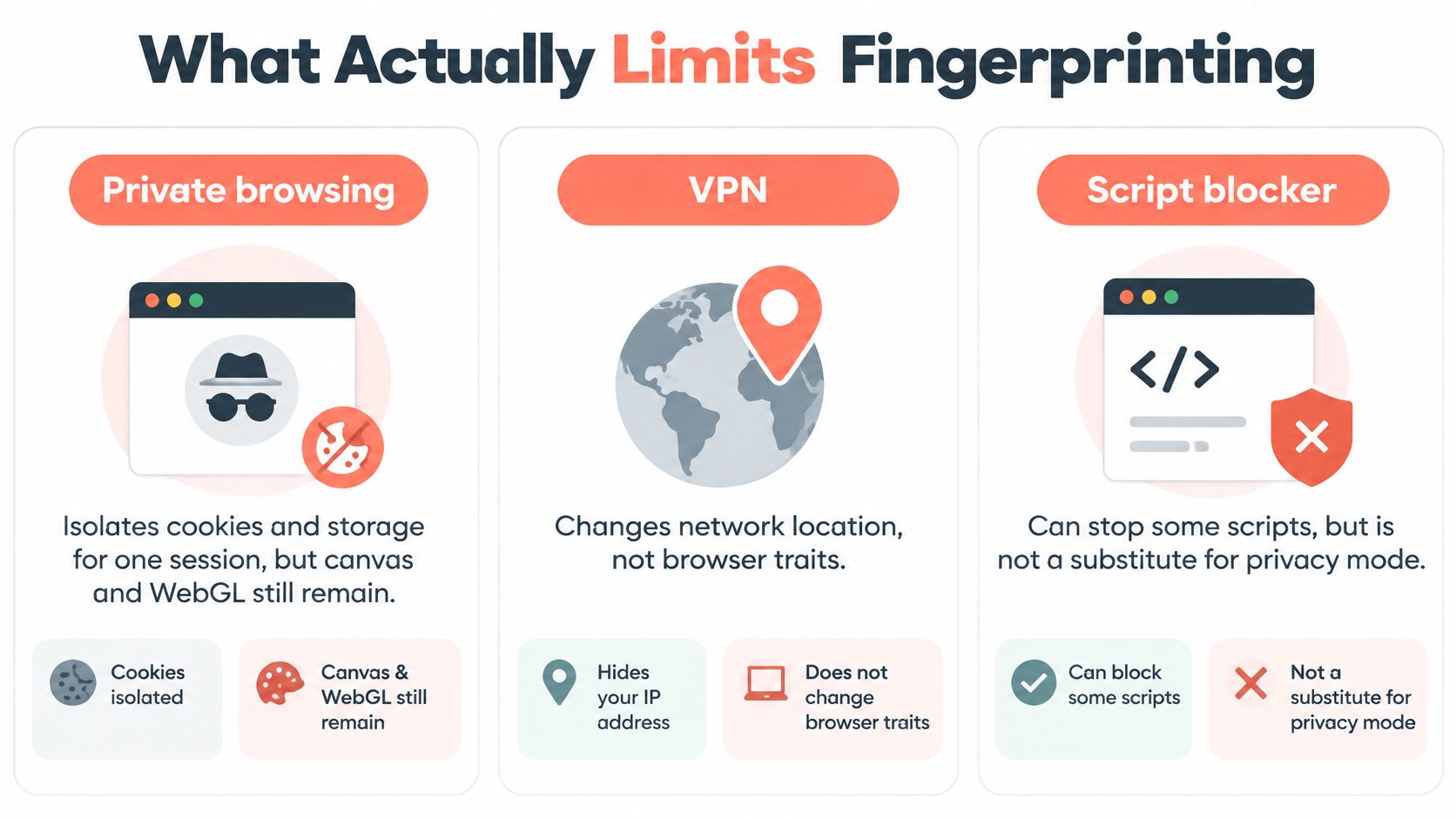
Blocking JavaScript prevents many active probes from executing. It can also disable application features, while leaving request headers and connection behavior observable to the server.
These controls can still be valuable. The mistake is expecting a change at one layer to erase observations made at another.
Reducing exposure differs from replacing values
Google's documented Privacy Sandbox approach describes reducing passive user-agent information and using selectively requested Client Hints. Moving information behind a request mechanism isn't the same as eliminating all browser-identification surfaces.
Privacy-oriented browser settings may standardize values, restrict APIs, or disrupt selected measurements. Evaluate their effect on the tracking job you care about, rather than assuming that a privacy label guarantees anonymity.
A page-level override takes a different approach: it replaces selected JavaScript-visible answers. It may miss an execution context, expose detectable changes to a native function, or disagree with observations outside JavaScript.
Engine-level configuration can coordinate related outputs closer to where the browser produces them. But coherent doesn't mean common. A plausible configuration that almost nobody else uses can remain distinctive.
A comparison of browser fingerprinting tools is most useful when you separate measurement tools from controls that change exposure.
Match the control to the objective
For session recognition, ask whether a site still obtains repeatable measurements during active use. For cross-session tracking, test what survives profile changes and browser restarts. For identity linkage, consider whether signing into the same account supplies the connection you hoped to prevent.
Teams also need to distinguish technical capability from permission to collect and reuse information. Freeform Company's guide can help you compare federal and state privacy regulations when framing that separate compliance review.
Stronger blocking can break legitimate functionality. More elaborate spoofing can introduce contradictions. Choose controls by their observable behavior and test the resulting configuration, rather than maximizing the number of altered settings.
Validate Coherence Before You Automate
Start with the browser profile you intend to use. Open a fingerprint test, save the results, and inspect disagreements rather than treating a single pass or fail label as a complete assessment.
A Windows user agent alongside Linux-like font behavior warrants investigation. So does a claimed GPU whose rendering output doesn't fit, or a claimed browser version that conflicts with the connection's observed characteristics.
Not every disagreement proves spoofing. Travelers, remote desktops, corporate proxies, and unusual hardware can produce legitimate exceptions. A contradiction is a diagnostic clue, not a verdict.
Compare execution contexts
For Playwright or Puppeteer, run supported probes in the page, a worker, and an iframe. Compare equivalent measurements, while distinguishing expected API availability differences from contradictory answers.
Use a repeatable sequence:
- Establish a baseline: Capture the stock browser's results before adding overrides or automation-specific configuration.
- Record the environment: Save browser build, operating system, profile, graphics mode, and proxy selection with the test output.
- Compare contexts: Check that exposed platform, locale, and rendering behavior agree wherever equivalent APIs are available.
- Repeat the run: Reload, restart, and revisit using the intended profile lifecycle.
- Change the network path: Confirm that a proxy change doesn't leave an accidental mismatch in location-dependent settings.
Don't force a worker to return a window-only property merely to make a report look uniform. The expected result may be that the API isn't exposed there.
For header-related failures, inspect user-agent spoofing as a consistency problem involving JavaScript, request headers, Client Hints, and the underlying browser build.
Evaluate the implementation without assuming invisibility
At Clearcote Labs, we maintain Clearcote, an open-source, de-Googled Chromium fork that sets fingerprint values in Chromium's own C++. There's no injected page script to find and nothing for a worker or iframe to contradict at that injection layer; our free fingerprint test runs 346 coherence checks, each with a plain-English explanation.
That implementation choice doesn't establish that every session is unrecognizable. We state explicitly that no tool is undetectable, and recommend checking configurations with CreepJS, BrowserScan, and Pixelscan.
Keep a seeded configuration only after comparing it against the stock baseline and verifying its behavior under your intended proxy and profile lifecycle. Save failures as reproducible test cases instead of hiding them behind another isolated override.
For an automation team, the useful deliverable is a consistent environment with documented limitations, not a promise that no website can recognize it.
Clearcote Labs offers engine-level browser identity controls, fingerprint diagnostics, and Playwright and Puppeteer integrations for testing consistent browser environments. Visit Clearcote Labs to inspect your browser's coherence, review contradictory signals, and evaluate a reproducible configuration before adding it to your automation workflow.