
You can get a hosted browser session running in minutes, watch the page load cleanly in DevTools, and still end up blocked once the target starts checking whether the browser really behaves like the device it claims to be. That mismatch is the reason cloud browser work gets frustrating fast. The page can render, the script can run, and the session can still leak enough cross-realm detail to fail later.
The gap is usually not visible in the UI. It shows up in the engine, where canvas, WebGL, fonts, locale, protocol fingerprints, and session state don't line up across every entry point the page can probe. If you're comparing vendors or building your own fork, that's the part that matters, because a persona only survives when the browser is coherent everywhere, not just when one injected script says it is.
Table of Contents
- Why a Cloud Browser Quietly Became a Fingerprinting Problem
- What Chromium Is and Why So Many Browsers Share Its Core
- Open Forks, De-Googled Forks, and Vendor-Controlled Browsers
- Engine-Level Identity Signals and Why JavaScript Patches Always Leak
- Build Reproducibility and Why Engine Patches Matter for Automation
- Local, Docker, or Hosted Cloud Browser Trade-offs
- A Practical Checklist for Evaluating Any Cloud Browser
- Frequently Asked Questions About Cloud Browsers and Chromium Forks
Why a Cloud Browser Quietly Became a Fingerprinting Problem
A common failure mode is easy to recognize. A Playwright job starts in a hosted browser, the fingerprint looks sane in one tab, and the operator sees clean output for a while. Then the target starts asking harder questions, a worker script checks a different realm, the session flips from “looks fine” to “looks synthetic,” and the block arrives after the browser has already spent time and budget getting there.

That's why browser identity can't be reduced to a single spoofed value. The page does not trust one probe, it compares multiple signals from multiple places, then looks for contradictions. A patched navigator.userAgent string means little if the rendering path, the network stack, and the runtime objects still reveal a different machine.
A useful privacy resource here is Matil privacy policy, not because it solves browser fingerprinting, but because it reflects the broader reality that hosted systems always involve a boundary between local intent and provider-side processing. In browser automation, that boundary is exactly where hidden leakage tends to live.
Practical rule: if the persona survives only in the top frame, it won't survive real scrutiny.
The important shift is mental, not cosmetic. A cloud browser is not just a browser sitting somewhere else. It is a browser whose runtime, transport, storage, and observability all sit in a controlled environment, which means the attack surface and the fingerprint surface both move with it.
What Chromium Is and Why So Many Browsers Share Its Core
Chromium is the open-source browser project that most modern browsers build on top of, and the easiest way to think about it is as the operating system for the web. The browser you see is the shell, but the thing that parses HTML, runs JavaScript, composites pixels, handles network requests, and stores session state is the shared core underneath.
The pieces that actually matter
Chromium's multi-process design separates responsibilities on purpose. The browser process coordinates the session, the renderer process executes page content, the GPU process handles compositing and graphics, the network process manages requests and responses, and storage-related components keep cookies and site data organized. That split is why a crash in one part doesn't have to take the whole browser down.
The rendering engine is Blink, the JavaScript engine is V8, and the network stack is its own subsystem. When people say two browsers “share Chromium,” they usually mean those core subsystems are still there, even if the shell, policies, branding, telemetry, and service integrations differ. Chrome, Edge, Brave, Opera, Arc, and many cloud browsers inherit that same core behavior, then layer their own controls on top.
| Fork Type | Telemetry | Build Reproducibility | Extension Support | Engine Patch Surface |
|---|---|---|---|---|
| Open Chromium fork | Often reduced or configurable | Strongest when the build chain is published | Usually broad, close to upstream | High, because the fork tracks engine code directly |
| De-Googled fork | Google services and proprietary hooks are removed or reduced | Strong when the fork keeps a transparent build process | Usually preserved, though policies may differ | High, but some upstream service-dependent paths disappear |
| Vendor-controlled browser | Depends on vendor policy | Often opaque to the customer | Usually preserved, but with vendor-managed rules | Limited, because the vendor owns more of the patch path |
The table is useful because it shows what you can change. If you need to patch identity at the engine boundary, you want the code path that determines the value, not a skin sitting above it. If the browser shell owns the setting but the underlying engine still sources the truth elsewhere, you've only hidden the symptom.
Chromium also explains why so many cloud browsers look similar once you peel back the wrapper. They may differ in deployment model, policy, and hosted features, but if they share the same engine lineage, the same classes of identity leakage and protocol mismatch still apply.
Open Forks, De-Googled Forks, and Vendor-Controlled Browsers
The useful distinction isn't "open versus closed" in the abstract. It's whether you can trace the behavior from source to binary, and whether you can patch the place where the browser decides what it is. If you can't follow that chain, the persona you think you built may not be the one the target sees.
Three buckets buyers actually run into
An open Chromium fork keeps the upstream codebase visible and adds features or build switches on top. That's the right bucket when you need to keep extension behavior, automation hooks, and patchability close to upstream while still changing the browser's identity behavior.
A de-Googled fork removes Google services and proprietary dependencies while preserving the build chain and engine structure. That makes sense when the goal is reducing service coupling and telemetry, not changing the fact that the browser is still Chromium at the core.
A vendor-controlled browser keeps the Chromium engine but ships closed patches and proprietary services around it. That can be operationally convenient, but it narrows your ability to inspect or alter the logic that governs identity, network behavior, and session handling.
If your security or automation requirement depends on engine-level consistency, ask where the value is created, not where it's displayed.
A clean way to evaluate the trade-offs is to ask four questions in order. Can I see the build path? Can I keep extension support? Can I patch the engine surface where identity is formed? Can I trust the vendor's runtime choices when the browser is hosted? Those questions usually separate a browser you can reason about from one you can only use.
Clearcote Labs fits into the open-fork category, because it ships a de-Googled Chromium fork with engine-level fingerprint and identity controls, plus hosted and local deployment options. That matters less as a brand claim than as a technical property, because the closer the patch sits to the engine, the fewer places there are for the browser to contradict itself.
Engine-Level Identity Signals and Why JavaScript Patches Always Leak
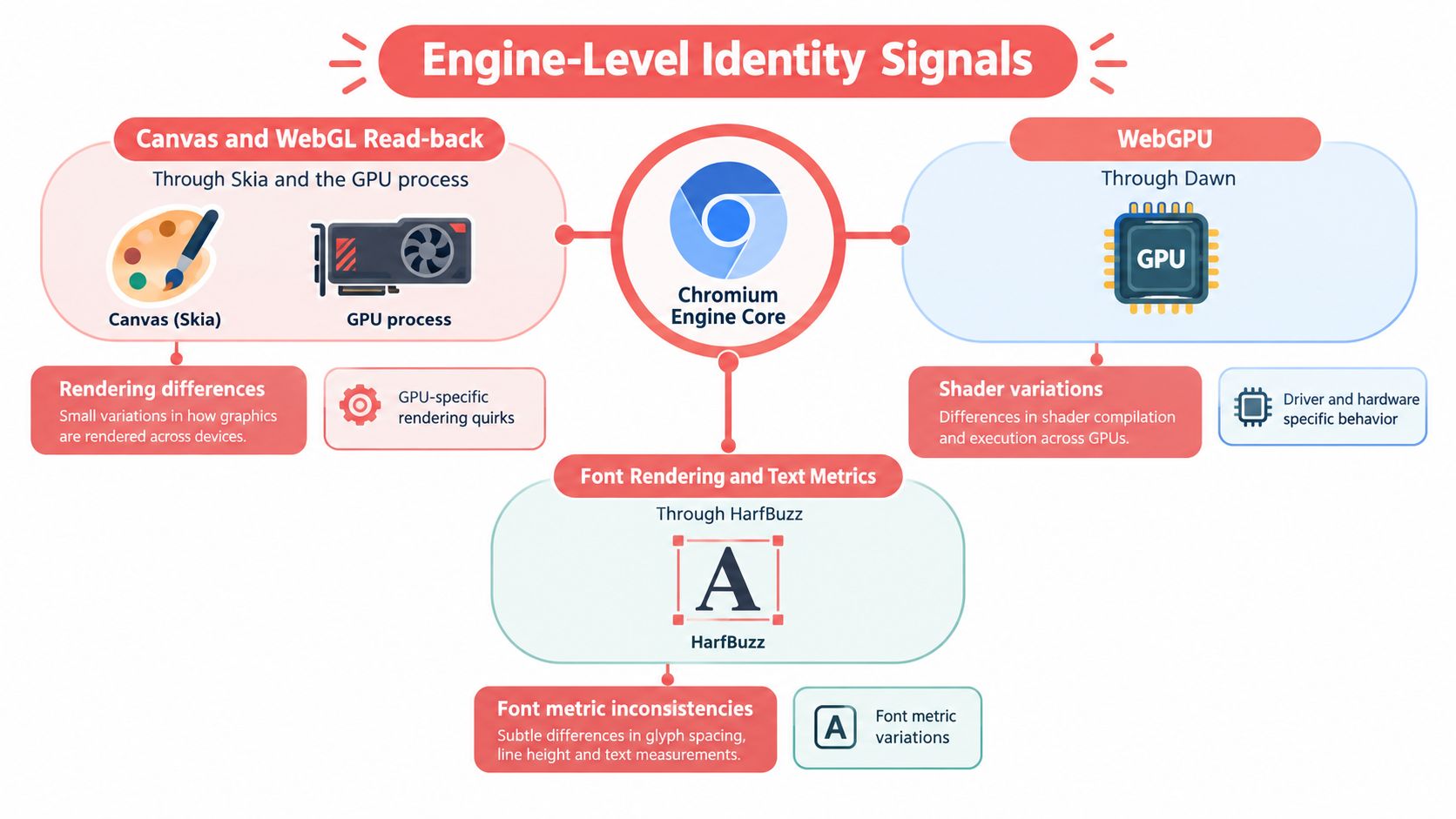
Identity doesn't emerge from one object in the page. It comes from engine paths that are easier to miss if you only patch JavaScript in the renderer. Canvas and WebGL read-back run through rendering code and the GPU path, locale values come from the browser process, font behavior comes from platform libraries, and protocol-level fingerprints come from the network stack, not from a script tag.
Where the signal actually originates
Canvas, WebGL, and other graphics-dependent surfaces are especially brittle when the patch only lives in JavaScript. The page can call the patched method on the main thread and get the spoofed answer, then query a worker, an iframe, or a lower-level rendering path and see the actual behavior. That inconsistency is what detection systems look for.
Fonts, locale, and language hints have the same problem. If the browser process still exposes one language, the page-level override says another, and a worker or internal probe sees something else again, the persona falls apart under comparison. The browser doesn't need to be perfect, it needs to be internally consistent.
WebGPU, audio, and other media-adjacent signals are worse for injected patches, because they often reflect state from services or process boundaries that JavaScript doesn't own. A renderer script can rewrite the value returned to a page, but it can't easily rewrite the upstream code paths that generated that value in the first place.
Why cross-realm coherence matters
The core idea is cross-realm coherence. A real device gives the same story from the main thread, workers, iframes, and protocol-level probes. A patched browser that only edits the visible surface gives different stories depending on where the question is asked.
That's why a C++ patch at the right call site matters more than a renderer-only hook. The browser should produce the persona once, then carry it through the engine, the network stack, and the exposed APIs. If the values are born in the right place, the page sees one identity instead of a stack of conflicting ones.
The practical implication is simple. A JS-injected identity patch is usually a patch on presentation, not on generation. It can help with obvious checks, but it rarely survives deeper inspection from real-world anti-bot logic, because the engine itself still tells the truth somewhere else.
Watch the video on YouTubeFor a closer look at how automation gets routed through the browser core, see Clearcote Labs' Playwright stealth mode guide.
Build Reproducibility and Why Engine Patches Matter for Automation
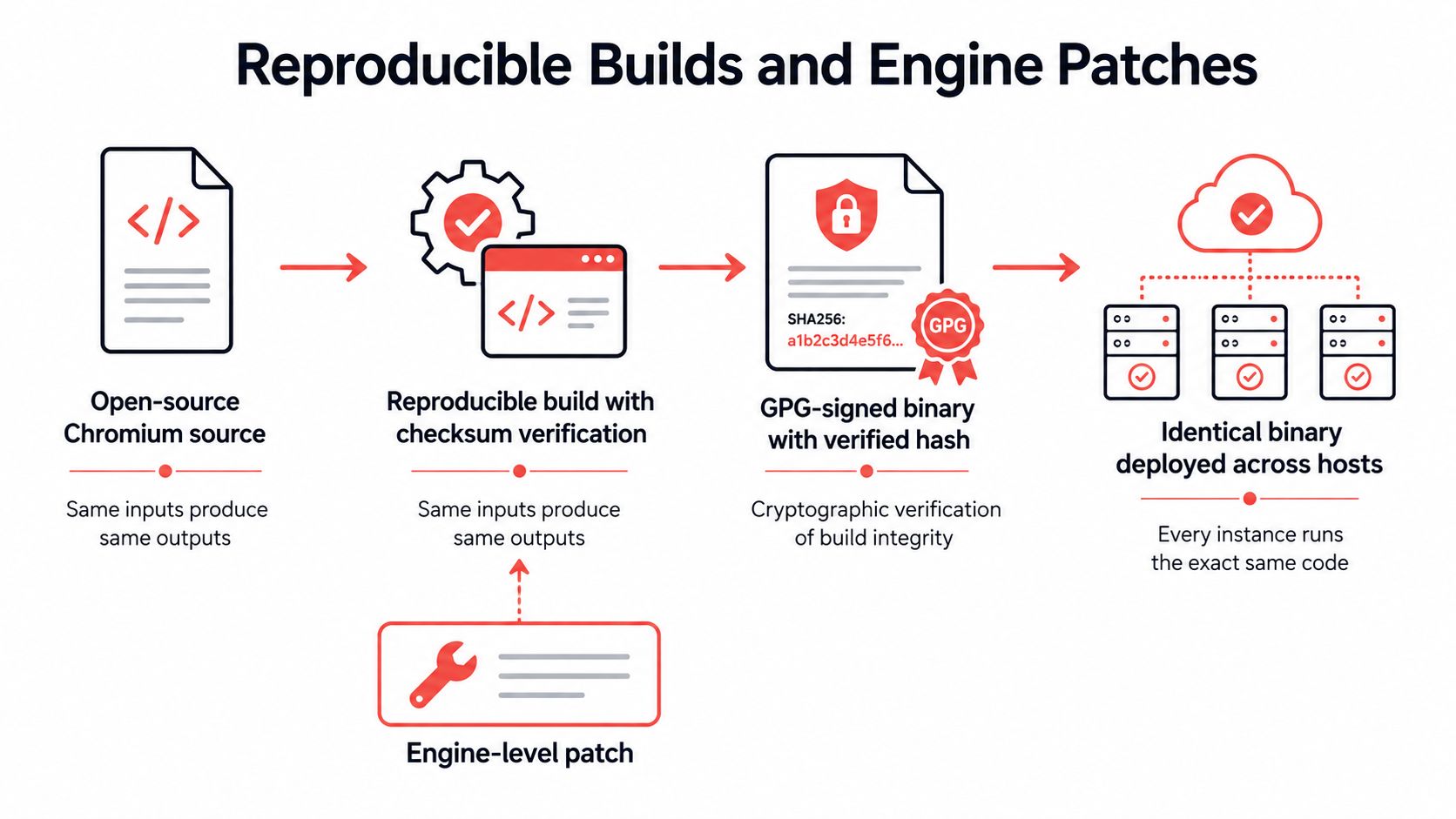
A browser fork is only trustworthy if you can prove the binary matches the source you think you built. Reproducible builds, deterministic checksums, and GPG signatures turn that from a hope into a verification step, which is exactly what you want before you rely on a fork for automation, identity control, or compliance-sensitive workflows.
Why the build chain is part of the product
Reproducible Chromium builds are published with deterministic checksums and GPG signatures so that any third party can verify the downloaded binary byte-for-byte matches the source manifest; without that, a downstream fork cannot prove its engine is the engine it claims to run. That matters because a browser fork is only as real as the code that ships.
A reproducible build also makes audits more meaningful. If CI, QA, and production are all running the same artifact, you can trace a flaky protocol issue or a fingerprint mismatch without wondering whether the binary changed underneath you. That is a supply-chain problem first and an automation problem second.
Protocol fingerprints still have to line up
TLS, HTTP/2, and UA-CH aren't decorative headers. They come from the network stack, and they need to match the Chrome version the browser says it is running. If the claimed version and the wire behavior disagree, you create another signal that the session is synthetic.
The same logic applies to release timing and behavioral traces. A license tier can add recorded human motion or release timing, but those are behavioral inputs, not magic fixes for a broken engine. If the identity source is wrong, extra motion on top doesn't repair the mismatch.
Practical takeaway: reproducibility proves what code you're running, engine-level patches control what the code says about itself.
For a deployment-oriented view of automation with browser binaries, Clearcote Labs' Playwright automation guide is a useful companion. It's most relevant when you want the same test suite to move across machines without changing the browser behavior you're validating.
Local, Docker, or Hosted Cloud Browser Trade-offs
The deployment shape matters because it changes what you can trust, what you can reproduce, and what you're asking the provider to do on your behalf. Local, Docker, and hosted aren't maturity levels, they're different answers to different constraints. If you treat them as interchangeable, you'll end up paying for the wrong thing.
The three modes are useful for different reasons
A local binary is the simplest path when you want direct control and the least moving parts. It gives you the clearest view of the engine and avoids provider trust, but you own the machine, the update cadence, and the environment drift.
A Docker image with a standing CDP endpoint gives you reproducibility plus isolation. It fits CI, repeatable automation, and controlled handoff between developers and machines, while still keeping the browser close enough to the code to debug.
A hosted browser makes sense when geography and infrastructure matter more than self-hosting. That's the trade-off when you want remote control, managed sessions, and a provider-run runtime, but it also means you're trusting the provider's logs, support flow, and build integrity.
Matching the runtime to the workload
Network placement changes more than latency. If your workload depends on recent production data, the question of freshness becomes part of the architecture, which is why production data freshness trade-offs are worth thinking about alongside browser placement. A browser near the target systems can help with access patterns, but it can also complicate where data is processed and retained.
Proxy geo-matching is the other operational knob that people use when the exit IP, timezone, language, and WebRTC behavior need to agree. A real-GPU canvas bridge goes a step further by keeping read-back pixels aligned with the persona's claimed graphics stack, which is useful when the target compares rendering behavior against hardware hints.
The main choice is whether you want control or convenience. Local and Docker keep the browser closer to your team's hands. Hosted browsers shift more responsibility to the provider, which can be the right move if you need remote access patterns, residential IP coverage, or less ops overhead.
For teams that want a browser delivered as a service, Clearcote Labs' browser-as-a-service overview is a straightforward reference point. Clearcote also offers local, Docker, and hosted options, so the same browser model can be moved between environments without changing the underlying engine assumptions.
A Practical Checklist for Evaluating Any Cloud Browser
Start with build reproducibility. If the vendor can't show that the binary matches a published manifest, you don't really know what engine you're running. That question comes before features, because everything else depends on the integrity of the build.
Check whether the identity logic lives in the engine or in injected JavaScript. Renderer-only patches are easier to bolt on, but they also leak more often across workers, iframes, and protocol probes. Then ask whether the browser returns the same persona across those entry points, because cross-realm coherence is what makes the profile believable.
Finally, verify identity separation. If one customer, workflow, or session can bleed into another through profiles, cookies, downloads, or support access, the hosted browser is only half isolated.
For a buyer's-eye comparison when you're choosing tools around scraping or automation, it's also worth comparing Instagram scraper options as a reminder that browser choice, session isolation, and data-handling policy always travel together.
Frequently Asked Questions About Cloud Browsers and Chromium Forks
Seed determinism means the same seed should recreate the same device persona every time. Different seeds should be unlinkable by design, so you can repeat QA without accidentally building a shared identifier across runs.
Playwright and Puppeteer usually don't need a rewrite if the browser exposes a compatible CDP endpoint or a drop-in binary swap. The important part is that the SDK integration preserves the same launch path while changing the engine underneath it.
Privacy and isolation aren't the same thing. A hosted browser may hide data from the endpoint, but it can still increase dependence on the provider's logs, extensions, support access, and build integrity.
Clearcote Labs builds engine-level browser controls for teams that need coherent identities, reproducible builds, and practical deployment options in local, Docker, or hosted form. If you're evaluating a cloud browser for automation, scraping, or QA, visit Clearcote Labs and compare the browser model against your own workload, not just the vendor's marketing page.