
Monday morning, twelve tabs open, one spreadsheet with a row per product per shop. The analyst copies prices by hand, spot-checks two of them, and moves on. By Thursday one shop has changed its layout, two rows are stale, and nobody can tell which two without rechecking everything.
That scene plays out in every team that collects data from the web. The fix isn't a faster copy-and-paste routine. It's a scheduled program that fetches, extracts and stores on a timetable, with records good enough that a second person can tell whether Monday's run was right. What follows is the workflow in the order you'd build it, including the part most tutorials skip: the collector's own quality and permission records, which are part of the product, not paperwork.
Table of Contents
- What Automated Data Collection Covers
- Choosing Between APIs, Parsers and Browser Automation
- Legal Limits and Privacy Safeguards for Collected Data
- How to Build a Working Pipeline Step by Step
- Quality Checks That Catch Silent Failures
- Real Cases From Statistics Offices and Price Monitoring
- Show Another Team Can Repeat the Dataset
- Confirm the Pilot Before You Scale Up
What Automated Data Collection Covers
Automated data collection is a scheduled program with three parts, and naming each one separately is what makes the thing debuggable a month later.
- Acquisition fetches a page, feed, or API response exactly as the source sends it.
- Extraction turns that response into named, typed fields, so a price is a decimal rather than a string with a currency symbol attached.
- Storage keeps the run, including the raw payload, so fixing a selector never requires a second fetch.
A person copying prices is a clerk walking the shelves. An automated collector is a night crew with a checklist. The crew never tires, and it will also fill in a hundred wrong lines without complaining, which is why it needs a supervisor more than the clerk does.

The practice is older than the commercial web. A history of web scraping published by Cambridge University Press traces it from information retrieval in the 1940s, through Fernando Corbató's 1960s MIT software that identified files changed since an earlier scan, to bulletin-board and IRC bots in the late 1980s, and then the 1993 World Wide Web Wanderer, which followed hyperlinks and recorded the number of unique pages it found. Scraping and browser automation extend that crawler model rather than replacing it.
Document sources keep the same three parts, and there the extraction stage does the heavy lifting. This guide to going beyond OCR for document extraction covers why reading the text is the easy half.
Choosing Between APIs, Parsers and Browser Automation
Use the highest method the source supports. Each step down that ladder adds code to maintain, adds signals to explain, and blurs the line between a retrieval failure and an extraction failure. A documented endpoint returning JSON usually outlives three redesigns of the page behind it.
| Method | Best source type | Common tools | Main risk | Upkeep |
|---|---|---|---|---|
| Official API | Structured records with documented endpoints | requests, httpx, vendor SDKs | Quotas and terms change without notice | Low |
| Feed or sitemap monitoring | New or changed items | feedparser, sitemap parsers | Feeds that omit fields or lag behind the site | Low |
| HTML parsing | Static pages with stable markup | Beautiful Soup, lxml, Scrapy | Selectors break after a redesign | Medium |
| Headless browser | JavaScript-rendered pages, logins, clicks | Playwright, Puppeteer | Slower, costlier, more detection signals | High |
| Hybrid pipeline | Mixed sources with an API and a web fallback | API first, browser fallback | Two code paths to maintain | Medium-high |
Quotas are an API's real cost. A vendor endpoint rarely breaks, it throttles, and the terms that govern it change on the vendor's schedule rather than yours. Read the rate limit before you size the schedule, and cache responses so a re-parse never spends quota.
Feeds are cheap but lossy. A sitemap tells you a URL exists and an RSS item tells you one changed. Neither guarantees the fields you need, so treat a feed as a discovery layer and fetch the item itself.
Practical rule: when a page renders its data only after scripts run, a parser returns an empty field rather than an error, and that silence is the expensive part.
Selectors are where HTML parsing gets fragile. Beautiful Soup, lxml and Scrapy will all hand back None for a field that moved, and None looks like a legitimate value until something downstream breaks.
A headless browser is the most expensive way to read a table. Playwright and Puppeteer earn their cost on pages that render with JavaScript, need a login, or hide data behind a click.
Why the hybrid design holds up
The AutoData research system is the clearest worked example. It combines web crawling with REST API calls and splits discovery, retrieval and structuring across several agents, covering academic, finance and sports sources, and it outperformed baseline approaches across most reported criteria on the SWDE and Extended SWDE extraction benchmarks, per the NeurIPS paper describing the system. The instructive part isn't the score. It's that calling the API first and falling back to a browser keeps parsing simple and makes a failed retrieval look different from a failed extraction.
Log the acquisition method, source version, HTTP status, schema state and extraction confidence for every record. Without those fields, a gain in coverage can conceal silent field-level degradation. Judge the pipeline on field completeness, extraction accuracy and successful page coverage, not on how many pages you crawled. The same principle, an API first with a browser fallback and a record of which path produced each row, runs through these reliable data collection architecture patterns.
The two-minute test before you write a request
- Check the raw source. If the field sits in the HTML the server sends, a parser will do and you can skip the browser entirely.
- Watch the network panel. Filter to XHR and fetch, reload the page, and look for a JSON response carrying the fields you need. A stable endpoint beats a clever selector every time.
- Disable JavaScript once. If the data still arrives, you've avoided a whole class of session and fingerprint problems.
Crawling and scraping get used interchangeably in conversation, though one discovers URLs and the other extracts fields. That distinction decides whether you're building a frontier or a parser, and web crawler vs web scraper maps where the overlap helps and where it misleads. If a browser does turn out to be necessary, where it runs belongs in the design: Clearcote can run on your machine, in a container, on its servers, or under an AI agent, and each option changes how you handle rate limits, session state and retries.
Legal Limits and Privacy Safeguards for Collected Data
Treat robots.txt as a signal, not a verdict. The most common compliance mistake in collection work is assuming that a file the industry uses to communicate permission has been read, understood and followed by the program sending the requests.
It often hasn't. A 2025 empirical study of approximately 3.9 million requests across 36 websites found that bots were less likely to comply with stricter robots.txt directives, and that AI search crawlers rarely checked robots.txt at all, as reported in this analysis of web-scraping compliance. Publicly accessible data is therefore not automatically safe to collect. Compliance can't be delegated to a text file that a meaningful share of collectors never open.
The same study reports the mirror-image problem. A benchmark that tested agents against 1,626 websites that explicitly prohibited scraping found compliance rates below 5%, and it also found agents refusing to collect on sites that never prohibited it. Under-compliance and over-compliance are both failures, and neither is cured by a default that blocks or allows everything.
The decision order for every new source
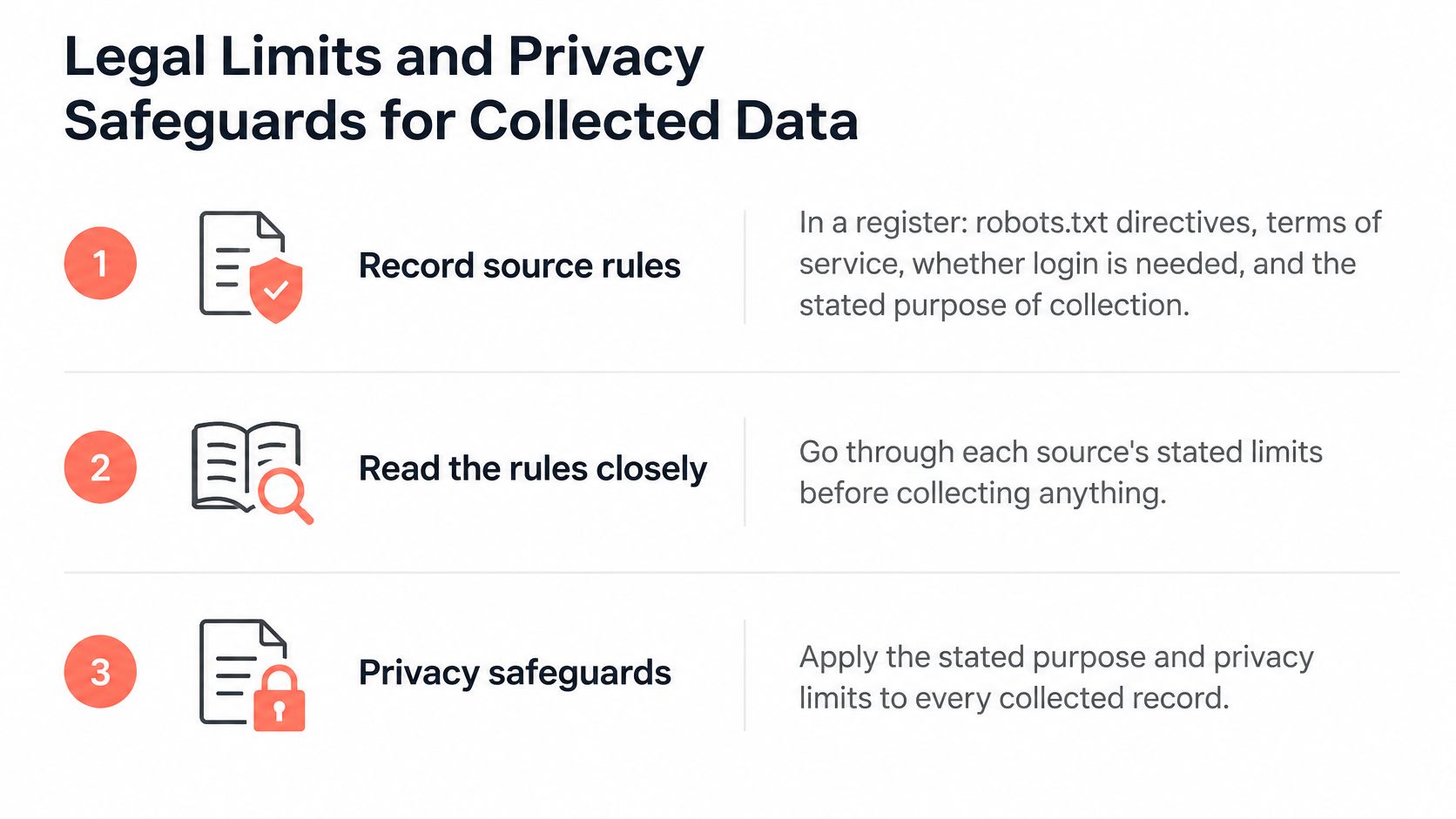
- Record the rules in a register. For each source, keep the robots.txt directives, terms of service, whether a login is required, and the stated purpose of collection in one place.
- Read the directives and the terms together. When they conflict with each other or with a jurisdiction's rules, the stricter reading wins until a human says otherwise.
- Limit the scope to the stated purpose. Collect the fields the purpose names, skip sensitive sources, and avoid persistent identifiers, stored cookies and repeated access patterns that link separate sessions. Purpose limitation is the operational form of this rule, and this data minimization guide for WA startups shows how it gets written down.
- Honor opt-outs and support deletion. Someone will ask eventually, and a run you can't selectively delete is a liability rather than an asset.
- Escalate ambiguity to a person and log the decision. The log is what turns one judgment call into a precedent the next engineer can follow.
Publicly accessible is not the same as operationally safe to collect.
Five questions to answer before a source goes live
- Purpose: what decision does this data support, in one sentence?
- Permission: which directives, terms and access conditions apply, and who signed off?
- Fields: which fields does the purpose require, and which get dropped?
- Retention: how long are raw payloads and parsed records kept?
- Reviewer: who resolves the ambiguous case, and where is that written?
Agents raise the stakes because they choose the next URL themselves, which means the policy has to live in the system rather than in a developer's habit. AI web scraping is worth reading for how autonomous collection changes the review loop.
How to Build a Working Pipeline Step by Step
Build the smallest thing that can be audited, then add sources. A pipeline covering one source completely is worth more than a broken crawl of forty.
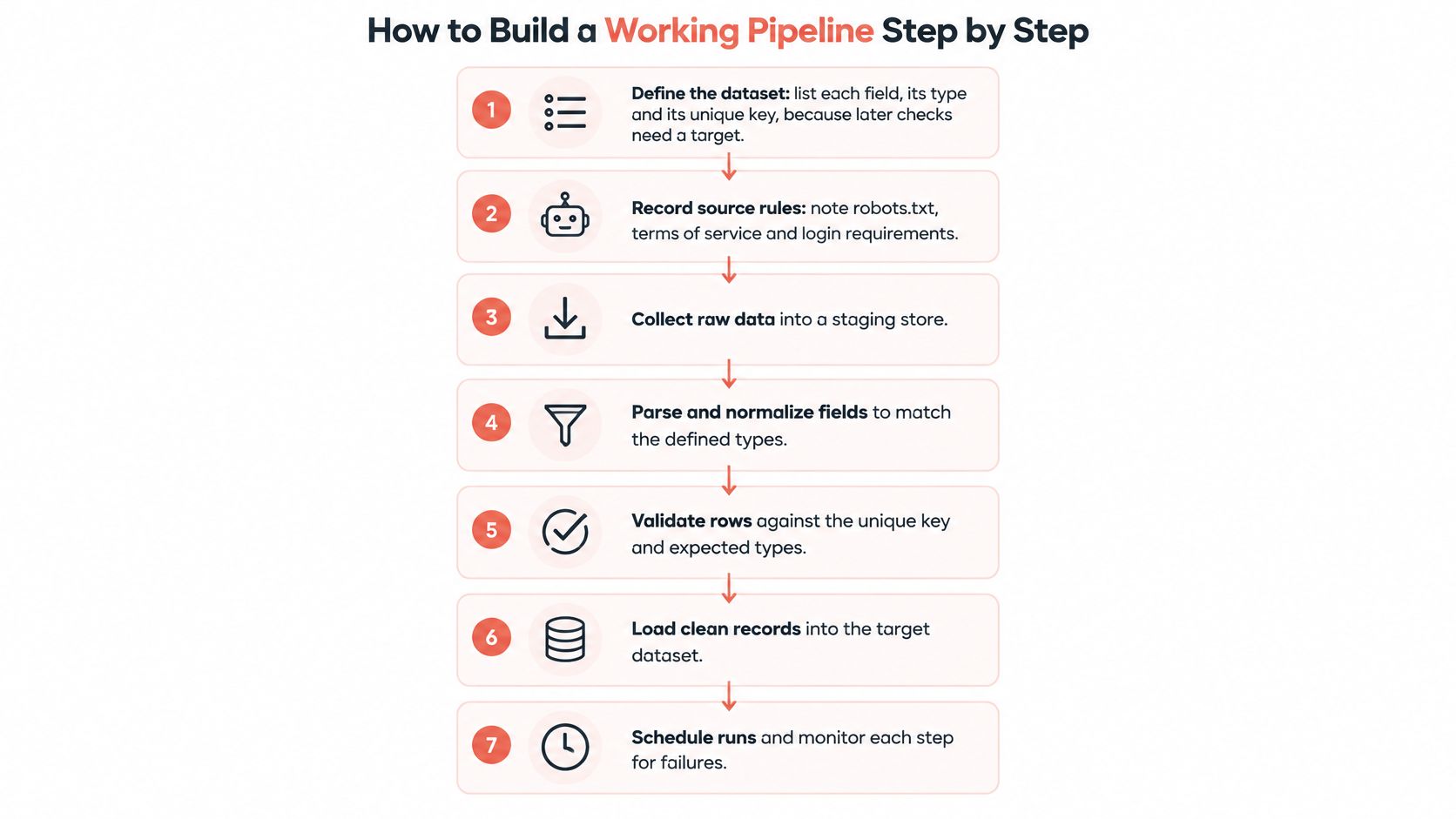
- Define the dataset. List each field with its type and pick a unique key for the record. Every later check compares a run against that target, so an undefined schema means nothing to validate against.
- Record the source rules. Write down robots.txt status, terms and login requirements before the first request leaves your machine. A source that changes its terms mid-project is far easier to spot from a dated record.
- Send one request. Start with the highest method the source supports, then save the raw response before writing a single line of parsing code. You'll re-read that file ten times.
- Set rate limits, retries and a schedule. Space requests to what the source tolerates, retry with backoff on timeouts and server errors, and never retry a permission error. Retrying a 403 only adds noise to a decision that needs a person.
- Extract into two stores. Keep the raw response as received in one place and the parsed fields in another. When a selector breaks, you re-parse the archive instead of re-fetching the site.
- Validate each batch before it loads. Check required fields, types and the unique key, and reject the whole batch when a required field is missing. Loading partial rows produces a dataset that looks complete and isn't.
- Publish with a freshness timestamp. Downstream users need to know when the data was last collected, not when it was last queried.
The walkthrough below follows the same order if you'd rather see the shape of it before writing code.
Watch the video on YouTubeOne check costs ten minutes and catches most of what a code review misses. Run the pipeline over five records and open each one against the live page by hand, comparing the parsed values with what the page shows right now. If they match, you have a pipeline. If they don't, you have a parser with an opinion.
Quality Checks That Catch Silent Failures
A run that returns rows can still be wrong. Crashes announce themselves; a slow decline in coverage doesn't, which is why the metrics need to be emitted by the pipeline rather than inferred by whoever happens to look.
The monitoring architecture described in an ICIQ paper on automated data-quality monitoring links four parts: metadata collection and quality assessment, a persistent quality repository, time-series analysis, and an interface for tracking quality over time. That's a heavier frame than many projects need in week one. The transferable idea is that every run emits quality metrics beside its payload.
| Metric | What it reveals | Alert type |
|---|---|---|
| Row and field counts | Coverage drop after a redesign or pagination change | Soft |
| Null percentage per field | Broken selector on a single field | Soft |
| Type-conversion failures | Changed date, currency or number format | Soft |
| Uniqueness or duplicate rate | Pagination loops or repeated pages | Soft |
| Freshness timestamp | Stopped schedule or stale source | Soft |
| Schema drift | New, renamed or removed fields | Hard |
| Authentication or transport errors | Expired session, block or timeout | Hard |
The split that matters operationally is hard versus soft. An expired session or a transport timeout means retry the transport layer. A sudden rise in empty fields means update selectors or parsing rules. Collapsing both into one "scraper failed" alert sends engineers to the wrong end of the system.
Monitoring rule: alert when a metric moves well outside its recent baseline, not when it crosses a fixed number, and keep a small sample of records for a human to open on every run.
Store those metrics as a time series rather than in a log file. A single snapshot can make a scraper look healthy while coverage has been sliding for weeks after a redesign or a change to pagination, and only the trend line shows it. Save one baseline run before you touch any parser, so a later change can be proved not to have reduced coverage. That habit catches more regressions than reading the diff. A Python web scraping walkthrough gives you a reasonable shape for the single re-runnable script these checks belong in.
Real Cases From Statistics Offices and Price Monitoring
Argentina is the most widely cited public example of scraping inside official price measurement. The country used prices collected from online retailers to calculate an online inflation rate. The country matters less than what the case proves: retailer websites can supply recurring price observations at a cadence a statistical office will accept.
Germany has moved the same way. A Hessian statistical office paper on web scraping in official statistics describes using scraped pages in price statistics to replace or supplement manually gathered observations. Both cases run on three mechanics:
- Repeated capture at volume, where a schedule replaces a survey round.
- Conversion into structured tables, turning pages written for shoppers into rows written for analysis.
- Fewer manual-entry errors, because nobody retypes a number from a screen.
A job-listing monitor shows the pattern at small scale. Say a team collects postings daily from a handful of career sites, tracking new and removed listings week over week. One Tuesday the count drops by a third. The right first move is a site check, because a changed layout or a new pagination scheme produces exactly the same signature as a hiring freeze. Treat the drop as a collection defect until someone opens a live page and confirms otherwise.
Both official cases carry the same limit. Websites change structure, access conditions vary between sources, and the collected data needs validation, cleaning and documentation before it can support an indicator of any kind. That support work is part of the product, not overhead around it. A run that returns rows can still be wrong in ways nobody sees, and the validation record is what makes the numbers usable months later. The automation removes the retyping. It does not remove the methodology.
Show Another Team Can Repeat the Dataset
A dataset nobody else can rebuild is a claim, not a dataset. Answer two questions about every run: could a colleague reproduce this from what you saved, and can you show the collector didn't take more personal data than the purpose allowed?
- Freeze a run bundle. Schema, source URL list, acquisition method, HTTP status, extraction confidence, a raw sample and that run's quality metrics.
- Have a second person replay it over the same date window and compare field completeness, row counts and unique keys rather than HTTP success.
- Run a dual-lens privacy check. Compare what a site's privacy policy says is collected with what the browser writes, including cookie writes under different privacy configurations. Research on privacy auditing uses exactly this policy-versus-measurement comparison.
- Apply minimization on the way out. Keep only fields named in the purpose, drop persistent identifiers, and record the retention period.
- Log every mismatch as a disclosure gap or as collector over-reach, and hold the dataset out of downstream use until someone resolves it.
Privacy risk can appear even when the scraper never stores an obvious identifier. Inconsistent browser state, lingering cookies, locale signals and repeated access patterns create linkability on their own. Success here is a replayable bundle plus a privacy diff, measured in evidence rather than page count.
Confirm the Pilot Before You Scale Up
The first action is a pilot on one source, not a crawl of every target on the list. Pick the source whose permission record is cleanest and whose method is simplest, usually a documented API or a static page.
- Write the schema and the register entry before the first request, so fields, types, unique key, robots.txt status, terms, login needs and purpose all exist on paper.
- Collect about fifty records, saving each raw response next to its parsed fields.
- Score the sample on row counts, null rates, duplicates, freshness, and five hand comparisons against the live page.
- Answer purpose, permission, fields, retention and reviewer in writing.
- Add the second source, or the browser fallback, only after the first one passes.
Standing up the browser side shouldn't outlast the pilot. A coding agent can follow the Clearcote setup steps to install the SDK, check the browser and run a first script without the licence key going into the chat. Treat detection claims with suspicion, ours included: Clearcote states that no tool is undetectable and recommends validating configurations against tools like CreepJS, BrowserScan and Pixelscan.
If the sample trips a hard alert, fix the source rules or the parser before any schedule is switched on. Scaling is the step that comes after the pilot matches the page, never the shortcut that replaces it.
Clearcote Labs builds the browser layer that sits under collectors like these: an open-source Chromium fork with identity controls implemented in the engine, drop-in for Playwright and Puppeteer, running locally, in Docker, or as a hosted browser with residential IPs. If your acquisition stage needs to be reproducible and auditable rather than merely working today, visit Clearcote Labs and run the first script against a source you already have written permission to collect.