
You checked the price monitor before standup, and every row came back empty. The job still says it finished. Overnight the retailer rebuilt the product grid, and every CSS selector points at a class name that no longer exists.
That is the moment AI web scraping stops being a label and becomes a design choice. A page that loaded is not a record you can ship. A long agent run that burns tokens and returns half a table is not a cheap win. The figure that should run the pipeline is cost per valid, traceable record: you got the fields, you can show where they came from, and the site's rules allowed the fetch.
What follows walks that pipeline in order. A language model reads the page. Records get structured. A browser agent moves. You see what that movement costs, how it sits next to Playwright or Puppeteer, which rules you weigh before the first request, and which fields you keep so an audit does not start from a blank log.
Table of Contents
- What AI Web Scraping Changes About Data Collection
- How LLMs Turn Raw Pages Into Structured Records
- How Browser Agents Navigate Pages Through MCP and CDP
- What Browser Agents Cost Compared With Structured Access
- Integration Patterns for Playwright, Puppeteer and Agents
- Robots Rules, Terms and Detection Risks to Weigh
- Provenance Fields Every AI Scraping Record Needs
- Confirm Your First Pipeline Before Scaling It
What AI Web Scraping Changes About Data Collection
AI web scraping means using a language model to read, locate, interact with, and structure web pages, instead of trusting only fixed selectors.
Three shifts follow from that sentence.
Language models turn messy text into fields. A price might sit in a badge, a spec table, or a sentence under the title. The model maps meaning onto your schema when class names move, which is exactly what broke the morning script.
Agents drive a browser when the data is not on the first paint. Filters, logins, and "load more" controls hide rows until someone acts. An agent observes, clicks, and tries again. That is navigation, not a parse of static HTML.
Models also tempt you to treat a guess as a record. Related text can look like the price for the wrong SKU. You still need a rule for a complete row, or the model fills the blank.
Purpose now splits the traffic. Training crawlers gather broad corpora. Search crawlers index pages for retrieval. User-triggered retrieval agents fetch a page because a person, or a tool acting for that person, asked. Those jobs do not share one rulebook. Sorting a web crawler from a web scraper before the first request keeps the purpose honest, which later research treats as a real split among those three operator types in the history of web scraping.
Scraping approaches compared
| Approach | How it finds data | Typical failure point | Best fit |
|---|---|---|---|
| Classic HTML scraper | CSS or XPath selectors on static HTML | Layout changes break selectors silently | Stable, repetitive pages with fixed fields |
| LLM extraction | Model reads cleaned page text and returns JSON | Hallucinated or missing fields that pass type checks | Varied layouts and free-text content |
| Browser agent | Model clicks, scrolls, and reads page state in a loop | Long runs, stale state, anti-bot blocks | Interactive or login-gated flows |
| Structured API or search endpoint | Vendor returns the fields directly | Limited coverage of fields and sources | Known data sources with documented schemas |
Practical rule: Use a model where layouts vary or the schema is fuzzy. Keep selectors where pages are stable and the fields never move.
How LLMs Turn Raw Pages Into Structured Records
Think of the pipeline as a kitchen line. Ingredients get washed, cut, portioned, plated, and checked before they leave the pass. A raw page is the delivery crate. A JSON row is the plate that reaches the table.
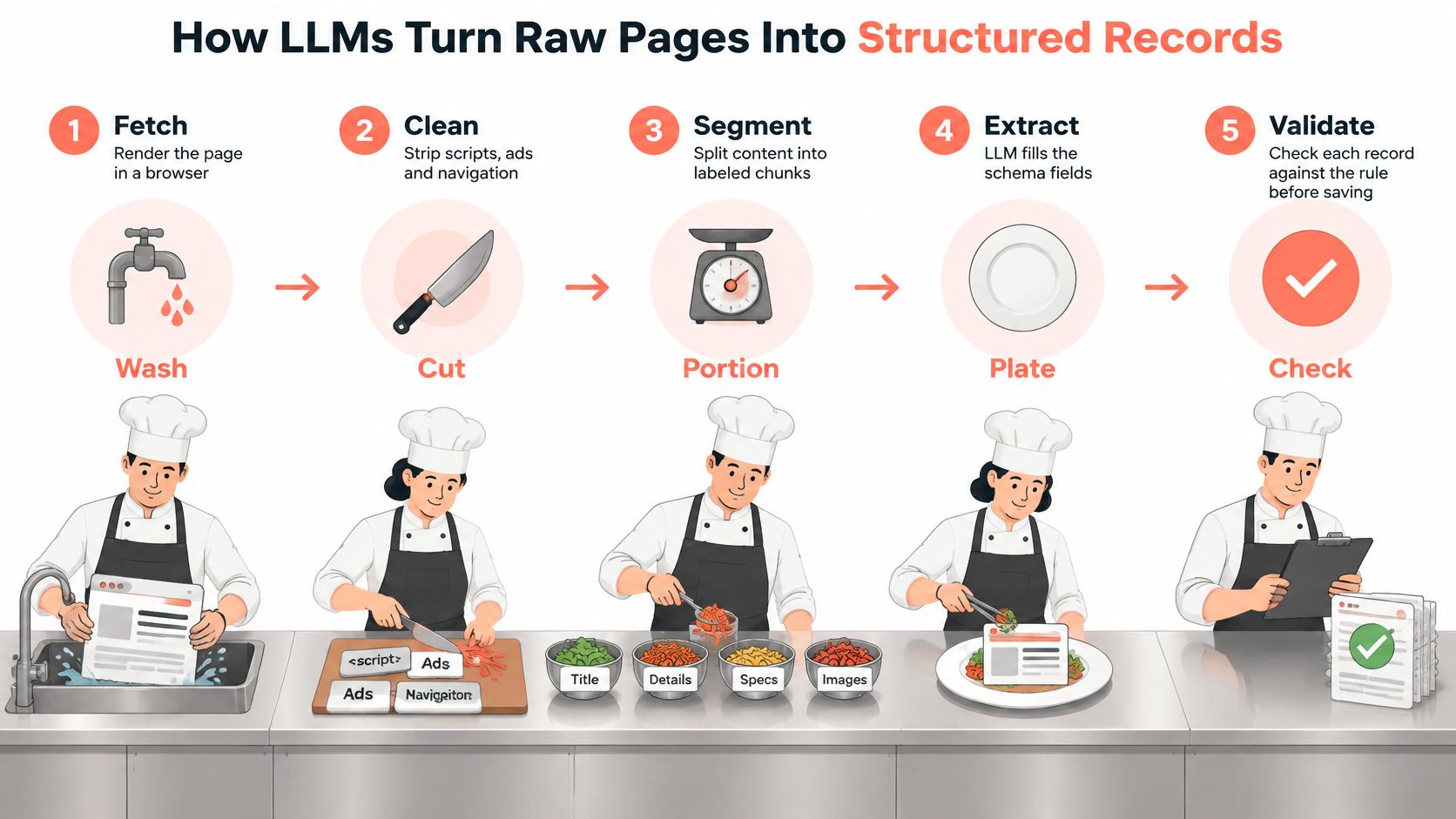
The seven handoffs
- Fetch and render. Download the page and run JavaScript where the grid is built in the browser. Skipping render means you extract a shell.
- Strip the noise. Drop scripts, nav bars, and cookie banners so the model reads content. Cleaning is how you cut token cost before the first prompt.
- Chunk to the context limit. Split long pages into labeled pieces that fit the model window. A chopped page beats a truncated one.
- Send a schema, not a wish. Name each field, its type, and the allowed values. A schema beats a free-text prompt because the model has fewer places to improvise.
- Parse and reject. Anything that fails the schema is not a record. A missing price should come back as null, not a guess from a nearby card.
- Merge and dedupe. Join chunks on a stable key, such as product ID plus URL. Duplicates from pagination are the same dish served twice.
- Store the evidence snippet. Keep the sentence or cell the value came from. Later you can tell an observation from an inference.
Where a typed field still lies
The failure that fools new pipelines is a price copied from a related product. It is a number, so the type check passes. The snippet check fails, because that number never appeared next to this SKU.
Sample twenty records from the first run and match every field to its snippet before you trust the batch.
How Browser Agents Navigate Pages Through MCP and CDP
Picture a driver in the seat, not a parser on a file. The driver reads the screen, notes what is on it, picks one action, and looks again. That loop is a browser agent.

CDP, the Chrome DevTools Protocol, is the control channel into the browser. MCP, the Model Context Protocol, is how a client such as Claude Desktop, Cursor, or Cline calls browser tools without you hard-coding every click. Our MCP server exposes 20 tools on one shared browser, launched without Playwright's automation flag so navigator.webdriver stays false.
A supplier portal, step by step
Say the prices live behind a login on a supplier portal. The agent opens the sign-in page, fills the form, waits for the catalog, sets a category filter, walks pagination, and pulls the table. Fixed selectors never had to learn that path. They also never had to notice the session died on page three.
Tools you will call:
- open and read_page: Open a URL and read what came back, including HTTP status and a page state.
- page_elements: Up to 200 visible links, buttons, and inputs, one per line, with a CSS selector where one exists.
- fill_field and press_key: Type into inputs and send keys.
- wait_for: Pause until a selector or text appears, instead of sleeping on a guess.
- get_page_html: Take the DOM after interaction, which is what extraction should see.
- save_profile and load_profile: Keep a logged-in identity so the next run does not start at the login wall.
Stop on a bad page state
Both the page load and read_page return http_status and page_state. The state is blocked for HTTP 401, 403, 429, or 503, empty when visible text is under 20 characters, and ok otherwise. The agent should stop on blocked or empty. Parsing a block page only invents rows.
Only http and https URLs are accepted. file:, view-source:, chrome:, devtools:, and every other scheme are refused, so a prompt cannot point the browser at the local machine.
A loaded page is still not the goal. The WebLists benchmark sets 200 extraction tasks across 50 websites. An agent can reach the right screen and still return an incomplete or schema-invalid dataset. Judge navigation, interaction, extraction, and schema fit together. The checks in the kitchen line, and the pilot at the end, are where that judgment happens.
A short walkthrough of an agent driving a real browser makes the loop easier to see than a tool list alone.
Watch the video on YouTubeWhat Browser Agents Cost Compared With Structured Access
On the same five tasks, a browser agent and a structured API did not have a close call. The browser route finished none of them. The structured route finished all five, for less money and less time. The figures below come from one reported five-task comparison, so treat them as directional. Your site, model, and prompt will move the numbers.
Browser agent versus structured API on five tasks
| Metric | Browser automation | Structured API |
|---|---|---|
| Tasks completed successfully | 0 of 5 | 5 of 5 |
| Average cost per run | about $1.53 | about $0.49 |
| Input tokens | about 3.7 million | about 577,000 |
| Average latency | about 457 seconds | about 141 seconds |
| Runs reaching the 80-turn cap | 5 of 5 | Not reported |
Why the turns pile up
The gap is operational, not a verdict on model quality. A browser agent must look at the page, read DOM or visual state, recover from a wrong click, and keep a long action list. Each extra turn is another chance for a timeout, stale state, an anti-bot interstitial, or extraction drift. Tokens grow because every observation goes back into the prompt. Hitting an 80-turn cap on every browser run means the loop never decided it was done.
Track cost per valid record, not cost per session. A run near $1.53 that returns an incomplete set costs more per usable row than a run near $0.49 that returns the full schema. A long failure can cost more than a short one.
A tiered path
- Start with a structured data or search-extraction endpoint when it already exposes the fields. You skip the browser tax.
- Escalate only the pages that need interaction. Login walls, filters, and pagers justify a browser. A static article does not.
- Cap turns and wall-clock time per task. A cap turns a runaway loop into a failed task you can see.
- Cache stable pages and intermediate results. Do not pay to re-read a header that did not change.
- Validate before any retry. Retrying an invalid schema just repeats the bill.
If the same source is available as structured data, pay for the browser only on the pages that truly need a click.
Teams running this at volume usually separate the cheap bulk path from the interactive path, which is the point of web scraping at scale.
Integration Patterns for Playwright, Puppeteer and Agents
Pick the lightest pattern that still returns a valid row. Heavier patterns add cost and new ways to fail. Playwright and Puppeteer stay the base when a page must render. LLM extraction sits after that render. It does not replace it.
Integration patterns and when to use them
| Pattern | Use when | Main trade-off |
|---|---|---|
| Playwright or Puppeteer with CSS selectors | Fixed layouts and known fields | Breaks on redesigns |
| Rendered page plus LLM extraction | Varied layouts or unknown schema | Token cost per page |
| Agent over MCP | Interactive or login-gated flows, exploration | Highest cost and turn count |
| Agent attached to a CDP endpoint | Sharing an existing browser session with a test or scraper | Session state and cleanup management |
| Playwright or Puppeteer with a CDP endpoint shared by an agent and a scraper | Repeatable QA and scraping on one browser | Session state and cleanup management |
Where a browser SDK fits
Clearcote Labs ships SDKs for Playwright and Puppeteer in Python, Node, and .NET. launch() returns a normal Playwright browser, so existing scripts keep their API. For self-hosted runs you install from pip, npm, or NuGet, bring your own proxies, and run on your machines or our Docker image, which can expose a standing CDP endpoint. That endpoint is one way to share a single browser between a scraper and an agent, which is the last two rows of the table. Other stacks people compare include Camoufox, Patchright, nodriver, playwright-stealth, Multilogin, GoLogin, and Kameleo. The Playwright web scraping path is usually enough until a page demands interaction.
How to choose
- Known fields on static HTML. Skip the model. Selectors are cheaper and easier to diff when they break.
- Pages vary, fields are still public. Render, then add LLM extraction with a schema.
- The row appears only after a click or a login. Add a browser. Do not add an agent yet if the clicks are fixed.
- The path itself is unknown. Add an agent for exploration. Once the path is stable, collapse it back to scripted steps so you are not paying turn-by-turn forever.
Robots Rules, Terms and Detection Risks to Weigh
A common belief is that a permissive robots.txt equals permission to collect. It does not.
The Robots Exclusion Protocol started in February 1994, when Martijn Koster proposed robots.txt so a site could say which crawlers may touch which paths. The IETF standardized it as RFC 9309 in September 2022. It stays advisory. It states a preference. It does not technically stop a non-compliant crawler from requesting the URL. Copyright, database rights, privacy law, and the contract in the terms can still forbid the use you have in mind.
Resistance has grown with model training. An audit of 14,000 domains tied to C4, RefinedWeb, and Dolma found that, between 2023 and 2024, newly added robots.txt restrictions fully covered more than 5% of all tokens in C4 and more than 28% of its actively maintained critical sources. Terms-of-service restrictions covered about 45% of C4, as summarized in the web scraping rules notes. Access policy is now part of the data design, not a footer.
Beyond the text file
European guidance treats scraping for generative-AI training as processing when it extracts, cleans, structures, or stores personal data. That processing needs a documented legal basis, such as a legitimate-interest balancing test. robots.txt does not settle that test. It also does not settle a licence that reserves text and data mining.
What gets a run noticed
Detection usually starts with behavior, not with a secret header.
- Request bursts. A human does not open 40 product URLs in a second.
- Mismatched browser signals. The user agent, the TLS fingerprint, and the JavaScript surface should describe the same browser.
- Inconsistent identity across pages. A new device on every request looks like a fleet, not a returning reader.
No tool is undetectable. A block, a challenge page, or a 429 is a signal to slow down or stop, not a puzzle to route around. Checking a configuration against CreepJS, BrowserScan, and Pixelscan tells you whether your own signals already disagree.
Before a run, ask four questions. Is there an API? What do the terms allow for your purpose? What personal data appears in the fields? What request rate would still look like a careful reader?
Provenance Fields Every AI Scraping Record Needs
Crawl success is the wrong unit of quality. Defensible lineage is the right one. The question to answer for every row is simple. What evidence lets you later show permission, purpose, accuracy, and deletion?
Provenance fields for each AI-scraped record
| Field | Why it matters | Example value |
|---|---|---|
| Source URL | Shows where the data came from | Product page URL for SKU 4412 |
| Fetch time | Proves when the page content was observed | 2026-03-14T08:12:03Z |
| Content hash | Shows exactly what was seen, for later comparison | sha256 of the raw HTML snapshot |
| Extraction version | Explains why a field changed between runs | extractor 1.4.2, schema 3 |
| Crawler identity | Identifies who collected the data | user agent string and operator name |
| Applicable licence | Defines permitted use and retention | terms snapshot ID or licence name |
| Robots or TDM decision | Records whether access was allowed at fetch time | allowed, tdm-reservation absent |
| Transformation history | Shows what cleaning, redaction, or merging happened | PII removed at step 4, merged on product ID |
How an audit uses the row
The content hash proves what was on the page, so a later redesign does not rewrite history. The extraction version explains why a price field changed between Monday and Thursday even though the hash did not. The transformation history shows whether personal data was removed before anyone used the row for training or retrieval.
Guidance aimed at machine-learning scrapes notes that the EDPB recommends recording timestamps, using reliable sources, and validating data before AI training so accuracy duties are more than a hope. Those three habits map directly onto fetch time, source URL, and the schema reject step.
Keep raw snapshots for a defined window. Keep derived records only as long as the licence allows. Purge on opt-out. Each run, re-check a small random sample of rows against the stored snapshots. When a deletion request arrives, find rows by source URL and hash, delete them, and log the deletion. A crawl log that only says "200 OK" cannot do that job.
Confirm Your First Pipeline Before Scaling It
Pick one pipeline. One site. One known schema. Run a pilot of 50 to 100 pages before you talk about a fleet.

- Write the schema and the rule for a valid record. Name required fields, types, and what null means. A row missing a required field is a failure, even if the browser returned 200.
- Choose the lightest pattern that fits. Static and stable means selectors. Varied layout means render plus extraction. Interaction means a browser, and an agent only if the path is still unknown.
- Set turn, time, and request-rate caps. Caps make a bad loop visible in minutes instead of in the invoice.
- Store the provenance fields on the first run. URL, fetch time, hash, extraction version, crawler identity, licence, robots or TDM decision, and transformation history. Adding them later means you cannot explain the pilot itself.
- Measure cost per valid record and completeness per field. A cheap session full of nulls is a miss. A complete cheap session is the one you scale.
- Check browser coherence before any larger run. Our free fingerprint test runs coherence checks on whatever browser opens it, each with a plain-English explanation. Cross-check with CreepJS, BrowserScan, and Pixelscan. A clean result is evidence, not a guarantee, because no tool is undetectable.
Scale only if cost per valid record stays flat across batches and the sample confirms the fields. If it does not, fix the schema first, or move that source to structured access. Do not buy more browsers to hide a bad record.
Clearcote Labs builds a browser and SDKs so Playwright, Puppeteer, and MCP agents can share a coherent identity while you measure cost per valid, traceable record. If you are about to pilot one site, start with the fingerprint checks and a capped run before you scale the fleet. Visit Clearcote Labs when you want the browser, the SDKs, and the MCP server in one place.