
The most popular advice about Playwright web scraping starts too late: launch a browser, open the page, then work out how to extract the data. Start by asking whether you need the browser at all. If an authorized HTTP request already returns the records, rendering the interface adds work without improving the dataset.
A production scraper needs more than a successful click. It needs a permission check, explicit readiness conditions, validated records, and a recovery path that doesn't repeat unsafe actions. Treat Playwright as the expensive execution layer for pages that require browser behavior, not as the default transport for every URL.
Table of Contents
- Why Playwright Fits Modern Scraping Workflows
- Setting Up a Playwright Scraping Project
- Handling Dynamic Content Without Fixed Delays
- Extracting Reliable Data and Scaling Responsibly
- Proxies, Sessions and Anti-Bot Countermeasures
- Comparing Browser Approaches and Where Clearcote Fits
- Deploying Your Scraper in Docker or Hosted Runtimes
Why Playwright Fits Modern Scraping Workflows
An empty HTML shell isn't an empty dataset. A page may fetch its records after JavaScript runs, depend on cookies, or load content only after an interaction. That's where browser automation earns its cost.
Microsoft released Playwright as an open-source project on January 31, 2020, followed by its first stable release on May 6, 2020, roughly 96 days later; that stable release supported Chromium, Firefox, and WebKit, according to the Playwright project history). The practical distinction is broader than browser choice: you can reproduce application behavior inside a full browser context instead of assuming the initial HTML contains everything.
A raw HTML fetch and a browser session answer different questions. The fetch tells you what the server returned for that request. The browser lets the application execute, consult storage, invoke browser APIs, and respond to interactions before you inspect the result.
Establish the extraction boundary
Before writing selectors, inspect the initial document and the application's network traffic. Decide what supplies the authoritative records and what merely displays them.
| What you observe | Engineering implication |
|---|---|
| Required fields already exist in the response HTML | Investigate parsing without browser execution |
| An interaction starts a background data request | Inspect the response and its authorization requirements |
| Records depend on client-side state and browser APIs | Keep browser execution in the candidate design |
| Rendering behavior differs between engines | Validate the relevant engine rather than assuming equivalence |
Don't confuse discovering an endpoint with receiving permission to call it independently. Access rules still apply to the eventual extraction method.
Keep browser work separate from pipeline work
A browser worker should have a narrow contract: accept a task, return validated records or a classified failure, and release its resources. Scheduling, dependencies, and downstream delivery belong outside the page script. For that wider design, digna's resource on orchestrating reliable data workflows is useful context for thinking beyond individual scraping jobs.
Practical rule: Use a browser to reproduce required application behavior, not to compensate for an extraction path you haven't investigated.
The strongest candidates are JavaScript-rendered routes, interaction-dependent listings, and flows that require browser-maintained state. A static document doesn't become a better scraping target because you opened it in Chromium.
Setting Up a Playwright Scraping Project
Keep the first project deliberately small. Use Node.js for this example, with the target, timeout, and output destination supplied through configuration rather than embedded throughout the extraction code.
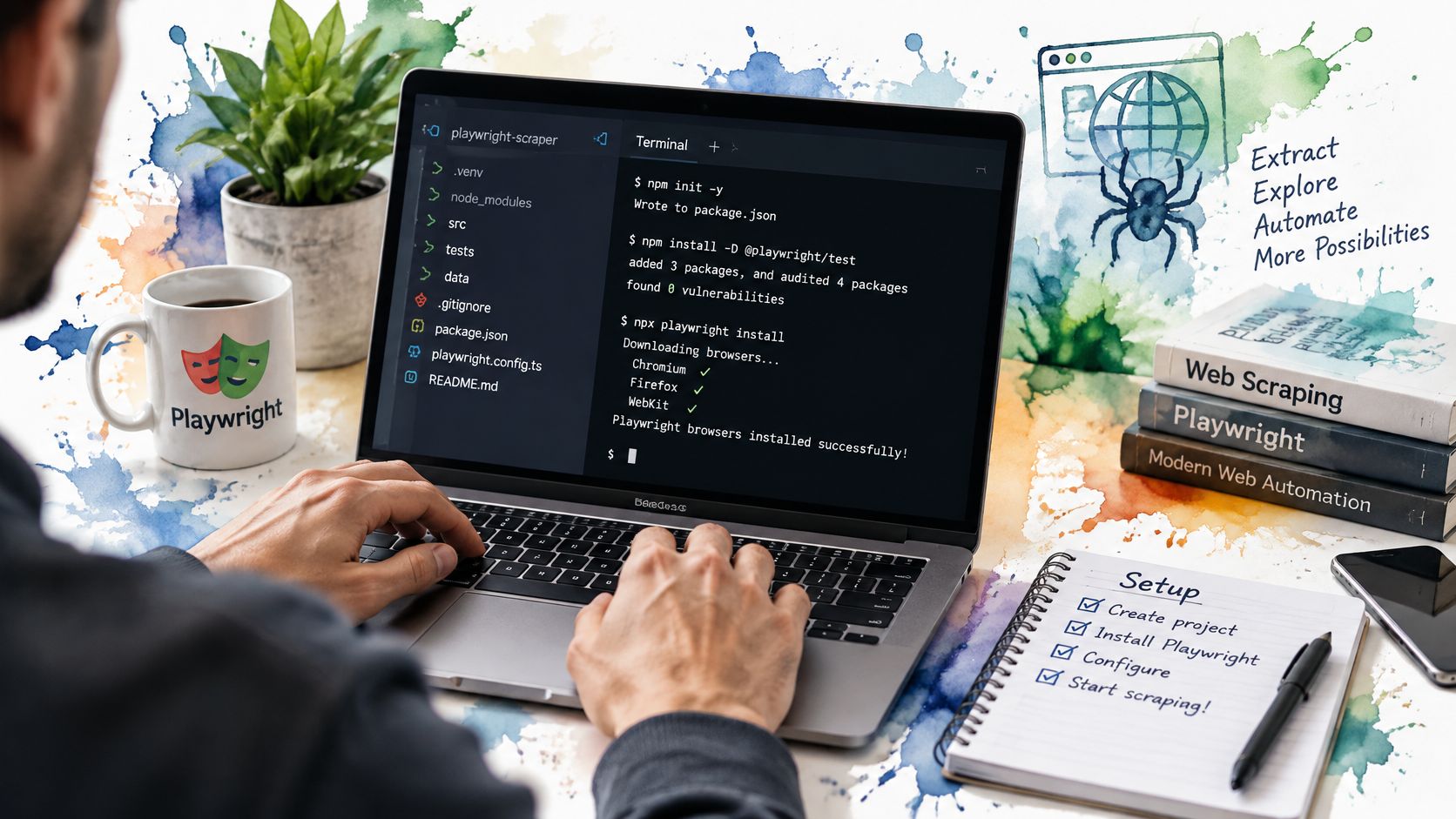
The setup below separates the terminal environment from the scraper itself.
Install the package and browser
Run these commands in your terminal:
mkdir playwright-scraper
cd playwright-scraper
npm init -y
npm install playwright
npx playwright install chromium
Installing the package and installing the browser are separate setup steps. Keep the project lockfile with your code, and rebuild the runtime deliberately when you change dependencies.
Use these configuration boundaries:
- Target URL: Supply a page you're authorized to test through
TARGET_URL. - Timeout: Supply a positive millisecond value through
SCRAPE_TIMEOUT_MS, chosen for your workload. - Output destination: Keep
OUTPUT_PATHin configuration before adding persistence.
Save this as config.cjs:
module.exports = {
  targetUrl: process.env.TARGET_URL,
  timeoutMs: Number(process.env.SCRAPE_TIMEOUT_MS),
  outputPath: process.env.OUTPUT_PATH
};
This walkthrough offers a visual companion to the initial setup.
Watch the video on YouTubeRun a minimal browser script
Create scrape.cjs with the following code. It deliberately prints a title rather than pretending that a generic selector can extract every site's records.
const { chromium } = require('playwright');
const config = require('./config.cjs');

async function main() {
  if (!config.targetUrl) {
    throw new Error('Set TARGET_URL before running');
  }
  if (!Number.isFinite(config.timeoutMs) || config.timeoutMs <= 0) {
    throw new Error('Set a positive SCRAPE_TIMEOUT_MS');
  }

  const browser = await chromium.launch();
  try {
    const context = await browser.newContext();
    try {
      context.setDefaultTimeout(config.timeoutMs);
      const page = await context.newPage();
      const response = await page.goto(config.targetUrl);

      if (!response || !response.ok()) {
        throw new Error('Navigation did not return a successful response');
      }

      console.log({
        url: page.url(),
        title: await page.title()
      });
    } finally {
      await context.close();
    }
  } finally {
    await browser.close();
  }
}

main().catch(error => {
  console.error(error);
  process.exitCode = 1;
});
Set the required environment variables in your shell, then run node scrape.cjs. A successful title read confirms the basic launch and navigation path, not that application data is ready.
Start each independent run with a fresh browser context so unrelated tasks don't inherit cookies or storage. Reuse state only when the task explicitly belongs to the same authorized session.
Handling Dynamic Content Without Fixed Delays
A clickable button doesn't mean the application has finished loading its records. Playwright's actionability checks cover conditions such as visibility, stability, enabled state, and whether an element receives events; they don't certify business-level readiness, as the actionability documentation explains.
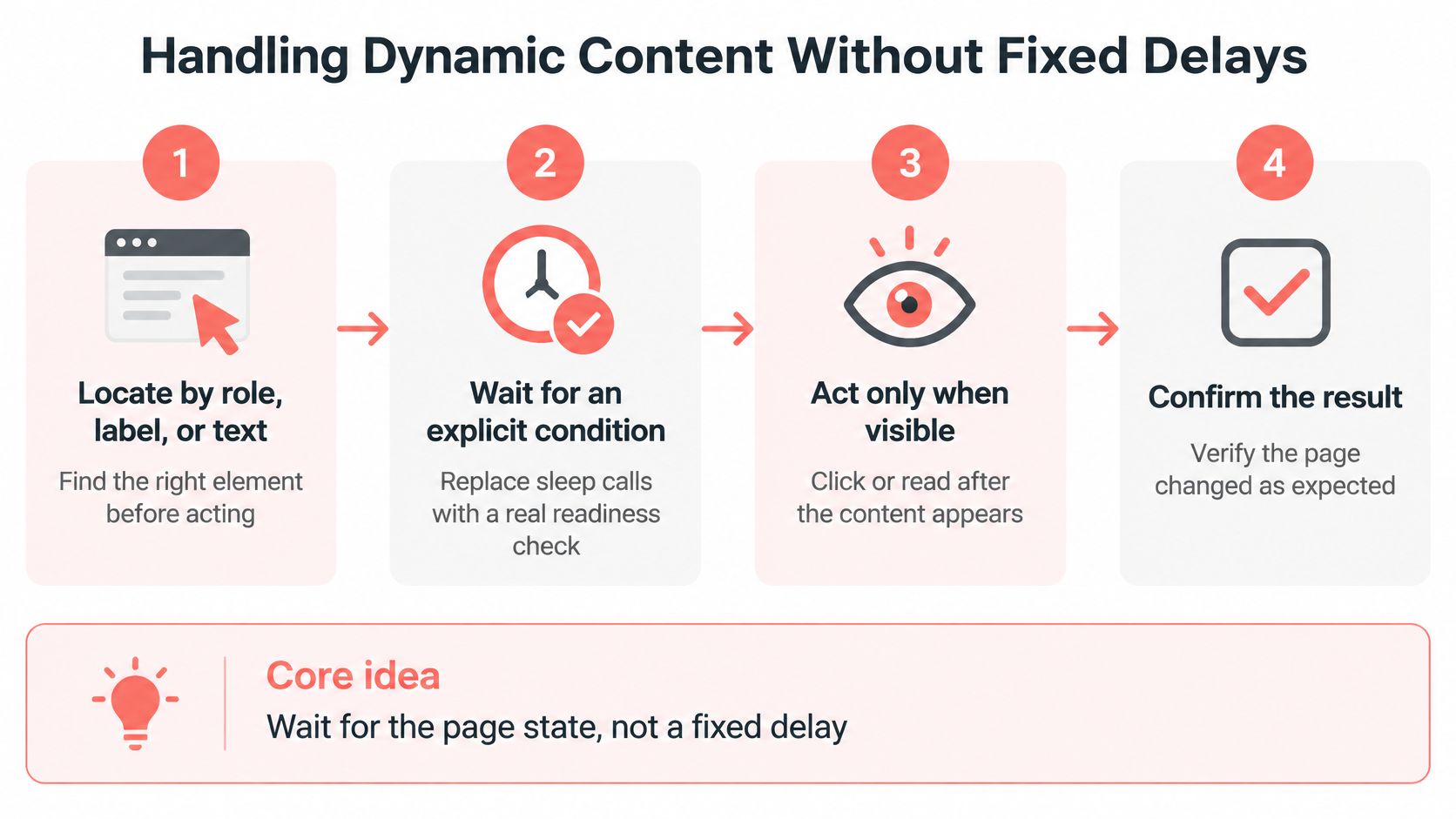
Model extraction as state transitions. Locate the control, register the expected result, perform the action, then validate what changed. A fixed sleep expresses none of those conditions.
The workflow is easier to reason about when each interaction has an explicit completion signal.
Register the response before clicking
Consider a paginated listing with a button named “Next.” The following function is an adaptable pattern, not a claim about a particular site's endpoint or payload schema. Supply the response matcher and validator after inspecting your authorized target.
async function readNextPage(page, matchesResponse, validatePayload) {
  const next = page.getByRole('button', {
    name: 'Next',
    exact: true
  });

  const responsePromise = page.waitForResponse(matchesResponse);
  const [response] = await Promise.all([
    responsePromise,
    next.click()
  ]);

  if (!response.ok()) {
    throw new Error('Listing response was unsuccessful');
  }

  const contentType = response.headers()['content-type'] || '';
  if (!contentType.includes('application/json')) {
    throw new Error('Expected a JSON listing response');
  }

  const payload = await response.json();
  return validatePayload(payload);
}
Match the request precisely enough to distinguish pagination from unrelated background traffic. Where relevant, include the expected method, cursor, and query parameters, not just a broad substring shared by several endpoints.
The validator should reject application-level errors, missing record keys, and unexpected pagination metadata. If the response contains the authoritative records, read them there rather than copying a table while the application replaces its rows.
Distinguish rendering from completion
For DOM extraction, prefer role, label, or test-ID locators, with text and CSS as fallbacks. Wait for a domain-specific marker, a confirmed URL transition, or the expected record condition before reading.
- Infinite scrolling: Register the expected data response before scrolling the loading trigger into view.
- Virtualized lists: Don't interpret the current DOM row count as the total dataset. Track record keys across loads or use the authorized backing payload.
- Pagination completion: Require an explicit end condition, such as exhausted cursor metadata, instead of treating a timeout as proof of completion.
Wait for evidence that the application reached the state you need, not for time to pass.
Avoid force as a routine fix for failed clicks. An obscured button often reveals a cookie banner, overlay, or incorrect page state that the scraper should handle explicitly.
Extracting Reliable Data and Scaling Responsibly
A full browser is often the most expensive way to collect a page's data. Use the lightest method that fits each page type: an authorized JSON endpoint for structured records, static HTML parsing for server-rendered pages, and Playwright when JavaScript or browser interactions are required. Keep the browser as the last resort, not the default.
Before running any collection job, check permission, applicable crawl preferences, terms, data categories, and operational limits. Record the decision and review date. A page rendering successfully in Playwright does not establish authorization to collect it.
Benchmark against a representative set of URLs and repeat runs. Track recovered records, duplicate and empty-result rates, median and tail latency, bandwidth, browser memory, and retry causes. Publish results from your own tests rather than borrowing a success rate from a different site or workload.
Classify failures before choosing retries
| Failure category | Evidence to retain | Likely investigation |
|---|---|---|
| Navigation | Response status, final URL, request failure | Connectivity, redirects, access state |
| Selector | Locator, screenshot, relevant HTML | Changed markup, overlay, wrong page |
| Parsing | Payload shape and validation error | Schema drift, optional fields, error envelope |
| Upstream API | Request identity and response metadata | Service failure, invalid cursor, authorization |
An aggregate success percentage can hide the cause of bad results. Keep failure categories separate so retries address recoverable problems instead of repeating broken selectors or invalid requests.
Use browserContext.route() or page.route() to block or modify traffic. Use request and response listeners for observation. Keep those responsibilities separate so diagnostic code cannot be mistaken for an interception rule.
Make bad outcomes reproducible
Capture the request that supplies the records, with credentials and personal data redacted. In a controlled test environment, replay empty payloads, delayed responses, and HTTP 500 errors using the Playwright network interception documentation. Confirm that the scraper rejects invalid output and resumes from the correct checkpoint.
Test resource blocking for correctness, too. Removing unnecessary assets can reduce browser work, but only if required interactions and extracted fields still behave as expected.
- Deduplicate by stable keys: Use source record identifiers where available, not row position.
- Persist checkpoints after durable writes: Don't mark a cursor complete before its records are committed.
- Bound retries: Apply exponential backoff to recoverable failures and preserve the final cause.
- Protect non-idempotent actions: Don't automatically replay a submission whose outcome is unknown.
For time-sensitive datasets, odds scraping with PolyBackTest offers a concrete example of questions to ask about record identity and observation timing. It is not a performance benchmark. For queue and persistence design, see this guide to web scraping at scale.
The acceptance criterion is correct records that survive restarts, not a browser process that exits cleanly.
Proxies, Sessions and Anti-Bot Countermeasures
A proxy isn't a permission mechanism. Neither is a browser that successfully renders a restricted page.
Technical access and authorization are different decisions. Robots.txt expresses crawl preferences, but it doesn't resolve contractual terms, authentication boundaries, or personal-data obligations. The distinction is discussed in this scraper ethics and limits guidance; commercial collection still needs a separate authorization analysis.
Review permission and session requirements before tuning transport settings.

Make preflight auditable
Record the decision, not merely a successful request:
- Crawl preferences: Fetch and retain the applicable robots.txt alongside the review time.
- Terms and authorization: Identify the governing terms and document any separate access agreement.
- Data categories: Flag personal, sensitive, account-bound, or otherwise restricted information.
- Operational limits: Apply domain-specific pacing and concurrency limits.
- Purpose and retention: Record why the data is collected, who receives it, and when it's deleted.
Treat this as an engineering gate with reviewable evidence, not a legal conclusion generated by the scraper. If permissions are unclear, pause collection and seek appropriate review.
The need for an explicit gate isn't hypothetical: a 2025 empirical study reported poorer compliance with stricter robots.txt directives and found that some crawler categories rarely checked the file at all, according to the large-scale crawler compliance study.
Preserve session consistency
Within an approved session, keep cookies, storage state, and the configured network route together. Store authentication material securely, and don't share a state file between unrelated identities.
Rotate a proxy only for a documented operational reason, such as an approved regional test. Don't make rotation the automatic response to a challenge. Changing the exit route while retaining an authenticated session makes diagnosis harder because you've changed several assumptions at once.
Treat challenge pages, unexpected redirects, and unexplained content changes as suspected access failures, not valid empty results. Preserve evidence, reduce activity, and inspect the session before continuing. The guide to Playwright bot detection provides additional context for that investigation.
Stop condition: If continuing requires crossing an unapproved authentication boundary, ignoring an explicit restriction, or collecting prohibited data, stop even when the browser can proceed.
Consistency helps reproducibility. It doesn't guarantee acceptance, and it doesn't convert prohibited collection into authorized work.
Comparing Browser Approaches and Where Clearcote Fits
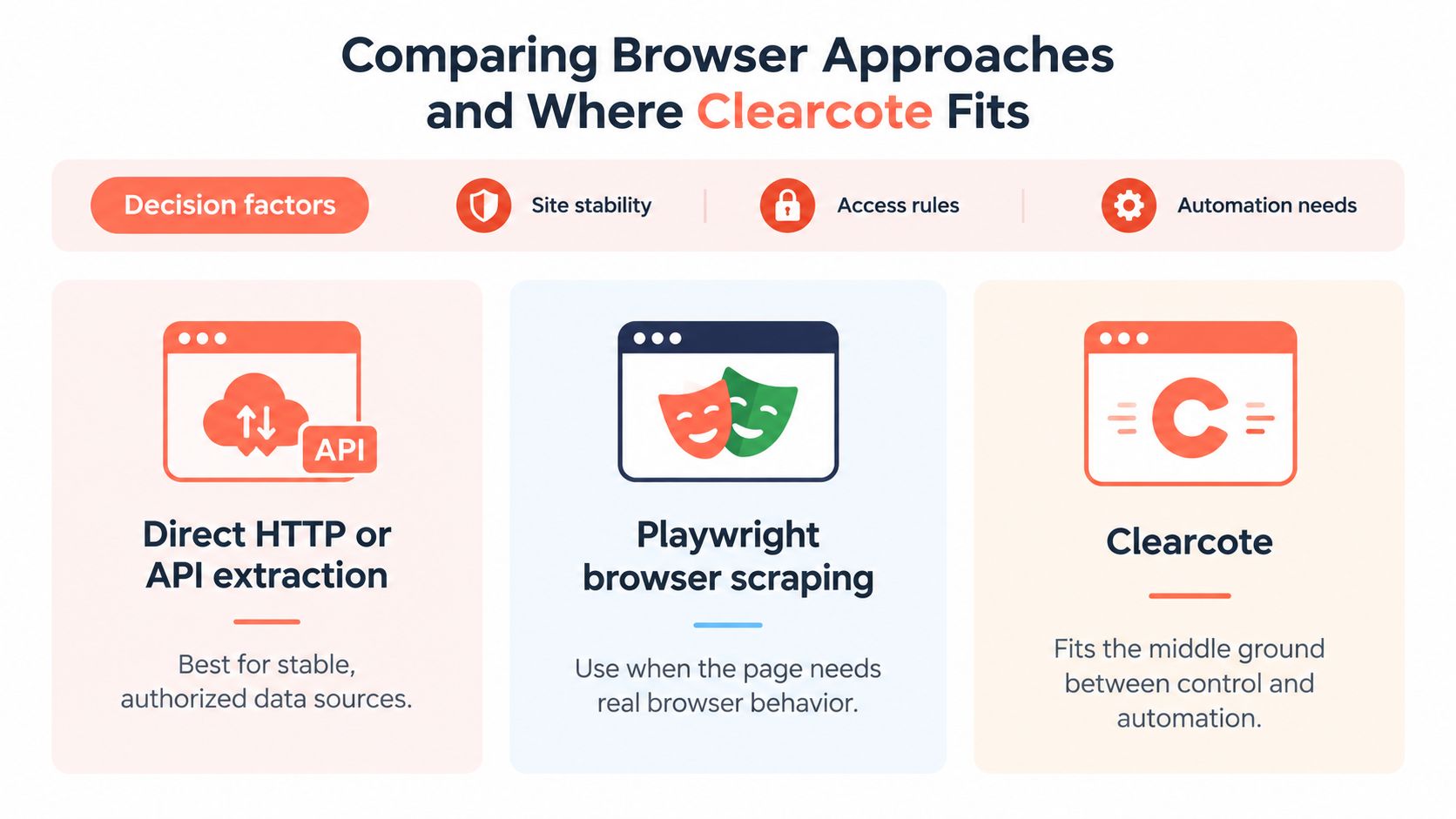
Choose the execution path per page type, not per repository. A scraper can use direct extraction for stable resources and reserve browser execution for the parts that require it.
Full browsers consume meaningful CPU and memory, and higher concurrency requires capacity planning, as this browser infrastructure comparison discusses. My recommendation is to make hybrid routing the default architecture to evaluate, rather than assuming every task should launch the same runtime.
| Approach | Appropriate workload | Main trade-off |
|---|---|---|
| Direct HTTP or API extraction | Stable, authorized HTML or structured resources | You must handle response semantics and schema changes |
| Full Playwright execution | Interaction-dependent routes and browser-state workflows | Rendering and browser lifecycle add resource costs |
| Hybrid routing | Mixed targets with different execution requirements | Routing rules and fallback behavior need maintenance |
Compare equivalent outputs
Run each candidate against the same approved corpus under identical domain limits. Compare browser startup time, peak memory per context, request volume, retry rate, and downstream record quality. Keep failed and empty results in the comparison rather than timing only successful pages.
A useful routing policy chooses the least expensive path that meets the data contract. Browser fallback should have a named reason, such as missing required rendered content, rather than activating after every parsing error.
For a listing-monitoring workload, a page to compare rental listing alerts provides a concrete requirements prompt: determine whether you need new-record detection, changed fields, or rendered interaction before choosing infrastructure. It isn't evidence that any particular extraction method will work on a target.
The visual below separates extraction choices from an optional browser integration.
Use identity controls for reproducibility
Clearcote is an optional browser implementation within the browser branch, not a replacement for HTTP extraction. It provides an open-source Chromium fork with engine-level fingerprint controls and drop-in Playwright SDKs for Python, Node.js, and .NET, with Windows x64 and Linux x64 support.
Its seeded identities are designed so the same seed reproduces the same device identity. That can support repeatable QA and controlled comparisons where changing browser characteristics would otherwise complicate diagnosis.
The publisher offers an open build and a GitHub-linked free licensed tier, with Pro for higher concurrency. Evaluate integration behavior, identity coherence, and operational fit on your own authorized workload; don't treat fingerprint controls as proof that a site will permit or accept automated access.
Deploying Your Scraper in Docker or Hosted Runtimes
Choose the runtime you can reproduce and operate. Moving a script off a laptop changes browser lifecycle, filesystem assumptions, secrets handling, and recovery behavior. A successful local run doesn't establish that those boundaries are correct.
For a small internal job, local execution can be sufficient if someone owns scheduling, updates, and failure review. For a recurring pipeline, I favor a containerized worker with explicit inputs, durable outputs, and an external task queue.
Package the execution environment
A Docker image lets you keep the browser version and required system dependencies consistent between development and deployment. Build package installation and browser installation into the image rather than downloading binaries when a scheduled job starts.
Use the Playwright Docker deployment guide as a starting point for the container boundary, then test your own launch, shutdown, and persistence paths.
| Runtime | Good fit | Responsibility to resolve |
|---|---|---|
| Local process | Development and supervised internal tasks | Machine availability and manual maintenance |
| Docker worker | Repeatable scheduled or queued extraction | Image updates, capacity, and durable state |
| Hosted browser | Teams outsourcing browser infrastructure | Session lifecycle, access controls, and usage monitoring |
Don't bake session cookies or proxy credentials into an image. Inject secrets at runtime, and write records and checkpoints somewhere that survives worker replacement.
Test attachment and shutdown explicitly
A standing CDP endpoint lets a compatible script attach to a running Chromium browser instead of launching its own. Framework-agnostic attachment can preserve much of the extraction logic, but context ownership and cleanup still need deliberate handling.
Confirm which component creates the session, which component closes it, and what happens when the client disconnects. Test a lost connection during extraction and verify that restarting the worker neither loses committed records nor repeats unsafe actions.
Use a compact deployment acceptance checklist:
- Reproducibility: Record the browser build, package lockfile, configuration, and extraction revision.
- Observability: Retain classified errors and redacted diagnostic artifacts.
- Recovery: Verify checkpoint resumption after forced termination.
- Capacity: Set concurrency from measured resource use and approved domain limits.
Before scheduling recurring collection, run the example against an authorized page in the intended environment. Inspect the extracted output and fingerprint test results, then verify that the worker shuts down and releases its browser resources.
Clearcote Labs offers an open-source Chromium fork with engine-level identity controls and Playwright-compatible deployment options. Visit Clearcote Labs, download the open build, and run the example script against a page you're authorized to test. Review the fingerprint coherence results before choosing local, Docker, or hosted execution.