
The most popular advice about web scraping with Python is to start with Requests and Beautiful Soup, then reach for a browser or proxies when something breaks. That's backwards. Start by deciding what a valid record looks like and how you'll detect a bad batch. Otherwise, a faster scraper just delivers empty prices sooner.
Treat the scraper as a four-stage data contract: fetch, parse, select, store. Each stage needs an observable outcome. An HTTP response proves that a server answered; it doesn't prove that you collected the records your downstream users need.
Table of Contents
- Pick the Python Stack for the Page
- Write the Collection Decision Before You Run
- Build the Static Scraper in Order
- Open Playwright When the HTML Is Empty
- Scale Fetches Without a Retry Storm
- Test the Dataset Not the Status Code
- Run the Two-Path Check Tomorrow
Pick the Python Stack for the Page
Choose the cheapest stack that can satisfy the field contract. Don't pay for browser rendering when the response already contains the product data.
Python scraping stacks by page type
| Stack | Use it when | Measured or typical cost | It does not solve |
|---|---|---|---|
| requests + lxml | Static HTML, stable selectors | Small HTTP client and direct parser; benchmark below | JavaScript-rendered DOM or access restrictions |
| requests + Beautiful Soup | Messy or irregular HTML, small scripts | Convenient navigation API with additional parsing overhead | Scheduling, retries, or JavaScript execution |
| Scrapy | Scheduled crawls with duplicates and throttling | Framework setup for scheduling, retries, pipelines, and resume | Pages that stay empty until JavaScript runs |
| Playwright for Python | Content rendered in the browser | Browser processes, contexts, and rendering work | Economical high-volume static fetches |
| aiohttp + lxml | Many static URLs waiting on network I/O | Connection-pool and concurrency management | CPU-bound parsing or blocked pages |
In the HasData Python scraping benchmark, collecting 200 rows across eight catalogue pages took a median 3.01 seconds with Requests plus lxml, using 43 MB peak RSS and 21 implementation lines, compared with 3.71 seconds and 45 MB for Requests plus Beautiful Soup, approximately 23% slower. That same benchmark kept tested HTTP clients within a 0.7-second band and returned HTTP 403 for plain-fetch stacks on its protected-page probe.
Those are controlled measurements, not a production capacity promise. The small sequential workload excludes network variability, retries, persistence, and politeness delays. A parser's speed also tells you nothing about whether the selected fields are correct.
Leave the baseline only for a specific reason
For a static catalogue, I would start with Requests plus lxml. Configure request behavior before spending time swapping HTTP libraries: explicit timeouts, bounded retries, connection reuse, and response logging are more useful than a marginal client benchmark win.
Choose Beautiful Soup when its navigation API makes irregular markup easier to maintain. You can use lxml underneath Beautiful Soup, but that isn't the same execution path as selecting directly with lxml and XPath.
Move to Scrapy when your script is becoming a scheduler, duplicate filter, checkpoint manager, and pipeline runner. Choose aiohttp when measurements show workers waiting on network responses. Open Playwright when rendering, rather than parsing or access, is the missing capability.
Selection rule: Change the stack to remove a measured bottleneck, not to make the dependency list look production-ready.
Define the job before choosing infrastructure
Suppose your objective is to identify stores currently running ads, rather than collect every product in their catalogues. A focused resource to find active ecommerce advertisers from AdvertiserLeads may fit the discovery task better than building a broad crawler. Evaluate access conditions and output fields before adding collection infrastructure.
For a wider comparison, use the web scraping tools guide to compare operational responsibilities, not just supported languages. The useful question is who handles failures, validates output, and preserves enough evidence to reproduce a disputed record.
Write the Collection Decision Before You Run
A public URL isn't automatic permission to collect and reuse its contents. Before scheduling a scraper, write a collection decision that the pipeline stores alongside its configuration.
The LearnCyberS ethical intelligence guide identifies authentication boundaries, terms, personal-data status, purpose, jurisdiction, and retention as collection considerations, including that GDPR obligations can apply to publicly available personal data while U.S. analysis may distinguish public pages from authenticated areas. Treat that as a reason to document the decision and obtain legal review where needed, not as a blanket legal conclusion.
Make the decision operational
Keep a compact record with:
- Source and access: Entry URLs, authentication requirements, site terms, and robots.txt review.
- Fields and purpose: What you'll collect, why each field is necessary, and who receives it.
- Permission or legal basis: The documented justification and the person responsible for reviewing it.
- Retention and deletion: An expiry condition, the deletion job, and how derived exports are handled.
Robots.txt is neither a universal legal ruling nor something to ignore. It records publisher access preferences that should inform your operating policy.
Drop fields you can't justify. Don't borrow someone else's authenticated session to reach material their account wasn't intended to export.
A collection record should let another person explain what you took, why you took it, and when it will be deleted.
Competitive intelligence also needs limits on interpretation. AdLibrarySpy's guidance to interpret competitor ads without overclaiming is relevant when turning observed content into business conclusions: seeing an advertisement doesn't establish commercial performance.
Separate discovery scope from extraction scope using the crawler versus scraper distinction. An approved product-listing extractor shouldn't become an unrestricted site crawler.
Build the Static Scraper in Order
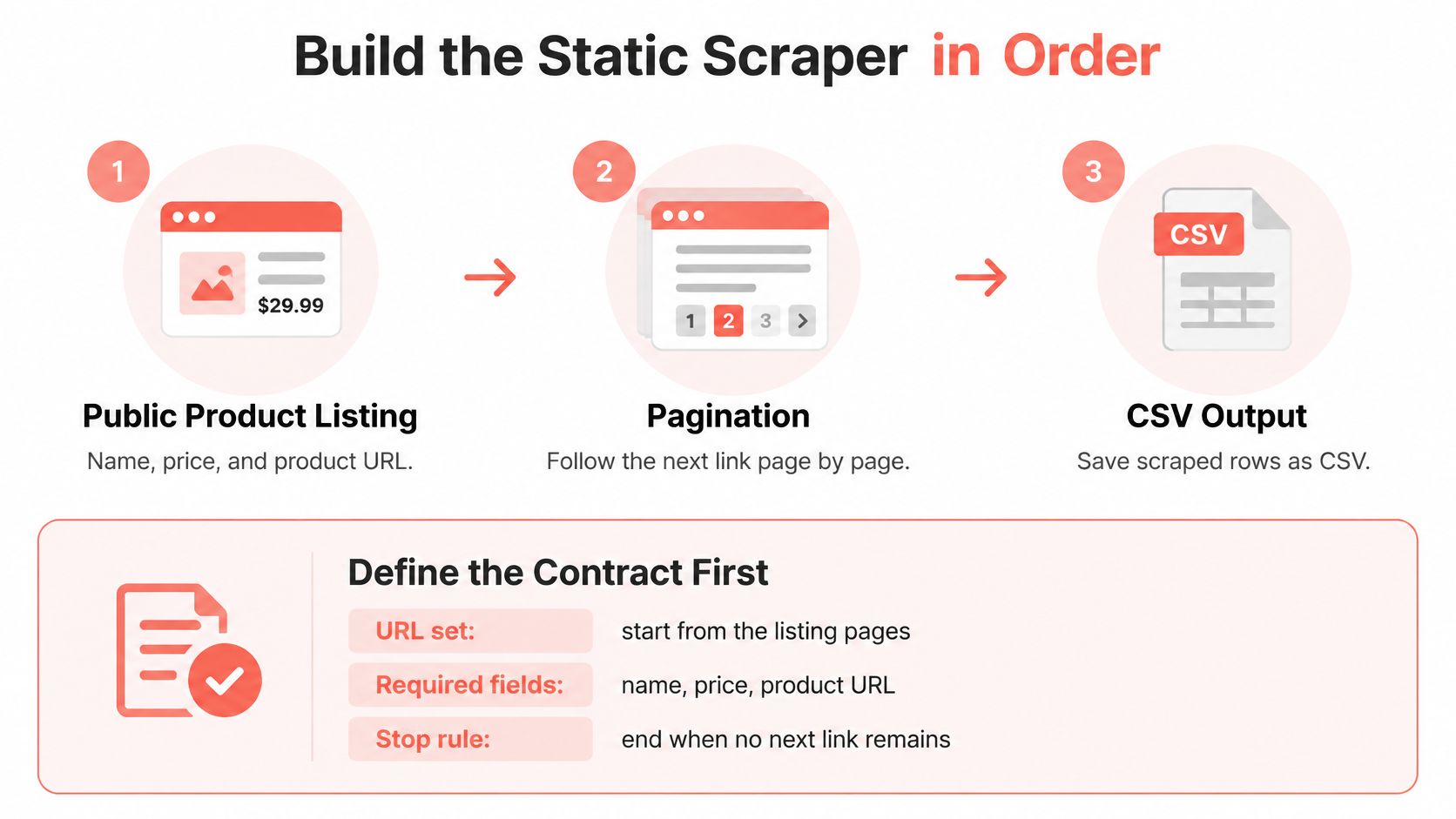
Use a concrete job: collect name, price, and product URL from a public listing, follow its next-page control, and save CSV output. The contract requires all fields, a parseable nonnegative price, approved listing URLs, and a stop when no next link remains.
A rejected record must retain its page and failure reason. Missing product containers are a page-level failure, not permission to write a successful empty file.
Assemble the stages deliberately
The Olostep Python scraping guide describes the modular workflow: Requests retrieves responses, Beautiful Soup parses them, and storage tools preserve extracted records. Keep those responsibilities separable so you can test extraction without making network requests.
- Pin the environment. Install
requests,beautifulsoup4, andlxmlin a locked environment. Uncontrolled dependency changes make parser regressions harder to isolate. - Set request boundaries. Use a Session, a descriptive project User-Agent, and separate connect/read timeouts. The example settings below are starting configuration, not universal targets.
- Bound retries. Retry transient connection failures and selected rate-limit/server responses with backoff. Don't repeatedly retry authentication failures or missing pages.
- Parse and select explicitly. Use Beautiful Soup with lxml. Missing cards or required elements go to rejects instead of becoming blank business records.
- Normalize cautiously. Resolve relative links and collapse whitespace. Parse prices according to the source's documented currency and decimal convention.
- Constrain pagination. Follow the in-page next control, restrict it to the approved origin, track visited URLs, and impose a page cap.
- Write separate outputs. Keep accepted rows and rejects apart. Record response status, size, latency, and final URL in a page manifest.
- Preserve replay evidence. Save raw responses keyed by a hash. A hash identifies a body; it cannot reconstruct a body you didn't retain.
Run a compact implementation
This example expects .product, .name, .price, and a.product-link selectors, with numeric prices in a data-price attribute. Save it as scraper.py; pass an approved listing URL as its command-line argument. The indented listing is executable Python.
import csv, hashlib, sys, time
from decimal import Decimal, InvalidOperation
from pathlib import Path
from urllib.parse import urljoin, urlparse
import requests
from bs4 import BeautifulSoup
from requests.adapters import HTTPAdapter
from urllib3.util.retry import Retry

def extract(html, base):
    soup = BeautifulSoup(html, "lxml")
    rows, rejects = [], []
    cards = soup.select(".product")
    if not cards:
        rejects.append([base, "missing product cards"])
    for card in cards:
        try:
            name = " ".join(card.select_one(".name").stripped_strings)
            price = Decimal(card.select_one(".price")["data-price"])
            href = card.select_one("a.product-link")["href"].strip()
            if not name or not href or not price.is_finite() or price < 0:
                raise ValueError("invalid required field")
            product_url = urljoin(base, href)
            if urlparse(product_url).scheme not in ("http", "https"):
                raise ValueError("invalid product URL")
            rows.append([name, str(price), product_url])
        except (AttributeError, KeyError, InvalidOperation, ValueError):
            rejects.append([base, "missing or invalid required field"])
    nxt = soup.select_one('a[rel~="next"][href]')
    return rows, rejects, urljoin(base, nxt["href"]) if nxt else None

def write_csv(path, header, rows):
    with open(path, "w", newline="", encoding="utf-8") as f:
        writer = csv.writer(f)
        writer.writerow(header)
        writer.writerows(rows)

def crawl(start, max_pages=20):
    rows, rejects, manifest, seen = [], [], [], set()
    archive = Path("raw")
    archive.mkdir(exist_ok=True)
    with requests.Session() as session:
        session.headers["User-Agent"] = "CatalogueAuditBot"
        retry = Retry(total=3, backoff_factor=1,
                      status_forcelist=(429, 500, 502, 503, 504),
                      allowed_methods={"GET"}, respect_retry_after_header=True)
        session.mount("https://", HTTPAdapter(max_retries=retry))
        session.mount("http://", HTTPAdapter(max_retries=retry))
        url = start
        while url and url not in seen and len(seen) < max_pages:
            if urlparse(url).netloc != urlparse(start).netloc:
                rejects.append([url, "pagination outside approved origin"])
                break
            seen.add(url)
            began = time.monotonic()
            try:
                response = session.get(url, timeout=(5, 20),
                                       allow_redirects=False)
                digest = hashlib.sha256(response.content).hexdigest()
                (archive / (digest + ".html")).write_bytes(response.content)
                manifest.append([url, response.url, response.status_code,
                                 len(response.content),
                                 time.monotonic() - began, digest])
                response.raise_for_status()
                if response.is_redirect:
                    raise ValueError("redirect requires scope review")
                good, bad, url = extract(response.text, response.url)
                rows.extend(good)
                rejects.extend(bad)
            except (requests.RequestException, ValueError) as exc:
                rejects.append([url, type(exc).__name__])
                break
            if url:
                time.sleep(1)
        if url and (url in seen or len(seen) >= max_pages):
            rejects.append([url, "pagination loop or page cap"])
    write_csv("products.csv", ["name", "price", "product_url"], rows)
    write_csv("rejects.csv", ["source_url", "reason"], rejects)
    write_csv("pages.csv", ["source_url", "final_url", "status",
                           "bytes", "seconds", "body_hash"], manifest)

if __name__ == "__main__":
    crawl(sys.argv[1])
This is a bounded baseline, not a publishing service. Its CSVs are staging artifacts; a failure late in pagination must not make the partial dataset look complete.
Test it offline by saving an approved page as fixture.html, then deliberately removing a price element:
from pathlib import Path
from bs4 import BeautifulSoup
from scraper import extract, write_csv

soup = BeautifulSoup(Path("fixture.html").read_text(encoding="utf-8"), "lxml")
base = Path("fixture-url.txt").read_text(encoding="utf-8").strip()
original_rows, original_rejects, _ = extract(str(soup), base)
assert original_rows and not original_rejects
soup.select_one(".product .price").decompose()
rows, rejects, _ = extract(str(soup), base)
write_csv("rejects.csv", ["source_url", "reason"], rejects)
assert len(rows) == len(original_rows) - 1
assert rejects == [[base, "missing or invalid required field"]]
The removed price now lands in rejects.csv, and the test runs with the network disconnected.
Open Playwright When the HTML Is Empty
The browser shows prices, but the saved response contains only navigation and an application root. Compare View Source with the rendered DOM in developer tools. If the required elements appear only after JavaScript executes, you have a rendering gap.
That diagnosis matters. A challenge page, an expired login, and a JavaScript shell can all produce no product rows, but they need different responses.

Wait for evidence of data
Install Playwright with pip install playwright, then install Chromium with python -m playwright install chromium. Pin the package and browser runtime together in your deployment environment.
For a rendered listing, keep the browser path narrow:
- Create a deliberate context. Set the intended locale and timezone rather than inheriting whatever the worker machine happens to use.
- Bound navigation. Apply a navigation timeout and inspect the navigation response before waiting for products.
- Wait for the contract. Use a selector such as
.product .price[data-price], not an arbitrary sleep or a broadmainelement. - Extract the rendered HTML. Pass
page.content()and the final page URL into the existing extraction function.
Don't make networkidle your universal readiness signal. Analytics, polling, and persistent connections can keep a page active after its products are ready. Conversely, a quiet network doesn't prove that every required field arrived.
For pagination, follow the discovered URL when the site exposes one. If it requires clicking, wait for evidence that the listing changed, such as a page indicator or a new first-product key. Waiting for an already-visible selector can return immediately and collect the previous page twice.
Keep browser work bounded
A browser carries processes, rendering state, JavaScript execution, and cached resources that an HTTP Session doesn't. Measure that cost on your worker image rather than assuming a universal multiplier.
Reuse a browser across bounded jobs and reuse contexts only where sharing cookies and storage is intentional. Limit simultaneously open pages, checkpoint completed URLs, and close contexts and browsers in finally blocks.
Use the browser to fill a rendering gap. Don't use it to conceal an extraction failure.
Web automation averaged 17.61% of web traffic, compared with 1.07% of mobile API traffic, in the F5 Labs scraper-bot analysis, based on activity through September 2024. Those figures describe F5's observed traffic, not your target's blocking policy.
Don't respond to a challenge by accumulating stealth patches. Inspect the access decision and response evidence. Keep HTTP for stable markup, browsers for confirmed rendering requirements, and a fixed browser build for reproducible tests; a fixed build alone doesn't guarantee identical sessions or content.
Scale Fetches Without a Retry Storm
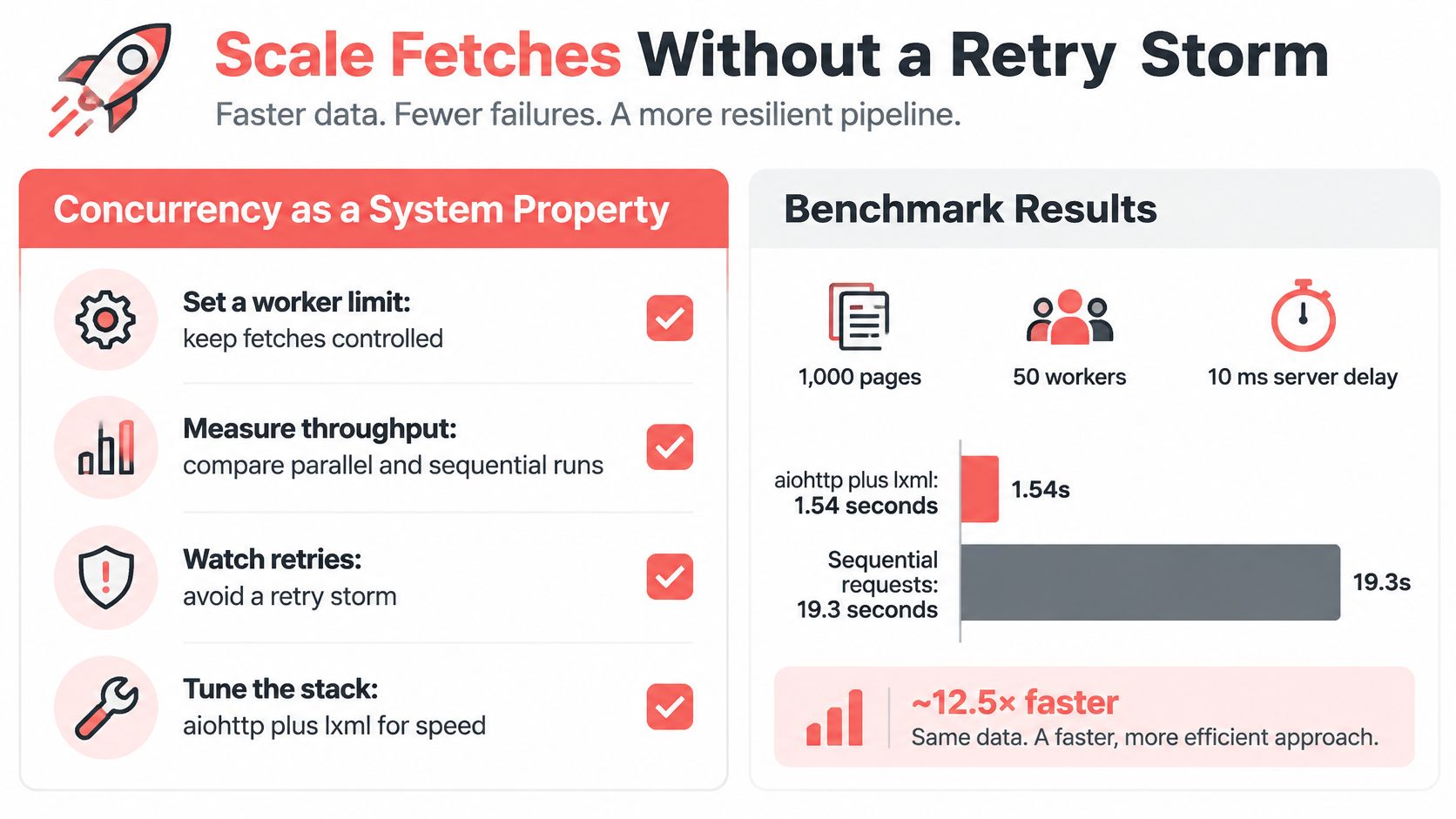
Concurrency is a property of the whole pipeline, not the number passed to a worker pool. If persistence slows down while fetchers keep accepting work, you haven't increased throughput. You've built a memory backlog.
A benchmark described in HasData's scraping-language comparison fetched 1,000 pages with 50 concurrent workers and a fixed 10 ms server delay in 1.54 seconds using aiohttp plus lxml, versus 19.3 seconds for sequential Requests, roughly a 12-fold difference. That controlled gap isn't a forecast for a remote site with DNS lookups, TLS handshakes, bandwidth contention, throttling, and intermittent failures.
Measure useful throughput
Compare implementations against the same approved URL corpus and extraction contract. Count validated records that reach staging, not merely completed request tasks.
What to measure on a Python crawl
| Metric | Watch for | What it usually means |
|---|---|---|
| Completion rate | Far below the URL list | Timeouts, DNS failures, or stuck workers |
| Valid-record rate | HTTP 200 responses with empty required fields | Selector drift or a shell page |
| Median and p95 latency | A long tail relative to the median | Hosts or proxy connections stalling the pool |
| Retry count | Retries rising without new rows | Missing backoff or a retry storm |
| 429 and 403 share | A spike against the previous baseline | Rate or access restrictions, not a parser bug |
| Bytes per record | A sudden drop | Challenge content or truncated responses |
| Memory per worker | Growth across successive pages | Unbounded queues or leaked browser resources |
These readings are diagnostic clues, not proof. A smaller response can also reflect a legitimate layout change, so preserve enough response evidence to investigate.
Give every stage a capacity limit
Start with a low per-host request rate and increase only while latency, validated yield, and publisher constraints remain acceptable. Apply host-level concurrency limits independently of the global worker count.
- Pool connections. Reuse clients rather than repeatedly paying connection setup costs.
- Bound queues. Make fetchers wait when parsers or writers can't keep up.
- Budget retries. Apply exponential backoff with jitter, respect server retry instructions, and cap both attempts and total elapsed work.
- Checkpoint idempotently. Use stable page and record keys so restarting a worker doesn't duplicate committed output.
A Requests read timeout isn't a total job deadline. Slow responses, backoff, and repeated attempts can consume much longer than an individual timeout setting suggests. Give each work item an overall deadline and let cancellation propagate through the queue.
The common fleet failures are unbounded concurrency, synchronized retries, duplicate pagination, and treating asynchronous I/O as a cure for CPU-heavy parsing. Profile parsing separately; moving blocking parser work into an event loop can stall otherwise healthy network tasks.
Proxies are a transport choice for geography and capacity, not permission to exceed a publisher's rate limits. If a test requires a particular region, keep the exit location, locale, timezone, and browser network settings coherent.
Use a structured blocked-scraping diagnostic before changing infrastructure. If forbidden responses climb while your exporter still writes blank rows, your success metric is wrong.
Test the Dataset Not the Status Code
A request returned HTTP 200, the script exited normally, and every price is blank. That run failed. Your acceptance decision belongs at the dataset boundary, not at the HTTP client.
The Electe Python scraper guide identifies recurring extraction problems including whitespace, relative URLs, duplicates, encoding irregularities, and empty fields. Turn each into a test with an explicit failure result.
Make fixtures and canaries answer different questions
Fixtures test deterministic extraction. Save representative HTML and expected rows, then replay them in CI without network access. Include a missing price, malformed numeric text, a relative product link, unusual whitespace, and a repeated product key.
Live canaries test whether the current site still satisfies your assumptions. Use a stable listing with known products and required fields. If you assert an exact price, maintain that expected value through an approved update process; a genuine price change isn't automatically a parser defect.
A useful acceptance checklist includes:
- Completeness: Required fields meet the contract's configured threshold.
- Identity: Stable product keys are unique within the intended dataset scope.
- Normalization: Text is trimmed, URLs are absolute, and price interpretation matches the source locale.
- Freshness: Fetch timestamps meet the consumer's delivery requirement.
- Coverage: Pagination completed normally rather than stopping at a cap or failure.
Don't select thresholds because they sound reassuring. Establish the expected behavior for that source and decide which missing fields require rejecting a row versus quarantining the entire batch.
Classify empty results before publishing
A legitimate empty result needs positive evidence, such as the site's recognized no-results state. A challenge or authentication page needs a different classification, even if it arrives with a successful HTTP status. A page with normal catalogue structure but no matching cards may indicate selector drift.
Quarantine ambiguous batches instead of appending them. Preserve the previous accepted dataset, store the failed run separately, and send the operator a reason with example pages. Replacing a populated table with an empty export without notice is a publishing defect.
For each run, retain the source URL, fetch time, parser version, raw-body hash, and extraction configuration. Store the raw body under the retention policy so the hash can locate replayable evidence. When field yield changes while response statuses stay stable, alert on the extraction change.
Downstream systems need their own checks too. CapyScout's guidance to validate customer database records is relevant when scraped records enter customer workflows, where duplicates and inconsistent fields can survive a technically successful import.
More requests won't repair a drifted selector. More browsers won't make an invalid row trustworthy.
Run the Two-Path Check Tomorrow
Use the next scheduled run to verify routing and acceptance, not to add another dependency.
- Freeze the contract. Commit the required-field list, extraction configuration, fixture bodies, and expected rows together.
- Keep Requests for URLs that satisfy both offline tests and live canary checks. A successful historical fixture alone doesn't prove the live page still works.
- Inspect static failures. Confirm that each candidate has a genuine rendering gap rather than an access denial, unexpected redirect, or changed selector.
- Move only those candidates to Playwright. Feed rendered HTML into the same extractor and preserve identical field validation.
- Compare equivalent observations. Run an appropriate canary through both paths, recording source, time, parser version, and body identity. Accept only outputs that satisfy the contract.
- If values differ, inspect the saved bodies and parser versions before editing selectors. Check locale, session state, and observation timing; raw HTTP and rendered DOM hashes are naturally different.
Schedule the collection job and its quarantine alert together. Assign an owner who receives the rejected-page examples and acceptance failure reason, then test that notification before enabling downstream publication. A failed batch should reach a person before it reaches a dashboard.
Clearcote Labs offers a drop-in Chromium SDK for Playwright and Puppeteer, with a downloaded, SHA-256-verified browser and an import-level integration change. For a self-hosted Python browser path, you bring your own proxies and run on your machines or our Docker image. Visit Clearcote Labs to evaluate that runtime against your existing fixtures, canaries, and acceptance contract.