
Your scraper ran clean for a month. On Tuesday, the same job starts returning empty pages, but the dashboard still looks healthy: requests finish, status codes look normal, and nothing crashes. You search for “web scraping blocked” and find advice to rotate proxies, change headers, or buy CAPTCHA credits.
Don't change the infrastructure yet. A completed request isn't proof that you received the intended content. First establish what the target returned, where the failure starts, and whether you're dealing with throttling, session loss, browser detection, or a silent soft block.
Table of Contents
- Diagnose Which Block You Are Hitting
- Choose the Fix That Matches the Block
- How to Recover from 429 Rate Limits
- Make Your Browser Identity Agree With Itself
- Catch Silent Blocks Hiding Behind HTTP 200
- Legal and Ethical Limits After a Block
Diagnose Which Block You Are Hitting
Blocking isn't a single mechanism, and defenses aren't uniformly effective. According to DataDome's Global Bot Security Report, as reported by Security Boulevard, only 2.8% of more than 16,900 tested domains blocked all tested bot requests in 2025, down from 8.4% in 2024.
That finding doesn't establish your target's policy or your chances of success. It does explain why “the site blocks bots” is too broad a diagnosis: different clients, sessions, and request patterns can produce different outcomes.
Use the response as a clue, not a verdict.
Block Signals, Likely Causes and First Checks
| Signal | Likely cause | First check |
|---|---|---|
| HTTP 429 with Retry-After | Request rate over the limit | Count requests per minute per IP and per identity |
| HTTP 403 on the first request | IP reputation or obvious automation | Replay the URL from a normal browser on the same IP |
| HTTP 403 or 503 after many requests | Threshold-based throttling | Check whether denials start at a fixed request count |
| CAPTCHA or challenge page | Behavioral or fingerprint flag | Load the page in a clean headed browser profile |
| HTTP 200 with a challenge page or short body | Soft block | Check for the expected content marker |
| HTTP 200 with missing fields | Silent degradation | Compare the DOM with the raw network response |
| Redirect to login after several pages | Session or cookie problem | Inspect cookie state across requests |
These are working hypotheses, not guaranteed mappings. A forbidden response can also mean missing authorization, while an unavailable response might reflect an actual service outage. Compare the failing URL with a permitted control request before assigning blame to anti-bot software.
For import pipelines, Vid Kraken's explanation of IP restrictions in YouTube import workflows provides useful context for distinguishing an address-level restriction from a broader workflow failure. When the address doesn't explain the difference, a browser fingerprinting primer helps identify the other client signals worth inspecting.
Preserve Evidence Before Changing the Client
Log status code, redirect chain, response size, response headers, final URL, and content-validation result for every request. Attach a session identifier and browser configuration label so you can group failures without exposing credentials or cookie values in ordinary logs.
Keep representative response bodies in restricted diagnostic storage. Once you've replaced the proxy pool and changed the browser configuration, reproducing the original failure becomes harder.
Practical rule: Change the client only after you've saved enough evidence to explain why you're changing it.
Today, run a short triage on your worst target. Write down the observed signal, the likely cause from the table, and the first check you'll run. That small incident note is more valuable than another unmeasured proxy experiment.
Choose the Fix That Matches the Block
If rate-limit responses persist after meaningful pacing changes, investigate whether authorized traffic needs additional IP diversity. If challenges appear on the first page, audit identity and behavior before purchasing more proxies.
The cheapest fix is the one that addresses the failing layer. A larger infrastructure bill doesn't make a session bug disappear.
Which Tactic Fixes Which Block
| Tactic | What It Fixes | What It Does Not Fix | Typical Running Cost |
|---|---|---|---|
| Request pacing and backoff | Rate limits and HTTP 429 responses | Fingerprint or content mismatches | Low, mostly slower jobs |
| Proxy rotation | IP reputation and per-IP limits | Browser inconsistencies and behavioral flags | Medium to high, paid proxy pools |
| Coherent browser identity | Cross-signal mismatches that bot checks flag | IP-level rate limits | Medium, engineering time for the audit |
| Hosted browser with residential IPs | Proxy and fleet upkeep | Logic errors, login-gated content and contractual limits | Usage-based, according to bandwidth or browser billing |
| Official API or data feed | An authorized alternative to page scraping | Downstream schema, coverage and integration requirements | Provider-set subscription or licensing terms |
An official feed doesn't solve every data problem. It replaces an uncertain acquisition route with an explicit access arrangement, but you still need to verify freshness, available fields, and permitted reuse.
Where Teams Spend Money Without Fixing the Cause
Proxy rotation has a narrow job. It changes the network origin. It doesn't repair a browser whose headers, rendering properties, and protocol behavior disagree, and it won't restore a missing authentication cookie.
Datacenter exits can be unsuitable for a target that applies stricter policies to hosting networks. Residential exits introduce their own procurement, bandwidth, and consent considerations. Use a proxy selection framework for web scraping to evaluate session persistence and billing alongside address type.
Keep authenticated workflows on sticky sessions unless the application explicitly supports moving them. Switching exits during a login flow can introduce a new risk signal while destroying your ability to isolate the original fault.
A CAPTCHA is a symptom, not a maintenance strategy. Where challenge completion is permitted, cap solver retries, record the triggering identity and exit, and quarantine the failing identity until a controlled test supports returning it to service.
Hosted browsers make sense when engineers spend their time maintaining browser processes, proxy connections, and fleet capacity. They don't make sense as a cure for incorrect navigation logic or an extractor that reads before the page is ready.
Chromium-based browser tools are available when you need repeatable identities. Judge them by usable output on your target, not their product category.
- Choose pacing when load correlates with denial.
- Choose IP diversity when a controlled comparison isolates the exit.
- Choose identity work when the browser configuration explains the difference.
- Choose hosting when fleet operations consume the engineering budget.
- Choose an API or feed when permission and predictable delivery matter more than page-level flexibility.
How to Recover from 429 Rate Limits
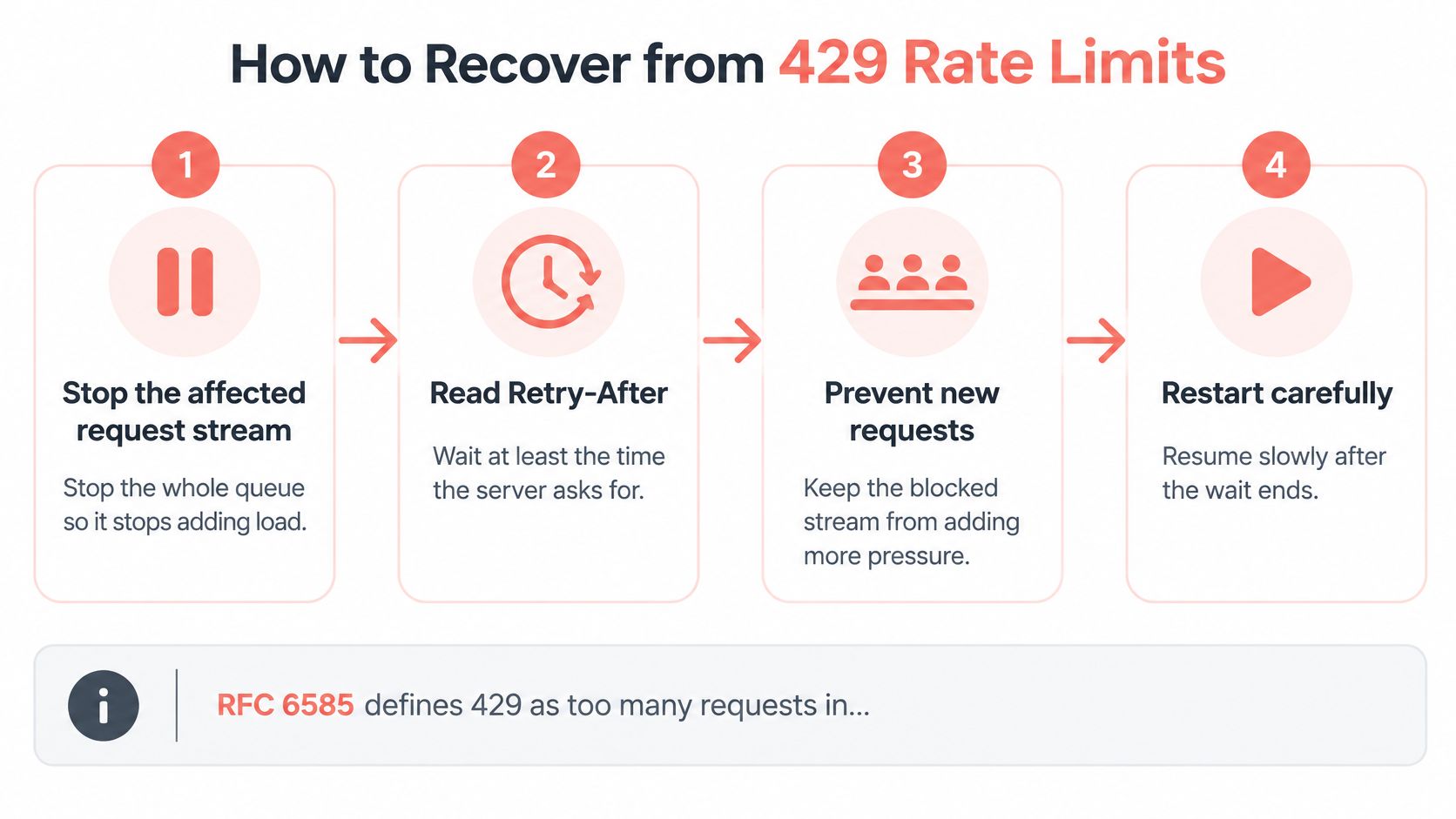
Treat HTTP 429 as a request-rate signal first. Your recovery should reduce pressure, preserve state, and produce a measurable explanation for whether the adjustment worked.
The transport-versus-identity distinction matters: academic work published through ACM found that conventional detection using HTTP logs exceeded 95% balanced accuracy against non-stealth bots, while browser-like fingerprints and humanlike behavior made detection substantially harder. A different-looking client isn't a substitute for correct throttling behavior.
Use this recovery flow before restarting the workers.
Restart the Stream, Not Just the Request
Stop the affected request stream. Pause the queue responsible for the denials, including automatic retries and scheduled pagination. Sleeping inside a worker doesn't help if the remaining workers continue adding load.
Honor Retry-After when present. Interpret the header as either a delay or an HTTP date, and don't resume before that point. If it's absent, apply your configured cooldown rather than immediately retrying.
Resume with jittered exponential backoff. Increase the delay after repeated denials, add random variation, and enforce a maximum delay and retry budget. Jitter prevents paused workers from all restarting together.
Reduce concurrency before resuming. Restart with a smaller active worker pool and increase it only after sustained valid responses. Changing concurrency after another burst of denials means you've already repeated the overload.
Persist session and crawl state. Retain cookies, completed-page checkpoints, and queue ownership. Otherwise, recovery can trigger duplicate navigation, repeat logins, and unnecessary requests.
Delay IP rotation until the evidence supports it. Compare behavior at a low request rate with a stable session. If every exit fails under the same client behavior, the address probably isn't the only variable that matters.
For example, suppose a listings crawler exhausts its permitted request budget during a busy run. Pause that target's queue, honor the server's requested wait, and resume with fewer workers while retaining the pagination checkpoint. Declare recovery only after the expected listings return consistently, not merely after the first accepted response.
Prevent the Retry Loop From Becoming the Incident
Don't raise parallelism to compensate for a slower queue. That increases pressure at precisely the point where the server has asked you to reduce it.
Also check whether multiple jobs share the same exit, account, or API credential. A worker can appear conservative in isolation while the combined workload exceeds the relevant budget.
A retry is another request. Budget it alongside the original workload.
Expose cooldown state in monitoring so operators can distinguish a deliberately paused stream from a dead worker. Keep the pause scoped to the affected target or identity rather than unnecessarily stopping unrelated jobs.
A 429 is a request-rate signal first and a reputation signal only if the pattern survives the slowdown.
Make Your Browser Identity Agree With Itself
A plausible User-Agent doesn't make a plausible browser. Consider a client that claims Chrome on Windows while its WebGL output resembles a Linux server environment and its available fonts don't fit the claimed platform. The page can render correctly while the combined identity remains questionable.
The Open Universiteit publication on fingerprint-surface detection found that most of the 14 examined web-bot frameworks were uniquely identifiable using established browser-fingerprinting techniques. That supports an audit of the whole client, not another isolated header replacement.
Capture a Coherence Audit
Save the effective values the target can observe, not just the values your configuration intended to set.
- Browser declarations: Record User-Agent, UA Client Hints, and the actual browser version.
- Regional settings: Capture timezone, locale, Accept-Language, and viewport.
- Rendering surfaces: Inspect WebGL and GPU exposure, canvas output, audio behavior, and available fonts.
- Execution and storage: Verify JavaScript execution, cookie persistence, and profile reuse.
- Transport behavior: Record the TLS fingerprint and HTTP/2 settings at the observable network boundary.
- Execution contexts: Compare applicable signals across the main document, iframes, workers, and repeated sessions.
Not every API exists in every context. Compare equivalent observable values where available rather than expecting a worker to expose every window property.
Changing only the User-Agent can make the discrepancy worse. A transport stack that doesn't resemble the claimed browser remains unchanged, and browser-generated Client Hints may contradict your manually supplied header.
Test a Hypothesis Without Replacing Everything
Run a controlled comparison with the target, session conditions, and request rate held constant. Change a single configuration variable, use equivalent starting state, and measure challenge rate, usable-content rate, latency, and valid pages incorrectly rejected by your checks.
Don't reuse a contaminated session blindly. If the session itself has become part of the restriction, prepare equivalent clean profiles for the comparison and document that choice.
Keep navigation and extraction outcomes separate. A browser reaching the final URL doesn't establish that the required fields appeared. Test regional endpoints independently, because differences in content delivery and risk policy can otherwise look like random client instability.
For the browser-layer test, our Clearcote SDK supports a drop-in Chromium replacement for Playwright and Puppeteer with one import change in Python, Node or .NET. It sets fingerprint values in Chromium's C++ paths rather than injected page scripts, and it's free for one browser at a time. Validate configurations with CreepJS, BrowserScan, or Pixelscan, but treat those checks as diagnostics, not proof of acceptance by your target.
No tool is undetectable. Cap retries and quarantine failing identities instead of repeatedly submitting the same broken configuration.
If a fix can't be reproduced in a controlled A/B run, you haven't established that it addressed the cause.
Catch Silent Blocks Hiding Behind HTTP 200
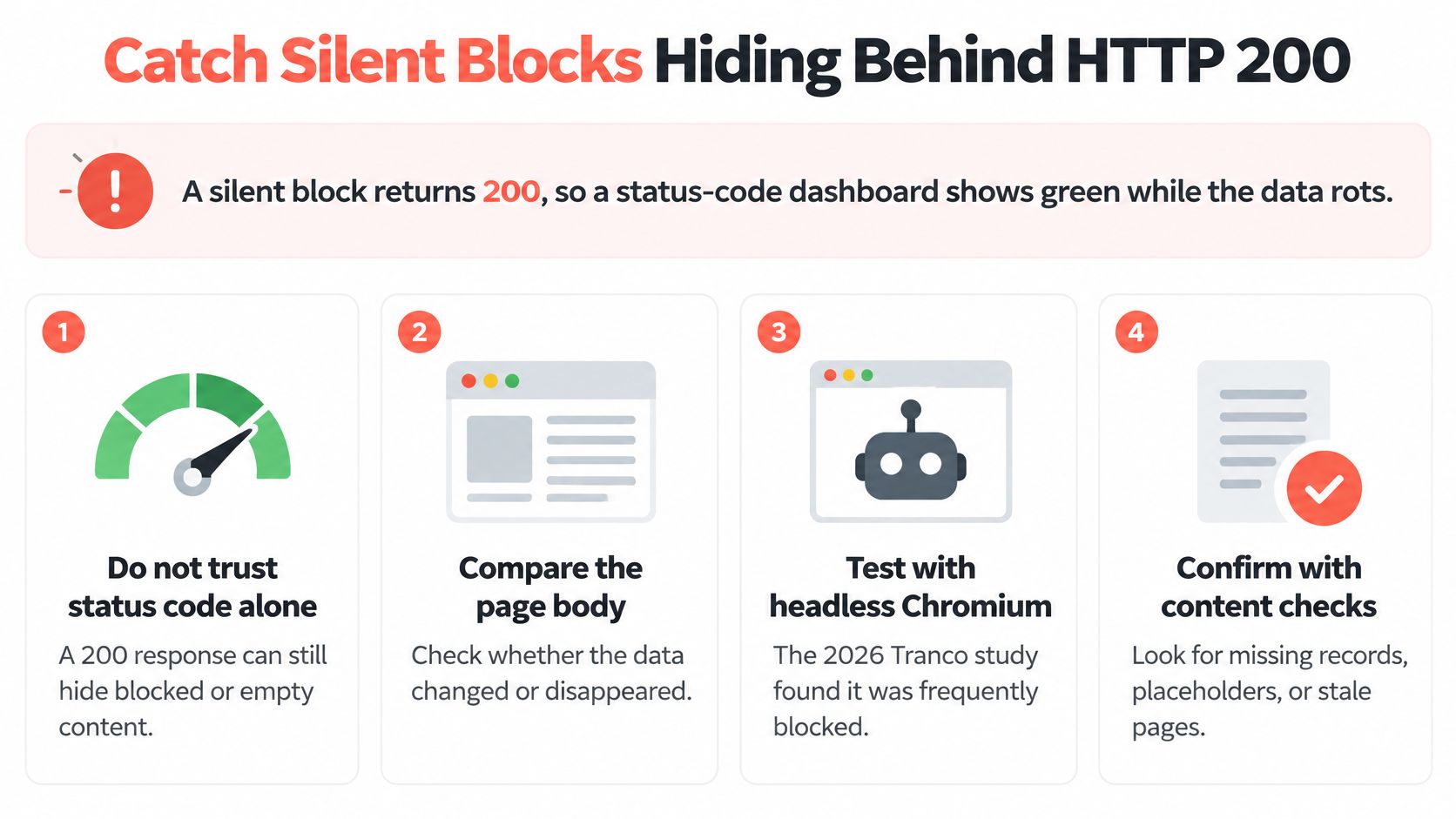
A silent block can return HTTP 200, leaving the status-code dashboard green while your pipeline publishes incomplete data. That's a more dangerous failure than an obvious denial because downstream systems may accept it without raising an exception.
A 2026 study of the Tranco top 10,000 sites, described by Shifter's analysis of silent failures, found headless Chromium soft-blocked on 15.2% of sites, compared with 6.8% to 7.2% for other browser configurations; 81.9% of those soft blocks were attributed to bot detection.
Don't translate those findings into a predicted failure rate for your crawler. Use them as a reason to measure content validity separately from transport success.
Build the following checks into the acceptance path.
Validate Every Batch
Require page-specific content markers. Check for a product title and product identifier on a detail page, or a results container on a listing page. A shared footer alone doesn't prove that the requested content arrived.
Enforce field completeness. Define required fields by page type and distinguish legitimately absent values from failed extraction. Reject records that don't satisfy the schema instead of filling them with empty strings.
Compare DOM and network payloads. Inspect representative pages to establish whether the underlying response contains the data the rendered page lacks. Differences can also arise from ordinary client-side rendering, consent screens, or timing errors, so investigate before labeling them blocks.
Fetch known controls each cycle. Use stable, permitted URLs with verified expected output. Controls help separate a target-wide change from a broken selector or local deployment.
Monitor output distributions. Alert on unusual row counts, response sizes, repeated titles, placeholder values, and unexpected freshness changes.
Distinguish Missing Data From Changed Data
Say a product endpoint returns a small HTML shell, prices disappear across unrelated categories, and the extracted titles become identical. Accepting those records because the request succeeded would turn an acquisition failure into a data-quality incident.
Save the raw response, rendered DOM, and extraction result together. If the payload contains valid prices but your records don't, investigate rendering or parsing. If the payload itself contains a challenge, changing selectors won't help.
Maintain a golden set of URLs with verified output, covering the page types your business consumes. Include expected identifiers, essential fields, and freshness checks where those fields have meaningful update behavior.
Acceptance test: A successful scrape contains the intended content in a valid form, not merely a successful HTTP response.
Treat unexplained drift from that baseline as a failed run pending review. Keep suspect batches out of production tables rather than overwriting the last known-good dataset with apparently successful emptiness.
Legal and Ethical Limits After a Block
A page loading without a login does not settle whether you may collect or reuse its contents. Contract terms, copyright, database rights, privacy obligations, and an explicit denial can all matter. Treat legal permission as a separate question from whether a request succeeds.

The hiQ and LinkedIn public-data scraping litigation is one example of how courts have addressed access to publicly available data. Robots.txt is not automatically a legal access barrier, but that does not make it a universal permission to ignore crawler rules. The policy can provide notice and may matter to other legal arguments or to commitments your organization has made.
Preserve Permission and Policy Evidence
Review the rules for the relevant market, the target operator, the data you collect, where processing occurs, and how you plan to reuse the results. A conclusion about public profile access does not automatically apply to copyrighted articles, personal information, or a licensed catalog.
- Snapshot the rules: Keep dated copies of relevant terms and robots.txt.
- Record authorization: Preserve agreements, approved accounts, written consent, and feed licenses.
- Document restraint: Retain cooldown decisions and rate-limit compliance logs.
- Handle opt-outs explicitly: Record applicable signals and what the crawler does when they change.
- Assign escalation ownership: Identify who can stop collection and request legal review.
For teams using extracted content in models or agents, include AI web scraping considerations in both the reuse review and the acquisition design.
A successful HTTP response does not establish permission, and a 200 response can still contain a soft block rather than usable content. Check what the page returns, then assess whether collection and reuse are authorized.
Watch the video on YouTubeIf a catalog returns forbidden responses and its crawler policy disallows the listing path you need, stop collection. Review the terms and any existing authorization, then ask for an official feed, a license, or written permission rather than trying another route.
This is an operational overview, not legal advice. Counsel in the relevant market should review the collection and reuse approach, especially after an explicit block or opt-out.
Clearcote Labs offers an open-source Chromium fork with engine-level identity controls and Playwright and Puppeteer integration for teams investigating browser-level scraping failures. Evaluate it against a failing target with controlled comparisons and content-validity checks, not status codes alone.