
The crawler was stable yesterday. This morning, it still returns HTTP 200, but the pages contain an empty shell or a challenge screen instead of the product data your pipeline expects. The team suspects the proxy provider, swaps endpoints, and watches the same failure continue.
That's a familiar production trap. A reliable web scraping bot depends on how its browser identity, network behavior, request timing, and workload fit together. When those signals drift apart, changing proxies alone rarely fixes the problem.
Table of Contents
- Why Most Web Scraping Bots Break in Production
- Picking the Right Tooling for the Job
- Why Fingerprint Coherence Beats Fingerprint Spoofing
- Proxy Strategies by Workload
- Benchmarking Yield Instead of Vanity Success Rates
- Beyond robots.txt: Proving the Crawl Was Authorized
- Launch Checklist and Failure Modes to Monitor
Why Most Web Scraping Bots Break in Production
The first clue is often misleading. Your dashboard shows successful responses, your retry queue is growing, and downstream tables are suddenly missing fields. Someone checks the proxy pool, but the actual cause may be a changed page template, a new challenge flow, or a mismatch between the browser's claimed identity and the way it connects.
Think of a scraper as a system of coupled signals, not a request loop. A browser can present one platform in JavaScript while its network stack reveals another. A realistic-looking browser can still behave unnaturally if it sends requests at a relentless pace. And a carefully paced client can still fail when its parser assumes that the page structure hasn't changed.

Three failures that look alike
Detection means the site identifies automated behavior and responds with a block, challenge, or altered page. Throttling means requests are delayed, rejected, or slowed because the crawler is sending too much traffic or not backing off after errors. Silent content gaps happen when the request appears successful but the response doesn't contain complete, usable data.
These failures need different diagnoses. A challenge page calls for inspecting the browser and request context. A burst of throttling calls for reviewing per-domain concurrency and retry behavior. A page that loads but yields incomplete records points toward rendering, parsing, pagination, or state handling.
Bot traffic itself isn't a single category. Imperva reported that bots generated 49.6% of internet traffic in 2023, while its “bad bots” category accounted for 32.0%, a classification that can include some scraping but also reflects other abusive or unwanted automation (Imperva's bot-traffic report). Those figures describe bot activity broadly, not the share of traffic devoted to scraping.
Practical rule: When a scraper degrades, compare what the browser says, what the network shows, how it behaves, and what your extractor actually receives before you replace the proxy.
Treat debugging as a review of the whole stack. Teams building data pipelines for fast-changing services can also benefit from seeing how CS2 API providers compare on documentation and integration. The same principle applies to scraping: clear interfaces and observable behavior make failures easier to locate.
Picking the Right Tooling for the Job
Start with the page and the permission you have, not with a favorite library. If a site exposes a documented API or serves the required information in static HTML, a lightweight HTTP client can be the simplest, fastest option. It's also easier to cache and reason about than a full browser.
But raw HTTP stops being a good fit when the page depends on JavaScript, login state, interaction, or browser-managed storage. In those cases, a browser automation stack such as Playwright or Puppeteer gives you access to the rendered page and the same interaction model used by the site. That usually makes it a more practical starting point for teams extracting content from modern web applications.
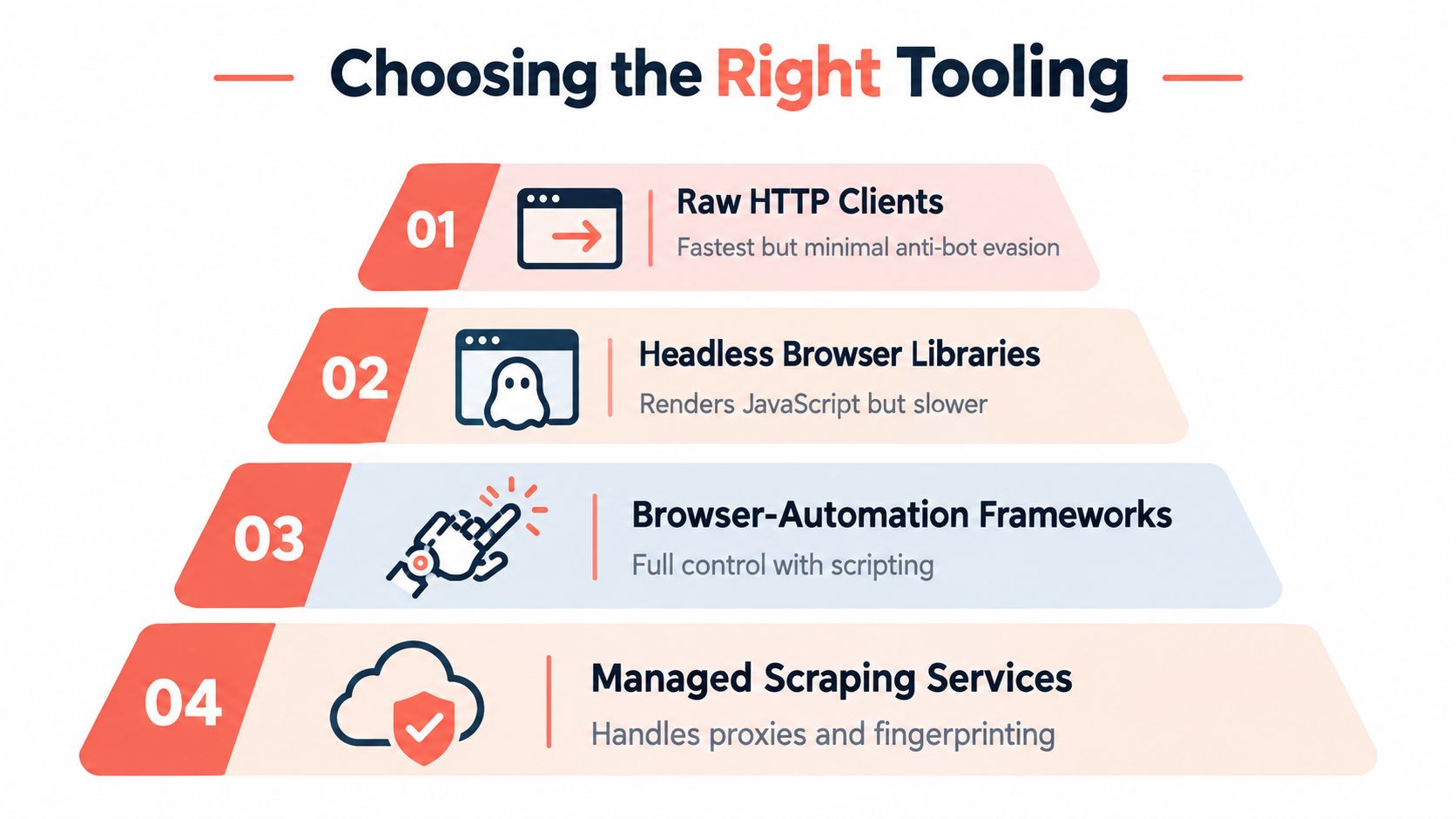
Choose by the hard part you need to solve
If rendering is the challenge, use a browser. If repeatable device identity, extension support, or closer control of browser-level signals becomes important, consider an engine-level browser rather than layering more JavaScript patches onto an ordinary automation setup. If running, patching, and observing browsers is taking more effort than building the data pipeline, a hosted or containerized runtime may be the more sensible trade.
Those choices aren't a simple ladder from “basic” to “best.” Browser automation consumes more resources than a lightweight client, while managed runtimes can reduce operations work at the cost of less control over the environment. Pick the least complex approach that handles the target's rendering and interaction requirements reliably.
Keep the migration path open
Teams don't need to rewrite a working scraper just because its requirements changed. Playwright and Puppeteer SDKs, CDP attachment, Docker images, and hosted browser endpoints can let existing scripts grow into a different runtime without replacing the extraction logic.
For example, Clearcote Labs maintains an open-source Chromium fork with engine-level identity controls and drop-in support for Playwright and Puppeteer, alongside Docker and hosted-browser options. That kind of setup is relevant when the browser itself is part of the operational problem, but it doesn't replace sound crawl controls or authorization.
Make the decision concrete: document the page's rendering needs, required interactions, identity constraints, and deployment preference. Then test the smallest viable stack against representative pages. Avoid choosing a managed service because a proxy rotation setting looks convenient, or building a custom browser fleet before you know what the workload requires.
Why Fingerprint Coherence Beats Fingerprint Spoofing
A browser fingerprint isn't one field you can edit in isolation. Detection systems can compare signals exposed in different parts of the browser and network, so a collection of individually plausible values may still look implausible when they contradict one another.
Consider a script that changes navigator.webdriver and claims a familiar browser version. Those edits don't automatically align Canvas, WebGL, AudioContext, fonts, locale, timezone, TLS, or HTTP/2 behavior. If a worker or iframe reports different values from the main page, the browser presents a fractured identity rather than a convincing device.
Keep signals consistent across the browser
A coherent identity means that browser-visible properties, network behavior, and location-sensitive settings describe a plausible environment together. A proxy's exit location can affect whether the browser's timezone and language appear reasonable for that session. A claimed Chrome version should also agree with the browser's protocol behavior, rather than relying on a user-agent string alone.
This is why injecting a JavaScript shim can disappoint. It may alter a property in the page context while leaving browser internals and other execution contexts untouched. Engine-level control can keep values consistent across main pages, workers, and iframes because the settings live below the page's own scripts.
For teams evaluating their setup, start with repeatability. Run the same identity through your normal browser checks and compare values across execution contexts. Then restart and test again. A seeded identity can make QA easier because the same seed can reproduce a device profile, while distinct seeds can support separate profiles.
A proxy changes where the connection exits. It doesn't, by itself, make the browser identity behind that connection consistent.
For a practical look at the signals automation teams commonly inspect, see this guide to Playwright bot detection and browser checks. Use such checks to find contradictions, not as a promise that a particular configuration will work against every site.
This walkthrough offers a visual companion to the discussion of browser identity.
Watch the video on YouTubeProxy Strategies by Workload
A proxy should solve a defined network problem. It might help reach a geography-specific page, provide an exit network accepted by a target, or separate traffic across domains. Picking a proxy class before understanding the workload often adds cost without fixing the underlying browser or request behavior.
| Proxy class | Best fit | Watch out for |
|---|---|---|
| Datacenter | Accessible pages where predictable connectivity and straightforward routing matter | Some targets restrict or challenge traffic from data-center networks |
| Residential | Workloads that need an exit associated with residential access networks | Higher operational complexity, session handling, and the need to keep browser signals consistent with the exit |
| Mobile | Targets where mobile-network context is genuinely relevant | Don't assume a mobile exit alone makes a desktop browser identity plausible |
Use datacenter proxies when the target permits them and the extraction doesn't require a different network context. Residential proxies can be useful for sites that treat data-center traffic differently, but they won't repair a browser that claims one device while exposing another. Mobile proxies should serve a real mobile-network requirement, not act as a generic answer to every block.
Match sessions and budgets to the target
Sticky sessions help when a workflow depends on continuity, such as moving through several pages while maintaining a login or basket state. Short-lived sessions can be suitable for independent fetches, but frequent identity changes during a single user-like flow can create inconsistency. Test session behavior against the actual target instead of assuming that rotation is always safer.
Apply independent concurrency, delay, retry, and error budgets per domain. A busy target shouldn't consume the whole worker pool or cause unrelated domains to inherit its retry storm. If your job is to detect abusive storefront traffic, that same separation helps distinguish legitimate automation from traffic patterns that need closer review.
Proxy choice is a workload decision, not a vendor decision.
When comparing proxy options, account for the cost model as well as access. A hosted browser with residential IPs included can reduce setup and maintenance for a small team, while direct proxy management may offer more control when the team can operate it well. This overview of proxy choices for web scraping is useful as a comparison point, but validate any choice with measured results from your own targets.
Benchmarking Yield Instead of Vanity Success Rates
An HTTP 200 response doesn't prove that a scraper collected a usable page. Sites can return a challenge, a soft block, an empty shell, or content that omits the fields your parser needs. A benchmark should count complete, validated extraction as success, not merely a response from the server.
A study of 10,000 websites found soft-block rates ranging from 7% to 15% across browser configurations, with 82% of observed blocks attributed to bot detection. In that study, Chromium headless had a 15% soft-block rate compared with 7% for other configurations (study of browser configurations and soft blocks). Those measurements aren't a forecast for your targets. They show why results can vary with the site sample and browser setup.
Build a benchmark you can reproduce
Select a fixed sample of target URLs and run each candidate configuration across multiple sessions and times. Define expected content in advance, such as required fields, record counts, or page sections, so a successful result has a clear meaning. Keep each configuration's session, browser mode, and relevant run conditions in the record.
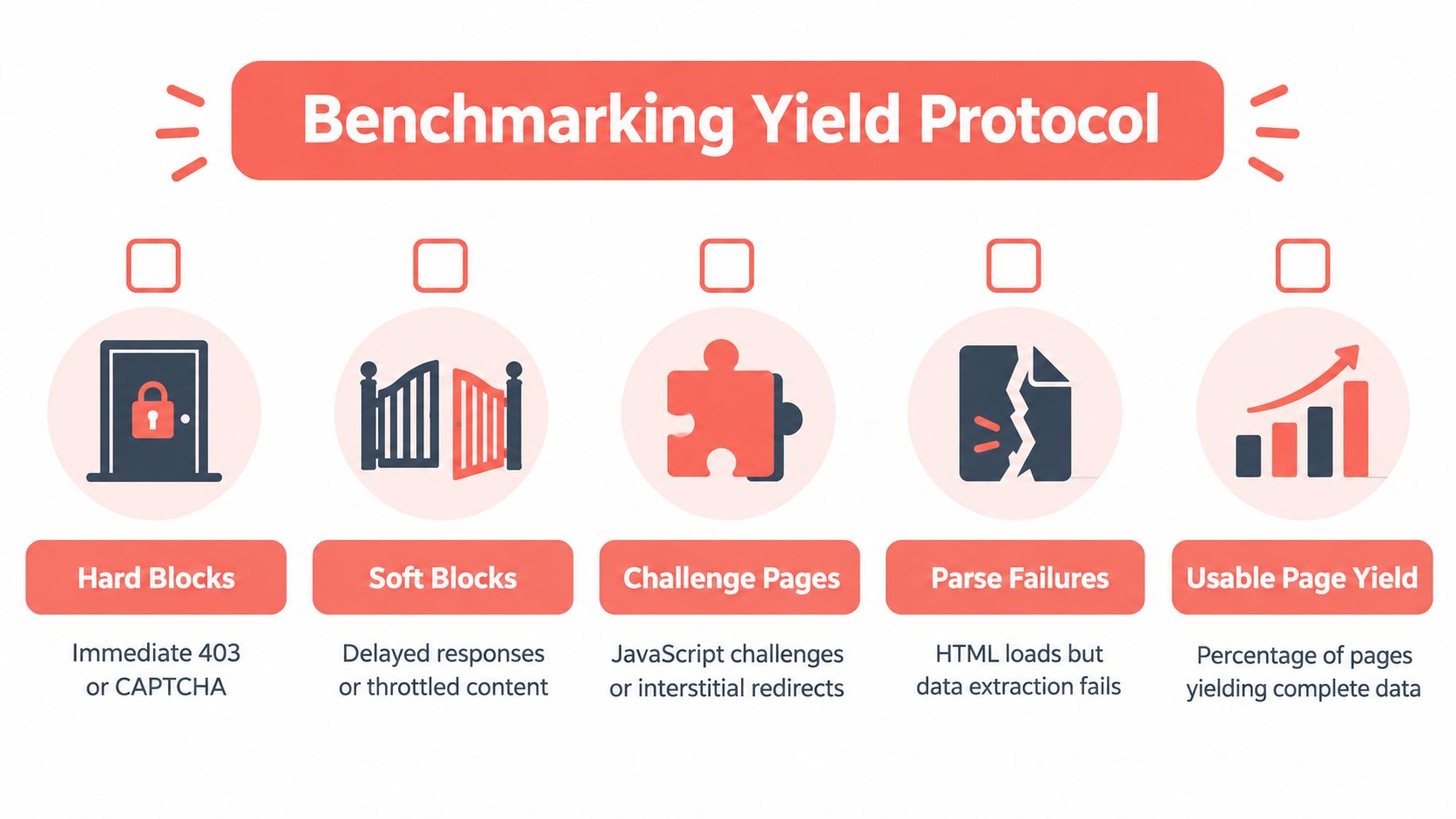
Classify failures separately rather than rolling everything into “failed”:
- Hard blocks: Immediate rejection or access denial.
- Soft blocks: Responses that load but contain throttled or altered content.
- Challenges: CAPTCHA pages, JavaScript checks, or interstitial redirects.
- Parse failures: HTML arrives, but extraction or completeness checks fail.
- Usable yield: Pages that pass the content and completeness rules you defined.
Report by domain, not just in aggregate
If one domain performs well while another returns challenge pages, a single overall rate hides the operational issue. Report the result by domain and configuration, and include uncertainty when the sample is limited. That makes it easier to decide whether a change improved actual extraction or merely shifted failures between targets.
A request can pass the browser's checks and still produce incomplete data because of pagination, authentication, consent dialogs, or a changed schema. Keep detection and extraction results separate. Before calling a setup production-ready, verify that it retrieves the expected content consistently and that the results can be traced back to the URLs and runs that produced them.
Beyond robots.txt: Proving the Crawl Was Authorized
Reading robots.txt is a useful operational check. It isn't a complete authorization decision. The protocol communicates crawler preferences, but it's voluntary and doesn't function as technical access control. A responsible crawler needs to consider the permission basis, the target's terms, authentication boundaries, applicable law, and the intended use of the collected data.
The gap matters for AI-related crawls in particular. A 2025 study found that AI search crawlers and data scrapers often rarely check robots.txt, and that bots are less likely to comply with stricter directives (study of crawler behavior and robots.txt). Cloudflare reported that only about 14% of 3,816 high-traffic domains it examined had robots.txt directives specifically targeting AI bots as of June 2025 (Cloudflare's analysis of AI crawler directives). A missing directive shouldn't be treated as permission, and a robots.txt entry shouldn't be the whole compliance record.
Record the basis for access
For each crawl, preserve an authorization record that another team can review. It should identify the target and collection purpose, save a timestamped snapshot of the applicable robots.txt file, and note whether access rests on an API, a contract, public access under an approved policy, or another documented basis. Keep the relevant terms or approval reference with the record rather than relying on an operator's memory.
The record should also capture opt-out signals, authentication conditions, the fields collected, and retention limits. If a site owner requests removal or disputes access, an audit trail should make it possible to identify the affected data and stop future collection while the request is reviewed.
Treat ambiguity as a review condition
Robots rules, terms of service, authentication, copyright, and jurisdictional requirements may not point in the same direction. Don't resolve that uncertainty by increasing request delays or changing the User-Agent. Pause the target for human review, document the decision, and constrain collection to what the approved purpose needs.
This approach is practical as well as careful. Teams that can show what they accessed, why they accessed it, and how they handled opt-outs are better equipped to investigate questions from publishers, internal reviewers, or legal teams. A crawler should preserve evidence of its authorization and behavior, not just the data it retrieved.
Launch Checklist and Failure Modes to Monitor
A production launch should include controls that keep one target's behavior from destabilizing the rest of the crawler. Start with a per-domain frontier, explicit concurrency limits, and a request interval appropriate to the site. A practical baseline is one request per second per domain unless the site permits higher throughput, with a Crawl-delay directive overriding that interval. Cache each domain's robots.txt for roughly 24 hours, and use exponential backoff for 429 and 503 responses (crawler politeness and robots.txt guidance).
Before launch, confirm that the pipeline canonicalizes URLs, records response status and crawl time, and persists raw responses with parser versions. Those records let you replay extraction after a parser change instead of refetching pages unnecessarily. Don't treat a robots.txt server error as permission to crawl, retry immediately after throttling, or use one global rate limit that ignores domain-level load.
Monitor failures that indicate drift
- Yield shifts by domain: A sudden drop may signal challenges, template changes, or a target-specific slowdown.
- Soft blocks and challenges: Watch for responses that look successful at the HTTP layer but fail content checks.
- Parser and source mismatch: Record which parser version processed each saved response so changed extraction logic can be traced.
- Browser upgrades: Check whether a Chromium change altered protocol behavior, rendering, or the identity your tests expect.
- Retry pressure: Repeated errors can reveal that backoff, error budgets, or domain scheduling need adjustment.
The workload matters too. Scheduled extraction, QA automation, interactive agent browsing, and bulk collection shouldn't automatically share the same identity, budget, cache policy, or review process. Give each purpose a clear label and measure its cost, freshness, completeness, and effect on the target.
If you deploy browsers in containers, review the operational details in this guide to running Puppeteer in Docker. A web scraping bot is software interacting with a site whose behavior can change without warning. The durable response isn't to assume the next proxy will fix it. Measure the content you deliver, preserve the evidence that explains each run, and make failures visible before they spread downstream.
Clearcote Labs offers an open-source Chromium fork with engine-level identity controls, plus Playwright and Puppeteer integrations for local, Docker, and hosted-browser workflows. If browser identity and repeatable extraction are part of your scraping challenges, visit Clearcote Labs to review the available options.