
What makes a browser “Chrome-based” if it doesn't look like Chrome, use Google search, or offer Google account sync? The answer is under the interface. A Chrome-based browser is built on Chromium, the open-source project that supplies much of its browser engine and infrastructure.
Think of Chromium as a car's chassis and running gear. Browser makers can build different bodywork, controls, and services around it. That shared foundation matters for developers because a browser's identity comes from more than its logo or the values a webpage can read.
Table of Contents
- What Makes a Browser Chrome-Based
- Which Chrome-Based Browsers Exist
- How a Chromium Fork Diverges from Chrome
- Multi-Process Security Every Fork Inherits
- Engine-Level Identity Controls Versus Injected Scripts
- Criteria for Testing a Fork's Identity Coherence
- Where Clearcote Fits and How to Choose
What Makes a Browser Chrome-Based
A browser is Chrome-based because its underlying code comes from the Chromium project, not because it resembles Google Chrome. Chromium provides a foundation for rendering web pages, networking, security, developer tools, and standards support. A browser maker can reuse those systems while changing the interface, bundled services, settings, or privacy policies.
Google Chrome's public release on September 2, 2008, helped establish this model. At launch, Chrome combined the WebKit rendering engine with Google's V8 JavaScript engine and introduced a multi-process design intended to isolate tabs and improve stability. Over time, Microsoft Edge, Opera, and other browsers adopted Chromium-based architectures, making Chromium a reusable platform rather than just the source for one consumer browser. The StatCounter global browser statistics illustrate the reach of browser families built on shared engines.
Here's a practical comparison. “Typical fork” means a browser maker has taken Chromium and made its own product from it. The precise services and defaults depend on the product, but the layers below show where the usual differences lie.
Where Chromium, Chrome, and a fork differ
| Layer | Upstream Chromium | Google Chrome | Typical Chromium fork |
|---|---|---|---|
| Rendering and JavaScript | Blink and V8 | Blink and V8 | Blink and V8, inherited from Chromium |
| Google sign-in and sync | Not included | Included | Removed or made optional |
| Update and telemetry beacons | Not included by default | Included | Removed |
| Branding and default search | Chromium project branding | Google branding and defaults | Replaced by the fork's defaults |
| Release cadence | Follows the Chromium release train | Chrome's own schedule | Follows Chromium with a lag |
The shared rendering and JavaScript layer is the car's running gear: it gives browsers a common basis for displaying sites and executing code. The account and sync row is about services around that core. A fork may offer its own account system, make sync optional, or omit it.
Update and telemetry behavior also isn't determined just by the Chromium engine. The product maker decides which update mechanisms and reporting services ship with its browser. Branding and search settings are even more visible differences, but they're defaults, not proof of what engine the browser uses. To see how one Chrome feature is evaluated, NeoTeo's account of Chrome Energy Saver findings offers useful context on a product-level feature rather than the shared engine itself.
Check the lineage
Start with the browser's About page. It often names the product and shows a Chromium or Chrome version. Then inspect the user agent string, which can identify the browser and claimed version, but shouldn't be treated as a complete inventory of the code or services. Finally, check whether Google services such as Google account sign-in are present. No single check tells the whole story, but the three together give you a useful first read.
Which Chrome-Based Browsers Exist
The Chromium family includes familiar commercial browsers as well as smaller forks. Their shared base can make websites behave similarly, but their defaults, bundled features, update paths, and privacy choices can differ.
| Browser | Base | Type | Notable change |
|---|---|---|---|
| Google Chrome | Chromium source plus Google services | Reference browser | Includes sync, update beacons, and Google defaults |
| Microsoft Edge | Chromium-based architecture | Large commercial fork | Adopts Chromium rendering and networking |
| Opera | Chromium-based architecture | Large commercial fork | Adopts Chromium rendering and networking |
| Vivaldi | Chromium fork | Fork with its own interface | Adds its own interface and policies |
| Brave | Chromium fork | Fork with its own interface | Adds its own interface and policies |
| ungoogled-chromium | Chromium fork | De-Googled build | Removes Google services, telemetry, and update beacons |
| Clearcote | ungoogled-chromium base | Identity-focused fork | Adds engine-level identity controls and seeded personas |
The table identifies each browser's broad type, not its exact current configuration. For instance, “Chromium fork” doesn't tell you which version a product currently uses, how quickly it incorporates upstream changes, or which search engine it selects by default.
Before adopting a browser for testing or automation, open its About page and check the Chromium version. Then look for the date or version of its latest upstream rebase, if the project publishes that information. Those details help you judge whether your test environment is running the engine you expect.
Don't infer a browser's update schedule from its family name. Release cadence and default search settings are product decisions. Verify both on the browser you plan to use, especially if a test depends on a specific engine version or search experience.
How a Chromium Fork Diverges from Chrome
A Chromium fork is a maintained software build, not a coat of paint. A maintainer selects a Chromium baseline, changes code and configuration, compiles the result for supported platforms, and repeats the work as upstream Chromium moves forward.
Choose a Chromium baseline. The maintainer starts with a particular Chromium source version. That choice determines which engine code and upstream fixes are present at the start of the build.
Apply the fork's patch set. A de-Googled project may remove Google API keys, sync, update checks, and telemetry. Those changes can reduce Google-specific dependencies, but they also create project-specific code that must be maintained.
Replace the defaults and add product features. The maintainer can change branding, the default search engine, and the start page, then add features such as privacy settings or identity controls. At this stage two forks built from similar source can become different products.
Build and sign for each platform. The team compiles the browser for its target platforms, such as Windows, Linux, macOS, or Android, and signs the resulting builds. Testing matters because a successful build doesn't by itself establish that a feature behaves consistently on every platform.
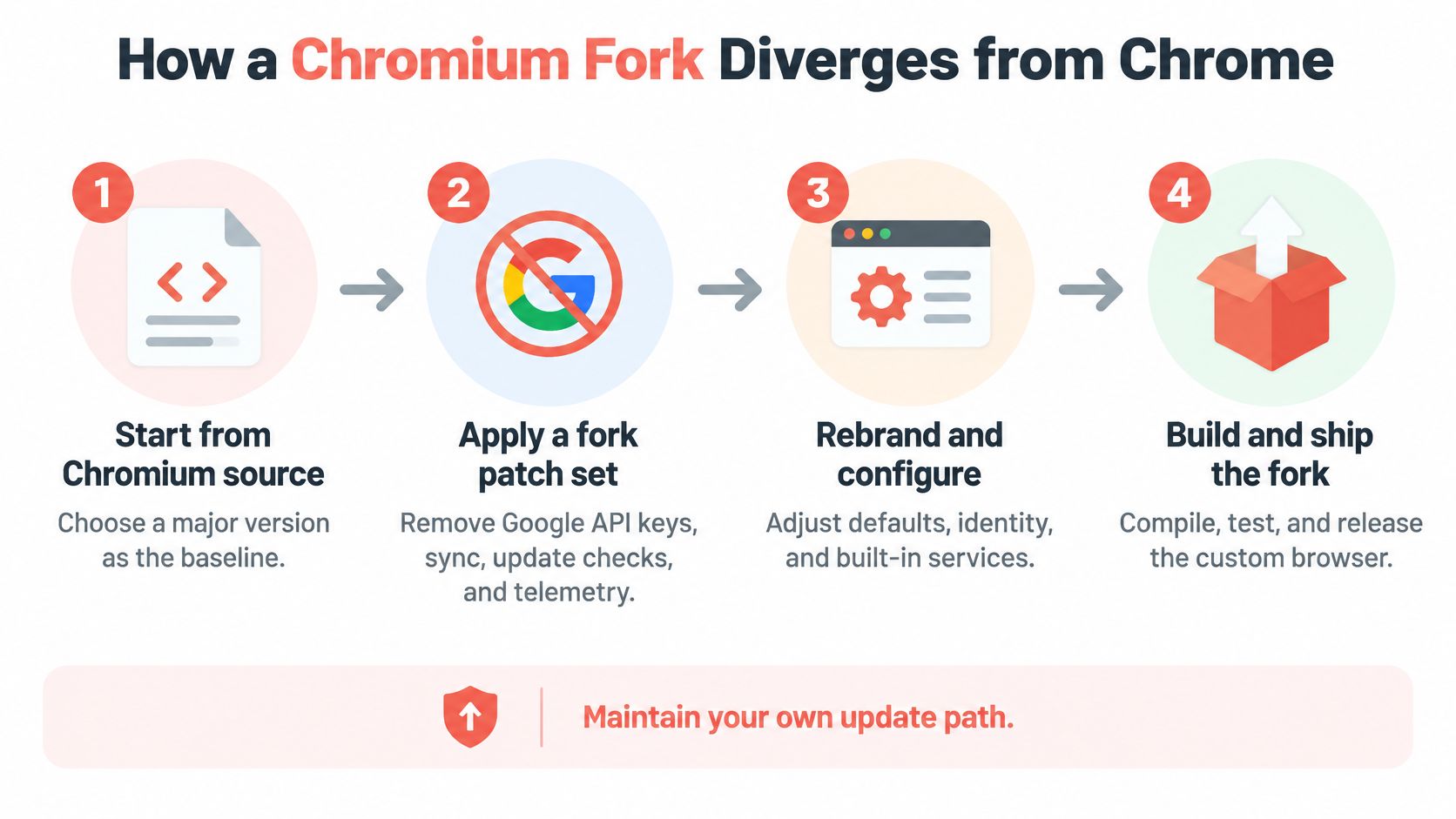
- Rebase and repair. When Chromium advances, maintainers bring their patch set onto the newer source and resolve conflicts. A change made deep in the engine can be harder to carry forward than a change to a browser's branding or settings.
Microsoft Edge and Opera are large commercial products built on Chromium-based architectures. Vivaldi and Brave also use Chromium forks while adding their own interfaces and policies. Their shared ancestry doesn't mean they share the same product decisions or ship changes at the same time.
A fork's engine is only as current as its last rebase. If the About page shows an older Chromium version, the browser may behave differently from a current Chrome release, even if both still belong to the Chromium family.
Before choosing a fork for a test fleet: record the Chromium version, the date of the last rebase, and whether the project publishes its patches. If you can't identify the source and version of a build, reproducing a browser-specific failure becomes harder.
Multi-Process Security Every Fork Inherits
Think of a browser as an office building. Each web page gets a tenant room with restricted access, while a concierge handles privileged building operations. In browser terms, the browser process manages privileged work, while renderer processes run web content in a sandbox with limited rights.
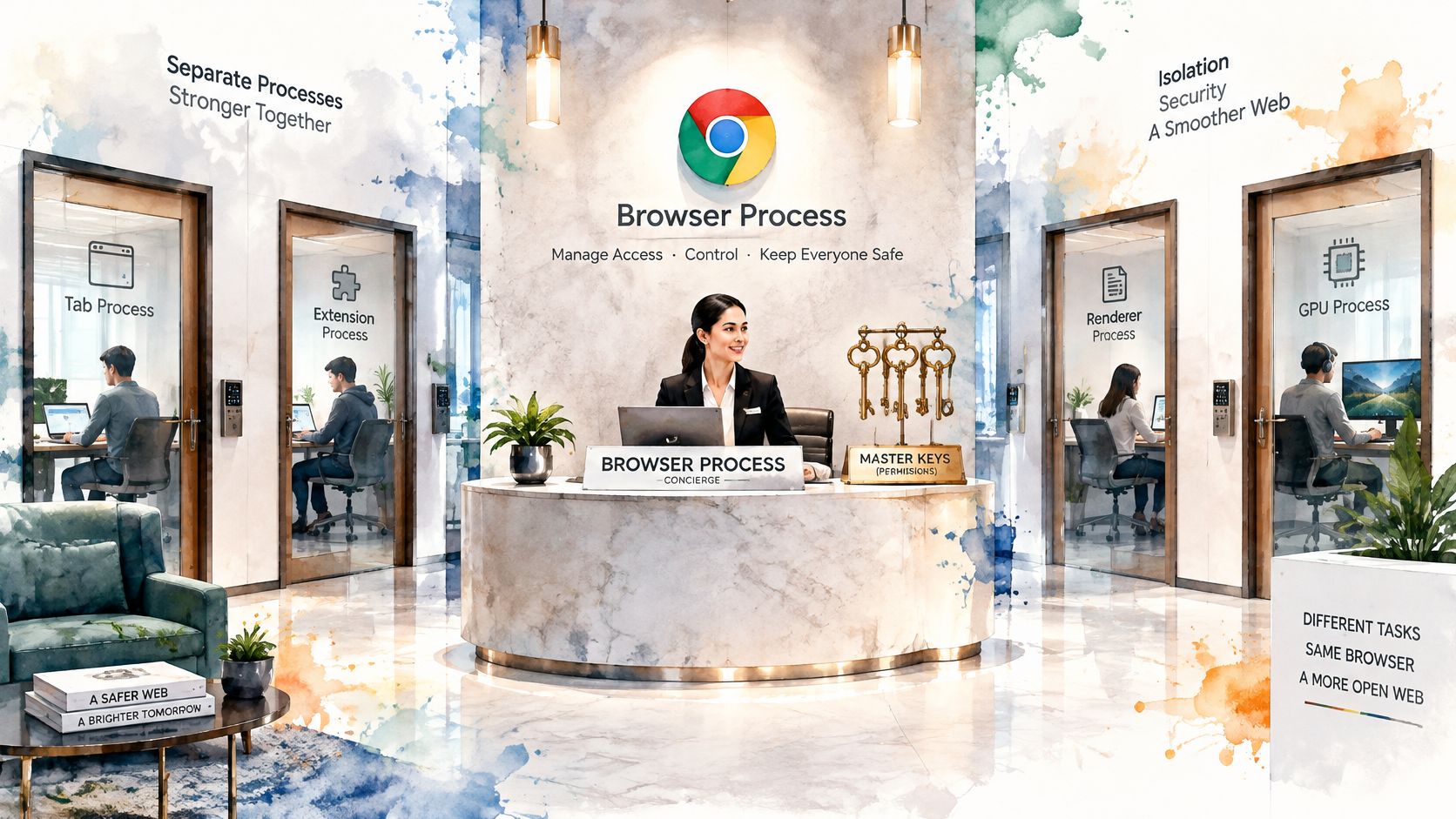
Site Isolation adds a stricter rule to that setup. Chromium can place documents from different sites in separate renderer processes and filter cross-site data. If an attacker exploits a renderer vulnerability, this separation can limit the damage compared with running unrelated sites together in the same process. The Chromium Site Isolation design document describes the architecture and its role in limiting what a compromised renderer can access.
What the process model means for tests
For automation engineers, a browser tab is not a reliable synonym for a process. A page can use multiple processes, and the browser's allocation depends on factors such as site boundaries, related-domain rules, and memory pressure. A test that assumes one renderer per tab can misread process counts, crash behavior, or resource use.
Site Isolation improves fault containment: one renderer crashing need not take unrelated tabs down with it. The trade-off is that extra process separation can use more memory and make cross-origin interactions harder to debug. When diagnosing a test failure, track the page, origin, frame, and process separately rather than treating the tab as one indivisible unit.
The isolation model also isn't a complete privacy boundary. Timing attacks can reveal whether particular sites are loaded or help identify a user's current site. That means a secure browser architecture is only one layer of defense.
A short overview can help when you're mapping the terms to real browser behavior:
Watch the video on YouTubeFor sensitive workflows, use defense in depth. Enforce strict origin policies, grant extensions only the permissions they need, and avoid placing cross-origin secrets in rendered pages. Sandboxing limits what a compromised component can do; it doesn't make it harmless or prevent every side channel.
Engine-Level Identity Controls Versus Injected Scripts
A common privacy technique uses an extension or automation script to change values that a page can read. It might override Canvas or WebGL output, fonts, or the user agent before the page's code runs. That approach can be useful for testing, but it has limits: a page may inspect the override, read related values from a worker or iframe, or compare those values with signals the script never changed.
The network layer is another potential mismatch. Changing a JavaScript user agent string doesn't change how the browser's own network stack communicates with a server. If the visible claim and the protocol behavior don't line up, the browser can still reveal a distinctive combination of signals.
A 2025 ACM study examined 1,748 Chromium configuration parameters across 18 Chromium versions and found that 32 to 56 parameters, depending on the version, affected the browser's observable fingerprint. The researchers inferred unknown configuration parameters with an average success rate of 84% for a single parameter and 78% when multiple parameters were involved, according to the ACM study on Chromium configuration fingerprinting. The practical lesson is that fingerprinting isn't limited to a short list of JavaScript values.
Compare the two approaches
| Signal | Script injection | Engine-level control |
|---|---|---|
| Canvas and WebGL readings | Overridden in page-visible script | Set in the engine's rendering paths |
| Fonts and locale | Overridden by a script a page can inspect | Set in the engine, with no page script to find |
| Workers and iframes | Can disagree with the main thread | The same patched engine returns consistent values |
| TLS and HTTP/2 handshake | Unchanged, so the network stack still shows | Produced by Chromium's own network stack |
| User agent and Sec-CH-UA | Often a plain string override | Aligned to the Chrome version being claimed |
Engine-level controls move the decision closer to where the browser produces the signal. That can make it harder for a page to find a separate override script, but it doesn't make a browser unidentifiable. A configuration can still be distinctive, and an identity change can still affect compatibility with websites.
A browser may return plausible values in the main page while disagreeing in a worker, iframe, or network request. For a plain-language introduction to the signals websites use, see this guide to browser fingerprinting.
A believable value in one JavaScript call isn't proof of a coherent browser identity. Test the same identity across contexts, the network stack, and browser upgrades.
Criteria for Testing a Fork's Identity Coherence
A Chromium version is a starting point, not an acceptance test. For QA, scraping, or automation, check whether a fork's behavior stays understandable across builds and upgrades. Research on Chromium fingerprint diversity has generated tens of thousands of fingerprints across many versions, as described in this study of Chromium fingerprint diversity. The range of possible combinations makes it useful to define what a passing result means before a fork enters a workflow.
| Criterion | Why it matters | Pass signal |
|---|---|---|
| Version pinning | A failure needs to be reproducible on the exact Chromium major | The build reports the Chromium version it uses |
| Reproducible build | You need to audit the binary you run | The build has a checksum and signed source |
| Cross-context coherence | Workers, iframes, and the main thread should agree | The same values appear across all three in one test |
| Persona stability | A test identity should survive an upgrade | The same seed returns the same device after an update |
| Extension support | Blockers and test tools may depend on browser extensions | The Manifest V2 and V3 extensions you require load |
| Compatibility cost | Some sites may reject privacy-modified behavior | You measure failures on your own target sites before rollout |
Turn each row into a test
For version pinning, record the browser version alongside each test result. If a page fails after an update, that record helps distinguish a site change from an engine change.
For reproducibility, keep the build identifier, checksum, and source revision together. This is like recording a car's chassis and parts: the browser's appearance alone does not tell you which code produced its behavior.
For cross-context coherence, run the same checks from the main page, a worker, and an iframe. Then test persona stability by running the same seeded identity before and after an upgrade, and check that it behaves as expected in the environments your tests cover.
Load the extensions your team needs, then test the fork on its target sites. Record failures and changes. A privacy setting that disrupts a required workflow may call for a different configuration or a narrower rollout.
A fork can look suitable on a feature list and still be hard to use in a reproducible test environment. This guide to browser fingerprinting tools can help you choose what to examine. Set acceptance criteria around your own sites, extensions, and automation.
A fork that passes these checks on a pinned version is easier to evaluate than one judged by its feature list alone. Your team can reproduce its behavior, identify what changed, and decide whether to adopt a new build.
Where Clearcote Fits and How to Choose
The main choice isn't between a “private” browser and an “unprivate” one. It's between different combinations of services, maintenance, identity controls, and compatibility. A de-Googled fork may remove Google-linked services, but that alone doesn't make its identity consistent across pages, workers, network behavior, and upgrades.
Choose according to what you're doing. For everyday privacy-focused browsing, a fork with de-Googled defaults and no Google sync may be sufficient. For QA on one machine, pin a Chromium build and record its version so you can reproduce failures. For scraping, testing, or AI agents that run repeatedly, prioritize persona stability, cross-context coherence, and version pinning over a longer feature list.
Clearcote is one option for that last use case. It's an independent project, not affiliated with Google or Chromium, built on ungoogled-chromium, with Google services, telemetry, and update beacons removed. It's an open-source, de-Googled Chromium browser with identity controls in the engine and seeded personas, described as a clear coat for browser identity. It's licensed under BSD-3-Clause. Before adopting any browser, check that its automation integrations and license fit your own environment.
Make the choice testable
Use a short rollout process rather than trusting a feature description:
Pick the use case. Separate daily browsing, repeatable QA, and large automation runs. They don't need the same controls or maintenance process.
Pin a version and run your acceptance tests. Check the browser version, build identity, cross-context behavior, extension support, and persona stability.
Measure compatibility on your target sites. A fork that behaves consistently can still encounter site-specific failures. Test the pages and workflows your team needs before rollout.
Upgrade only after the tests pass again. When you move to a new Chromium major, repeat the same checks and compare the results. That gives you a concrete basis for deciding whether the update is ready.
For browser automation, the control interface matters too. Teams using the Chrome DevTools Protocol can review how CDP connects tools to a browser before settling on a browser runtime and test harness.
No fork eliminates fingerprinting, and no project can make a browser unidentifiable. Treat identity controls as a way to manage consistency and reduce avoidable mismatches, not as a guarantee. Choose a browser you can audit, test it against your own workflows, and keep the version and results with your test records.
Clearcote Labs offers an open-source, de-Googled Chromium browser with engine-level identity controls, plus options for Playwright and Puppeteer workflows. If you're evaluating a Chrome-based browser for repeatable automation, visit Clearcote Labs to explore the browser and its testing tools.