The popular advice to randomize your browser fingerprint and check whether the score improves skips the most useful question: do the browser's signals agree? A changed canvas hash doesn't establish privacy, and a plausible user agent doesn't establish a convincing device configuration. Treat a fingerprint analysis kit as a consistency check across browser contexts and sessions, not a certificate that you're anonymous.
Table of Contents
- What a Fingerprint Analysis Kit Measures in a Browser
- How to Run a Coherence Check Step by Step
- Reading Mismatches and Assigning a Verdict
- Testing Across Workers, Iframes and Sessions
- What a Clean Result Cannot Prove
- A Worked Example of Two Signals Disagreeing
What a Fingerprint Analysis Kit Measures in a Browser
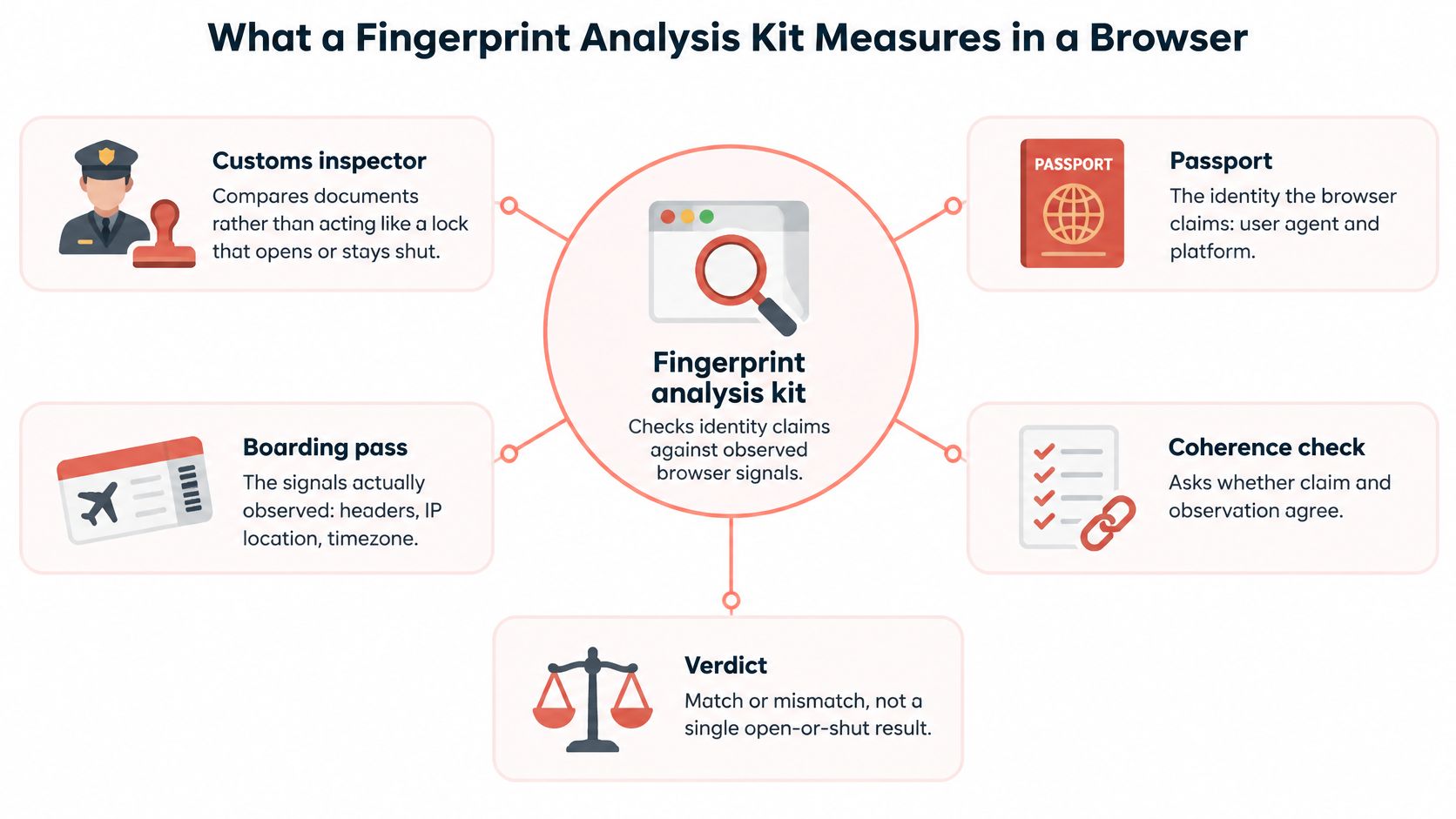
A fingerprint analysis kit works more like a customs inspector comparing a passport with a boarding pass than a lock that either opens or stays shut. The inspector compares claims with observations. In a browser, that means checking whether the reported platform, rendering behavior, settings and network characteristics make sense together.
The name also describes physical latent-print kits. Those use powders and chemical developers on surfaces, with different processes for porous and nonporous materials, as described in the FBI's latent-print processing guidance. A browser-side kit instead gathers software-visible measurements and, where supported, observations from a cooperating server.
The distinction matters: a browser script can draw a canvas, but it can't directly inspect its own TLS handshake. A test that reports both needs client-side probes and server-side collection. For the underlying concept, this explanation of browser fingerprinting provides useful context.
The diagram illustrates the claim-versus-observation model.
Signal families a fingerprint analysis kit reads
| Signal | What the script reads | What makes it vary |
|---|---|---|
| Canvas | Pixel output of a drawn test shape | GPU, graphics driver, font rasterizer and rendering settings |
| WebGL | Available renderer information and rendered output | GPU vendor, driver version, browser restrictions and software rendering |
| AudioContext | Sample output from a short oscillator and processing graph | Browser implementation, audio-processing stack and exposed precision |
| Fonts | Font availability inferred through rendering and fallback behavior | Operating system, installed software, downloaded fonts and access restrictions |
| Screen and hardware | Exposed resolution, colour depth and logical core count | Device hardware, display configuration and browser privacy controls |
| Locale and timezone | Language list, timezone identifier and UTC offset | System and user settings; proxy-aware software may adjust them |
| TLS and HTTP/2 | Server-observed handshake and protocol characteristics, returned to the page | Browser build, network stack and any intermediary that terminates the connection |
Read measurements within their limits
Canvas and WebGL are related, not interchangeable. Text rasterization, accelerated graphics and software fallback can take different paths. A renderer label alone doesn't predict every pixel, so a useful test preserves the drawing recipe alongside its output.
Fonts also need interpretation. Ordinary pages generally infer whether selected fonts are available rather than obtaining an unrestricted inventory of every installed font. Likewise, a screen value describes what the browser exposes, which isn't necessarily a complete hardware specification.
Locale requires a separate distinction: a proxy changes the network route, not automatically the browser's timezone or language. An offset also isn't a unique timezone identifier.
An individual value rarely supports a strong conclusion. Several related values provide a more useful picture, provided the tester distinguishes direct measurements, inferred properties and configuration choices.
How to Run a Coherence Check Step by Step
Start with a browser configuration you can describe and reproduce. For Playwright or Puppeteer testing, save the launch options as well as the results: viewport overrides, locale settings and browser arguments are part of the experiment.
This workflow keeps collection separate from interpretation.
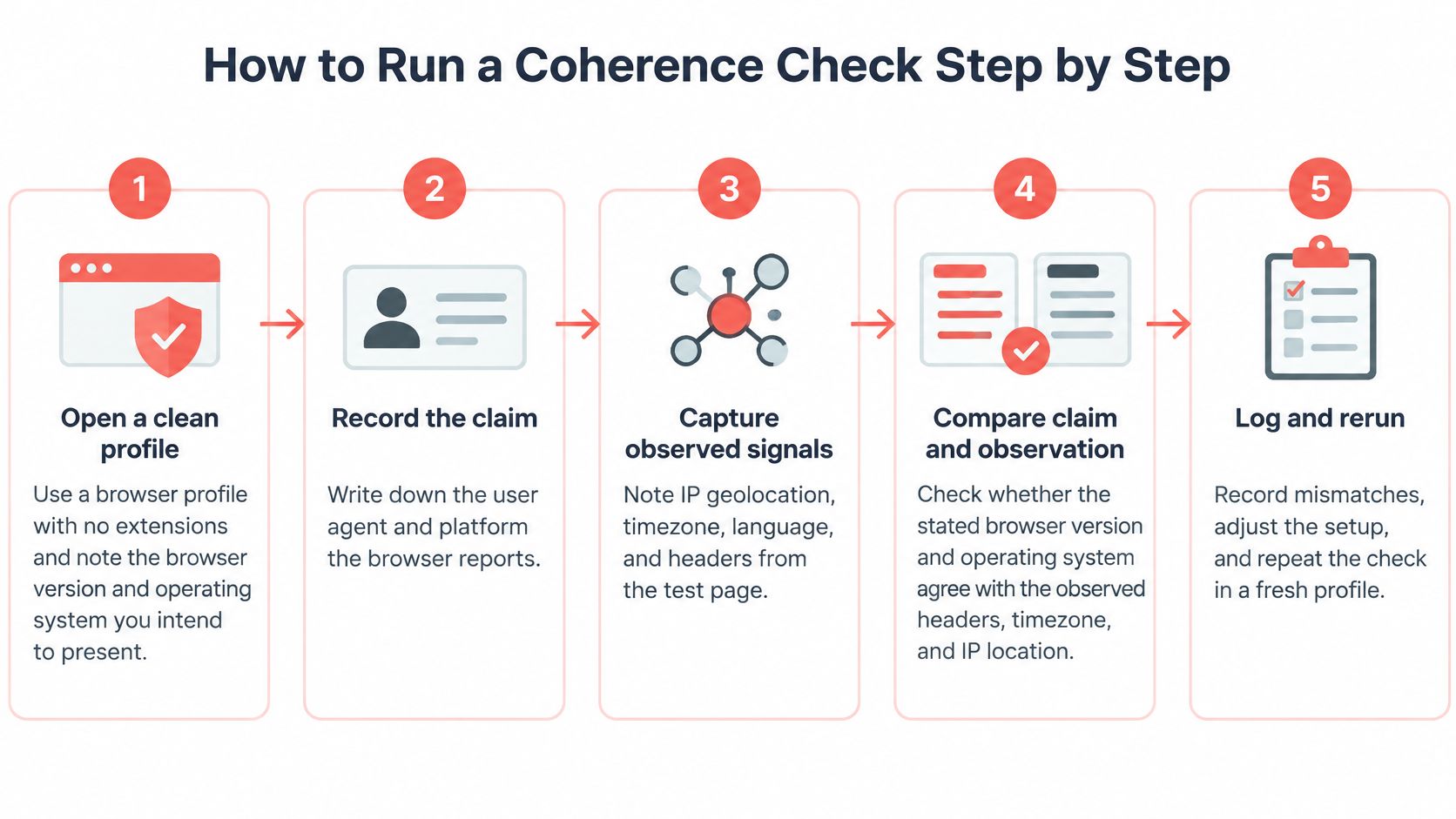
Open a clean profile and document the intended configuration. Disable extensions for the baseline, record the browser build and operating system, and wait for the page's probes to finish. Extensions can affect observations, but the common collection error is simpler: saving a partially loaded report.
Capture the claims and the observations separately. Save the user agent, available platform information, canvas output, WebGL renderer, tested fonts, language, timezone and server-reported connection details. Preserve a fresh export rather than comparing a current page against an old cached report.
Compare the platform claim with the font pattern. Segoe UI can support a Windows interpretation, while Helvetica Neue may fit a macOS configuration, but neither font proves the operating system. Look for a plausible collection and fallback behavior; installed applications and manually added fonts can explain exceptions.
Check the network route against the intended locale. If you use a proxy, record its exit location alongside the timezone and language, then ask whether that combination matches the test scenario. Don't assume disagreement means deception: a traveller, multilingual user or remote worker may legitimately retain different settings.
Save the baseline, change a single variable and rerun. Record the date, build, profile identifier and proxy configuration with each export so you can attribute the difference. Changing the browser, proxy and locale together may produce a different result, but it won't isolate the cause.
Make the baseline usable
Use a comparison log with fields for signal, observed value, expected value, explanation and retest status. Store the underlying value when possible, not just a coloured badge or composite score. A report saying that canvas changed is less useful than a report that preserves the input drawing, output digest and rendering configuration.
Keep test conditions explicit. A headless run and an interactive desktop run are different configurations; compare them deliberately rather than treating either as a substitute for the other. If a test can't collect a signal, label it unavailable, not matching.
At Clearcote Labs, our free fingerprint test runs coherence checks on whatever browser opens it, with a plain-English explanation for each check, and identifies contradictory signals. When evaluating browser fingerprinting tools, prefer that kind of inspectable result over an unexplained score.
The accompanying video offers another way to follow the checking process.
Watch the video on YouTubePractical rule: A useful baseline lets another tester reproduce your setup and understand why you accepted each difference.
The desired outcome isn't identical values everywhere. It's a configuration in which each observation either fits the intended environment or has a documented, testable explanation.
Reading Mismatches and Assigning a Verdict
An odd value is a reason to investigate, not a verdict. A disagreement between related observations is more informative, but the strength of that evidence depends on the relationship. A browser-generated request header and a JavaScript language list have a closer connection than a person's preferred language and their current network location.
Avoid treating every mismatch as equally serious. Check whether the measurements describe the same thing, whether an intermediary changed either observation, and whether your expectation is a technical requirement or merely a common configuration.
Signal pairs that should agree
| Signal pair | Example mismatch | Why it stands out |
|---|---|---|
| Operating system claim and installed fonts | Windows user agent with a font collection associated with Linux | Suggests a platform inconsistency, although fonts can be installed across platforms |
| Browser version and TLS handshake | Recent Chrome claim with connection characteristics unlike the expected Chromium stack | Warrants checking the build, collection method and TLS-terminating intermediaries |
| Timezone and exit IP location | Berlin timezone on a US exit address | Conflicts with a geographically aligned persona, but is legitimate for many real users |
| GPU renderer string and canvas output | Claimed vendor with rendering behavior outside the expected reference configuration | Requires checking drivers, fallback paths and the exact rendering test |
| Language list and Accept-Language header | fr-FR in the page with en-US in the request |
May reveal inconsistent overrides, request-specific settings or header modification |
| Touch support and desktop claim | Exposed touch points on a desktop persona | Deserves a device-model check, but touch-enabled laptops are valid desktop devices |
The table is a diagnostic checklist, not a set of universal identity rules. Fonts don't uniquely name an operating system, geography doesn't dictate language, and touch support doesn't establish a mobile device.
Assign a verdict with a reason
Use labels that describe your evidence rather than implying a probability you haven't measured:
- Coherent: The collected observations fit the intended configuration, and accepted exceptions are documented.
- Explainable: A discrepancy has a plausible, testable cause, such as a deliberately retained timezone or a modified request header.
- Contradictory: Comparable observations conflict with the configuration's requirements, and you haven't established an explanation.
Keep incomplete collection separate from those verdicts. A missing server-side handshake report can't support either agreement or disagreement.
A conflict spanning JavaScript and network observations deserves attention because it may expose independently configured layers. It doesn't automatically outweigh every same-layer conflict, however. Two precise measurements of the same property can be stronger evidence than loosely related observations from different layers.
A mismatch becomes actionable when you can name the expectation it violates and the experiment that would explain it.
Fix the suspected outlier first, then repeat the test in a fresh session. Save the before-and-after observations with the build and network configuration. Only then decide whether to keep the persona, revise its configuration or replace it before using it for a reproducible test suite.
Testing Across Workers, Iframes and Sessions
Run equivalent probes in the main page, a dedicated worker and relevant iframe contexts, then export the results into a comparison sheet. Add service-worker observations only for properties that context exposes. Different API availability isn't the same as a contradictory value.
Use rows for signals and columns for execution contexts. Record the probe version, origin and whether the context could access the API. This prevents a blocked third-party frame or unsupported worker API from appearing as a false identity mismatch.
Compare equivalent observations
A page-level JavaScript override may affect the main document without affecting a worker. That makes cross-context testing valuable, but the comparison must use the same input and equivalent measurement method.
- Main page and worker: Compare shared properties, such as available language or hardware information, where the relevant APIs exist.
- Same-origin iframe: Check whether a newly created frame returns the intended configuration without relying on initialization in its parent.
- Cross-origin iframe: Record origin boundaries, permissions and privacy restrictions before interpreting differences.
- Service worker: Separate worker state and lifecycle effects from browser identity measurements.
Don't compare a DOM canvas operation with an unrelated worker rendering recipe and call the difference a leak. Make the drawing dimensions, fonts, processing steps and serialization consistent wherever equivalent APIs allow it.
Repeat with controlled changes
Next, run a fresh browser session, a run after clearing site storage and a run with a different network route. Change these conditions separately. Cookies and storage are useful experimental variables, but they're not substitutes for recording the rendering environment.
Fonts and hardware-facing values should remain explainable when the underlying configuration hasn't changed. A browser update, graphics-driver change or switch to software rendering can invalidate an old reference. Record those changes rather than forcing a new result into the previous baseline.
Distinguish a changed digest from a diagnosed environmental change. If canvas output differs, inspect repeatability and pixel differences before attributing it to privacy protection or hardware. A changed WebGL renderer string provides a more direct configuration clue, but still needs an explanation.
For teams organizing cross-device testing, keep these identity checks beside functional results. That lets you distinguish a layout failure on the intended device profile from a failure caused by loading the wrong configuration.
Finally, exercise clicks, scrolling and form focus during the test flow instead of observing only initial load. Log when collection occurs so that event-dependent results remain reproducible.
Comparison discipline: When equivalent probes disagree across contexts, preserve the disagreement before changing the setup.
What a Clean Result Cannot Prove
A clean result doesn't prove that a browser is private. It establishes only that the checks performed didn't expose an unexplained inconsistency under the tested conditions. A consistently exposed configuration may still be distinctive, and a changing configuration may still be linkable.
The ACM web-tracking study highlights why learnability matters more than apparent instability, describes the blind spots of collection that misses interaction-triggered fingerprinting, and places cookie deletion and private browsing within the broader problem of re-identification. A scrambled output isn't sufficient evidence that an observer can no longer associate visits.
Separate coherence from unlinkability
A coherence test asks whether observations fit together. An unlinkability evaluation asks whether an observer can associate records across conditions. Those are different questions, and a pass on the former doesn't answer the latter.
A careful evaluation needs explicit questions:
- Persistence: Which properties survive a new session, a storage reset, a different network or a different execution context?
- Noise: Can repeated measurements distinguish random output fluctuations from a changed configuration?
- Distinctiveness: Does a privacy modification make the browser less ordinary within the population relevant to the test?
- Observer capability: Can the evaluator see only page scripts, or also request metadata, account activity and server-side history?
- Evidence: What comparison method and independent test conditions support a claim that visits can't be linked?
Don't translate an unfamiliar fingerprint into an anonymous user. An evaluator may lack enough reference observations to interpret a configuration, while a service with account history has additional information.
Keep operational security separate
Fingerprint controls don't replace secure account handling, careful permissions or separation between research and personal sessions. For teams reviewing those adjacent practices, the developer security checklist from Mallary is a useful companion to a browser-measurement checklist. Treat it as a separate operational review rather than evidence about fingerprint quality.
A responsible report states its scope: which browser was tested, which contexts were exercised, what interactions occurred and which observations remained unavailable. It should also distinguish a successful configuration check from a site-specific tracking assessment. Otherwise, readers may mistake the absence of a reported inconsistency for the absence of collection.
Engine-level controls can remove many common inconsistencies without establishing universal invisibility. Clearcote is not undetectable, detection methods evolve, and no test result guarantees evasion of any system. The defensible conclusion is narrower: the observed configuration met the stated checks under the recorded conditions.
A Worked Example of Two Signals Disagreeing
Suppose a QA engineer needs a Windows browser configured for a German-market test. The browser connects through a proxy whose exit address geolocates to Frankfurt. The test specification explicitly calls for German language preferences and the Berlin timezone, so regional alignment is a requirement rather than an assumption about all users in Germany.
The engineer begins with an apparently suitable configuration.

The user agent claims Windows, the tested font collection is plausible for that platform, and the browser version matches the intended build. But the page reports America/New_York, while the captured request carries en-US as its preferred language.
Neither observation proves the proxy is broken. Both are compatible with a browser profile whose default regional settings were left unchanged.
Diagnose the configuration before replacing it
The engineer checks the saved launch configuration and finds that the proxy changed, but the profile's locale settings didn't. That provides a testable explanation: the network route matches the scenario, while the browser's regional configuration doesn't.
| Observation | Test requirement | Action |
|---|---|---|
| Exit location is Frankfurt | German-market network route | Retain the proxy |
Timezone is America/New_York |
Europe/Berlin |
Change the timezone configuration |
Preferred request language is en-US |
German preference | Configure de-DE and verify the generated header |
| Windows platform observations | Windows test environment | Preserve the platform configuration |
For a US-market scenario, changing to an appropriate US exit could be a reasonable alternative. Here it would violate the test specification, so the engineer keeps the Frankfurt route.
Retest the hypothesis
To preserve attribution, the engineer changes the timezone first and reruns the relevant probes. After confirming that correction, the engineer changes the language configuration and repeats the collection. A final fresh-session run checks the complete intended setup.
In this hypothetical retest, the page reports Europe/Berlin, the language list and captured request reflect the German preference, and equivalent worker observations agree with the main page. The server-observed connection characteristics remain compatible with the browser build; changing locale hasn't required changing the network stack.
The original verdict is explainable mismatch, caused by configuration, not demonstrated identity leakage. The engineer records the original values, configuration edits and final export before running the cross-device suite. That record makes the correction auditable without claiming that the corrected browser is anonymous or indistinguishable from every physical Windows device.
Clearcote Labs offers a Chromium-based browser with engine-level fingerprint controls and Playwright and Puppeteer SDKs for reproducible browser testing. Visit Clearcote Labs to run the free fingerprint test, inspect its explanations and build a baseline you can compare across contexts and sessions.