
In a 2024 study of 8,400 U.S. participants, approximately 60% of users had a unique overall browser fingerprint, according to researchers publishing on arXiv. A fresh browser isn't automatically anonymous, and an empty cookie jar doesn't necessarily look like a new device.
Table of Contents
- Why Browser Identities Need Active Management
- The Parts of a Profile and What Each Controls
- Keeping Signals Consistent Across Sessions
- How to Build and Reuse a Persistent Identity
- Choosing a Team Model for Shared Profiles
- Fixing Common Profile and Device Problems
- Start With One Identity Before You Scale
Why Browser Identities Need Active Management
Say your team runs 200 authorized accounts through a Playwright script. On Monday, the accounts sign in normally. On Tuesday, after a browser update and a deployment to another machine, some accounts receive unfamiliar-device challenges.
The script hasn't changed, and the cookies are still present. But the browser now reports a different combination of rendering capabilities, fonts, hardware characteristics, and browser-version information. From the website's perspective, the person holding the session token may have arrived with a different device.
Profile & device management means keeping each intended browser identity stable, separated, and reproducible across sessions, machines, and team members. It's broader than saving cookies, but narrower than managing an entire corporate laptop.
Separate the account from the device
An account answers who is signing in. A session token helps establish that the user has already authenticated. A browser fingerprint describes characteristics of the environment making the request.
Those things interact, but they aren't interchangeable. Restoring a session doesn't restore the graphics environment, and changing a device identity doesn't revoke an account's existing sessions.
Treat a browser profile as a device record with attached session state, not as a folder that happens to contain cookies.
For automation, the practical questions are straightforward:
- Identity purpose: Is this a persistent account, a disposable QA persona, or an anonymous collection task?
- Continuity: Should the website recognize the environment on the next run?
- Ownership: Who may launch, modify, export, or retire the identity?
The components, their matching rules, and the handover process all follow from those decisions. Choose which identities you need before writing the automation code, rather than trying to infer identity boundaries from whichever browser contexts your script happens to create.
The Parts of a Profile and What Each Controls
A profile resembles a passport: its name, photograph, and supporting details should agree. A plausible photograph doesn't rescue a document whose other fields describe someone else.
The analogy has limits. A browser profile isn't a government identity document, and a website can't verify every characteristic it receives. Still, it helps explain why individually believable settings can form an implausible whole.
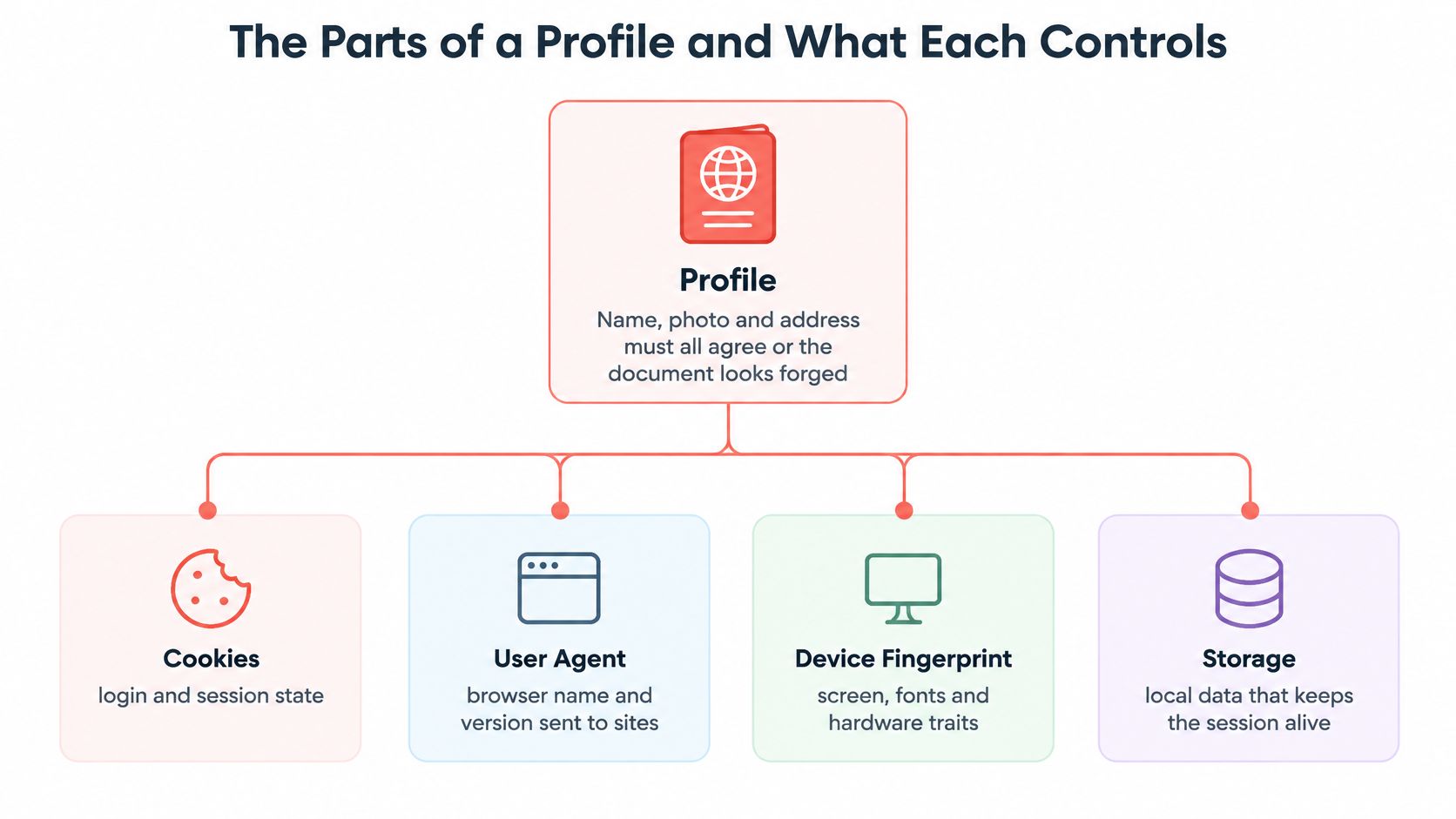
Profile components, persistence and matching rules
| Component | What it controls | Persists across sessions | Must stay consistent with |
|---|---|---|---|
| Cookies | Login and session state | Yes, when saved and unexpired | Account and expected proxy region |
| Local and session storage | Site state and app settings | Local storage persists in the user-data directory; session storage needs explicit handling | Account identity |
| IndexedDB and cache | Large app data and cached resources | In the user-data directory, subject to eviction and clearing | Browser version and application schema |
| Canvas, WebGL and WebGPU | Rendering output and exposed graphics capabilities | Seeded outputs persist with a fixed seed and compatible configuration | GPU vendor, operating system, and rendering backend |
| Fonts | Font availability and text measurements | With a fixed font configuration or seeded implementation | Operating system |
| Screen and hardware | Resolution, cores, and memory | With a fixed device configuration | Device class |
| Locale and timezone | Language and clock presentation | With saved, fixed settings | Intended user locale and proxy exit location |
| TLS and HTTP/2 | Network handshake characteristics | Determined primarily by browser build and network-stack configuration | Browser version claimed in the user agent |
Cookies identify sessions, but their expiry and server-side revocation still apply. Local storage usually survives browser restarts; session storage belongs to a browsing session, so don't assume a saved directory or a framework's storage export restores it.
IndexedDB can contain substantial application state. Cache is different: applications should tolerate its disappearance, and your automation shouldn't treat a cache entry as an authentication credential.
Persistence has different owners
Storage persistence comes from preserving the appropriate browser data. Fingerprint persistence comes from preserving the identity configuration, including its seed where the implementation supports seeded signals. Network-handshake consistency comes from the actual browser stack, not a user-agent string pasted onto another executable.
A seed alone doesn't freeze an ordinary browser's installed fonts or physical GPU. Likewise, a German-speaking user can legitimately browse through another country. Matching rules describe coherent operating assumptions, not universal laws about where people live.
For a broader device matrix, use a cross-device testing approach that records the environment alongside the test result. Otherwise, a rendering failure can look like a profile failure.
Also distinguish browser profiles from enterprise configuration profiles. Purple Access's guide to MDM certificate profile differences is useful when the issue concerns managed Wi-Fi certificates rather than browser storage or fingerprint settings.
List your profile's components, then mark which must move together. That inventory is more useful than a single “profile saved” checkbox.
Keeping Signals Consistent Across Sessions
Randomizing every attribute on every run isn't a sound default. You can replace a recognizable configuration with a contradictory one, without establishing meaningful separation between identities.
A large-scale browser fingerprinting study using telemetry from tens of millions of real Chrome browsers found that entropy estimates must account for dependencies and correlations among Web APIs. Treating signals as independent can misstate how much identifying information they reveal.
For an automation engineer, the implication is practical: validate combinations, not just fields.
Plausible values can form an implausible device
Consider these configurations:
- Windows user agent with Linux-oriented fonts: The operating-system claim and font environment deserve investigation, especially when text measurements reveal the underlying platform.
- German timezone with a U.S. exit location: This can be legitimate travel or remote access, but unexplained changes between runs introduce another variable.
- GPU renderer incompatible with the claimed platform: The reported graphics stack may contradict the operating-system assumptions used elsewhere.
None of these proves that a visitor is automated. They do make the environment less controlled, which is enough to undermine reproducible testing.
Choose a limited set of internally consistent identities. Keep each identity's seed fixed, and change dependent settings together when an intentional migration is necessary. Our captured device profiles provide thousands of real-machine profiles, tagged by GPU vendor, to load instead of constructing a synthetic persona from unrelated values.
Record provenance and test every relevant realm
Your inventory should include the configuration's origin, browser version, operating-system assumptions, GPU and rendering characteristics, and locale relationships. Record whether values came from an actual machine, a captured profile, or a manually assembled test fixture.
Understanding what seeded means helps separate deterministic identity generation from ordinary storage persistence. They solve different problems and should have separate validation checks.
Compare supported signals in the main frame, workers, and iframes. Workers don't expose every API available to a document, so compare equivalent capabilities rather than expecting identical objects everywhere.
Practical rule: A valid-looking field is insufficient. The combined identity should resemble a plausible device and remain stable unless you deliberately change it.
Store a baseline snapshot and review differences after browser upgrades. A changed value isn't automatically a defect, but an unexplained change should block promotion of that identity configuration into production.
How to Build and Reuse a Persistent Identity
Build the identity before performing the login. Otherwise, you can accidentally authenticate under a temporary environment and preserve only part of what the website observed.
Keep a small configuration manifest beside the automation job. It should identify the account reference, seed reference, storage directory, browser build, device configuration, and network policy without containing passwords.
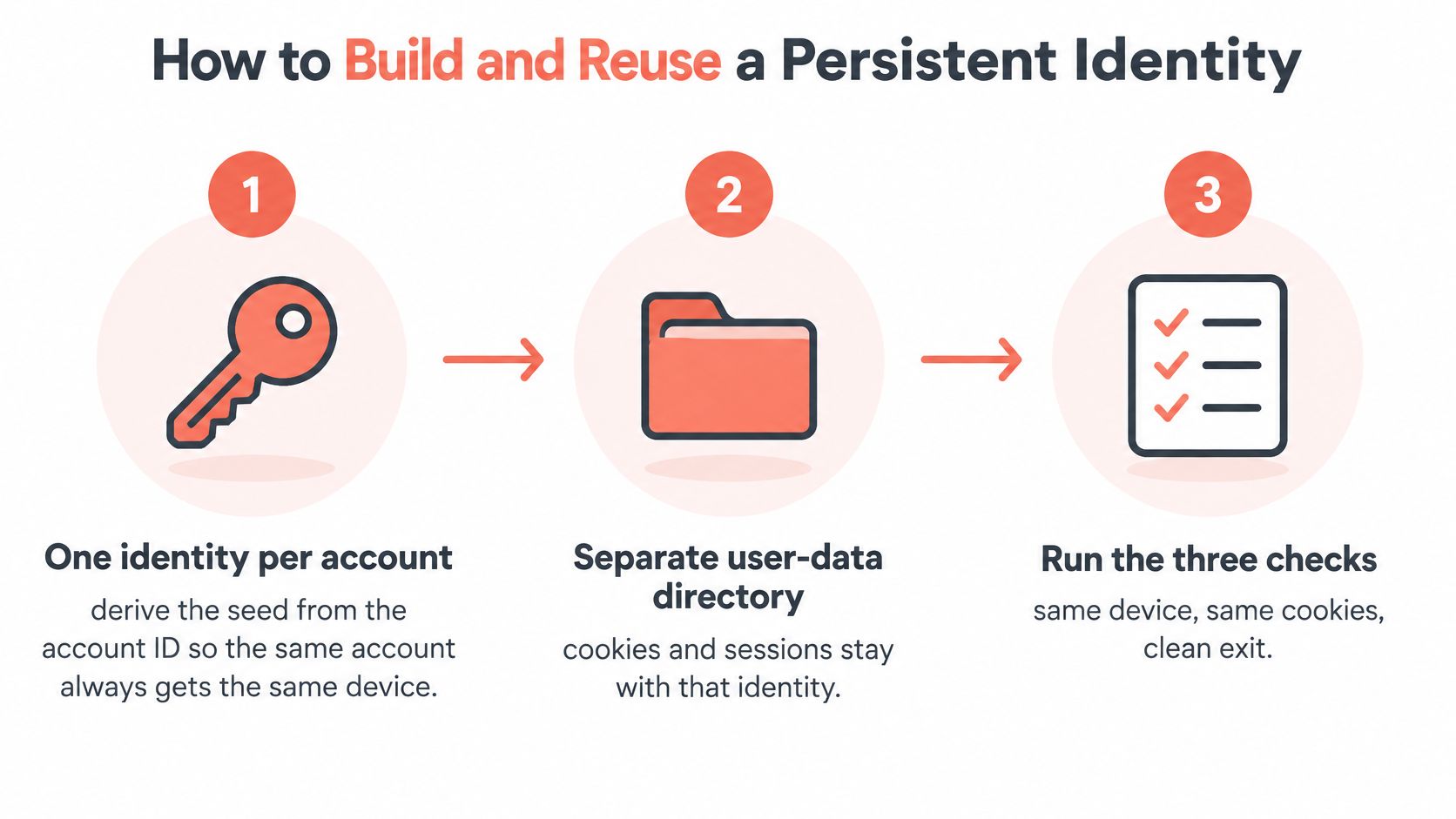
Establish the identity before authentication
Allocate a deterministic seed to the account. Derive it from a stable internal account or tenant identifier, using a namespaced mapping rather than exposing personal information directly. Generating a random seed inside the launch function creates a different device on every execution.
Give the identity a separate user-data directory. With Playwright, use a persistent browser context when you need the full directory; with Puppeteer, configure the corresponding user-data path. Sharing that directory between accounts mixes state, while opening it concurrently can also cause locking or corruption problems.
Select the platform, GPU-tagged device configuration, and browser build together. Record them as a versioned configuration rather than independent launch flags. A copied user-agent override won't make an incompatible rendering backend or network stack match.
Choose the proxy route before assigning timezone, languages, and WebRTC policy. Use the intended exit location as the starting point, while preserving any deliberate locale exception. Choosing a timezone first and replacing the proxy later creates avoidable configuration drift.
Authenticate, save, and prove restoration
Launch the configured browser and authenticate through the authorized flow. Save the resulting cookies and supported storage to a named profile file, or preserve the complete user-data directory when the application needs more state. If your environment provides
save_profileandload_profiletools, save after successful login, and treat the resulting file as a credential.Run a fingerprint check that compares equivalent values across the main document, a worker, and an iframe. Record the results with the configuration revision so failures can be traced to a specific change. Testing only the top-level page can miss a different value exposed elsewhere.
On a later launch, restore the saved profile before navigating to the authenticated application. Verify both the device baseline and an authenticated application action, rather than merely checking whether a cookie exists. Expired or revoked sessions may require legitimate reauthentication even when restoration worked correctly.
Don't assume every export format captures every storage mechanism. A lightweight state file and a complete browser directory are different artifacts, and an application may require state that a particular export omits.
Acceptance check: After a clean shutdown and relaunch, the intended device configuration is unchanged and the application still recognizes the saved session.
Keep the original directory intact while testing migration to another machine. If the application uses host-bound credentials or additional device checks, copying browser state alone may not be sufficient.
Choosing a Team Model for Shared Profiles
| Model | How identities are shared | Linkability risk | Best fit |
|---|---|---|---|
| One identity per account | Each account gets its own seed and user-data directory | Low from profile reuse; other links remain possible | Long-running account management |
| Shared pool of personas | Several jobs draw from one pool of identities | High when one persona touches unrelated accounts | Stateless, high-volume scraping |
| Fresh profile per run | New seed and empty storage on every run | Low from retained profile state, but no login reuse | One-off QA and cross-device tests |
| Single shared browser | One profile used by the whole team | Very high | Read-only tests only, with controlled state |
The most hazardous model is the single shared browser. Even a read-only visit can create cookies, local storage, or service-worker state, so read-only doesn't mean state-free.
A teammate can inherit another person's login or preferences without realizing it. Parallel jobs can also overwrite state, making failures difficult to reproduce and ownership difficult to establish.

Choose ownership before concurrency
Start with the account inventory and whether authentication must survive between jobs. Persistent account work benefits from dedicated identities; disposable QA cases usually benefit from clean fixtures.
A shared pool can suit authorized stateless collection, but don't let a worker borrow an identity that another job is actively using. Coordinate checkout and release, and apply explicit limits when testing in parallel.
For agencies that handle several client LinkedIn profiles, Flowkon's workflow discussion provides useful context for ownership and handover. Technical separation still needs client authorization and compliance with the service's rules.
The table's risk labels describe linkability introduced by profile sharing, not anonymity guarantees. Accounts can still be associated through shared credentials, recovery details, network infrastructure, or application activity.
Make handover auditable
Record an owner, permitted operators, configuration revision, storage location, and retirement status for every identity. Provide a documented launch procedure for non-developers rather than asking them to reconstruct browser flags.
Enterprise management also requires explicit authorization boundaries. NIST's enterprise mobile-device guidance describes management profiles as administrator-approved permissions and resources, reinforcing the distinction between possessing a configuration and being authorized to use it.
When an engineer leaves, revoke their access to profile artifacts and secrets. When an account is retired, revoke its saved sessions, delete its user-data directory, remove exported profile files from shared storage, and record the retirement. Deleting a local file doesn't revoke a session already copied elsewhere.
Fixing Common Profile and Device Problems
A login that disappears after every run usually warrants a storage check before a fingerprint investigation. Confirm that authentication completed, the save operation succeeded, and restoration happened before navigation; also check whether the service expired or revoked the session.
Profile symptoms, causes and fixes
| Symptom | Likely cause | Fix |
|---|---|---|
| Logged out after each run | Storage was never saved or loaded | One-run change: save after login and load before navigation |
| New device on every visit | Seed changes on each run | One-run change: derive the seed from the account ID |
| Values differ between tabs | Workers or iframes not tested | Validation change: compare equivalent signals across realms |
| Wrong locale or clock | Timezone not matched to the proxy | Full re-validation: align timezone and languages with the intended exit location |
| Two accounts share state | Same user-data directory | One-run configuration change: assign separate directories, then authenticate cleanly |
| Blocks after a browser update | Identity version drifted from the browser version | Full re-validation: update the identity configuration and test again |
Treat these as diagnostic hypotheses, not proof of a website's detection logic. A block after an update can also result from application changes, account restrictions, or network reputation.
Debugging discipline: Change one suspected cause, preserve the failing baseline, and rerun the acceptance checks.
Say a team finds its accounts logged out each morning. If the trace shows that the profile was saved before authentication finished, moving the save operation after a verified authenticated action addresses the actual fault.
A successful repair produces an active session on relaunch, the intended device baseline, and matching supported values across execution realms.
Start With One Identity Before You Scale
Create a persistent identity for an authorized account and prove it survives a clean restart. A fleet scheduler won't fix an identity whose storage and device settings are already unreliable.
Use this final checkpoint before expanding the account inventory.
Require an unchanged intended device configuration, coherent values across the main frame and supported worker and iframe APIs, and an authenticated session on the subsequent run. If a check fails, use the matching diagnostic row, repair the cause, and repeat the complete acceptance test.
Scale by allocating a separate configuration and storage boundary to each account, not by cloning an authenticated profile. Keep credentials and API keys out of shared chats, scripts, and repositories; account holders remain responsible for activity under their accounts.
Keep browser identity and endpoint enrollment distinct
If the task concerns enrolling company hardware, IT Cloud Global, LLC's guide to Intune enrollment for Houston businesses addresses that separate management layer. Browser identity controls don't replace endpoint compliance policies.
For agent-assisted implementation, our setup instructions let a coding agent install the SDK, check the browser, and run an initial script without putting the licence key into chat.
Use the accompanying video alongside that hands-on setup.
Watch the video on YouTubeBefore adding another account, save the passing configuration and its validation result. Make reproducibility the admission requirement for every new identity.
Clearcote Labs offers engine-level browser identity controls, captured device profiles, and Profile Manager for creating and launching persistent identities. Visit Clearcote Labs to build an account-specific profile, verify its signal consistency, and test session reuse before expanding your automation.