
Your suite finally got faster, and that's when it stopped being trustworthy. You raised the worker count, the wall-clock time dropped, and then logins, carts, and dashboards started failing in places that passed yesterday. Retries turn green, so nobody knows whether the product broke or your workers collided. That's the normal starting point for testing in parallel, and it's fixable. Treat it as an isolation problem first and a speed setting second, and the setup below will hold up.
Table of Contents
- Pick a Parallel Pattern Before You Add Workers
- How to Set Up a Parallel Run Step by Step
- Keep Each Worker's Accounts, Profiles and Seeds Apart
- Size Your Workers Against Queue Time
- Tell a Real Bug From a Parallel Failure
- Confirm the Setup Before You Scale Out
Pick a Parallel Pattern Before You Add Workers
Say a suite drops from 40 minutes to 12, then starts failing in random places. The speed gain is real. The failures usually aren't new product bugs. They appear because you've added concurrency at one layer while leaving shared state untouched at another.
Parallel testing has three layers you need to keep separate in your head. Workers run inside one machine, shards split files across CI machines, and browser instances are what your own code launches and controls. A config change at the first layer doesn't give you isolation at the third, and a new machine at the second doesn't stop two shards logging in as the same user.
Parallel patterns compared
| Pattern | Where workers run | Isolation you get | Best for |
|---|---|---|---|
| Playwright workers | Several worker processes on one machine | Separate browser per worker; shared accounts and data stay shared unless fixtures isolate them | Fast local and single-machine CI suites |
| Playwright sharding | Test files split across CI machines | Machine-level separation; shards still collide on shared accounts and external systems | Large suites that outgrow one machine |
| Puppeteer parallel browsers | Several browser instances started from one Node script | Separate processes; profiles are shared unless each gets its own user-data dir | Scraping jobs and custom runners |
| Docker containers with CDP | One container per worker, each exposing a CDP endpoint | Filesystem and network separation per container | Isolated worker pools in CI |
| Clearcote serve per identity | One browser per identity, each with its own seed, proxy, timezone and language | Identity separation by seed and profile directory | Repeatable cross-device QA |
The gap in that table is the point. Sharding separates machines, not identities. Two shards on different runners can still open the same tenant, edit the same record, and invalidate each other's sessions. The same caution applies when you plan pre-cutover data validation for a migration, where parallel checks against shared data need their own boundaries before you trust the results.
The upside is worth getting right. A 2025 Journal of Systems and Software study of the STILE tool evaluated eight end-to-end web test suites and found optimized parallelization reduced execution time by up to 80% versus sequential execution and up to 50% versus Selenium Grid.
Choose the pattern by the state your tests share, not by how many cores you have.
Cores decide how fast you could go. Shared accounts, files, and profiles decide whether you should.
How to Set Up a Parallel Run Step by Step
Start narrow, prove the baseline, then widen. The infographic below sums up the first moves before you touch worker counts.
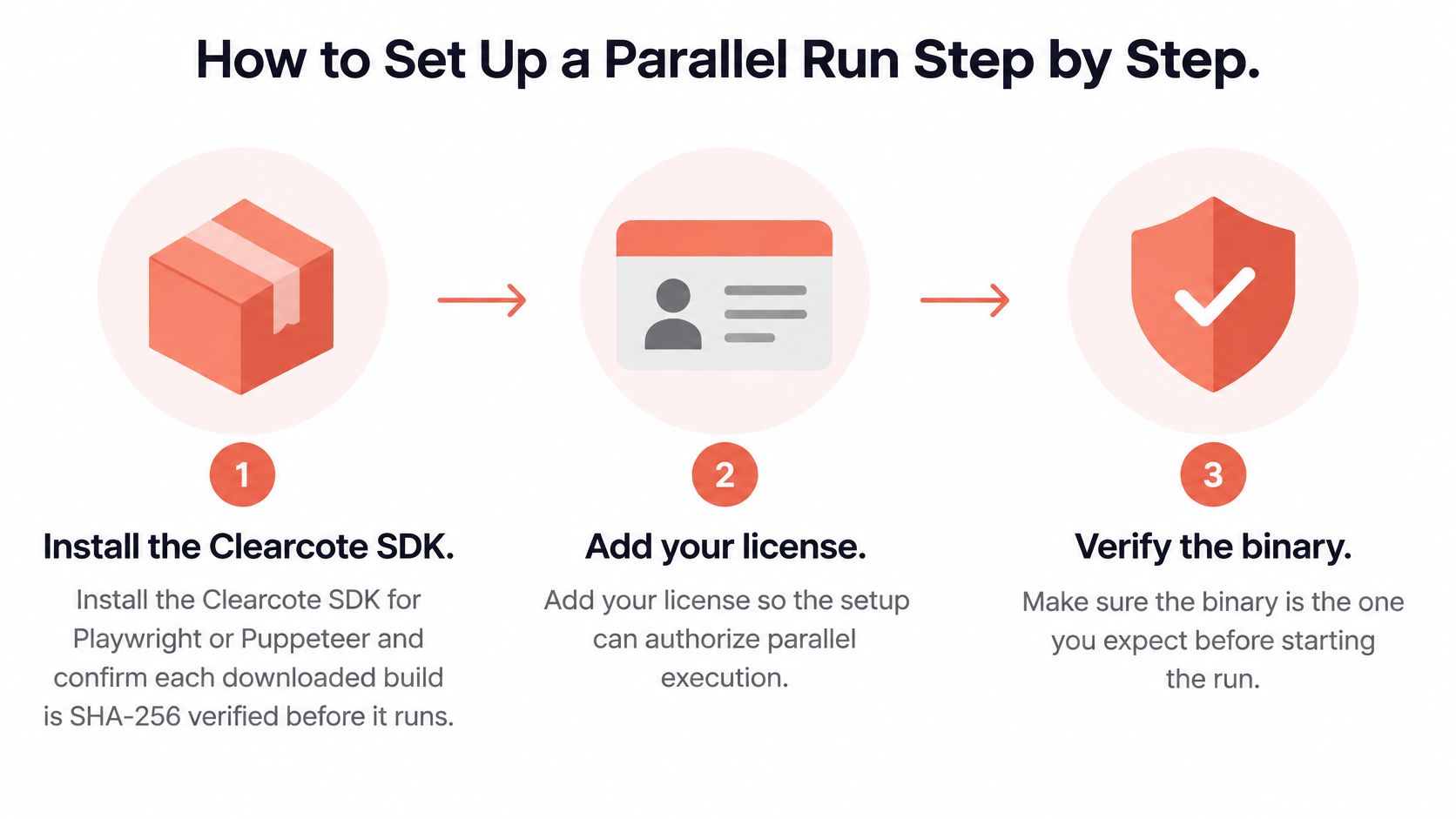
The eight steps
Install the SDK: Install the Clearcote SDK for Playwright or Puppeteer. Every build the SDK downloads is SHA-256-verified before it runs, so you know the binary is the one you expect. Don't skip verification to save a minute in CI, because a wrong or stale binary makes every later comparison meaningless.
Add the license key via an environment variable: Keep the key out of the repository. With a license key, each launch asks which build is current and checks a browser slot out, sending the key, a random machine id, the OS, and the SDK and browser versions. It keeps the slot alive while the browser runs and gives it back on close, so count slots against your limit before raising workers.
Swap the executable path: Point Playwright or Puppeteer at the Clearcote binary. The SDK is a drop-in, so your test code usually stays the same. The common slip is changing the binary in one project config and leaving another project on stock Chromium.
Turn on parallelism and check independence: Enable workers in your config, then audit each test. No test should depend on data another test created earlier, rely on
beforeAllstate, or assume file order. If it does, fix that before you measure anything.Give each worker its own user-data directory: Cookies and storage must never cross workers. A shared user-data directory is the most common cause of logins that work alone and fail under load. Key the directory by worker index so it's obvious in artifacts which profile produced a failure.
Assign a fingerprint seed per worker: Derive each seed from its tenant or account id. That keeps identity stable for a given account across runs while keeping workers distinct from each other.
Run a one-worker baseline first: Record pass count and run time with a single worker, then raise workers in steps. If you skip the baseline, you can't tell whether a new failure came from parallelism or was already there.
Save worker count and seed list with every report: You'll need both in section 4, where the three-run diagnosis uses them. Attach them to traces and videos, not just to a CI log line nobody can find later.
For containerized setups, the same steps apply inside the image, and our Playwright in Docker setup guide covers how the binary and config fit together there. It's also worth deciding now what happens when a run goes wrong at 2 a.m., since automating app incident response is easier to wire up while you're already touching CI than after the first bad night.
The short walkthrough below shows the launch side of this in practice.
Watch the video on YouTubeA healthy first parallel run is boring. You get the same pass count as the baseline, a shorter wall-clock time, and no new failures. If any of those three is missing, don't add more workers. Find out why first.
Keep Each Worker's Accounts, Profiles and Seeds Apart
Say thirty tests all log in as the same admin user. The second login logs the first session out, a third worker changes the admin's settings mid-test, and the failures look random because the collision depends on timing. Nothing about that is a product bug. It's one identity being asked to be in thirty places at once.
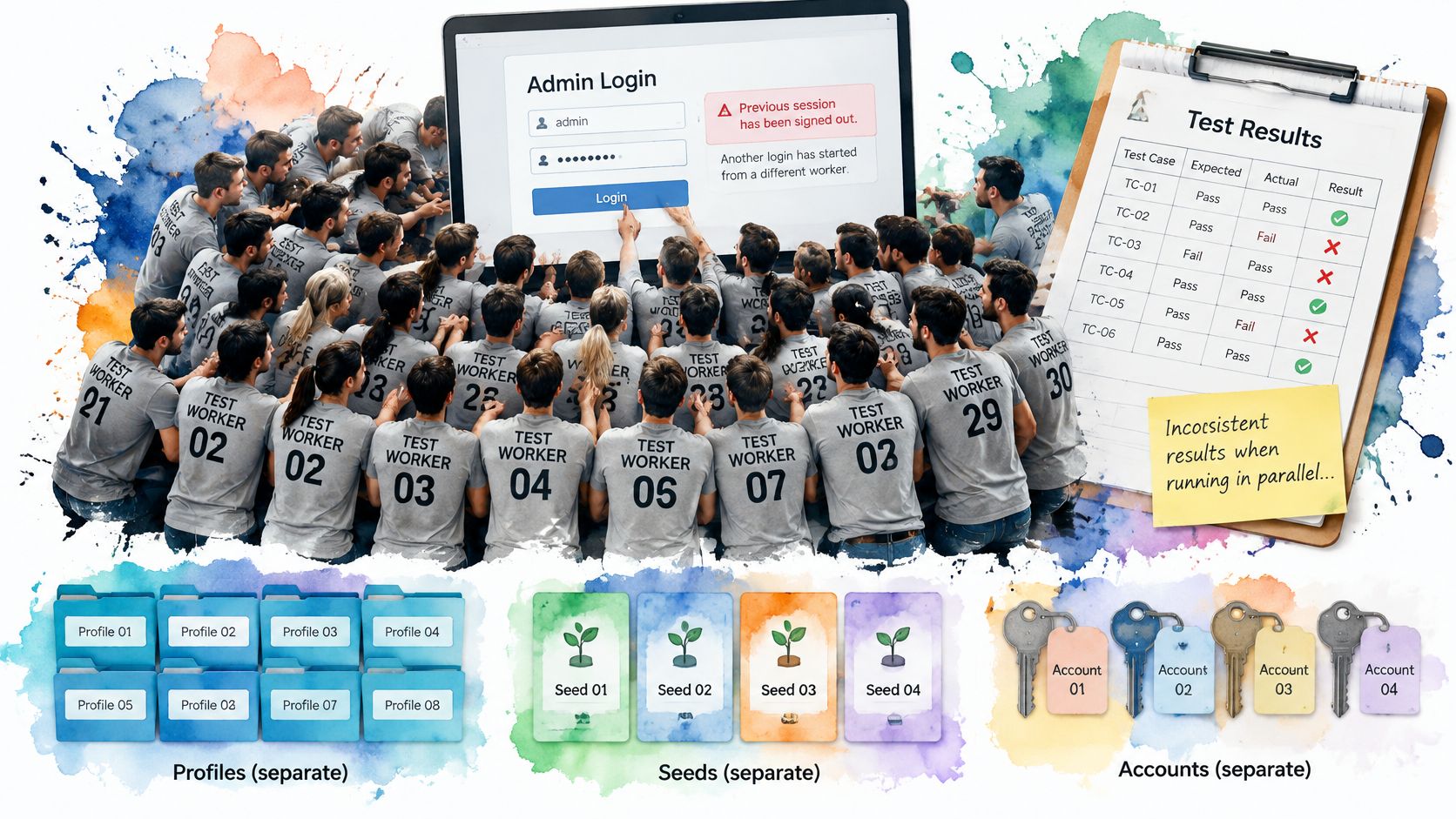
What workers typically share
Parallel workers collide on more than accounts. The usual list is accounts, tenants, ports, files, databases, and browser profiles. Any one of them can produce a failure that vanishes when the test runs alone, which is why you should inventory all of them rather than fixing whichever one broke first.
For accounts, create test users per worker and use the worker's parallel index to pick one. Seed each user with only the data its tests need, and clean the users up after each run so state doesn't accumulate across nights. If your app enforces single sessions, this isn't optional, it's the whole fix.
For profiles, use a separate user-data directory per profile so cookies and storage stay with their identity. Sharing a profile directory means one worker's logout, local storage write, or service worker update lands in another worker's browser. You'll chase that for days if you read it as flakiness.
Seeds are identities, not decorations
In Clearcote, a seed defines the device. The same seed gives the same device every time, and different seeds are unlinkable by design. To run multiple distinct identities, use a different fingerprint seed per identity, derived from a tenant or account id, and a separate user-data dir per profile for cookies and storage.
Never let two workers share one seed. They'd present as the same device, so rate limits, device-bound sessions, and fingerprint checks would treat separate workers as one returning user. That can look like an app bug when it's really your identity setup collapsing two actors into one.
Pre-run check: List every resource each test writes to, and confirm each one is keyed by worker or tenant. If you can't name the key, it's shared.
A clean isolation layer doesn't remove the need to test for it. The verification steps in section 5 will show whether it held under load.
Size Your Workers Against Queue Time
More machines help, but not in a straight line. The 2023 empirical study of Ericsson and Google Chrome test histories found that running all tests in parallel required 7 machines to reproduce Ericsson's observed average feedback time of 8.33 hours, while Chrome required 217 available machines to reproduce 36.48 minutes. The first machines remove most of the waiting because delays compound across the queue. Later ones buy less.
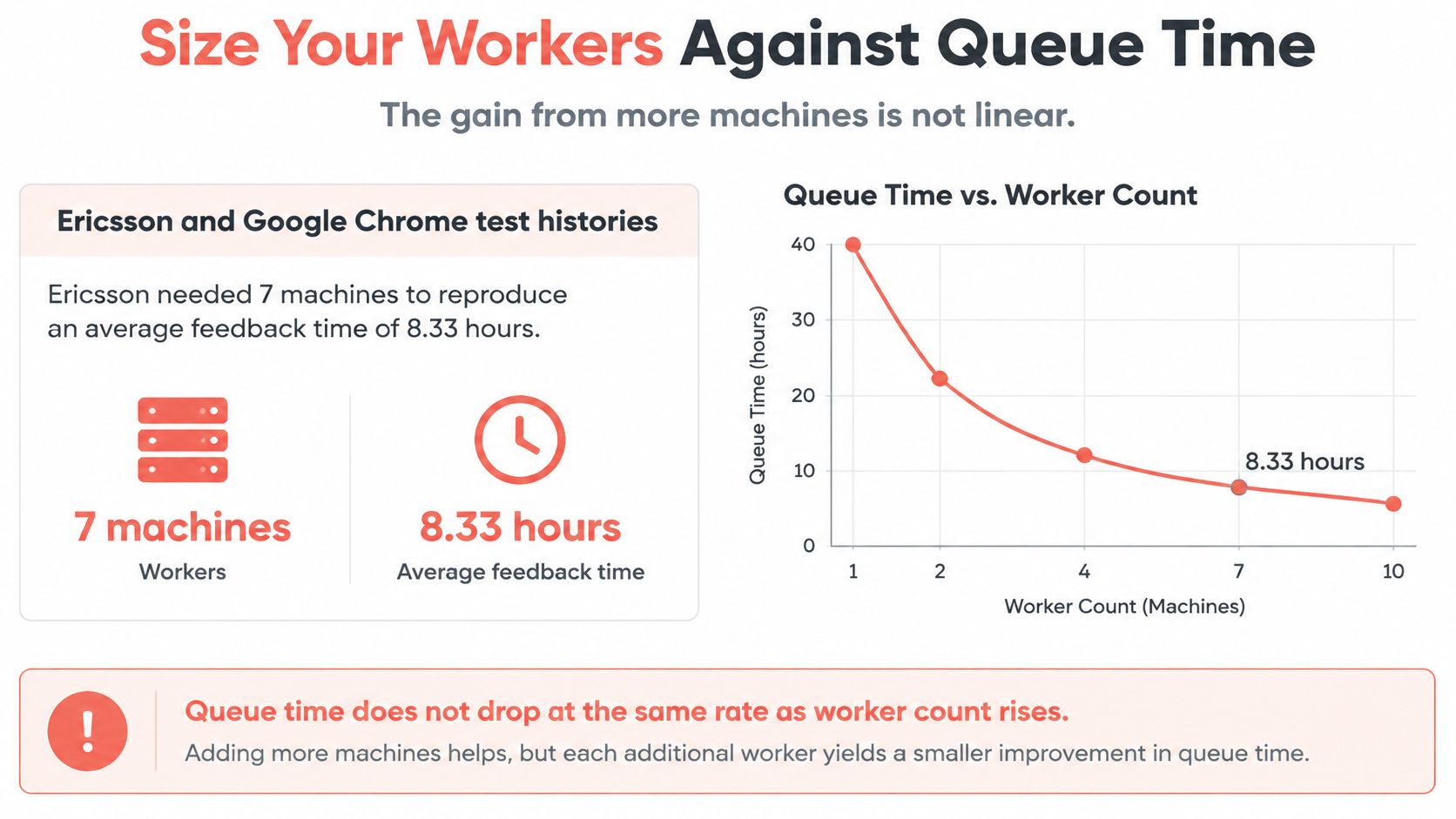
What batching changes
One scope note before the numbers. These batching results describe CI scheduling of test runs across builds on shared machines, not the number of browser workers on one machine. They still matter here because they show scheduling, not raw concurrency, determines whether infrastructure scales efficiently.
| Strategy | Machines saved (up to) | Execution time cut (up to) |
|---|---|---|
| One test per machine (baseline) | 0% | 0% |
| ConstantBatching, batch size 4 | 72% | 75% |
| BatchAll | 91% | 99% (variable) |
| TestCaseBatching | 81% | 67% |
ConstantBatching with a batch size of 4 maintained the actual average feedback time while using up to 72% fewer machines. That's the pattern to copy in spirit for browser suites, whether you're tuning workers directly or following a Selenium in Docker worker pool layout to run them.
In practice, start from your baseline, add workers in steps, and stop when wall-clock time stops falling. Browser suites are hit hardest by queueing, machine availability, and uneven test duration, so your slowest test often sets the floor no matter how many workers wait beside it. Group long and short tests so one slow file doesn't hold a worker while the others sit idle, and split long files instead of compensating with hardware.
Tell a Real Bug From a Parallel Failure
A checkout test fails in CI. The retry passes. The team marks it flaky and moves on. What happened is another worker deleted the cart the first test was using, and by retry time that worker had finished. You've now filed a real isolation bug under noise, and it'll come back on a busier run.
Run three comparisons before you retry
A guide to parallel test execution in CI/CD pipelines frames the useful question directly, how can teams distinguish a real product defect from a parallelism-induced failure or ordinary flakiness, and the practical answer is to compare three runs. Keep the original parallel run, then do an isolated sequential rerun of the failed tests, then a reduced-worker run. If a failure disappears sequentially or gets less frequent as worker count falls, shared state, resource contention, or ordering dependence is more likely than an application defect.
| Observed pattern | Likely cause | First check |
|---|---|---|
| Fails only in parallel, passes when run alone | Shared account, port, file or profile | Rerun alone and list every shared resource the test touches |
| Fails when run alone too | Application defect or ordinary flakiness | Reproduce with traces and video before changing the test |
| Fewer failures as worker count drops | Resource contention | Rerun the same tests at two or three lower worker counts |
| Passes only on retry | A collision that cleared after other workers finished | Log worker count and retry history before retrying again |
Order matters here. Classify before retrying, because a retry after other workers finish may no longer reproduce the collision. Preserve worker count and scheduling metadata with each failure, then run failed cases in a separately isolated sequential pass and only then decide whether the product is at fault. The same discipline helps in adjacent work like testing Expo apps before store submission, where you also need to separate environment noise from a defect that would block a release.
Our Playwright automation patterns notes cover the fixture side of keeping that metadata attached to each test. Whichever tooling you use, don't let the retry button become your triage process. A green retry tells you the failure is timing-sensitive. It doesn't tell you why.
Parallelism itself isn't inherently flaky. Inadequate isolation is the usual mechanism.
That's especially true for browser E2E suites sharing accounts, tenants, ports, files, databases, or browser profiles. Name the shared thing, key it by worker, and most mystery failures stop being mysterious.
Confirm the Setup Before You Scale Out
Start with the limit stated plainly. No tool is undetectable, and we recommend validating configurations against CreepJS, BrowserScan, and Pixelscan rather than trusting one result. A single green check from a single site tells you very little about whether an identity contradicts itself elsewhere.
Checks you can pass or fail
- Run the free fingerprint test in one worker: It runs 346 coherence checks on whatever browser opens it, each with a plain-English explanation. You're looking for signals that contradict each other, not just a score.
- Compare two workers with the same seed: They should report the same device. If they don't, your profile or seed plumbing is broken before parallelism even enters the picture.
- Compare two workers with different seeds: They should not report the same device. If they do, your workers aren't distinct identities, whatever your config says.
- Cross-check externally: Run the same configuration through CreepJS, BrowserScan, and Pixelscan and reconcile any disagreement before scaling.
Vary the schedule on purpose
Speed isn't the only thing concurrency changes. The 2016 SCTBench study of 49 real buggy concurrent programs found probabilistic concurrency testing with parameter d = 3 found every bug the other techniques found, plus 3 additional bugs, and missed only 1 bug overall. Different thread interleavings expose different failures, so a system that repeats one schedule at high speed covers less ground than one that deliberately diversifies it.
For a browser suite, that means randomizing test order with a recorded seed, rerunning a sample in a different order, and keeping the seed so a failure can be reproduced exactly. Don't randomize without recording. That just trades one kind of irreproducible failure for another.
I would make this the single gate. Scale out only when the baseline matches, wall-clock time falls, and the three-run check defined in section 4 shows no new failures. If any part fails, you don't have a scaling problem yet. You have an isolation problem with good marketing.
Clearcote Labs builds Clearcote, a drop-in Chromium fork for Playwright and Puppeteer with seeded, engine-level identities you can keep separate per worker, tenant, or account. If you're setting up testing in parallel and need each worker to present as a stable, distinct device, visit Clearcote Labs to try the SDK and run the free fingerprint test on your own configuration first.