Your Playwright script worked on your laptop. Then it went into a container, pointed at three hundred URLs, and the host started swapping. Nothing raised an exception. The run just stopped finishing, and the Chromium processes were still resident the next morning.
The distance between a script that runs and a Python headless browser setup that survives a week of production is mostly three decisions made before you write much code. Which library and browser you install. Whether you need a browser at all. How many of them you allow to run at once. Launch flags and stealth patches come after those, and they solve far less than the marketing around them implies.
Table of Contents
- Pick a Library and Install Headless Chromium
- How to Write Your First Headless Script
- Choose Direct Requests Over Rendering When You Can
- Run Concurrent Browsers Without Overloading the Host
- Diagnose Hung and Leaking Browser Processes
- Handle Bot Detection Without Pretending It Is Invisible
- Pick Your First Script and Measure It
Pick a Library and Install Headless Chromium
Three setups cover almost every Python headless browser job, and the decision usually comes down to what you already maintain.
| Option | Install | Headless switch | Best fit |
|---|---|---|---|
| Playwright sync | pip install playwright, then playwright install chromium |
launch(headless=True), the default in scripts |
New scripts and QA runs |
| Playwright async | Same as sync | async_playwright() with await calls |
Many pages at once |
| Selenium 4 | pip install selenium, Selenium Manager fetches the driver |
Chrome options with --headless=new |
Existing WebDriver suites |
Playwright sync is the row to start on. It reads top to bottom like ordinary Python, headless=True is already the default so you rarely type it, and the install step downloads a browser build that matches the library version. New scrapers and QA flows belong here.
Playwright async uses the same install and a different entry point, async_playwright(), with await on every call. Choose it when a single browser process has to serve many pages at the same time, because the sync API can't overlap work without threads.
Selenium 4 needs only pip install selenium, and Selenium Manager resolves the driver that matches your installed Chrome, which removes the old driver-download ritual. The headless switch lives in Chrome options, not in the launch call. Keep this row if you're inheriting a WebDriver suite or need a browser Playwright doesn't drive.
Python's place in that stack is well documented. Selenium's first survey, published in January 2021, found 31% of respondents used Python as their language binding, behind Java at 67%, with Ruby at 6.1% (Selenium project survey results). The same survey explains why setup keeps absorbing attention: 59.5% wanted Selenium to manage browser installation and configuration for them, which is exactly what Selenium Manager and playwright install now do.
Headless stopped being a separate browser category in 2017, when Google shipped official support with Chrome 59 on Linux and macOS and Chrome 60 on Windows (history of Puppeteer). What you launch today is the full rendering engine with the window turned off.
Playwright carries most new work: 33% of professional developers in a 2024 survey, up from 24% in 2023, according to ContextQA's automated testing framework survey. Selenium still leads in other populations, with a 2023 TestFlix conference survey reporting 59% Selenium against 8% Playwright (Michael Palotas). Different samples, different answers. Pick by what you have to maintain.
On a Linux server, run playwright install --with-deps chromium so the libraries Chromium links against are present. If launch fails inside Docker, check shared memory before you touch the script: Docker's default is 64 MB, and Chromium exhausts that quickly. Finish setup with a one-line script that opens a page and prints its title. If it prints, the environment works and you can move on.
How to Write Your First Headless Script
The smallest useful script is seven decisions long, and each one has a failure mode you'll meet later if you skip it.
Wrap the session in a
withblock.with sync_playwright() as p:shuts the Playwright driver down when the block exits, including when an exception fires halfway through a page. The usual slip is calling.start()by hand and forgetting.stop(), which leaves a driver process running after your script returns.Launch once and keep the object.
browser = p.chromium.launch(headless=True)costs a second or two of cold start. Launching inside a loop pays that cost on every URL and is the single most common reason a scraper that should take four seconds takes four minutes.Create a context before a page.
context = browser.new_context()gives each job its own cookies, localStorage and cache. Two jobs sharing a context can leak session state into each other, and the symptom shows up hours later as a login that fails on a page you never touched.Load the page, then read the status code.
response = page.goto(url)hands back a response object, so checkresponse.statusbefore parsing anything. An error page renders perfectly well and will return a complete HTML document containing zero records.Wait for an element, not a clock.
page.wait_for_selector(".result-row")returns the moment the element exists.time.sleep(3)burns three seconds on every fast page and still fails on the one slow page. Auto-waiting covers most actions, but an explicit selector wait is how you define what "loaded" means.Extract in one pass and count the results.
page.locator(".result-row").all_inner_texts()returns a list, so compare its length against what the page claims to hold. A selector copied from DevTools often matches a hidden duplicate (a mobile nav, a template block, an off-screen clone), which doubles your count while the data still looks plausible.Close the context, then the browser. Do it in a
finallyblock when you aren't using thewithform. Skipped closes leave Chromium child processes resident, and enough of them will exhaust a host long before the job finishes.
The four stages of a clean run look like this:
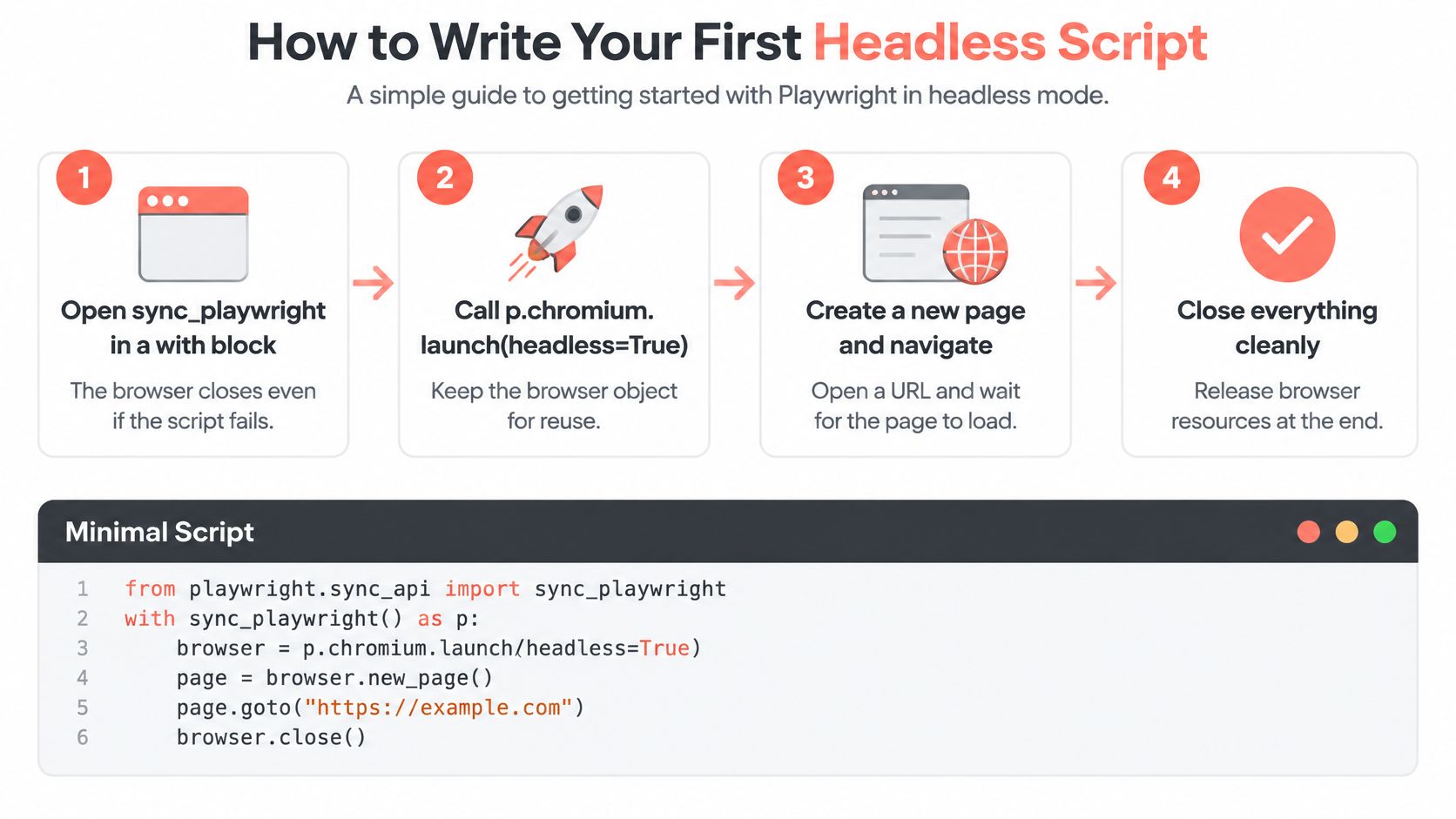
Success looks boring. The script prints the number of items you expected, exits with code 0, and finishes a second or two after the page settles. An exit code of 0 with an empty list is a failure wearing a passing status, which is precisely why step six exists.
Rule of thumb: if you can't name the element that proves the page loaded, you don't have a wait strategy, you have a
sleepwith extra steps.
Choose Direct Requests Over Rendering When You Can
Say a listing page renders 100 records after a spinner. Rendering that page with async Playwright and CSS selectors took about 4.80 seconds and 180 MB. Calling the JSON endpoint the page used to build the list took about 1.45 seconds and under 15 MB, roughly 3.3 times faster, in a benchmark of exactly that comparison (async Python extraction benchmark).
| Method | Time for 100 records | Memory | Breakage risk |
|---|---|---|---|
| Async Playwright with CSS selectors | about 4.80 s | about 180 MB | Higher, class names change |
| Direct JSON request | about 1.45 s | under 15 MB | Lower, responses are more stable |
Treat the multiplier as a range. Repeated runs in that benchmark landed between 1.6 and 7.4 times faster, because Chromium cold start and network latency dominate when the target responds slowly or the browser is already warm.
How to find the endpoint
Open DevTools, switch to the Network panel, filter for XHR and fetch, and reload. The request that returns the records is usually one of the first three entries. Then work through the details:
- Reproduce it outside the browser with an HTTP client, where the site permits it, and confirm you get the same payload.
- Trace pagination. The next-page cursor may sit in the request body, in a response header, or in a cookie that the server rotates.
- Trace authentication. Note whether the call needs a bearer token, a CSRF header, or a session cookie issued on page load.
- Keep Playwright for what needs it. Login flows, click-driven states, and pages whose data can't be reached any other way.
Breakage risk is the quieter argument. Class names and layout wrappers change with every UI refresh, while a structured response usually changes only with an API version, and that change is announced by a new path rather than discovered in production. For the request and parsing side of that work, web scraping with Python covers the layer below the browser.
When rendering is unavoidable, drop the fixed sleeps and use semantic locators (get_by_role, get_by_text), explicit readiness conditions, bounded retries, response interception and per-step timeouts. Validate against expected counts and schemas, then log the URL, browser version, timing percentiles, retry count and a failure category for every run. That log is what lets you tell a broken selector from a change on the target site.
Practical rule: if the Network tab shows the records arriving as JSON, the browser is a rendering cost you're paying for nothing.
Run Concurrent Browsers Without Overloading the Host
Launching a browser per URL is the fastest way to kill a host. The shape that holds is one Chromium process, one isolated context per job, pages reused inside that context, and a semaphore capping how many run at once. asyncio.gather across a thousand URLs opens a thousand pages, and the machine runs out of memory before the target notices the traffic.
Measure the worker count first
Throughput doesn't scale linearly, so the ceiling is a number you measure rather than assume:
- Start with two workers.
- Record memory per context and per browser process.
- Add workers until p95 action latency roughly doubles or memory approaches the container limit.
- Step back one worker and keep that number.
Discard warm-up runs, isolate each scenario in its own container, and change one variable at a time. A published benchmarking framework recommends Docker isolation with cgroup limits of 4 CPUs, 8 GB RAM and 8 GB shared memory, with headful, headless and headless-shell modes run in separate passes so they don't compete for the same resources (Annales CSIS benchmarking paper). In that same line of controlled testing, Playwright completed Firefox workloads up to 51% faster than Selenium, Edge 47% faster and Chrome 14% faster.
Read those figures as context, not a ranking to copy. Three pitfalls distort almost every comparison: measuring browser startup inside every URL operation, letting asyncio concurrency run unbounded, and reading faster page rendering as faster extraction when network or JavaScript execution dominates the clock. The container side of this deserves the same attention, and running Selenium in Docker covers the image and display details that trip up benchmark runs.
Diagnose Hung and Leaking Browser Processes
A scraper can stay green in the supervisor while Chromium children stack up on a shared host. No test crashed. The suite is still connected. Orphaned browser processes sit there until the machine starts swapping, and every new job waits behind a worker that still reports healthy.
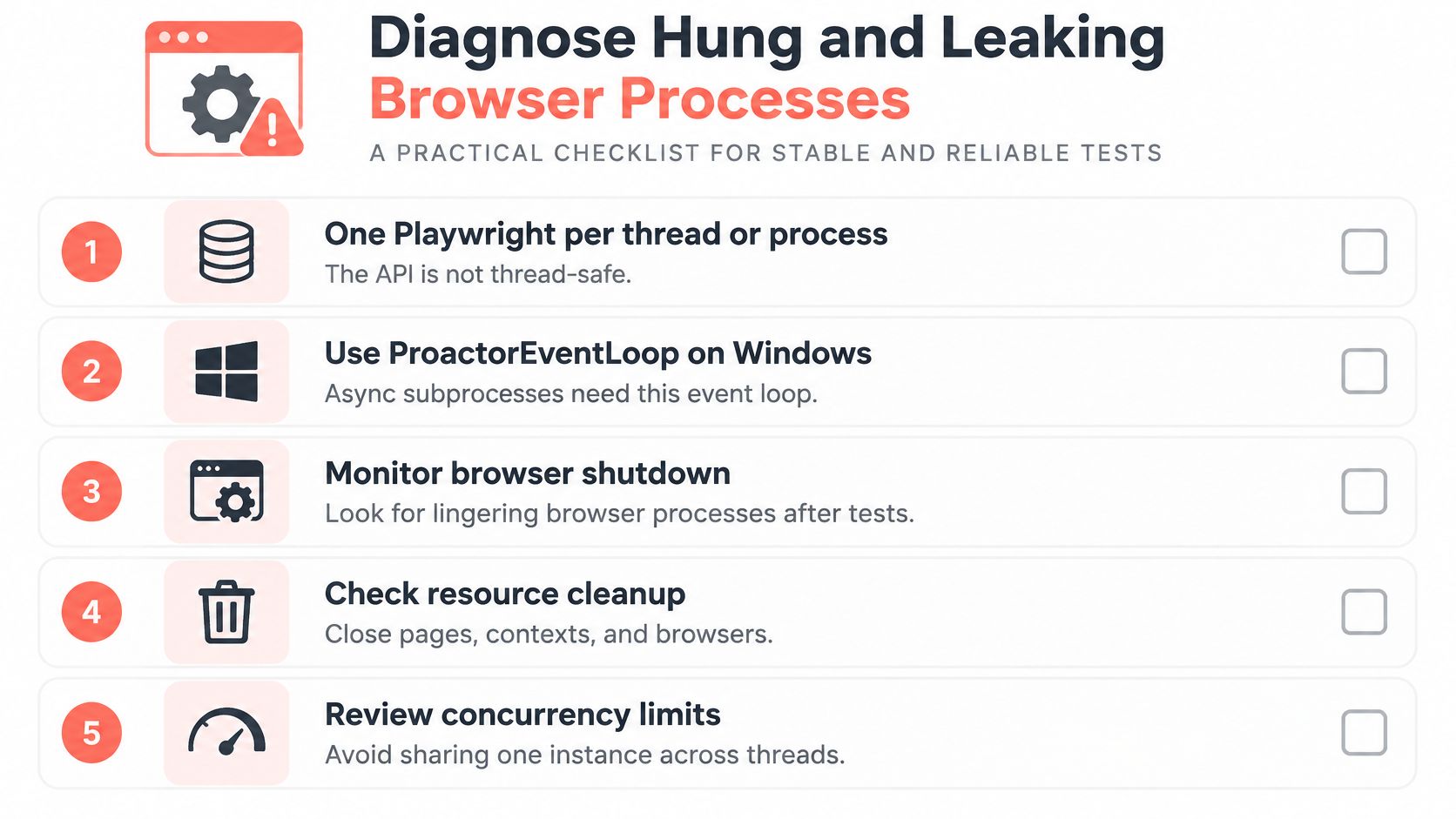
Two boundaries in Playwright's Python documentation decide how that fan-out should be owned: the API is not thread-safe, and async subprocesses on Windows need the ProactorEventLoop. A single-page script never hits either one. A QA runner or agent with several workers does. I treat a cancelled in-flight call as unfinished work. Close the context yourself instead of assuming the library rolled the browser and its profile back.
The checklist to run against your own host
- One Playwright instance per thread or process. Sharing an instance across threads produces intermittent protocol errors that look like target-site flakiness.
- A timeout and a watchdog around every page action. A call with no deadline is a call that can hang forever.
- Browser recycling on a fixed budget, either a page count or an elapsed time. Restarting a browser every few hundred pages bounds any leak you haven't found yet.
- Contexts closed in
finallyblocks, so an exception path doesn't leave storage behind. - SIGTERM handled, so the browser shuts down with the script instead of outliving it.
- A post-run process count of Chromium children, with an alert when the number grows across runs.
A hung worker keeps its memory, holds its connection, and blocks the next job while reporting itself as healthy. A crash is easier to see, because the supervisor restarts it. Lifecycle is the lever here: who starts the browser, which endpoint it talks on, and whether the child count after the run matches the concurrency you measured. If the growth is host-level rather than one browser, investigate production memory leaks with Fivenines walks through the signals to watch.
A crashed job pages someone at 2am. A hung job sits quietly until the queue is three days deep and nobody can say when it started.
Handle Bot Detection Without Pretending It Is Invisible
Search for how to stop a Python headless browser from being detected and you'll get a list of flags: patch navigator.webdriver, rotate the user agent, install a stealth plugin. Those patches answer a model of detection that serious sites moved past years ago.

The evidence points at behaviour and protocol consistency rather than static signals. A measurement study of seven AI browsing agents found that browser fingerprints barely separated them, because most were built on the same Chromium base. Typing, scrolling and mouse dynamics were more distinctive than the fingerprint itself (headless Chrome detection analysis). If the fingerprint is a commodity and the motion is the tell, no single flag fixes anything.
What the layered model covers
A defensible approach stacks independent layers: browser version alignment so the user agent, Client Hints and TLS handshake agree; HTTP/2 fingerprint consistency from the same network stack; IP reputation, where a residential address and a datacenter address are different products; timing and navigation patterns, since a page that goes from load to click in 40 milliseconds looks like nothing a person does; and explicit authorization, meaning robots.txt, terms of service and rate limits read before the first request.
Video walkthrough of the detection surface in practice:
Watch the video on YouTubeTwo goals get confused here, and separating them saves weeks. QA reproducibility wants seeded identities and fixed timing so a test fails for a code reason rather than a random one. Anti-bot evasion wants variation, and that variation makes failures harder to reproduce and diagnose. If a run passes on Tuesday and fails on Wednesday with no code change, randomness in the identity layer is a likely cause.
Tool families you'll meet in comparisons include Camoufox, Patchright, undetected-chromedriver, nodriver, playwright-stealth, selenium-stealth, puppeteer-extra stealth, and commercial anti-detect browsers such as Multilogin, GoLogin and Kameleo. Treat every one of them as a candidate to test, not an answer.
The honest test is a false-positive rate measured on a site you own or a permitted test environment, reported as a number. Promising invisibility isn't a result. When a target does block you, handling a blocked scraper covers the permitted responses, from slowing down to negotiating access.
Pick Your First Script and Measure It
Choose one site you're permitted to scrape, or one internal QA flow that currently runs headed. Write it with the seven-step procedure and headless=True, then run it five times and record the median run time and peak memory. The decision that follows comes straight from the numbers.
- Records arrive in a JSON request? Move to direct requests. The rendering step was never doing work for you.
- Memory climbs across runs? Work the hung-process checklist before adding capacity, since more RAM only delays the same failure.
- You need several browsers in parallel? Size concurrency with the measurement procedure rather than picking a round number.
Keep the script in version control with a header comment naming the target URL, the browser version and the date of the last known-good run. When results change three weeks later, that comment is how you tell a code regression from a site redesign.
Minimum viable instrumentation: median runtime, peak memory, and the number of browser processes still alive one minute after the run ends.
If a fixed, reproducible identity turns out to be the blocker rather than speed, our Playwright SDK is a drop-in Chromium that needs one import change in Python, and the browser it downloads is SHA-256 verified.
Then schedule it and log the same three numbers on every run. They cost nothing to collect and they answer the only question that matters after a failure: did the script change, the host change, or the site change?
Clearcote Labs builds Clearcote, an open-source, de-Googled Chromium fork with fingerprint and identity controls implemented in the engine rather than injected through JavaScript. It ships as a drop-in for Playwright and Puppeteer, runs on Windows and Linux, locally, in Docker or as a hosted browser, and it's free for one browser at a time. If your next step is a Python headless browser that returns the same identity on every run, visit Clearcote Labs.