Your popup test is green, the build artifact loads locally, and CI still reports that the extension never answered a message. You add a longer timeout, rerun, and get a pass. That's not much reassurance when an actual failure could be a suspended worker, a missing host permission, or a profile that never received the update.
Chrome extension testing needs to prove what happens outside the popup. Playwright and Puppeteer can drive the visible pages, but reliable coverage also needs explicit checks for worker restarts, content-script execution, persisted state, and permission drift.
Table of Contents
- Why Extension Tests Break Differently From Page Tests
- How to Load an Unpacked Extension in Playwright and Puppeteer
- Test Popup, Content Script and Messaging Flows
- Testing Service Worker Restarts Without Flaky Sleeps
- Permission and Performance Gates Worth Automating
- Debug Failures and Gate Extension Tests in CI
Why Extension Tests Break Differently From Page Tests
Say a suite passes against an older extension build, then fails after a browser update. The popup might still render while its background worker stops answering. Or Chrome might refuse to load the extension at all. Those failures need different diagnoses, even when both appear as an automation timeout.
An extension runs across separate execution contexts: the popup, background service worker, content scripts, and options page. Each has its own lifetime and access to browser APIs. A popup locator can prove that a button exists, but it can't prove that a content script received the button's message.
Browser compatibility is part of the test
Google's Manifest V2 deprecation timeline records the cutoff for new MV2 submissions beginning January 17, 2022, and broader staged disabling beginning with Chrome 127 in June 2024. These milestones explain why a pass on a legacy-compatible browser isn't evidence that an extension will install and work on users' current Chrome builds.
Separate installation failures from runtime failures immediately. Verify the loaded manifest, confirm the expected extension context exists, and only then exercise its features. Otherwise, a missing extension can produce misleading failures throughout the suite.
Practical rule: Test the browser your users actually run, not merely the browser that still accepts your extension.
For managed deployments, include the relevant enterprise policy configuration in the environment definition. Keep an MV2 regression run only where you still maintain a legacy extension and have a compatible runtime. Don't let that compatibility job substitute for testing current Chrome.
How to Load an Unpacked Extension in Playwright and Puppeteer
Launch settings for extension tests by framework
| Setting | Playwright | Puppeteer |
|---|---|---|
| Launch method | chromium.launchPersistentContext with a user data directory |
puppeteer.launch with a userDataDir option |
| Extension flags | --disable-extensions-except=PATH and --load-extension=PATH |
--disable-extensions-except=PATH and --load-extension=PATH |
| Headless runs | Use headed mode, or headless on a current Chromium build after confirming the extension loads | Start headed, and confirm the extension loads on your Chromium build before going headless |
| Service worker access | context.serviceWorkers() or waitForEvent('serviceworker') |
browser.targets() filtered by target type service_worker |
| Extension ID | Read from the service worker URL | Read from the service worker target URL |
Make installation observable
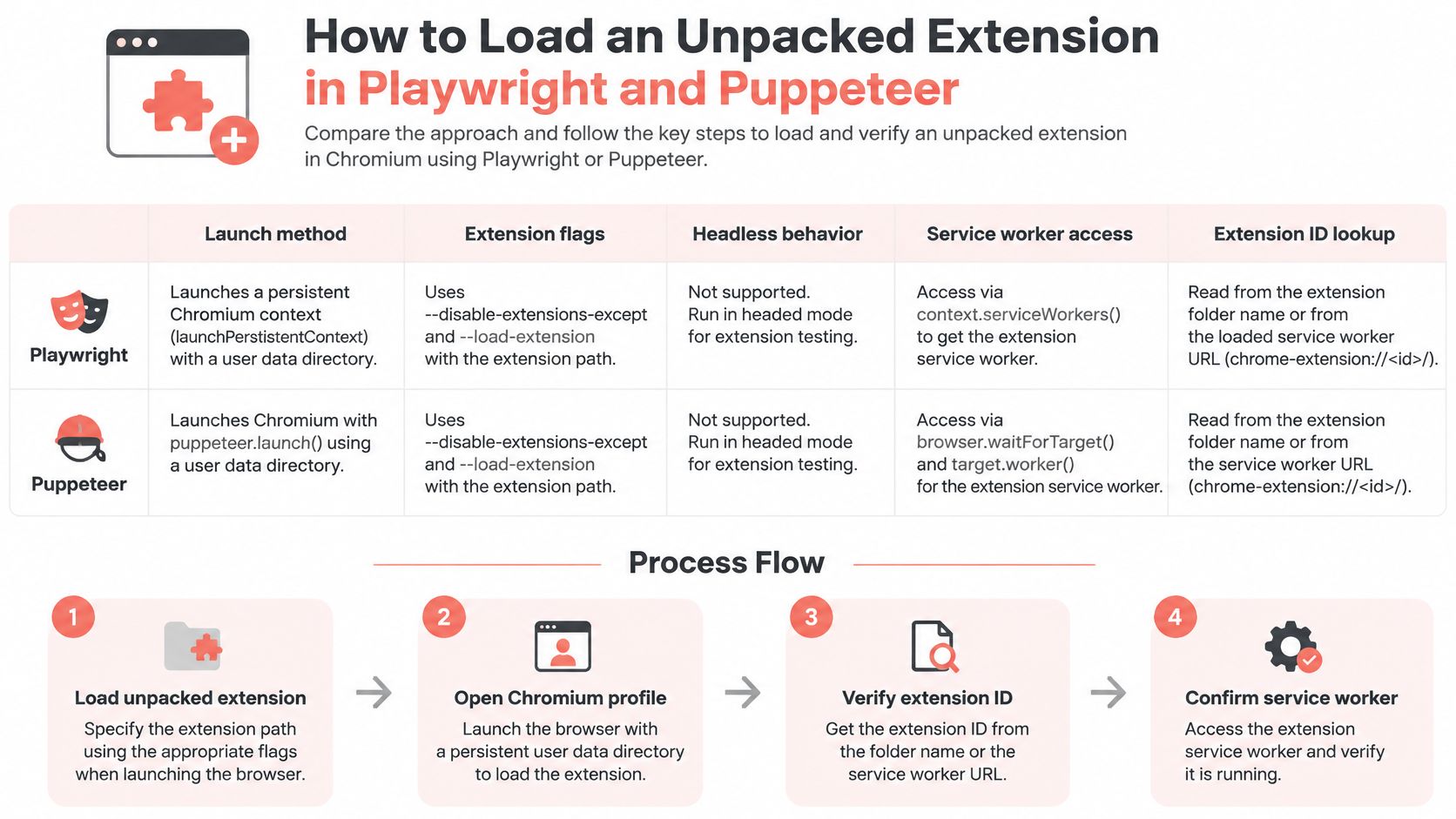
- Resolve the build directory. Use an absolute path to the unpacked directory containing
manifest.json, not the repository root. Relative paths are vulnerable to changes in the runner's working directory. - Pass both extension flags with that resolved path. Use a dedicated profile so unrelated extensions and personal browser settings don't contaminate the run.
- Launch persistently in Playwright. Supply a writable user data directory to
chromium.launchPersistentContext. Don't share that directory between parallel browser processes. - In Puppeteer, supply
userDataDirand start withheadless: false. Confirm the installed browser binary honors extension-loading flags before switching modes. Branded Chrome and Chromium builds don't necessarily accept identical loading configurations. - Discover the ID at runtime. Find the worker belonging to your extension and extract the host from its
chrome-extension://URL. Register the worker-event listener before launch-dependent actions, and check existing workers to avoid an event race. - Open the extension's actual popup resource using the discovered ID and the manifest's
action.default_popuppath. Don't assume every build calls itpopup.html. - Wait for readiness, not elapsed time. Require the expected worker and an application-level ready signal before assertions.
This chart summarizes the launch and discovery sequence.
Keep clean and returning profiles
Use isolated profiles for ordinary tests, plus an intentional relaunch test that reuses its profile. Always starting fresh hides persistence and upgrade bugs.
Our Clearcote build loads unpacked MV2 and MV3 extensions at launch, headed or headless, on Windows and Linux. For lower-level target discovery and browser attachment, the Chrome DevTools Protocol guide explains the control layer beneath framework APIs. Extensions without a background worker need an extension-page discovery path instead.
Test Popup, Content Script and Messaging Flows
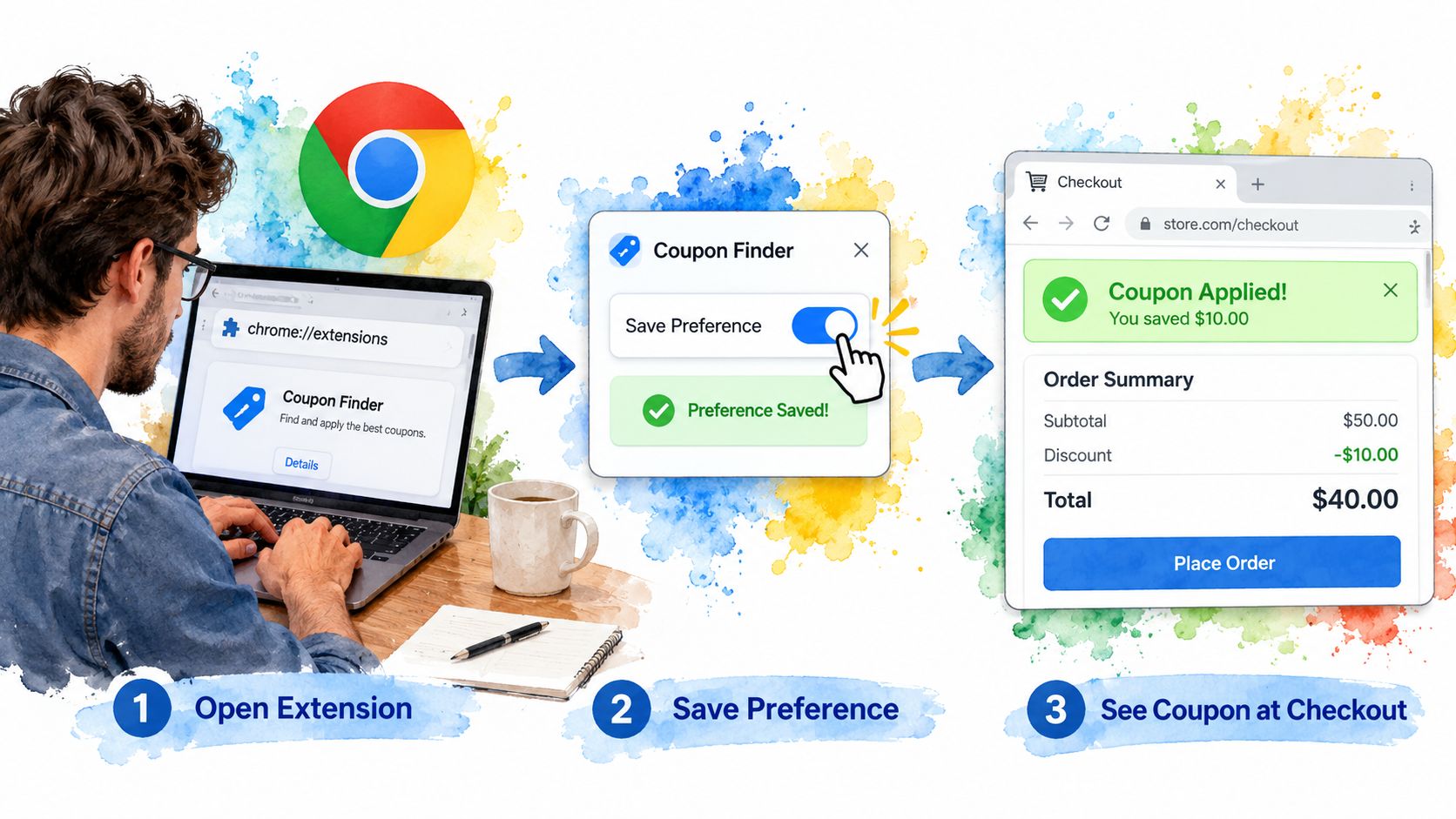
Consider a coupon-finder extension that saves a preference in its popup and injects a banner into checkout pages. The useful test follows that preference across execution boundaries, rather than checking isolated screenshots.
Use a checkout fixture that makes the expected extension behavior obvious.
Follow the preference through the extension
Open the popup resource as an ordinary page and use Playwright locators or Puppeteer selectors to enable automatic coupon suggestions. Assert the selected control state, then read chrome.storage.local.get() through the extension page's execution context. Assert the stored value separately, because a checked control doesn't prove the asynchronous write completed.
Serve a fixed checkout fixture from a local test server whose origin matches the test manifest's host rules. Open the fixture in a normal browser tab and wait for a marker the content script owns, such as [data-coupon-banner]. Assert its visible text and enabled state, not just its presence.
Change the preference while the checkout tab remains open. If the product uses popup-to-worker-to-content-script messaging, assert that the existing banner changes without navigation. Correlate the request and response so an old message can't satisfy the assertion.
A successful message send isn't the outcome. The outcome is the correct change in the receiving page.
Test failure behavior too: close the receiving tab before sending, or move it away from an allowed origin. The popup should show a controlled unavailable state rather than leaving an unhandled rejection.
This demonstration provides another view of extension interaction during testing.
Watch the video on YouTubeInclude frames and popup lifetime
Add an iframe fixture if the extension uses all_frames. Check the intended frame directly and verify that the extension doesn't duplicate banners in frames where it shouldn't run. Cross-origin frames need their own matching permission coverage.
Opening a popup resource in a tab is convenient, but it doesn't reproduce toolbar-popup dismissal or every activeTab grant condition. Keep a separate action-triggered check when the feature depends on those semantics.
The minimum useful coverage is a popup flow, an injection assertion, and a storage round trip. A popup-only suite leaves the page-side behavior largely untested.
Testing Service Worker Restarts Without Flaky Sleeps
A green run doesn't prove suspension safety. An MV3 worker can lose its in-memory state between events, while a test that continuously interacts with it never exercises that boundary.
The Chrome extension testing case study describes natural suspension waits as slow and unreliable, and forced worker stops through browser internals as a source of flakiness. That's a reason to validate the termination mechanism, not to treat a CDP command as a universal fix.
Establish a restart boundary
Create state through the production path and wait for its durable write to complete. Don't prepopulate every storage key if doing so would bypass the persistence code you need to test.
Use a browser-level CDP session to identify the extension worker's registration and running version. Where supported by the pinned build, ServiceWorker.stopWorker can stop that version. Poll for the old execution target to disappear before sending the event intended to wake it.
Closing a debugger session isn't stopping a worker. Treat generic target-closing approaches as browser-specific until a harness check proves actual termination and subsequent recovery.
Worker restart scenarios and what to assert
| Scenario | What to Assert | How to Trigger It |
|---|---|---|
| Worker stops with a pending alarm | Alarm still fires and its handler runs once for the scheduled event | Set the alarm, stop the worker over CDP, confirm its target disappears |
| Message arrives during restart | Message is delivered after restart through the supported messaging or retry path | Send from the content script while stopped, then poll for the reply |
| Port reconnects after suspension | Popup reconnects and receives current state | Open a runtime port, stop the worker, exercise disconnect and reconnect |
| In-memory cache cleared | Values reload from chrome.storage |
Stop the worker, reload the extension page, read stored values |
| DevTools closed during test | Result matches the DevTools-open run | Repeat with and without attached DevTools |
Assert recovery, not transport guarantees
Chrome doesn't provide your application with a durable message queue or automatic port reconnection. Implement retries, acknowledgments, and reconnect logic where required, then test them. Make alarm handlers idempotent rather than assuming all side effects have exactly-once delivery semantics.
Keep forced-restart cases targeted and reserve natural idle-timeout coverage for a nightly job. The Playwright automation guide provides supporting framework setup, but lifecycle correctness still needs externally visible assertions with DevTools closed.
Permission and Performance Gates Worth Automating
Most requested extension permissions
The counts and shares below come from the extension-permission benchmark covering 21,328 extensions.
| Permission | Extensions Requesting It | Share of Extensions |
|---|---|---|
| storage | 11,446 | 53.67% |
| tabs | 4,970 | 23.3% |
| activeTab | 4,633 | 21.72% |
| scripting | 3,118 | 14.62% |
| contextMenus | 2,418 | 11.34% |
These are review priorities, not a blacklist. A permission is justified by the feature and its actual behavior, not by how commonly other extensions request it.
Gate capability changes and data flows
Diff the built manifest, including permissions, host_permissions, optional permissions, and content-script matches. Compare API usage against the permission requirements for each API member. Don't use a simplistic namespace rule: some tabs operations don't require the tabs permission, and activeTab grants temporary access rather than permanent host coverage.
Reject unexplained capability expansion and test denied optional-permission requests. Also assert that unrelated origins remain inaccessible.
Manifest migration isn't a security approval: a 2025 audit of 287 Chrome Web Store extensions found inappropriate security configurations in approximately 30.31% of cases. Add a network-destination allowlist and inspect requests from workers as well as pages. Check request bodies for fixture secrets, not just destination hostnames.
Measure extension cost as a paired experiment
Use a clean baseline profile and a matched profile containing only the target extension. Keep browser build, hardware, network conditions, page content, and activation scenario fixed.
The Chromium extension performance study used 10 repetitions per website with and without the extension, applying the Wilcoxon signed-rank test and Cliff's delta to paired results. Follow that paired design, alternate treatment order, and report medians, spread, and effect sizes alongside tail interaction latency.
Set release thresholds before running the benchmark. A statistically detectable change isn't automatically a user-visible regression.
Measure popup interaction and content-script activity separately. A cheap popup can coexist with expensive DOM observation on checkout pages, so an aggregate page-load score won't identify the costly feature.
Debug Failures and Gate Extension Tests in CI
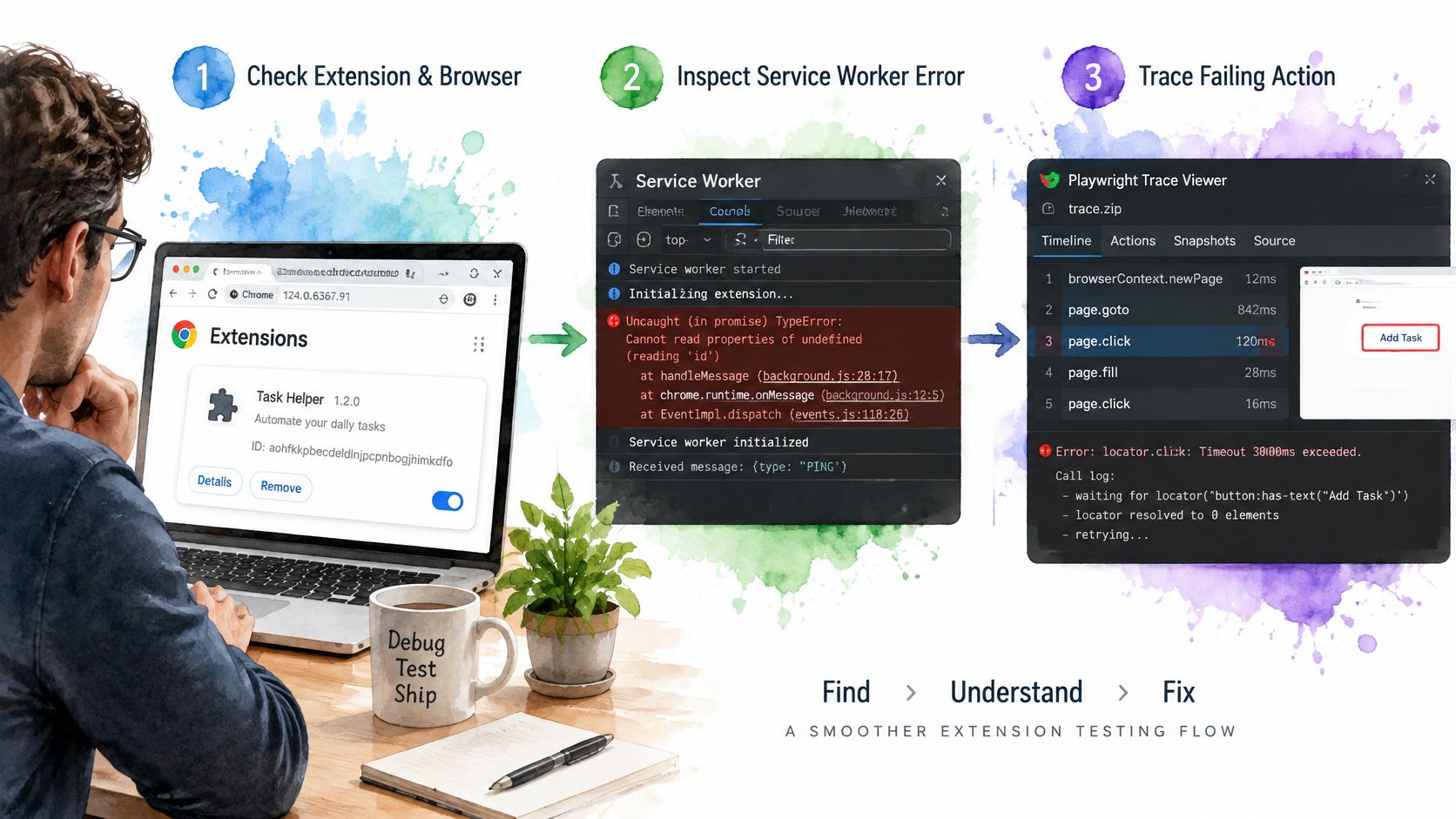
Reproduce the failure using the same browser executable and extension artifact before changing timeouts. Inspect the service worker console next, then open the saved Playwright trace to reconstruct popup actions, navigation, and assertions.
Capture worker logs independently. Trace Viewer won't automatically provide a complete history of background-worker execution, especially across termination and replacement.
A useful failure bundle keeps those artifacts together.
Record enough to reproduce the failure
Save the Chrome version, executable identity, extension build hash, extension ID, manifest version, granted permissions, profile preparation steps, and test seed. Record worker target changes with timestamps so you can distinguish a missing response from a process that restarted mid-request.
Protect the artifacts themselves. Profiles, traces, and network logs can contain authentication tokens or page data. Prefer synthetic accounts and fixtures, and redact sensitive payloads before uploading CI artifacts.
For installation, enablement, and everyday browser troubleshooting, SuperX's guide to resolve browser extension issues is a useful companion. Keep those environment checks separate from application assertion failures.
Split release checks into independent jobs
- Capability and privacy checks compare manifest changes, permission grants, and observed network destinations. Require explicit review for newly introduced access.
- Injection security checks exercise content-script entry points with DOM and XSS payloads. The Chalmers extension-hardening methodology combines static triage with instrumented execution and exploit confirmation, a stronger approach than scanning source alone.
- Functional flows exercise the APIs the extension uses, including tabs, storage, alarms, downloads, messaging, and
webRequestwhere applicable. Don't request extra permissions just to make a test harness convenient. - Lifecycle and performance checks run independently so a functional failure doesn't prevent collection of restart or resource-regression evidence.
Pin the executable used by each job, then update it through a deliberate compatibility run. Include current user-facing Chrome coverage and keep any legacy MV2 runtime isolated. A Chromium fork's compatibility result doesn't establish Chrome Web Store acceptance.
On Linux, headed runs can use a virtual display. The Playwright Docker guide helps establish the container environment; also preserve the browser dependencies, launch arguments, and profile ownership settings.
A single-page pass can miss behavior across frames, navigations, permission states, and delayed events. Start with the popup, injection, and storage flows, add a worker-recovery case and permission diff, then expand only after those checks produce actionable failures on a pinned build.
Clearcote Labs offers an extension-capable Chromium runtime with Playwright and Puppeteer integration, plus documentation covering installation, recommended settings, examples, and release verification. Visit Clearcote Labs to set up a reproducible extension-testing environment, and use our free Chrome releases and browser diagnostic tools to check the environment before investigating application failures.