
Your scraper works on your laptop, returns clean data for an hour, then starts getting CAPTCHAs, empty pages, or prices that don't match what a colleague sees in another city. You've checked your code, your headers, and your rate limits. The remaining variable is the address your traffic appears to come from. That's usually when someone suggests residential proxies, often with a warning that they're slower and more expensive than the proxies you're already using. They're right on both counts, and sometimes they're still worth it. The deciding factors aren't pool size or advertised speed. They're IP reputation, session behaviour, and consent provenance, and you can test all three before you commit.
Table of Contents
- Residential Proxies Compared With Datacenter and ISP Proxies
- How Residential Networks Source IPs and Rotate Sessions
- Use Cases Where Residential Proxies Fit
- Reputation, Blocking and Cost Trade-offs
- Ethical and Legal Checks Before You Buy
- Pairing Residential IPs With a Hosted Browser
- Confirm Your Setup Before You Scale
Residential Proxies Compared With Datacenter and ISP Proxies
Think of a datacenter proxy as a server you rent in a hosting facility, with an address that clearly belongs to that facility. A residential proxy instead routes your request through a real household connection, so the target site sees an ordinary consumer address assigned by a home internet provider. That single difference, who issued the IP and what it looks like on paper, drives most of the trade-offs between cost, speed, and how often you get blocked.
The four types on the same criteria
| Proxy type | IP source | Typical speed | Block resistance | Usual pricing basis |
|---|---|---|---|---|
| Datacenter | Hosting provider address blocks | Fastest | Low on sites that check hosting ranges | Per IP or per port |
| Static ISP | Consumer ISP address, fixed for long periods | Fast | Medium to high | Per IP |
| Rotating residential | Consumer ISP addresses from a changing pool | Variable | High | Per GB |
| Mobile | Carrier addresses from phones | Variable | Highest | Per GB, highest rate |
Datacenter addresses are the fastest and cheapest per IP because they're provisioned in bulk on stable infrastructure. They're also the easiest for a target to identify, since hosting ranges are well catalogued, so sites that screen for them block them first. If your target doesn't screen, they're the sensible default.
Static ISP addresses sit in the middle. They're issued by a consumer ISP but hosted so they stay fixed for long periods, which gives you a residential appearance with a stable identity. That stability suits account work and repeat visits where a changing address would itself look suspicious.
Rotating residential pools trade consistency for trust. Each request can leave from a different household, which spreads your footprint and avoids per-IP limits, but throughput swings with the quality of whichever home connection you draw. Mobile addresses carry the highest trust because carriers put many real subscribers behind shared addresses, so targets hesitate to block them. You pay for that hesitation in the highest per-gigabyte rates and in unpredictable latency.
Decision rule: Start with the cheapest type that passes your target, and move up only when blocks, CAPTCHAs, or geographic mismatches show up in your own logs.
That rule sounds obvious, but teams often skip it and buy residential bandwidth for targets that would have accepted datacenter traffic all along. Run the cheap test first. Your logs, not a provider's marketing page, should tell you when to upgrade.
How Residential Networks Source IPs and Rotate Sessions
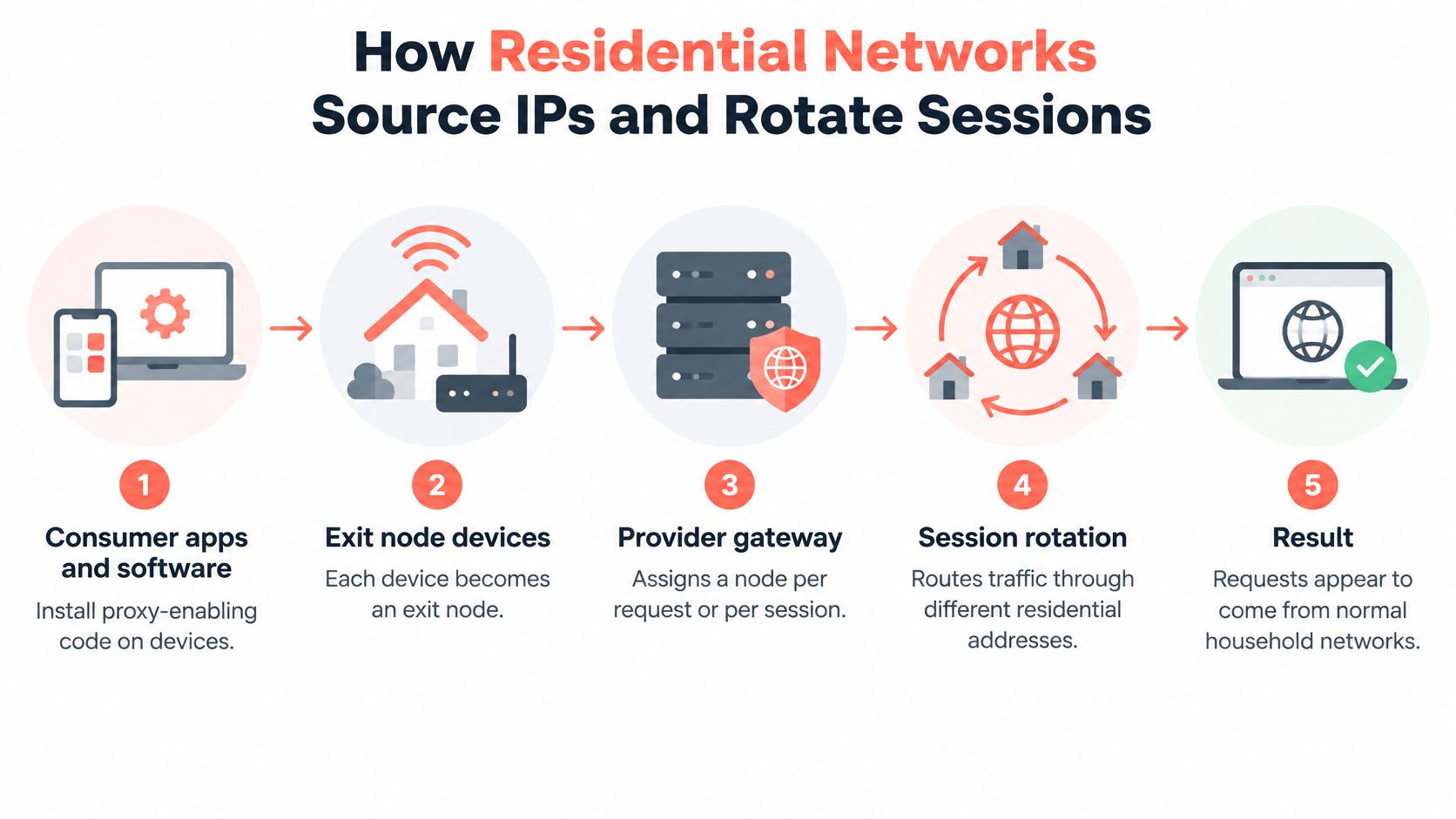
A residential pool isn't a warehouse of modems. It's a supply chain, and it helps to walk it in order. First, consumer apps and other software install proxy-enabling code on a phone, computer, or similar device. Second, that code turns the device into an exit node, willing to relay other people's traffic through its home connection. Third, the provider's gateway receives your request and assigns one of those nodes, either for a single request or for a session. Fourth, your request leaves through that household connection, so the target sees the home IP, the ISP, and the location that go with it.
The flow looks like this in practice.
Scale and churn
The scale that model produces is large, but it's not stable in the way a server fleet is stable. The 2026 Stanford measurement study collected 6.18 million unique residential-proxy IP addresses over four months, spanning more than 230 countries and 52,000 internet-service providers. The same study found that 91% of observed residential-proxy IP lifetimes lasted fewer than 10 days.
That churn has ordinary causes. ISPs reassign dynamic addresses, devices go offline or get replaced, users uninstall the app that enrolled them, and providers remove endpoints. So a headline pool size describes how many addresses passed through the network, not how many will be there next Tuesday. Country coverage has the same limitation. A provider can offer exits in a country and still fail to keep one address alive for the length of your task.
A residential pool is a flow of short-lived addresses, not a fixed inventory. Plan for replacement, not permanence.
Session modes and what they suit
| Session mode | IP behaviour | Suits | Watch for |
|---|---|---|---|
| Rotating per request | New IP on each request | Broad crawls, price and stock checks | Breaks logins and multi-step flows |
| Sticky, minutes | Same IP for a provider-set window | Short checkouts and form flows | IP can disappear mid-window |
| Sticky, hours | Same IP for a longer window | Account sessions and longer tests | Fewer IPs available in small regions |
| Geo-targeted | Exit in chosen country, state or city | Localization and ad checks | Smaller pools in narrow locations |
Before you pick a mode, write down one number, how long a single logical task must keep the same IP. A price check that fetches one page needs a fresh address each time and nothing more. A checkout test needs one address to survive every step from cart to confirmation. Pick the shortest sticky window that covers your task, because longer commitments shrink the pool you can draw from, especially in one city.
Use Cases Where Residential Proxies Fit
Residential IPs justify their price in certain situations and waste money in others. The five cases below cover most legitimate demand, and each one gets a straight verdict on whether you need them.
Five common jobs, judged one by one
Price and availability monitoring. Say you're tracking prices across retail sites that block hosting ranges or serve altered pages to datacenter traffic. If your cheap requests return block pages or phantom stock, you can't fix that with better parsing. Residential exits are usually necessary here, because the target is filtering on the address type itself.
Ad verification. A media team needs to confirm what a consumer in Leeds sees on a live campaign, including local offers and placement. A datacenter exit in the wrong region shows the wrong creative or nothing at all. City-level residential exits are the point of the exercise, so this is a genuine residential job.
Search result checks by location. This one splits. For country-level results, a datacenter exit located in the right country often returns what you need, so test that first. City-level results, where rankings shift between neighbourhoods or metro areas, need residential exits in those places.
Localization QA. You're reviewing your own site as it renders in a target market, checking currency, language, and shipping logic. Your own site presumably doesn't block you, so datacenter exits in the right country usually suffice. Switch to residential only if a third-party component on the page, such as a payment or fraud widget, treats hosting ranges differently.
Testing consumer account flows. If you're testing sign-up, login, and checkout on accounts your team owns, you want arrivals that resemble real customers. Residential IPs with sticky sessions match that arrival pattern and keep one identity through the flow.
The pattern across all five looks like this.

What you gain and what you give up
Pros
- Higher acceptance: Protected targets challenge household addresses less often than hosting ranges.
- Consumer network profile: Your traffic arrives with the ISP and routing pattern of a home user.
- Precise targeting: Country, state, and city selection supports local checks that coarse exits can't do.
Cons
- Higher cost per gigabyte: You pay for bandwidth, so heavy pages and retries add up fast.
- Variable throughput: A congested home connection becomes your bottleneck without warning.
- Uneven provider quality: Two pools with similar claims can behave very differently on your target.
- Consent questions: How the pool was recruited carries risk, covered in the ethics checks below.
Take the first use case on your own list and write down the cheaper result that would satisfy you. If a datacenter run returns the page you need for that job, you already have your answer.
Reputation, Blocking and Cost Trade-offs
Here's the assumption worth discarding early. A residential label describes where an IP was issued, not what it has been used for. An exit with an abuse history earns you the same CAPTCHAs, throttling, login challenges, and outright denials as any other flagged address. The target judges behaviour and history, and it can also detect scripted browser abuse from signals beyond the IP itself, so a clean-looking address doesn't rescue an obviously automated session.
The coverage gap makes this worse. In a large-scale ACM study of residential proxy infrastructure in China, researchers collected 9,077,278 residential-proxy IPs, and 96.70% were absent from publicly available residential-proxy datasets. If reputation feeds miss that much of the pool, you can't outsource your judgement to a blocklist. You have to measure the exits you're given, which is also the practical fix when you find your web scraping blocked and need to separate address problems from fingerprint or rate problems.
Provider evaluation criteria and red flags
| Criterion | What to measure | Red flag |
|---|---|---|
| Success rate on your target | Share of requests returning the real page | Rate falls after the first week |
| IP reputation | CAPTCHA and denial rate per exit | Repeated challenges on the same ranges |
| ASN diversity | Number of ISPs behind the pool | Most traffic from a few networks |
| Rotation behaviour | Whether IPs change as documented | Sessions break faster than advertised |
| Geographic accuracy | Exit country, state or city against a geolocation check | Mismatch with the stated location |
| Session stability | Time an IP stays usable for a multi-step flow | Drops mid-flow without notice |
| Cost per successful result | Price per GB divided by successful results per GB | Lower price per GB but higher cost per result |
Two rows deserve emphasis. ASN diversity tells you whether the pool is spread across many ISPs or concentrated in a few networks that a target can throttle as a group. Success rate after the first week tells you whether you were shown the pool's best addresses during the trial. Measure both across the full test, not the first afternoon.
The only cost number that matters
Price per gigabyte is a billing unit, not a result. Run this labelled hypothetical. Provider A charges less per gigabyte but half your requests return block pages you still download and pay for. Provider B charges more per gigabyte and nearly every request returns the page. Divide each price by the successful results per gigabyte and B is cheaper where it counts. Retries, CAPTCHA pages, and oversized error responses all consume paid bandwidth, so a dirty pool taxes you twice. Trust your own measurements over any provider's claimed success rate, because their test target isn't yours.
Ethical and Legal Checks Before You Buy
The uncomfortable fact comes first. Proxyware can be installed on phones, computers, IoT devices, and home routers, and much of it may be there without the device owner's informed consent. The F5 Labs 2025 Advanced Persistent Bots Report describes a 2025 analysis in which 30% to 95% of traffic on major residential proxy networks appeared associated with blackhat or greyhat activity, including ad fraud, search manipulation, ticket scalping, and spam.
Sit with what that means for a buyer. Your script can be entirely lawful, and you can still be routing it through a stranger's router that was enrolled by malware, a bundled SDK, or terms nobody read. If that network draws complaints or legal attention, your traffic is in its logs and your company name is on its invoices.
Paying for a residential IP can transfer legal, reputational, and security risk to you, even when your own automation is lawful.
The checks below turn that risk into questions a vendor can answer with documents.
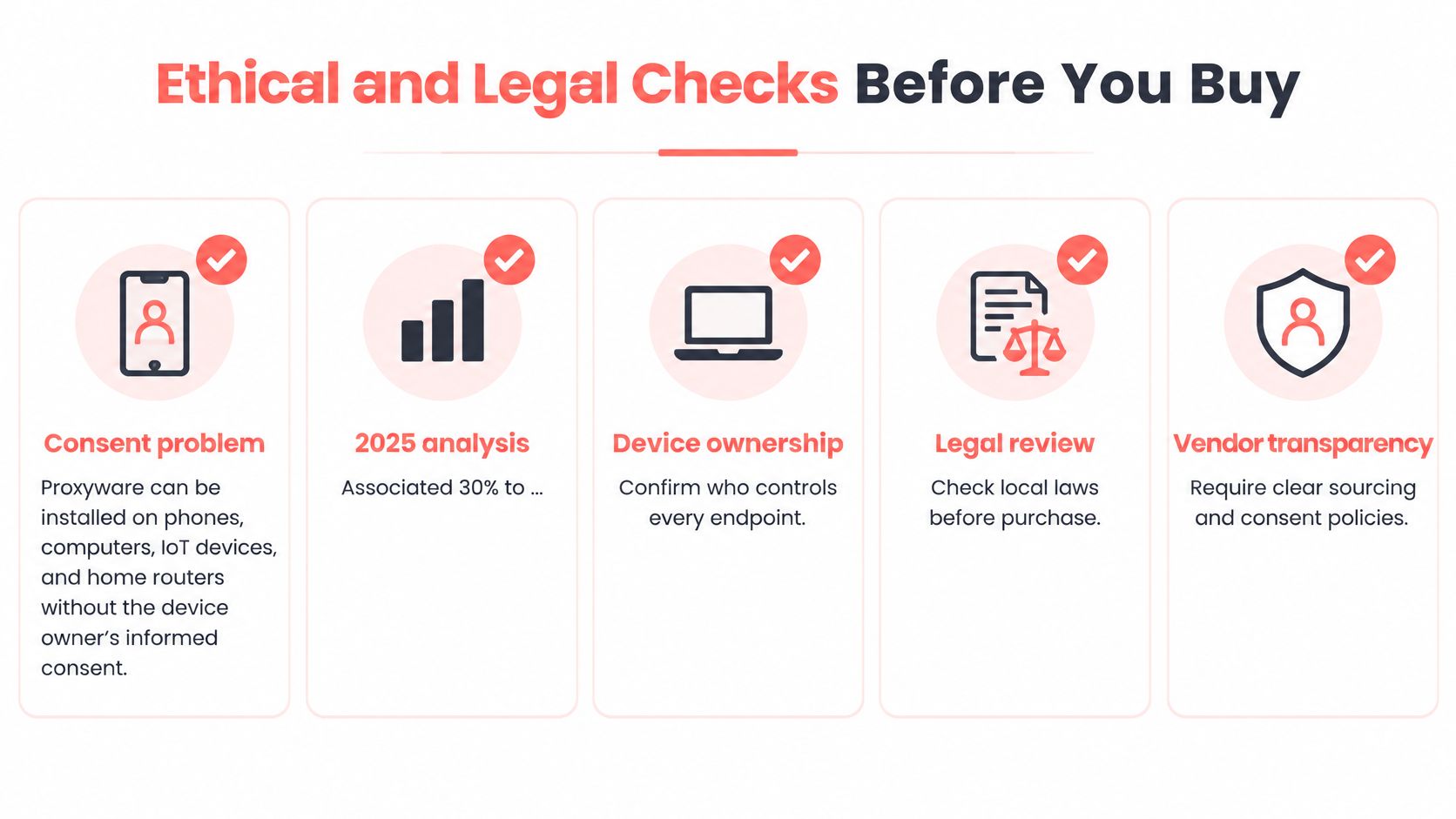
A due-diligence checklist you can audit
- Documented IP source: Ask exactly how endpoints are recruited, in writing, not a marketing phrase about partners.
- Explicit consent language: Request the actual text device owners agreed to, and check it names proxy relaying plainly.
- Know-your-customer controls: Confirm the provider verifies its own customers, which limits who shares the pool with you.
- Abuse-response procedure: Get named contacts and response steps for complaints tied to exits you used.
- Opt-out handling: Ask how a device owner withdraws and how fast that exit leaves the pool.
- Incident notification terms: Pin down when the provider must tell you about compromise or enforcement action.
- Local network isolation: Require evidence that relayed traffic can't reach the residential user's own local network.
The legal layer you still own
Consent standards, consumer-protection rules, and intermediary liability differ across markets, so a pool that's defensible in one country may not be in another. Check local law and the target site's terms for every market you operate in, and treat lawful AI web scraping as a constraint on method, not just intent. Our own terms reflect that posture. Clearcote is built for privacy, testing, research and lawful automation, and use is subject to local law and site terms. Users agree not to use it to violate law, infringe rights, access systems without authorization, or circumvent security controls.
Put the seven checklist questions to the vendor in writing before you sign, and keep the answers with the contract. A provider that can't answer them isn't cheaper. It's just moving its risk onto your balance sheet.
Pairing Residential IPs With a Hosted Browser
An IP is only half the identity a page sees. The browser controls fingerprint and session behaviour, things like timezone, language, and device signals, while the residential proxy supplies the network address. If the two disagree, say a Leeds exit IP with a browser timezone set to another continent, the page spots the mismatch even when the address itself is clean. Pairing them correctly is mostly a matter of order and consistency.
Set the pairing up before your first real request.
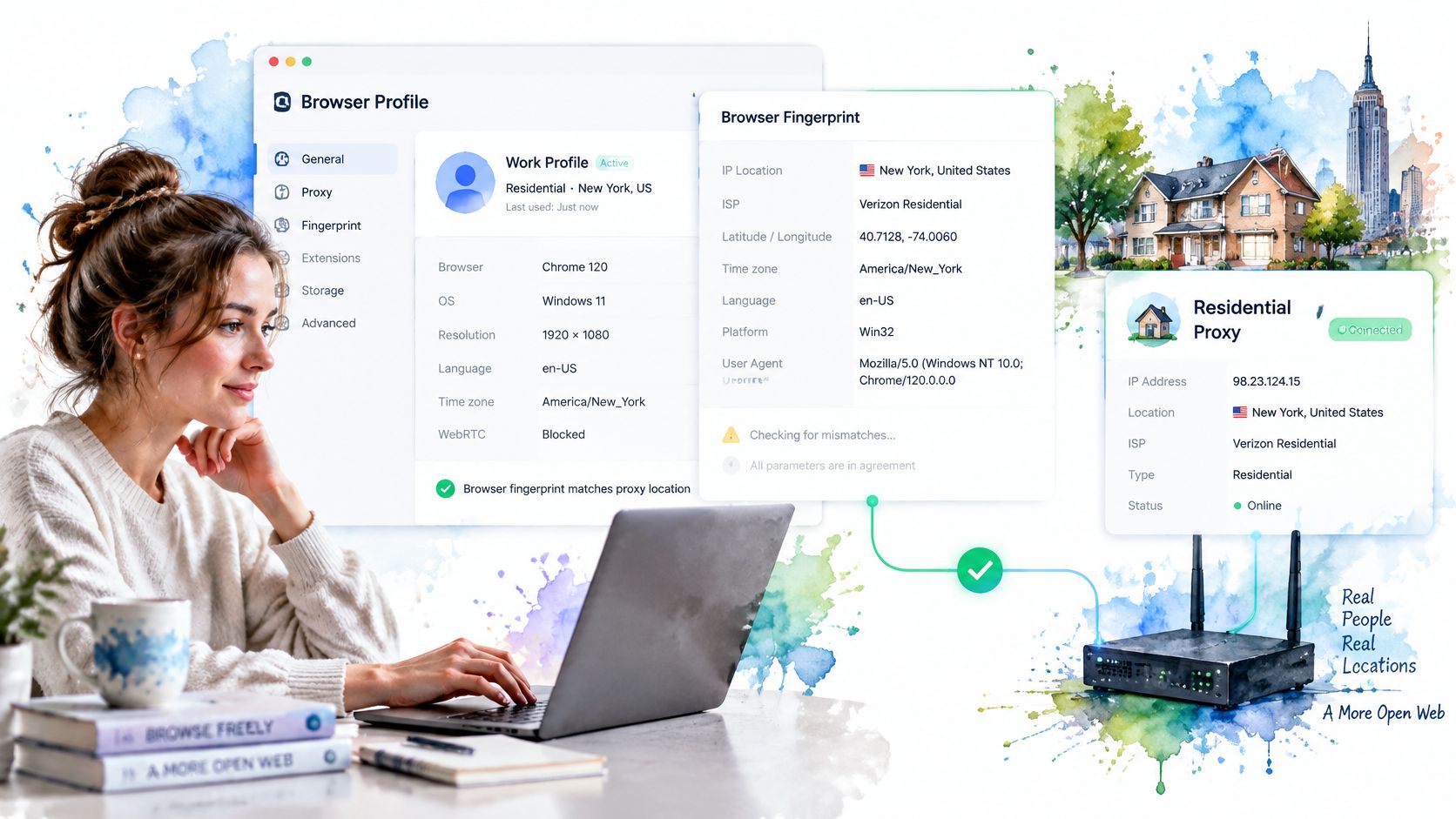
Six setup steps in order
- Choose the location first: Pick the country, state, or city the target expects, and keep one exit per account so identities never cross.
- Set the proxy at session start: Configure it before the browser loads anything. The common slip is setting it after the first page load, which sends that first request from your original address and links the two.
- Let locale follow the exit: Timezone, language, and WebRTC should all follow the exit IP. We build this in, so setting a proxy with geoip on makes timezone, languages and WebRTC follow the exit IP automatically.
- Verify from inside the browser: Load an IP and geolocation check page in the session itself and confirm the address and location match what you ordered. Checking from your own machine proves nothing about the session.
- Run a WebRTC leak test: Confirm the public address WebRTC reports is the proxy address, since WebRTC can otherwise expose a different IP than the one your page traffic uses.
- Keep the session persistent: Hold each account on one session, and retire that session when its IP changes rather than letting the account hop addresses mid-relationship.
This short walkthrough shows the pairing in a live session.
Watch the video on YouTubeYou can assemble this yourself with a local browser and a separate proxy subscription, or take both from one place. A hosted cloud browser with residential IPs included, such as our hosted offering, starts each session clean and lets you select residential IPs by country, state or city, at €1 per GB of traffic with the residential proxy included and no plan required. The six steps above still apply either way. One practical note if you bring your own authenticated proxies, you'll need the licensed build, because the open build cannot pass proxy credentials to the browser.
Confirm Your Setup Before You Scale
Everything so far points to one habit. Don't buy a pool, buy a measured result. A small pilot with fixed targets and recorded numbers will tell you more in a week than any comparison table, and it protects you from the two expensive mistakes, paying residential rates for work a cheaper proxy handles, and scaling a pool whose exits your target already distrusts.
A six-step pilot with explicit thresholds
- Pick 20 to 50 representative targets: Choose real pages from your actual workload, including the ones that fail today, and run them through the cheapest proxy type first to set your baseline.
- Repeat through residential proxies: Run the identical set through residential exits using one session mode, sticky minutes for checkout-style flows or sticky hours for account flows. Changing the mode mid-pilot makes the comparison worthless.
- Record three numbers per run: Log success rate, CAPTCHA rate, and time per request for each target in each run. Averages hide the failures, so keep the per-target rows.
- Calculate cost per successful result: Divide what each run cost by the number of real pages it returned. That's the figure the purchase decision hangs on, not the price per gigabyte.
- Collect the written answers: Get the consent, sourcing, and terms responses from the due-diligence checklist in writing during the pilot, not after you've integrated the provider into production.
- Scale on two conditions only: Expand when the residential cost per result beats your cheaper baseline and the written answers are complete. If either condition fails, you don't have a bargain or a defensible supplier.
Keep the pilot log in a shared sheet with one row per target. Columns for proxy type, session mode, outcome, and time let the whole team see exactly which target failed on which mode, instead of arguing from memory a month later. That sheet also becomes your regression test when a provider's quality drifts, which pools do as their short-lived addresses turn over.
Watch two patterns in the results before you decide. If failures cluster on a few targets while the rest pass on cheap proxies, route only those targets through residential exits and keep the bulk of your traffic on the cheaper type. If residential success starts high and slides within the pilot week, treat that as the pool's real behaviour, not bad luck.
Run the pilot this week. Write down, before you start, the cost per successful result that would make residential proxies worth buying for your workload, and hold the purchase to that number.
If your pilot shows you need residential exits inside a real browser session, Clearcote Labs offers hosted browsers with residential IPs included, selectable by country, state or city, so you can run the same tests without stitching a proxy subscription to a separate browser fleet. Start with a small measured run, compare cost per successful result against what you're using now, and scale only if the numbers justify it. Visit Clearcote Labs to set up your first session and run that comparison this week.