
A rotating IP address is an address a client uses that changes per request, per session or on a timed interval, so the destination sees a different network origin each time. The most repeated advice about it, rotate as hard as you can across as many addresses as you can afford, gets the arithmetic backwards: an analysis of more than 170 million residential proxy addresses found that 60% were observed only once in a 90-day window.
IPinfo's 2026 analysis of residential proxy infrastructure makes that churn plain. A pool isn't a set of stable identities you can plan around. It's a door that keeps turning, and the thing most scripts leave standing still is everything except the address.
Rotation changes one signal, the address the server sees. It usually leaves the TLS handshake, the header order, the cookie jar, the account, the request timing and often the ASN exactly where they were, and modern defences correlate those before they trust anything. The fix that works is duller than buying more addresses: match the rotation unit to the job, keep one identity per account, and make the fingerprint move with the exit.
Table of Contents
- What a Rotating IP Address Means
- Common Use Cases and When Rotation Helps
- Rotation Methods Compared by Source and Cadence
- Why Changing the IP Alone Often Fails
- How to Set Rotation Rules Step by Step
- Where Proxy Rotation Fits in Browser Automation
- Checking Residential Proxy Sourcing Before You Buy
- Choose a Rotation Setup and Test It
What a Rotating IP Address Means
Think of a mail carrier who writes a different return address on every parcel. The recipient can't group the parcels by sender from the label alone, so the obvious move is to look at the handwriting, the wrapping and the postmark. Rotation works the same way. It changes the label, and only the label, unless you deliberately change the rest.
The site on the other end sees one thing: the address that opened the connection. That address normally belongs to a network exit, whether that's a proxy server, a carrier gateway or a home line, not to a person sitting at a desk.

Three ways the address changes in practice
Operator-switched pool. You point your client at a proxy endpoint and the provider hands back a different exit for each request, each session or each timed window. You control the cadence, which is why this is the only method you can schedule.
ISP reassignment. A home or office line on a dynamic lease gets a new address when the provider renumbers. That happens on the provider's schedule, not yours, and often not at all.
Carrier rotation. A mobile connection sits behind carrier-grade NAT, so many subscribers share one public address and the carrier moves you between them. You get a mobile origin with no control over when it changes.
The default is no rotation at all
Most connections never change address. A static line keeps its address until the provider reassigns it, and even a dynamic lease usually renews onto the same address, because the server hands back what it gave you last time. Anything built on the assumption that a dynamic address rotates on a schedule is built on a guess.
So the useful question isn't whether to rotate. It's which unit of work needs a fresh address, and what else has to move with it.
Common Use Cases and When Rotation Helps
Rotation pays for itself in six jobs, and each one wants a different unit. Pick the unit first and the tooling decision gets much smaller.
Scraping and monitoring at scale. Every extra request from one address raises the chance of a rate-limit response or a flat block, so spread them across a pool and rotate per request. This is the case where aggressive rotation helps, because the pages are stateless and nothing ties two requests together.
Geo-specific checks. Localised prices, search results and ad placement differ by country, so you need exits inside the region you're checking. Rotate per region, not per request, or you'll be comparing Frankfurt to Frankfurt while thinking you compared a country.
Ad verification and brand protection. Confirm how a campaign renders from different locations and network types. One datacenter exit in a single city tells you what datacenter traffic there sees, which is not what a shopper there sees. Mix network types inside the region.
QA of region-specific releases. Checkout, shipping options and language variants need a stable session through the funnel. Keep one address per test run and rotate between runs, so a failed run is reproducible.
Account work that needs continuity. Keep one address per account for the life of the session. A rotating IP address is the wrong tool at the moment continuity becomes the point, because changing address mid-session is itself the anomaly.
Home-line reset. A router reboot or lease renewal may return the same address, a similar one or a new one. The result can't be guaranteed, so treat it as a one-off fix for a single block, never as infrastructure.
Practical rule: rotate the unit the target cares about. Stateless pages want a new address per request, logged-in flows want one address for the whole session, and geo checks want the right address rather than a fresh one.
Rotation Methods Compared by Source and Cadence
Four methods cover nearly every production setup. They differ in who decides the cadence and in what the address looks like to the target.
| Method | How the address changes | Typical cadence | Main trade-off |
|---|---|---|---|
| Datacenter proxy pool | Addresses from hosting blocks, switched per request or per session | Per request or per session, set by your tool | Fast and low cost; hosting ranges are easy to recognise |
| Residential rotating proxy | Addresses from consumer ISP connections, switched by the gateway | Per request or on a timed interval | Looks like home traffic; higher cost and sourcing needs checks |
| ISP dynamic address (DHCP) | Changes when the lease ends or the line reconnects | Roughly daily for 8.5% and weekly for 5.4% of probes in one CAIDA study | Free, but the ISP decides and often keeps the same address |
| Mobile proxy | Addresses from cellular carriers, often shared behind carrier NAT | Set by the carrier, typically on reconnect or after an idle window | Credible mobile origin; capacity and cost limit scale |
Why the ISP row cannot be scheduled
A CAIDA study of RIPE Atlas connection logs tracked 2,272 dynamically assigned probes across 95 ISPs. It found 193 probes, or 8.5%, changed addresses on a roughly 24-hour cycle, and 123, or 5.4%, changed on a roughly weekly cycle. The study also recorded 20 ISPs with periodic reassignment, showing that the interval is a provider policy, not a protocol constant.
DHCP tries to keep an address when a client renews its lease. Force a reconnect and you'll often get the same address back, or another one from the same small pool, which is why reboot loops produce neither a new identity nor useful data. Record the address, timestamp, ASN and region for every request and model the rotation empirically instead of trusting a lease timer.
What the table leaves out
Datacenter addresses are fast and cheap, but they come from hosting blocks a site can recognise by network owner in a single lookup, so they suit targets that only count requests. Mobile exits come from carrier ranges and cost the most per gigabyte, which caps how much traffic you can push through them.
The residential row is a commercial market rather than a side effect of the internet. Mordor Intelligence valued the global residential proxy server market at USD 122.03 million in 2025, and paid capacity buys variety, not invisibility. Most production stacks end up combining methods, which is exactly how the proxy setups built for web scraping describe the working pattern.
Choose the method by the trade-off you can accept, then read the next two sections before rotating anything.
Why Changing the IP Alone Often Fails
The most popular instruction in rotation guides is to rotate aggressively so no single address trips a rate limit. Rate limits are the easy case, and often the only case a bigger pool fixes.
Research on traffic against booking and e-commerce platforms found that bots tend to rotate through a finite set of addresses and reuse those addresses across sessions, which turns IP history into a detection signal in its own right (study of platform traffic). A defender who logs addresses for a week doesn't need to catch you in one request. They watch the same small set of exits cycle through your sessions and score it.
Protocol-level detection adds a second blind spot. JA4 TLS fingerprints can stay identical when a client changes its IP address or its User-Agent, so the handshake still identifies the automation behind the rotation. Swapping exits does nothing to a signal generated below the HTTP layer.
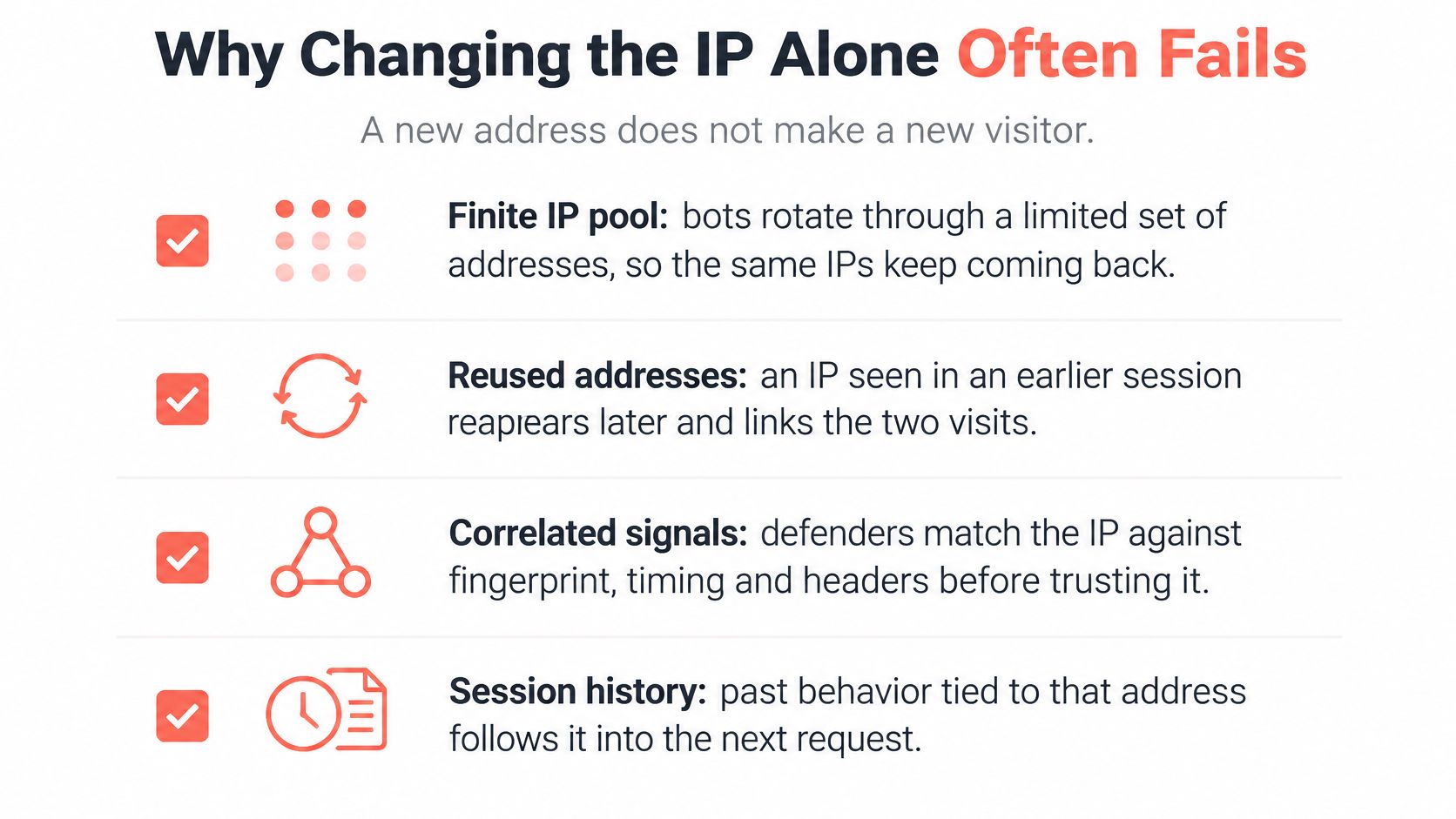
The signals that do not move
| Signal | Changes when the IP changes? | Detection value |
|---|---|---|
| TLS fingerprint (JA4) | No, can stay unchanged even when IP or User-Agent changes | Links sessions across rotated addresses |
| HTTP/2 behaviour | No, stays tied to the client stack | Shows the automation stack |
| Cookies and account login history | No, stays with the account | Ties identity across addresses |
| Browser traits such as fonts, canvas and locale | Only if deliberately varied | Repeats across sessions |
| Timing and request cadence | No, stays with the script | Reveals the automation pattern |
| Originating ASN | Yes, changes with the exit | Can flag hosting or datacenter ranges |
Read the middle column as a list of things rotation doesn't buy you, and the right column as what a defender does with each one.
Residential rotation sometimes gets treated as the fix for protocol fingerprints. It isn't. A residential exit can look geographically plausible and still present the same JA4 hash, the same header order and the same cadence, which is a stranger pattern than a datacenter exit doing the same thing. GreyNoise's analysis of 4 billion sessions from November 29, 2025 through February 27, 2026 found 39% of unique IPs targeting the internet edge came from residential address space, so a home connection is not a trust signal by itself.
Three questions to settle before buying more addresses
- Which signals change together? If the exit moves and the fingerprint, locale and timing stay frozen, you've created a mismatch rather than a new identity.
- Which stay linkable? Cookies, account history and protocol fingerprints survive the swap, so plan for the correlation instead of hoping it's ignored.
- Does a mid-session change look wrong? A session that changes network mid-flow is rare among real users. Rotate between sessions, not inside one.
The signals in that middle column are the ones dissected in this guide to browser fingerprinting, and they're the reason a fresh exit with a stale profile still gets blocked.
If rotation only changes the address, you're paying for a smaller blast radius, not for a new identity. That's worth money when the goal is keeping one blocked address from stopping a job. It's wasted money when the goal is getting past fingerprinting.
How to Set Rotation Rules Step by Step
Rotation rules live in three places: the pool, the session binding and the trigger. Get the order wrong and you'll rotate during a checkout, or hold an address long after the target has stopped answering.
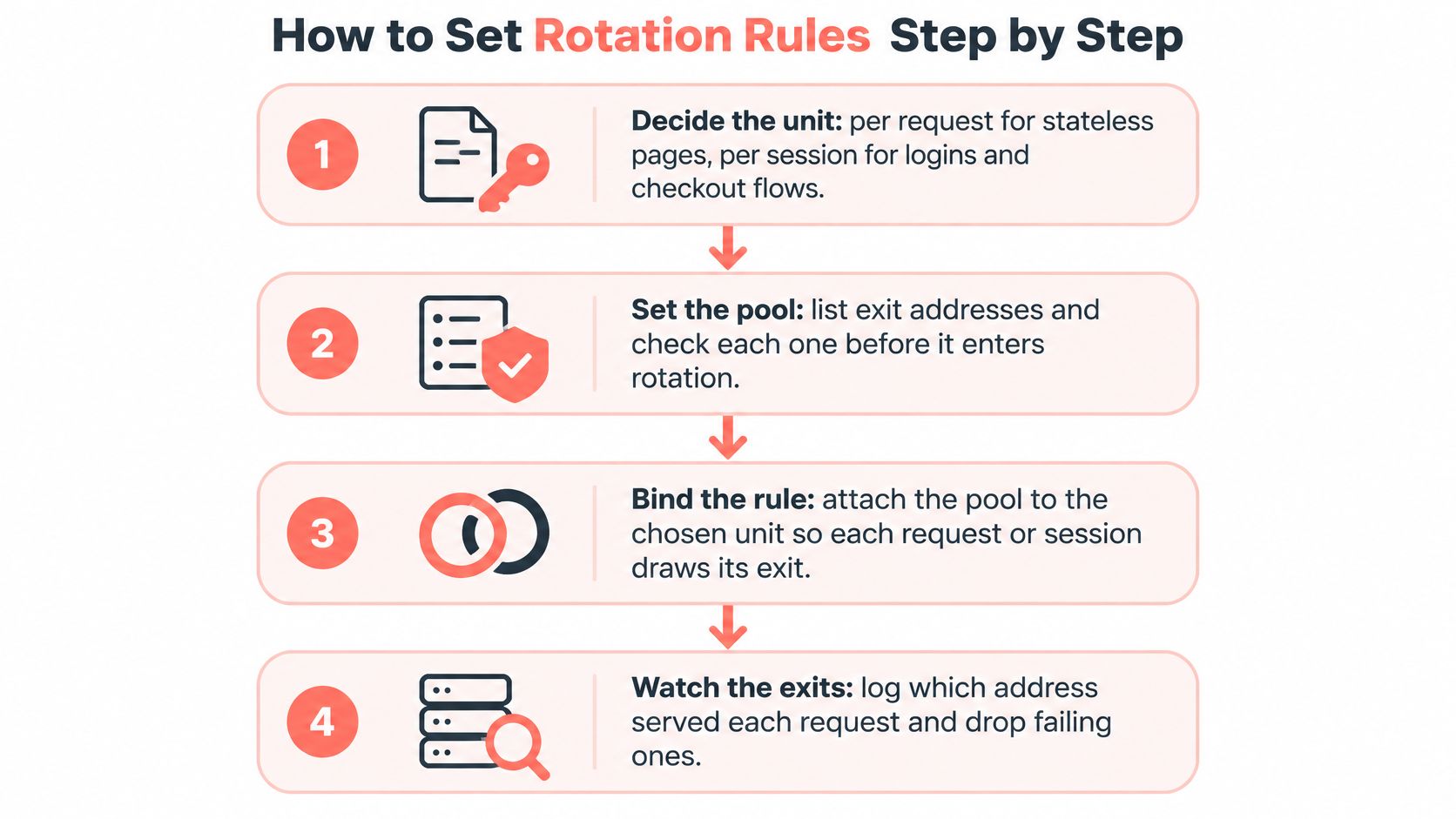
Decide the unit. Per request for stateless pages, per session for anything behind a login or a cart. The common slip is rotating per request everywhere because it's the client library default, which breaks any flow that depends on a cookie set two requests ago.
Build a pool per target. Keep exits for site A separate from site B so a burned address on one doesn't poison reputation on the other. Group by region inside each pool.
Bind the session. One address plus its cookie jar for the whole session, so the account never jumps mid-flow. The slip is binding the browser but not the context, so a second tab picks a different exit.
Choose the trigger. On failure, on a timer, or after a fixed request count. A timer alone will eventually fire mid-session, so failure-triggered rotation is the safer default for account work and for anything that has to finish a multi-step flow.
Pass the proxy at launch. Playwright and Puppeteer both accept proxy settings when the browser starts, with host, port and credentials. SOCKS5 proxies with a username and password work directly on every Clearcote build from 151. The slip is setting a proxy on the page or context after launch, which leaves the first navigation on the machine's own address.
Log what the server saw. Address, timestamp, ASN and region for each request. Without this you're trusting a provider dashboard instead of your own traffic.
Watch the port side. A high-concurrency client can exhaust its allocated source-port range even when the address changes cleanly, because shared IPv4 systems give each customer an exclusive set of transport ports, a model RFC 7600 sets out. Monitor success rate, connection resets and ephemeral-port use, not just the count of distinct addresses.
The check at the end of a run is two-part: the logs show a different address, and the session still returns the same account state. If only one of those is true, you've either moved an exit without preserving an identity, or kept an identity on an address the target has already scored.
Where Proxy Rotation Fits in Browser Automation
Automation has three layers, and rotation lives in exactly one of them. The proxy sets the network exit. The browser sets the identity signals: timezone, language, WebRTC, canvas, fonts. The script sets behaviour, meaning the order of navigation, the timing and what gets clicked. Rotating the proxy changes the first layer and leaves the other two untouched.
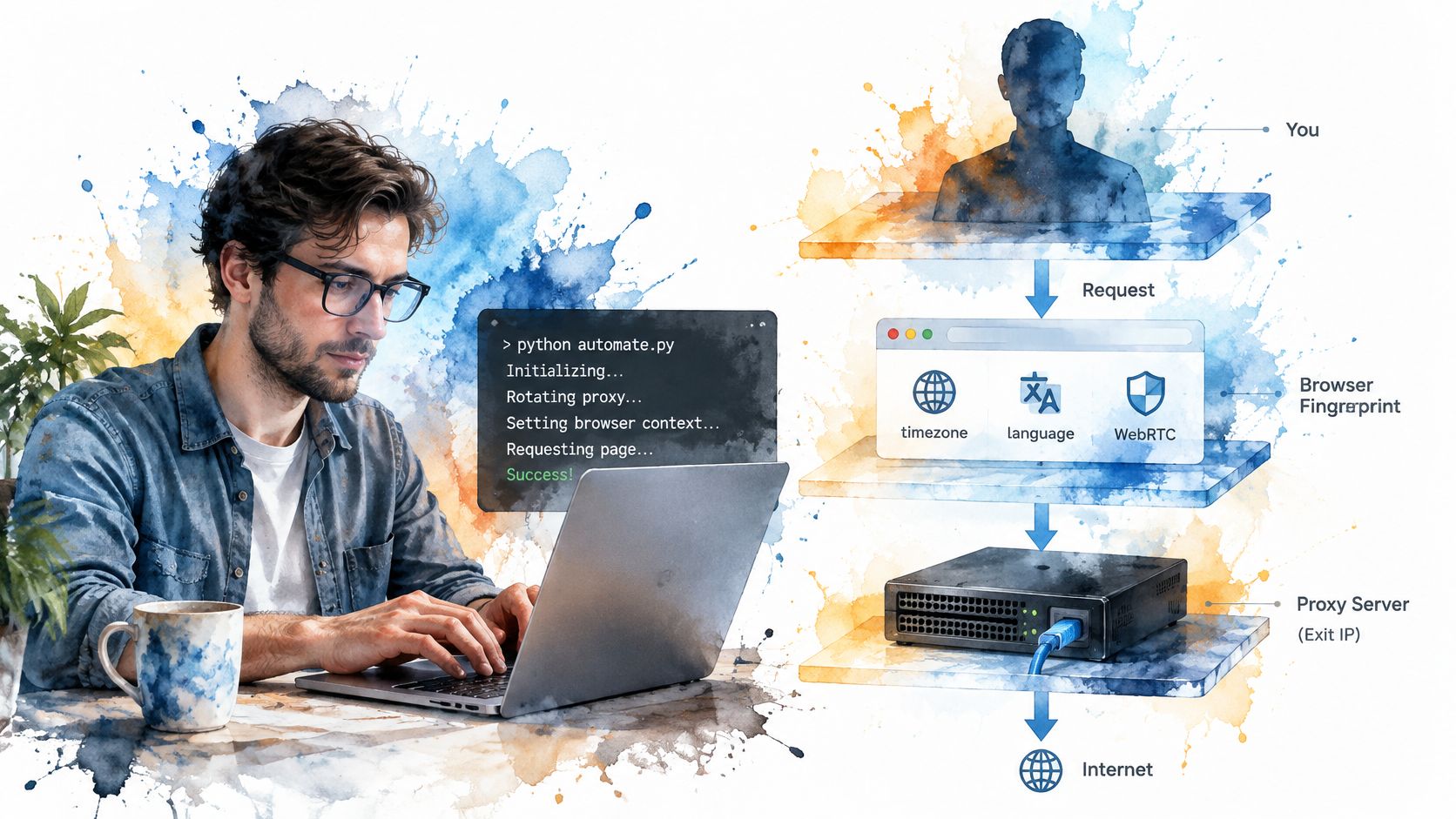
That's fine for stateless collection and wrong for anything claiming to be a user in a specific place. A German exit paired with a US timezone and an English locale is a contradiction a defender reads in one request, and it's the most common mismatch in scripts that bolt a proxy onto a default browser profile.
Matching the browser to the exit
Clearcote provides proxies and geo matching, where timezone, languages and WebRTC follow the exit IP. The point isn't cosmetic. If the address says Munich, the clock, the Accept-Language header and the WebRTC candidate should agree, because a mismatch is a stronger signal than a datacenter ASN.
When one script needs several separate identities, clearcote serve starts a browser per identity, with each connection choosing its seed, proxy, timezone and language. Puppeteer and other CDP clients reach the same model through serve(), so the identity setup isn't tied to one framework.
Say a price-monitoring job pulls three regions, rotates per request, and also holds two accounts that must not look related. The regional pulls use rotating exits, with the browser following each one for timezone and language. The accounts get a seed each, a sticky exit each, and never share a cookie jar.
The mistake to avoid: one browser switching its IP every few seconds. A real shopper doesn't change networks between page loads, so a session that hops exits on a timer looks like automation even when every other signal is clean.
If the target is a social platform with its own automation rules, the Instagram API proxy comparison guide covers how exit type changes what an endpoint returns before you tune anything else.
Checking Residential Proxy Sourcing Before You Buy
The risk missing from most rotation guides is attribution. When your automation exits through a residential address, the traffic arrives from someone's home connection, and the household whose line it is has no part in your job. Threat research on residential proxy ecosystems associated 20.8 million blocked attacks with those networks between January and mid-September 2026, and drew the distinction plainly: the paying proxy customer is not the household whose connection carries the traffic.
That gap is where legal and reputational exposure sits. A pool can include compromised or unwilling devices, and a complaint about your scraping can land on a subscriber who has never heard of you. "Residential" describes where an address is registered. It doesn't mean safer, higher quality or more human.
Eight questions to put to a vendor in writing
| Question | What a good answer sounds like | Red flag |
|---|---|---|
| End-user consent | A named consent flow, disclosed use, evidence on request | "We partner with app developers" and nothing further |
| Opt-out for households | A documented removal path with a stated turnaround | No removal process, or one that needs a support ticket |
| Device-compromise controls | Scanning, revocation of flagged peers, published criteria | Peer quality described only as "verified" |
| Abuse response time | A committed window for acting on reports | "We monitor abuse" with no number attached |
| Customer verification | KYC or business checks before access | No questions asked at signup |
| Logging and retention | A stated retention period and named access | "We don't log" from a provider billing per request |
| Sanctions screening | Screening of customers and resellers | Silence about resellers |
| Complaints and law enforcement | A named process and a contact | "Handled case by case" |
Written answers outlive the sales call, which is why they're worth more than any dashboard figure. A vendor that answers six of eight clearly and admits the other two is a better bet than one that answers all eight in marketing language. Ask before production traffic moves, and ask again when the pool changes hands.
If you want the mechanics of how these pools are assembled in the first place, this explainer on residential proxies covers the network side.
Choose a Rotation Setup and Test It
Match the setup to what the target checks. Work down this list and stop at the first line that describes your situation.
Rate limits only. Rotate datacenter addresses per request inside one region. It's the cheapest option, and speed is the only real constraint.
Accounts tied to behaviour. Keep one stable identity per account with a sticky session and rotate on failure only. Changing exits during a logged-in session creates the anomaly you were trying to dodge.
Geography checks. Use residential exits matched to timezone and language, and finish the sourcing questions before any production traffic moves.
Repeatable QA across devices. Use seeded identities. The same seed gives the same device every session and a different seed gives an unrelated one, and Clearcote recommends one seed per account.
Skip any option whose target signals you haven't confirmed. Guessing at the detector and then buying capacity to beat it is how budgets double while success rates sit still.
Then run the test that settles it. Log address, ASN, TLS fingerprint and account outcome for two weeks, keeping one job rotating and an identical job pinned to a fixed exit. Compare outcome per thousand requests rather than proxy spend, because pages returned, accounts intact or checks passed are the only numbers that decide whether the pool earned its keep. If the two runs tie, the extra addresses are decoration, and you can scale the pool the day the rotating run wins.
Clearcote Labs builds Clearcote, a de-Googled Chromium fork with fingerprint and identity controls in the browser engine itself, so the exit address, timezone, languages and WebRTC move together instead of drifting apart. Hosted browsers include residential exit IPs and start in the cloud with one call, and the licensed build is free for one browser at a time, which is enough to test whether your rotation rules survive contact with a real target. Visit Clearcote Labs to run the two-week test on your own job rather than on a vendor's benchmark.