
You open a listing page, copy a CSS selector, and read_html() comes back with an empty node set. The prices are right there in the browser. They are not in the HTML your script received. That mismatch is where most web scraping with R jobs stall, long before any tidyverse step.
I would start one layer lower than the page you can see. Check whether the server already returned the values, or whether a JSON call behind the page holds them, before you install a browser driver. A request for the right endpoint is faster to rerun than a click script that breaks when a button moves.
The order that holds up on real projects is simple. Match the package to the page, settle permissions and pace before the first request, extract with rvest when the markup is enough, and stop a run when row counts or status codes say the data is wrong.
Table of Contents
- Pick the Right R Package for Each Page
- Check Permissions and Pace Before You Scrape
- Set Up a First Scrape with rvest
- Target Elements with CSS Selectors and XPath
- When JavaScript Hides the Data
- Store, Validate and Check Your Data
- Fix Blocked, Empty and Broken Scrapes
Pick the Right R Package for Each Page
Disable JavaScript and reload the page. If the listings, prices, or table cells are still visible, the server sent them and rvest is enough. If they disappear, open the network panel and look for a JSON response before you reach for a browser. That two-minute test decides the package, and it saves more time than any amount of selector tuning.
| Tool | Best for | Handles JavaScript | Trade-off |
|---|---|---|---|
| rvest | Static HTML pages, tables and links | No, server HTML only | Fast and simple, parses what the server returns |
| httr2 | JSON APIs and endpoints found in network traffic | No, calls data directly | Fastest route when a usable endpoint exists |
| rvest read_html_live() | Pages whose content appears only after scripts run | Yes, runs in a live browser | Needs a browser install and is slower |
| chromote or RSelenium | Full browser control such as clicks, typing and logins | Yes | Most flexible but most fragile and slowest |
| polite | Any rvest or httr2 session that must respect robots.txt and crawl delays | Not applicable | Adds policy checks, pacing and caching |
The rule that drives the choice is the lowest usable source. When the values sit in the HTML the server returns, use rvest, which wraps xml2 for parsing and httr for the request. When the page fills itself from a JSON endpoint, call that endpoint with httr2 and skip rendering and HTML parsing. Reserve a live browser for pages where scripts must run before the data exists. polite is not a scraper. It wraps a rvest or httr2 session with robots.txt checks, delays, and caching.
A HasData walkthrough of web scraping in R measured the selector cost that people over-weight. Median CSS-selection time rose from 16.31 ms for five nodes to 140.38 ms for 200 nodes, while equivalent XPath selection ranged from 5.84 ms to 126.01 ms. CSS is translated to XPath through selectr, and that fixed overhead matters most on many small, repeated queries. The relative gap narrowed as the document grew.
Parse the document once, select a broad stable container, and pull several fields from each node. On API-backed sites, validate the schema and store the raw JSON before you normalize it, so a bad transform can be replayed without another fetch. For volume, time the whole pipeline, including latency, retries, serialization, and politeness delays. A selector microbenchmark is not throughput. If you are still choosing among collectors, this comparison of web scraping tools is a useful map of where R sits next to other stacks.
Check Permissions and Pace Before You Scrape
A page that answers your request has not given you permission to collect it. Technical access and a defensible collection are different questions, and the second one has to be settled before the first loop runs.
Recent OECD analysis of intellectual property and scraped training data is direct on the point people skip. robots.txt is a machine-readable request, not necessarily a legally enforceable restriction, and an international research dataset can sit under overlapping copyright, privacy, contract, and text-and-data-mining rules. The same analysis notes that bots comply selectively, that stricter directives are associated with lower compliance, and that some AI crawlers rarely check the file at all. Sites have also adopted robots policies aimed at this kind of collection since mid-2023. Treat the file as one signal in a wider risk check, not as a universal yes or no.
A checklist before the first request
- Name the publisher and the purpose. Write down who publishes the site and what the collection is for. Internal analysis, a product feature, and redistribution are not the same activity, and the purpose decides how careful the rest of the list needs to be.
- Read the terms and the robots directives, then record both. Note allowed and disallowed paths, any crawl-delay, and any clause about automated access. If the terms, the robots policy, personal-data exposure, or the jurisdiction is unclear, pause. Do not treat a successful HTTP response as authorization.
- Stay off login walls and personal data. If the values sit behind authentication, stop and read the access rules instead of working around them. Skip pages that expose personal data you do not need.
- Pace the host with polite. A session reads
robots.txt, sends an explicit user agent, applies the crawl-delay, and can cache both the policy and the page. The documented default delay is 5 seconds, the minimum you can configure is 1 second, and a longer interval inrobots.txtwins. Keep one session per host and change URLs through that session. - Cache responses and keep provenance. Persist the cache so a stopped job can resume, and store the collection date next to each URL.
- Plan for removal requests. Decide, before you run, who reads a takedown note and how the stored rows get deleted.
- Log the policy decision beside the code that acts on it. A comment that says "allowed, public table, no personal data, checked on this date" is what you want six months later.
The polite package documentation is the practical half of that list. Combine rvest and xml2 for HTML extraction with polite for request governance. bow() opens the session. scrape() fetches through it, so the cache holds policy and responses instead of you issuing unmanaged requests. Log the HTTP status and the timestamp on every call.
Practical rule: One well-behaved worker is not a well-behaved job once you add
futureorparallel. Concurrency multiplies load even when each worker waits.
When the crawl gets large
Cap request count and depth before you schedule anything. Retry transient failures with exponential backoff, and stop or cut concurrency after 429 or 503 responses. Those codes are the server asking for less traffic, not a prompt to rotate something and continue. Caching also stops you fetching an unchanged page on every retry.
For how this governance question shows up once models enter the pipeline, see AI web scraping and apply the same checklist there. The habit that fails is copying a user-agent string and calling the ethics question finished.
Set Up a First Scrape with rvest
rvest is the foundational scraping package on CRAN. Its job is to make page harvesting accessible by wrapping httr for HTTP retrieval and xml2 for parsing HTML or XML, which keeps transport, parsing, and analysis as separate steps. It was already in the 0.3.x series by August 2016, and the current CRAN record carries a formal package DOI, so a scrape can be cited as part of a methods note. Scraped pages then move straight into R's wrangling and modelling tools. The docs also describe session-oriented browser behavior, including navigation history, for sites that need a sequence of requests rather than one static URL. The CRAN page for rvest is the reference for that design.
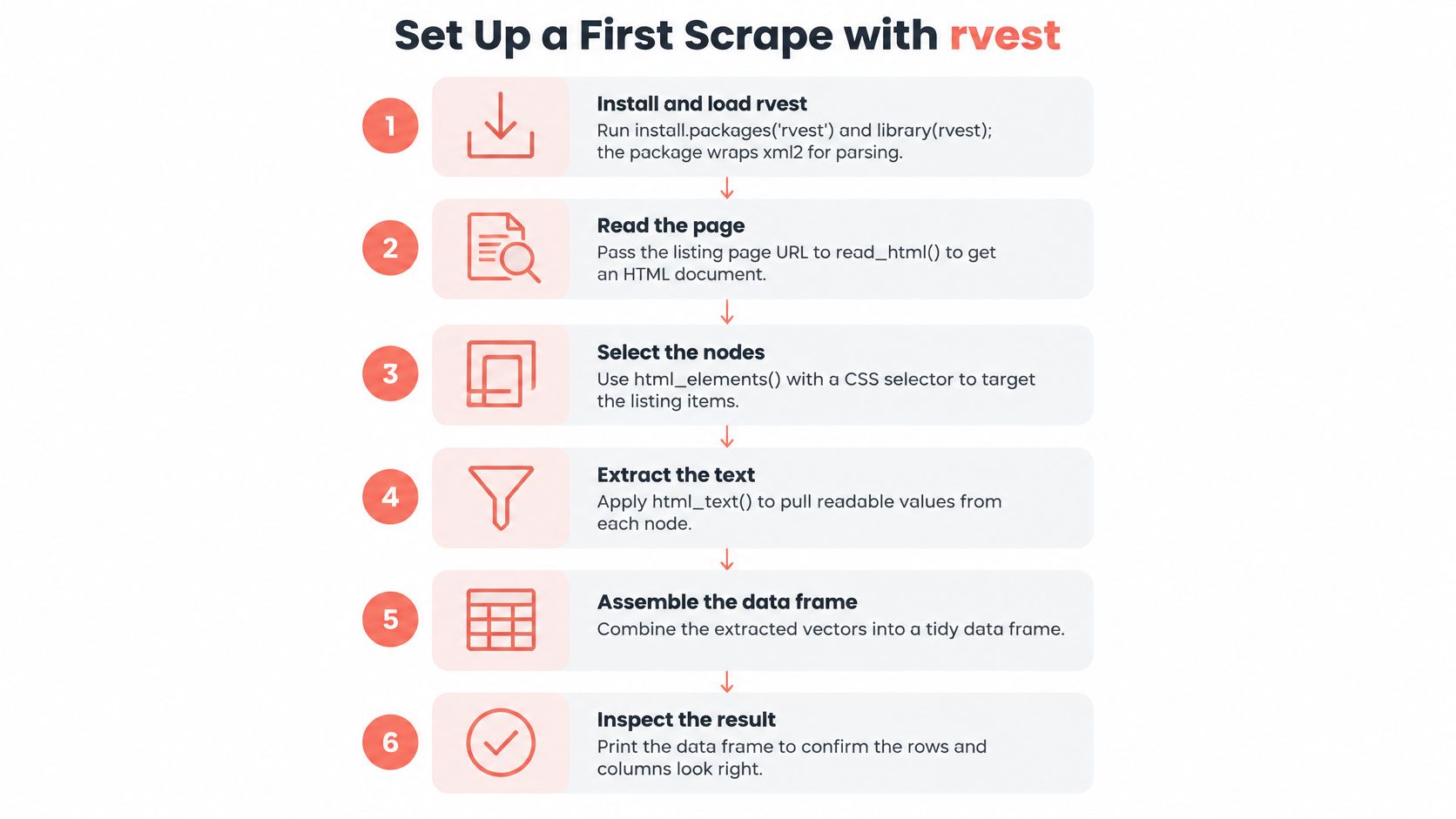
Say you need titles and links from one public listing page whose HTML already contains both.
- Install and load it with
install.packages("rvest")andlibrary(rvest). You rarely loadxml2orhttryourself, because rvest calls them. Confirm this on a plain page before you debug a difficult one. - Read the page once with
read_html(url)and keep that object. Downloading again for every field wastes time and invites blocks. - Select the nodes with
html_elements(), for example"h2.title", then pull links withhtml_attr("href"). Test the selector on this one page before you write a loop. - Take visible text with
html_text2()rather thanhtml_text(). It collapses whitespace the way a browser displays it, so you spend less time onstr_squish()later. - For an HTML table,
html_table()returns a list of tibbles. Check which element is yours before you assume the first one is correct. Footnotes often land in a later element. - Bind the fields with
tibble(). Every vector must have the same length. A mismatch means a field is missing on some items, and coercing the lengths hides that. - Save with
write.csv(df, "articles.csv", row.names = FALSE).
A clean result is one row per item, no NA in the key columns, and a row count that matches what the page shows. For a multi-page listing, follow the next-page link or the page parameter until it disappears, and stop when a page adds no new items. Run this on a single page, read the status log, and only then point it at the full list.
Target Elements with CSS Selectors and XPath
In the browser, right-click the element, choose Inspect, and copy the selector. Paste it into html_elements() on the page you already downloaded, and print the length and the first few texts. If the count is wrong, fix the selector before any loop. SelectorGadget is fine as a draft. It often grabs a layout wrapper you will regret after the next deploy.
CSS selectors are readable, and they are usually enough. rvest translates them to XPath through selectr, so both forms hit the same document. Prefer a stable container, such as a product card, and extract title, price, and link from that card. Querying the whole page once per field is how columns drift out of alignment.
Skip class names that look generated, the long hashes that change on every frontend release. Prefer a data-id, a meaningful class, or a short structural path you can still read next month.
html_element() and html_elements() are not interchangeable. The first returns one node per card and yields NA when a field is missing, which keeps the rows lined up. The second returns every match, so a card without a price shortens that vector and shifts every later row. On a card that sometimes omits a sale price, html_element() is the one that keeps the tibble honest.
| Target | CSS selector | XPath equivalent |
|---|---|---|
| Article titles | h2.title | //h2[@class='title'] |
| Links inside cards | div.card a | //div[contains(@class,'card')]//a |
| Table cells | table.stats td | //table[@class='stats']//td |
| Element by data attribute | [data-id] | //*[@data-id] |
| Text of first list item | ul li:first-child | (//ul/li)[1] |
Copy a row, run it against one saved page, and only then generalize it. A selector that is technically correct can still be a bad one if it depends on a wrapper the design team will rename.
When JavaScript Hides the Data
The symptom is specific. The browser shows prices, and read_html() returns an empty node list. The script did not crash. It parsed the document the server sent, which is often a shell.

The official rvest manual warns that static scraping fails when JavaScript generates the HTML. Start from the lowest-level data source and work upward. Four checks, in order, and stop at the first one that yields the data.
Search the raw HTML for a value you can see on screen. If the price string is already in the response, you are selecting the wrong node, and rvest is still the right tool.
Read the script tags. html_elements("script") plus jsonlite catches data that ships inside a script block, often as one large JSON object the page hydrates on load. A lot of catalog pages do this, and parsing that blob is more stable than reading rendered text.
Copy the background request. In developer tools, filter the network panel for Fetch or XHR, and find the call that returns the records. Reproduce it with request(url) |> req_perform() |> resp_body_json(). Infinite scroll usually hides a paginated API, and calling that API directly is easier than scripting scrolls. Treat it like any other endpoint: confirm the site's terms and robots.txt permit it, then pace your requests.
Only then open a browser. read_html_live(), added in rvest 1.0.4, reads HTML into a live browser and can click, type, and scroll. A browser still costs an install, runtime, and fragility, so it stays the last step. Static extraction relies on HTTP and HTML alone. Interactive targets need the live browser, plus stricter reproducibility notes about viewport size and wait times.
For agent-driven sessions that must click through a rendered page, a browser tool for agent workflows from BeatAPI is a practical way to keep that last step out of a one-off RSelenium script.
Watch the video on YouTubeCheck completeness before you trust the extract. Compare the count on the page, the length of the API payload, and the number of rows you stored. If those three disagree, you stopped one check too early.
Store, Validate and Check Your Data
A scrape can finish with no error and still be wrong. The usual silent failure is a selector that matched last week and now matches nothing, while the script writes a tidy file of empty strings and your model trains on it.
Save each raw response with its URL and a timestamp before any cleaning. A parsing bug can then be fixed and replayed without hitting the site again. On the final table, add provenance columns: source URL, retrieved_at, and HTTP status. Those three columns are what let you answer "where did this row come from" without reopening the script.
| Check | How to run it | Red flag |
|---|---|---|
| Row count | Compare extracted rows with the total shown on the page or in the API payload | Fewer rows than the stated total |
| Missing fields | Count NA values per column after extraction | A key column empty on more than a few percent of rows |
| Duplicates | Count distinct URLs or IDs against total rows | Repeated items from overlapping pages |
| Status codes | Log HTTP status and timestamp for every request | Any 403, 429 or 503, or 200 responses with empty bodies |
Run the row-count check against the total the page or the payload reports, not against yesterday's file. A key column that is empty on more than a few percent of rows usually means the markup moved, not that the publisher left the field blank. Distinct URLs or IDs against total rows catches pagination overlap, which inflates a dataset. And a run of 200 responses with empty bodies is as serious as a 429. The status was success. The body was not.
Put these checks in a small function that stops the pipeline when a red flag trips. Bad rows should never reach the analysis step just because the HTTP call returned. Write the failure, the URL, and the status to a log you will read.
A file that loads in
read_csv()is not a dataset until the counts, the missingness, and the statuses agree.
Fix Blocked, Empty and Broken Scrapes
Start with the empty node list, because it is the symptom that sends people into the wrong fix. Match what you see in the console or the status log to a cause, then change one thing and rerun a single page.
| Symptom | Likely cause | Fix |
|---|---|---|
| Empty node list | Data rendered by JavaScript | Check script tags and network requests, then use read_html_live() |
| HTTP 401 or 403 | Access control or login requirement | Stop, check terms and access rules, do not bypass authentication |
| HTTP 429 or 503 | Too many requests | Increase delay, reduce concurrency, retry with exponential backoff |
| NA in one column | Missing node or changed class name | Use html_element() per card and re-check selectors in developer tools |
| Fewer rows than the browser shows | Pagination or lazy loading | Follow next-page links or page parameters until none remain |
| Garbled characters | Wrong character encoding | Set encoding explicitly, for example read_html(url, encoding = 'UTF-8') |
Read status codes before you touch a selector. 401 and 403 mean the page is behind access control. Stop, read the terms and the login rules, and do not try to get around them. 429 and 503 mean you are sending too much. Lengthen the delay, cut concurrency, and retry with exponential backoff. Those two fixes are minutes of code. Redesigning the collector is what you do only after the status log is clean.
An NA in one column is usually a renamed class, or a card that omits a field. html_element() on each card keeps the other columns aligned while you re-copy the selector from developer tools. Fewer rows than the browser shows is pagination or lazy loading, so follow the next link or the page parameter until it is gone. Garbled text is an encoding miss. read_html(url, encoding = "UTF-8") fixes it without a new stack.
If the same host blocks ordinary fetches even after you have slowed down and stayed inside the published rules, read what to do when web scraping is blocked before you add retries. For search-result pages specifically, a maintained best SERP API from looot is often a steadier source than a scraper aimed at a results page that changes markup every week. The fixes in the first three rows take minutes. An empty list that survives the script-tag and network checks needs the live browser, and that is a redesign, not a one-line patch.
Clearcote Labs publishes practical guidance on web scraping with R, from httr2 and rvest through to the point where a page needs a browser. If your pipeline has outgrown one-off scripts and you want engine-level browser identity for Playwright or Puppeteer, visit Clearcote Labs and see how the open build and the hosted browser fit the job.